
Set PDF page size, margins, and image options
To set the page size of a PDF you make from HTML with thirds.ai, send a named format such as A4 or Letter, or send both width and height, in the pdf object. Add landscape: true for a wide page and set margins for each side. A PDF from HTML is A4 portrait with zero margins unless you change it, and a saved template uses its own page. For a picture, set image format and dimensions with image.format, image.width, and image.height. An image from a saved template uses the template's own size, and an image from HTML defaults to 1280 × 720 pixels. Each PDF or image costs one credit when it succeeds.
Give this prompt to your AI agent. The agent does the task for you.
Read https://thirds.ai/docs/pdf-and-image-options and help me choose PDF or image settings for my design and prepare a request with the right layout, fonts, and dimensions.
thirds.ai is a web app for PDFs and images you make again and again. You save a design once, like an invoice, a report, or a social post, with your logo, colours, and fonts. Then you type in new details and get a finished file. You set the page size, margins, and fonts one time in that saved design, so you don't fix the layout again for the next file. A verified free account gets 50 free credits each month.
For your first API request, start with Generate your first PDF with the API. To see what you can make, read about the HTML to PDF API and the HTML to image API.
Make it without code
You can change the page size of a PDF in the thirds.ai editor without writing any code. It takes three steps, and you need a free thirds.ai account. The Campaign results report template starts on an A4 page, and you can switch it to Letter or any other size before you download it.
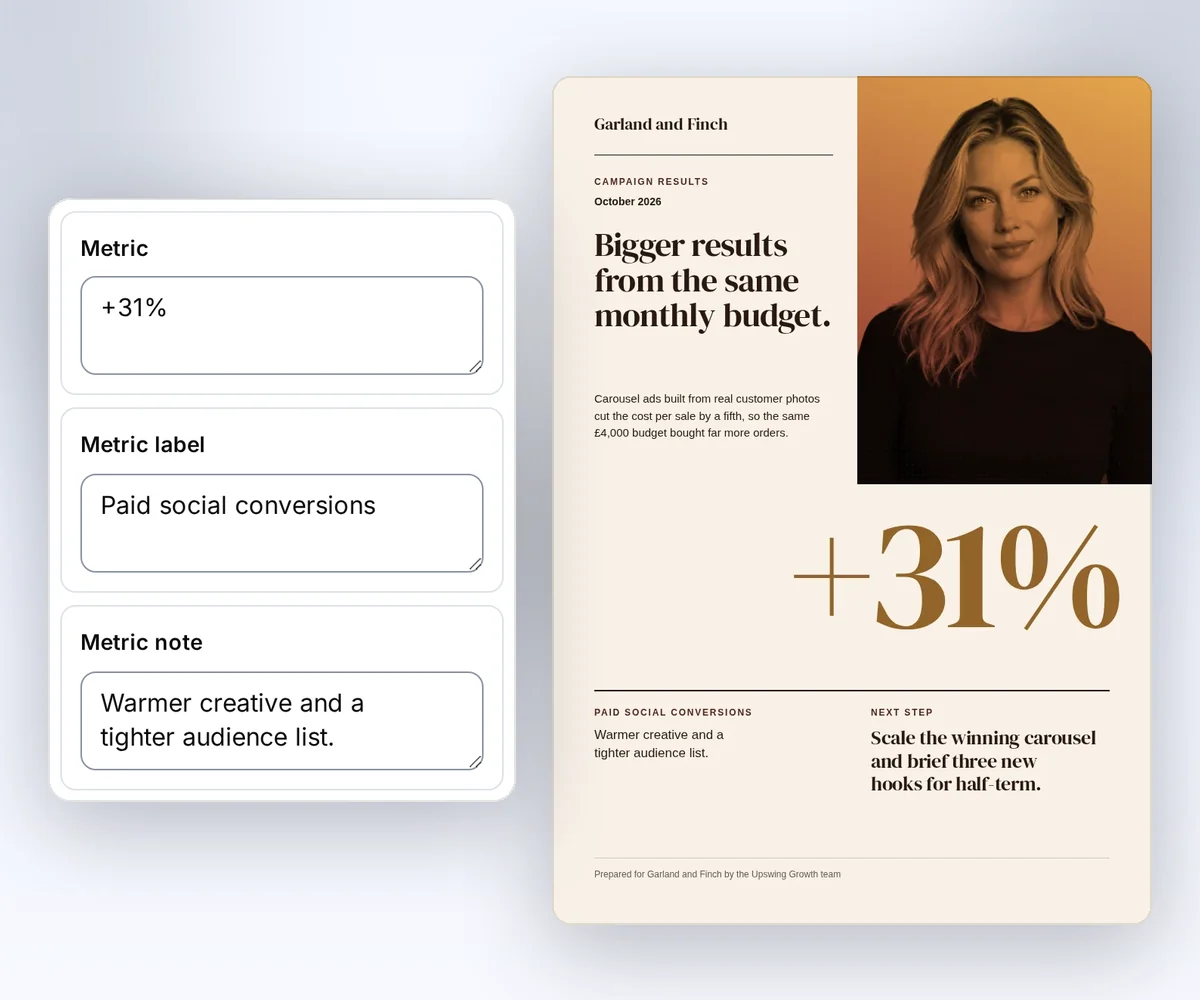
- Open the Campaign results report template and click Use this template. Sign in first if you need to.
- Click Page size at the top of the editor and choose a paper size from the Size preset list, such as A4, A5, Letter, or Legal. To type your own width and height, choose Custom size and pick pixels, millimetres, or inches under Units.
- Open the Data tab and type your details. Click Export, then Save and export PDF, and download the file.
Check that your longest text still fits on the new page before you send the report. How to make a template you can reuse walks through the rest of the editor.
Set PDF page size, orientation, and margins
You set the PDF page size, orientation, and margins in the pdf object of a POST /v1/pdf request. Choose a named format, or set both width and height, and use only one of these methods in each request. Add landscape: true to turn the page on its side. Put each margin in pdf.margins. A side you leave out is 0mm. You need an API key from your account page before you send the request. The PDF render reference lists every pdf field.
The named sizes are A0 to A6, Letter, Legal, Ledger, and Tabloid. Include a unit such as mm, cm, in, or px with each width, height, and margin. Backgrounds are on by default, with a scale of 1.
This request makes a wide US Letter page with half-inch margins:
{
  "html": "<!doctype html><html lang='en'><head><meta charset='utf-8'></head><body><h1>Price list</h1><p>Prices from 1 October 2026</p></body></html>",
  "pdf": {
    "format": "Letter",
    "landscape": true,
    "margins": {
      "top": "0.5in",
      "right": "0.5in",
      "bottom": "0.5in",
      "left": "0.5in"
    }
  }
}
When you make a PDF from a saved template and don't set a size, you get the template's own page. That's the printed size saved with it, like 85 × 55 mm for a UK business card PDF, or its canvas size if it has none. Your design scales to fit the page. Batches and editor exports use the same page. To pick a different page, set format, or width and height. You can save a printed size with the page field when you save a template.
The request sets the paper size. A CSS @page size does not override it, so keep your CSS and request settings in agreement. PDF output uses print styles. Check any @media print rules in HTML you import. If your HTML was written for DocRaptor, check its @page rules first, because Prince and Chromium read them differently. The DocRaptor comparison explains the move. If your request was written for PDFShift, move its top-level format, landscape, and margin options into the pdf object. The PDFShift comparison lists the other changes.
Control PDF page breaks
You control PDF page breaks with CSS rules in your HTML. Use break-before: page to start a new page and break-after: avoid to keep a heading with its text. Use break-inside: avoid to keep a table row or a total in one piece. A block must fit on one page before break-inside: avoid can keep it together.
h1,
h2 {
  break-after: avoid;
}
tr,
.total {
  break-inside: avoid;
}
.new-page {
  break-before: page;
}
p {
  orphans: 3;
  widows: 3;
}
Test an invoice with no items, one item, many items, and a long item name. Let rows grow with their text. A fixed row height or overflow: hidden can hide values. Use a real table with thead and tbody for invoice items. Compute amounts in your app and pass the results as template data.
Choose PDF pages
To put only some pages of a design in a PDF, send pages with their canvas data-thirds-page ids, in the order you want. Omit pages to keep every page. Duplicate or unknown ids return invalid_request with field pages.
A PDF of selected pages still costs one credit. To export the same pages as images, use carousels.
{
  "html": "<!doctype html><html lang='en'><head><meta charset='utf-8'></head><body><div data-thirds='canvas' data-thirds-page='cover' style='width:400px;height:500px'>Cover</div><div data-thirds='canvas' data-thirds-page='cta' style='width:400px;height:500px'>Action</div></body></html>",
  "pages": ["cta", "cover"]
}
Add headers and page numbers
You add a header and page numbers to a PDF with display_header_footer, header_template, and footer_template in the pdf object. Headers and footers sit outside the document body, so leave enough top and bottom margin for them. Give each template its own styles. They do not inherit body styles, and their scripts do not run.
This request makes two pages with the same header and a numbered footer:
{
  "html": "<!doctype html><html lang='en'><head><meta charset='utf-8'><style>body{margin:0;font:15px/1.55 sans-serif}article{break-after:page}article:last-child{break-after:auto}</style></head><body><article><h1>Quarterly report</h1><p>Orders completed: 24</p></article><article><h1>Next steps</h1><p>Send the report to your team.</p></article></body></html>",
  "pdf": {
    "format": "A4",
    "margins": {
      "top": "20mm",
      "right": "12mm",
      "bottom": "20mm",
      "left": "12mm"
    },
    "display_header_footer": true,
    "header_template": "<span style='font-size:9px;width:100%;text-align:center'>Quarterly report</span>",
    "footer_template": "<span style='font-size:9px;width:100%;text-align:center'><span class='pageNumber'></span> / <span class='totalPages'></span></span>"
  }
}
The pageNumber and totalPages classes insert the current page and total page count. Keep header and footer templates small. Put logos and complex layouts in the document body when possible.
Set PDF details and a password
Set pdf.title, pdf.author, and pdf.subject to fill the PDF's document properties. Each accepts up to 256 characters without control characters. When you omit them, the title uses the saved template name. The author and subject are empty by default.
Set pdf.password when the reader must enter a password to open the file. It accepts 1 to 127 UTF-8 bytes without control characters. A letter such as a uses one byte. Other characters can use more. The renderer applies AES-256 encryption after it creates the PDF.
{
  "html": "<h1>September report</h1><p>Orders completed: 24</p>",
  "pdf": {
    "title": "September report",
    "author": "Northline Studio",
    "subject": "Monthly order summary",
    "password": "replace-with-your-own-password"
  }
}
Keep the password in your own secure store and share it with the reader through a separate channel. The render response does not return it. To make a file that opens without a password, omit pdf.password.
Use the fonts and assets you need
Your PDF or image can use the fonts built into the renderer, a licensed web font, or the fonts in your brand kit. A font that's only installed on your laptop won't load. Include <meta charset="utf-8"> for currency symbols and accented names. Set a font family in CSS and test each language you use.
The renderer includes these font families. Use lang on each text block and dir="rtl" for Arabic or Hebrew.
| Text | Font family |
|---|---|
| Latin | Liberation Sans, Liberation Serif, Liberation Mono |
| Japanese | IPAGothic |
| Simplified Chinese | WenQuanYi Zen Hei |
| Thai | Loma |
| Arabic | Noto Sans Arabic |
| Hebrew | Noto Sans Hebrew |
| Devanagari | Noto Sans Devanagari |
| Emoji | Noto Color Emoji |
These fonts cover common text in each group. A rare symbol can still need a licensed font that includes it. Set the family by name when the design needs a specific font.
Use your brand kit for saved designs. For direct HTML, load a licensed web font with @font-face or choose a generic family such as sans-serif. Images can use an uploaded private reference, a public HTTPS URL, or a supported inline data format. We can't read your local files through relative paths or file:// URLs.
We check the addresses of fonts, images, and styles, and we reject private network hosts and unsafe redirects. If a remote font or image changes, later output can change even with the same HTML. Keep asset versions fixed when you need a stable layout. See retries and limits if an asset fails to load.
Upload an image once
To use your own photo or logo in a PDF or image, upload it once as a still PNG, JPEG, or WebP file before you save or render a template. Send the raw file bytes with its media type:
curl https://thirds.ai/v1/image-assets \
  -H "Authorization: Bearer YOUR_API_KEY" \
  -H "Content-Type: image/png" \
  --data-binary @photo.png
The reply gives you a reference, such as asset://asset_0123456789abcdef0123456789abcdef, plus the image width and height. Use that exact reference in an HTML body image src. You can also pass it as template data, for example <img src="{{ photo }}" alt="Product"> with photo set to the reference.
Uploads are private and free. The reference works only for your account. It stays fixed so saved versions and later renders use the same bytes. An upload can be up to 10 MiB. Images and brand files share a 100-file, 100 MiB account limit. One render can use up to 20 MiB of image bytes. If your photos go over a limit, shrink them first with the free image compressor, which keeps their width and height. An SVG logo is not a still PNG, JPEG, or WebP file, so turn it into a PNG with the free SVG to PNG converter before you upload it. A missing or foreign reference fails before a render job or charge. Put uploaded images in the document body. Private references don't work in PDF header or footer templates. See the API reference for the full limits.
In the editor, click Image in the left toolbar and pick a picture from your computer. Uploaded images show in the design canvas. Remote image URLs stay hidden in browser previews. Exports fetch them through the protected render service.
Make a static image
You make a static image from HTML with POST /v1/image, and you set its size with image.format, image.width, and image.height. The renderer captures the rectangle you specify at device scale 1. It does not scroll to capture more content. Anything beyond that rectangle falls outside the image. If you move from HTML/CSS to Image, set image.width and image.height where you set viewport_width and viewport_height before. The HTML/CSS to Image comparison lists the other changes. To send this request from Python, follow HTML to image in Python.
{
  "html": "<!doctype html><html lang='en'><head><meta charset='utf-8'><style>*{box-sizing:border-box}body{margin:0;background:#0a46ff;color:white;font:32px/1.4 sans-serif}main{padding:64px}h1{font-size:64px;margin:0 0 24px}</style></head><body><main><h1>September report</h1><p>24 orders completed</p></main></body></html>",
  "image": {
    "format": "png",
    "width": 1200,
    "height": 630,
    "transparent": false
  }
}
| Format | Choose it for | Options |
|---|---|---|
png | Sharp text and flat colours | Supports transparency. Omit quality. |
jpeg | Photos | quality is 1 to 100 and defaults to 80. Transparency must be false. |
webp | Smaller images with text or photos | quality is 1 to 100 and defaults to 80. Supports transparency. |
Width can be 320 to 7680 pixels, and height can be 200 to 4320 pixels. The total must also fit the pixel limit. For transparent PNG or WebP, set transparent: true and leave the HTML background transparent too. The Open Graph image generator page uses this same fixed-size capture for a 1,200 by 630 link-preview card, and the Open Graph image size guide lists the size each platform wants. Make Open Graph images from HTML takes one card from HTML to the og:image tag on your page.
Add sizes and export a pack
You can make one saved image design in several sizes and download them together as a ZIP file. In the editor, click Smart resize on a saved image template and add the presets or a custom width and height. The layout adapts to each canvas for free. You can still edit one size by hand. Save writes every size in the new version. For a finished picture with no template, the free social image resizer makes one new size in your browser.
Export pack makes one image for each size. Each successful file costs one credit. Failed sizes cost nothing, and Retry failed sizes makes only those sizes again. The ZIP keeps the requested order, with names such as 01-story.png. To see a pack for a square sale ad, read make static ad variations from one design.
curl --fail-with-body --silent --show-error https://thirds.ai/v1/image-packs \
  -H 'Authorization: Bearer YOUR_API_KEY' \
  -H 'Content-Type: application/json' \
  -H 'Idempotency-Key: YOUR_UNIQUE_PACK_REQUEST' \
--data '{"template_id":"tpl_00000000000000000000000000000000","version":1,"data":{"headline":"Autumn sale"},"format":"png","sizes":["original","square-post","story"]}'const response = await fetch("https://thirds.ai/v1/image-packs", {
method: "POST",
headers: {
"Authorization": "Bearer YOUR_API_KEY",
"Content-Type": "application/json",
"Idempotency-Key": "YOUR_UNIQUE_PACK_REQUEST"
},
body: JSON.stringify({
"template_id": "tpl_00000000000000000000000000000000",
"version": 1,
"data": {
"headline": "Autumn sale"
},
"format": "png",
"sizes": [
"original",
"square-post",
"story"
]
}),
redirect: "error",
signal: AbortSignal.timeout(30000),
});
if (!response.ok) throw new Error(`HTTP ${response.status}; Retry-After: ${response.headers.get("retry-after") ?? "none"}`);
console.log(await response.text());import json
from urllib.error import HTTPError
from urllib.request import HTTPRedirectHandler, Request, build_opener
class NoRedirect(HTTPRedirectHandler):
def redirect_request(self, req, fp, code, msg, headers, newurl):
return None
request = Request("https://thirds.ai/v1/image-packs",
method="POST",
headers={
"Authorization": "Bearer YOUR_API_KEY",
"Content-Type": "application/json",
"Idempotency-Key": "YOUR_UNIQUE_PACK_REQUEST"
},
data=json.dumps({
"template_id": "tpl_00000000000000000000000000000000",
"version": 1,
"data": {
"headline": "Autumn sale"
},
"format": "png",
"sizes": [
"original",
"square-post",
"story"
]
}).encode("utf-8"),
)
try:
with build_opener(NoRedirect()).open(request, timeout=30) as response:
print(response.read().decode("utf-8"))
except HTTPError as error:
retry = error.headers.get("Retry-After", "none")
raise RuntimeError(f"HTTP {error.code}; Retry-After: {retry}") from NonePoll GET /v1/image-packs/{id} until every size has succeeded or failed, then download archive_url. See the image packs reference.
Make many files from a CSV
A CSV batch makes one PDF or image from a saved template for each row of your data. To start one, upload a CSV batch. Each successful file costs one credit. The ZIP names files 001.pdf in row order.
Finish JavaScript before capture
Your JavaScript must finish before the renderer makes your PDF or image, and JavaScript is off by default. Send finished HTML for invoices and other fixed data when you can. If a chart needs JavaScript, set javascript.mode to enabled. Set the ready marker after the chart is complete:
document.documentElement.dataset.thirdsRenderReady = "true";
The renderer waits up to two seconds for this marker, then stops scripts once it is ready. Set the marker only after fonts, data, and chart drawing finish. If the marker is missing, the render fails with javascript_readiness_timeout. The renderer blocks browser navigation, popups, nested frames, and background workers.
Next, download the finished file. See credits and billing for output and preview costs. If you are replacing wkhtmltopdf, follow the migration guide.
For a complete two-page recipe, read How do I control page breaks, headers, and fonts in HTML to PDF?.