
To add an HTML page break, put break-before: page on the block that should start a new page. Put break-inside: avoid on a block you want to keep whole when it fits on one page. Then give headers and footers their own styles and enough page margin. Use a web font or a built-in font, because a font that only lives on your computer won't load. thirds.ai runs the browser on our servers, so you set these rules once in a saved design and then make each PDF from the editor, from ChatGPT or Claude, or from your own code with the HTML to PDF API, with no browser to install or patch.


Read the setup prompt
Help me follow https://thirds.ai/blog/html-to-pdf-page-breaks-headers-fonts in ChatGPT or Claude. Read its linked thirds.ai docs before giving steps. Keep API keys and webhook secrets out of chat. Fix the page breaks, headers, and fonts in my HTML PDF. Ask for the HTML and the page that breaks. Explain the smallest CSS change and help me check a PDF. Before spending credits, tell me the cost and wait for my approval.
Once these rules sit in a saved design, you can ask ChatGPT or Claude for each new report, or send a spreadsheet and get one PDF per row, with no one at the screen. The editor's preview is free, so you can check every page first.
Read the transcript
Here’s how to control page breaks in HTML to PDF – so your totals stay whole, and every page gets a header and a page number.
Here’s a real campaign report, sent with no print rules. The total gets cut in half across two pages… page two starts right at the top edge, and there are no page numbers.
Add three print rules. break-inside: avoid keeps a table row, the total, and the chart in one piece. break-after: avoid keeps each heading with the block under it. And break-before: page starts the summary on a new page.
Now the header. In the PDF options, turn on display_header_footer, and leave 20 mm of margin at the top and bottom for it. The pageNumber and totalPages classes fill in the numbers for you.
Save the report as a template – that’s free. Then send one request to /v1/pdf, with its ID and these options.
And here’s the same report! The total stays whole, the summary gets its own page, and every page has the header and its number – one of three, two of three, three of three.
One tip for fonts. The renderer can’t see fonts on your laptop, so this report embeds its web fonts. And the header doesn’t use the body font – give it its own styles, like the font size.
But hey, a report like this comes back every month, for every client, right? Save it once as a template on thirds.ai, and send each client’s numbers as data. Three clients, three branded reports, one credit each.
Get the full recipe on the blog, and start free at thirds.ai.
Make it without code
You can make a report PDF in the thirds.ai editor without writing any code. It takes three steps, and you need a free thirds.ai account. The Campaign results report template already starts on an A4 page, so you only type your details.
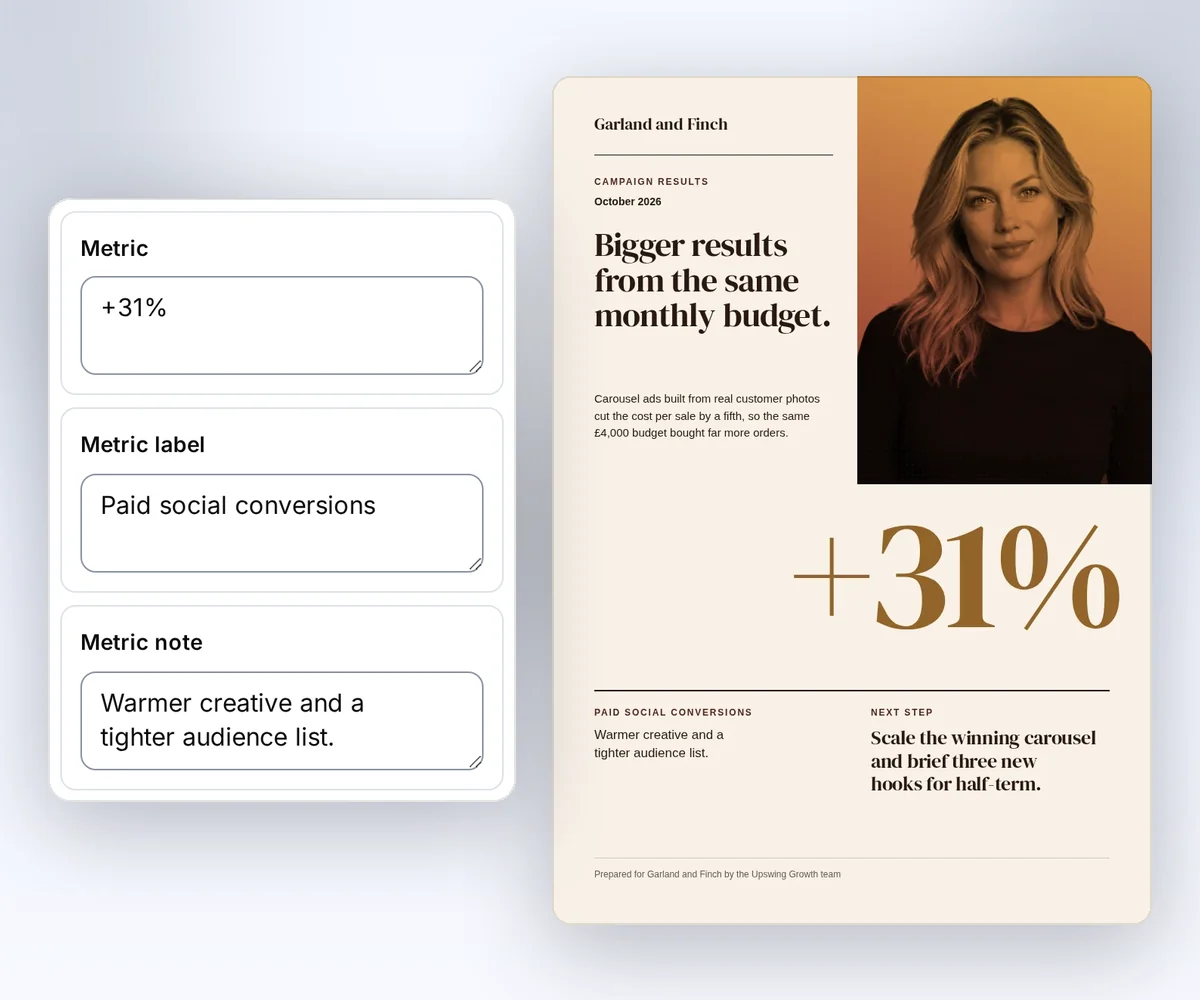
- Open the Campaign results report template and click Use this template. Sign in first if you need to.
- Open the Data tab and type your period, title, and the rest of the report. It changes on the canvas as you type.
- Click Export, then Save and export PDF, and download the file. Open it and check that no text gets cut off at the edge of the page.
Try your longest summary and next step before you send the report to a client. How to make a template you can reuse walks through the rest of the editor. To make the same kind of report from your own code, follow Generate your first PDF with the API.
How do I add a page break in HTML?
Put break-before: page on the block that starts the next printed page. Older code writes the same rule as page-break-before: always. Browsers still read the old name, but MDN marks it as deprecated, so use break-before in new code. A forced break takes priority over an avoid rule. The MDN break-before reference and the MDN page-break-before reference explain these rules (both read on 12 October 2026).
.next-page {
  break-before: page;
}
h1,
h2 {
  break-after: avoid;
}
tr,
.total {
  break-inside: avoid;
}
Wrap the total and its label in one block so they move together. break-inside: avoid can't help a block taller than a page, so test your longest record and let table rows grow with their content.
The Campaign results report template is a one-page design. Its source shows a report sized to fit one page, which is a useful start before you add breaks of your own.

Why is my HTML page break not working?
An HTML page break can fail because the element isn't a plain block in the normal page flow. MDN says the break rules apply to block-level elements in the normal flow, and browsers may also apply them to table rows. A break on a span, a floated box, or an absolutely placed box can be ignored. The MDN page-break-before reference lists this rule (read on 12 October 2026).
- Put the break on a
div, asection, or a heading. A<br>tag only starts a new line. - Move the break out of a floated or absolutely placed box.
- Check the printed output. Page breaks only show in a PDF or a print preview, so an ordinary browser view can look like nothing happened.
How do I add a page break to a PDF?
Set the breaks in the HTML before you make the PDF. thirds.ai makes PDFs from HTML or a saved template, and it can't change the pages of a PDF you already have. Use this recipe to check breaks and page numbers together.
You need curl and an API key. Set THIRDS_API_KEY through your secret store. Saving the template is free.
Save this JSON as page-break-template.json:
{
  "source": "<!doctype html><html lang='en'><head><meta charset='utf-8'><style>body{margin:0;font:16px/1.5 sans-serif;color:#152335}h1{font-size:28px}h1,h2{break-after:avoid}.next-page{break-before:page}</style></head><body><section><h1>Quarterly report</h1><p>Orders completed: 24</p><p>Prepared for Northline Studio.</p></section><section class='next-page'><h2>Next steps</h2><p>Send the approved report to your team.</p></section></body></html>",
  "schema": {
    "type": "object",
    "properties": {},
    "additionalProperties": false
  }
}
Save the response to a private file. If the request drops before you get a reply, look in Templates for the saved copy before you try again.
umask 077
curl --fail-with-body --silent --show-error \
  https://thirds.ai/v1/templates \
  -H "Authorization: Bearer $THIRDS_API_KEY" \
  -H 'Content-Type: application/json' \
  --data-binary @page-break-template.json \
  --output page-break-saved.json
Read the template id from page-break-saved.json. Save this JSON as page-break-request.json and put your ID in it. It uses version 1 of the new template and leaves room for a header and footer:
{
  "template_id": "tpl_00000000000000000000000000000000",
  "version": 1,
  "data": {},
  "pdf": {
    "format": "A4",
    "margins": {
      "top": "20mm",
      "right": "12mm",
      "bottom": "20mm",
      "left": "12mm"
    },
    "display_header_footer": true,
    "header_template": "<span style='font-size:9px;width:100%;text-align:center'>Quarterly report</span>",
    "footer_template": "<span style='font-size:9px;width:100%;text-align:center'><span class='pageNumber'></span> / <span class='totalPages'></span></span>"
  },
  "wait": false
}
This request makes one PDF and spends one credit when it succeeds, even when the PDF has two pages. Choose your own Idempotency-Key for it.
curl --fail-with-body --silent --show-error \
  https://thirds.ai/v1/pdf \
  -H "Authorization: Bearer $THIRDS_API_KEY" \
  -H 'Content-Type: application/json' \
  -H 'Idempotency-Key: YOUR_UNIQUE_PAGE_BREAK_REQUEST' \
  --data-binary @page-break-request.json
Keep the id from the response. Read the job until its status is succeeded, and replace the sample ID with yours:
curl --fail-with-body --silent --show-error \
  https://thirds.ai/v1/pdf/pdf_00000000000000000000000000000000 \
  -H "Authorization: Bearer $THIRDS_API_KEY"
Copy download.url from that response and add https://thirds.ai before it. The download doesn't need your API key.
curl --fail --silent --show-error \
  'https://thirds.ai/v1/downloads/YOUR_SIGNED_DOWNLOAD_TOKEN' \
  --output page-break.pdf
Open page-break.pdf. Check that it has two pages. Page 1 holds Quarterly report, and page 2 starts with Next steps. Both pages have the header, and their footers read 1 / 2 and 2 / 2.
If the create request stops, send it again with the same key and the same file. For a changed design, use a new key. The recovery guide explains when another create request is needed. If you're moving from wkhtmltopdf, the wkhtmltopdf guide maps each of its options to thirds.ai.
Why do headers or fonts look different?
Header and footer templates have their own styles. They don't inherit the body font or run scripts. Set their font size in the template and leave enough page margin for them. The PDF options guide has the thirds.ai settings, and the underlying Puppeteer PDF options list the pageNumber and totalPages classes (read on 12 October 2026).
If you print these PDFs with your own Puppeteer or Playwright code today, your headerTemplate and footerTemplate move into the pdf object as header_template and footer_template, and the browser you install and patch goes away. The Puppeteer and Playwright comparison maps the other options. If your headers came from DocRaptor, check them first: Prince reads its own paged-media CSS, and Chromium reads the CSS a browser reads, so a header set in @page rules moves into header_template here. The DocRaptor comparison covers the rest of the move.
The recipe uses a generic font and no remote assets. For a brand font, use a licensed web font, or set up a brand kit once and your logo, colours, and fonts land on every saved design together. Test accented names, currency signs, and every script your customers use. Keep font file versions fixed because a changed font can move text onto another page.
| Result | Check |
|---|---|
| An extra blank page | Remove a forced break after the last section. |
| A heading sits alone | Set break-after: avoid and check the next block fits. |
| A footer is missing or clipped | Set display_header_footer and increase the bottom margin. |
| A row loses text | Remove fixed heights and clipping from the row. |
| A font changes | Check that its URL loads over HTTPS, its license allows web use, and it has every character you need. |
idempotency_conflict | Send the old request again, or use a new key for a new output. |
How do I convert HTML to a single-page PDF?
Choose a paper size that fits the content and remove forced page breaks. For a short report, reduce empty space before you reduce the type size. You can use a named paper size or a custom width and height. The request controls the paper size, and a CSS @page size doesn't override it.
If the PDF must stay on one page, set a limit on how much content you accept, then test the longest names and largest table within it. If the content grows past that limit, let the report use another page or shorten the content in your app. A business card is the same job on a tiny page: make a UK business card PDF at 85 by 55 millimetres.
How can I print a webpage as a PDF without page breaks?
A PDF still has page boundaries. A taller custom page can hold more content on one page, but a PDF can have at most 100 pages and 25 MiB, as the limits guide says. Removing CSS breaks alone doesn't make a long page fit.
You send the HTML yourself, because the API doesn't fetch a webpage URL. If you need a service that loads a live page, the ranked list of HTML to PDF APIs shows which tools take a URL. Prepare the HTML and its print styles first. If you need a fixed graphic instead, use the image options and set its width and height.
Next, sign in, open the Campaign results report, and make a PDF from your longest real record. The PDF options guide has every page size and margin setting, and previews are free.


