
Add thirds.ai to Lovable as a custom MCP server
You add thirds.ai to Lovable as a custom MCP server in Connectors, with the URL https://thirds.ai/mcp and a private API key. Lovable then uses thirds.ai as a chat connector. That's the other way round from the Lovable MCP server at https://mcp.lovable.dev, which lets other AI apps build in Lovable. With thirds.ai, you save a design once, such as an app ad or an invoice, with your logo, colours, and fonts. Then you type in new details and get a finished image or PDF. After that, ask Lovable chat for those files while you build, so you don't lay out each one by hand. Each successful file costs one credit, and a verified account gets 50 free credits each month.
Give this prompt to your AI agent. The agent does the task for you.
Read https://thirds.ai/docs/mcp/lovable and help me connect Lovable to thirds.ai with an API key
Make it without code
You can make the same branded files in the thirds.ai editor without Lovable or any code. It takes three steps, and you need a free thirds.ai account.
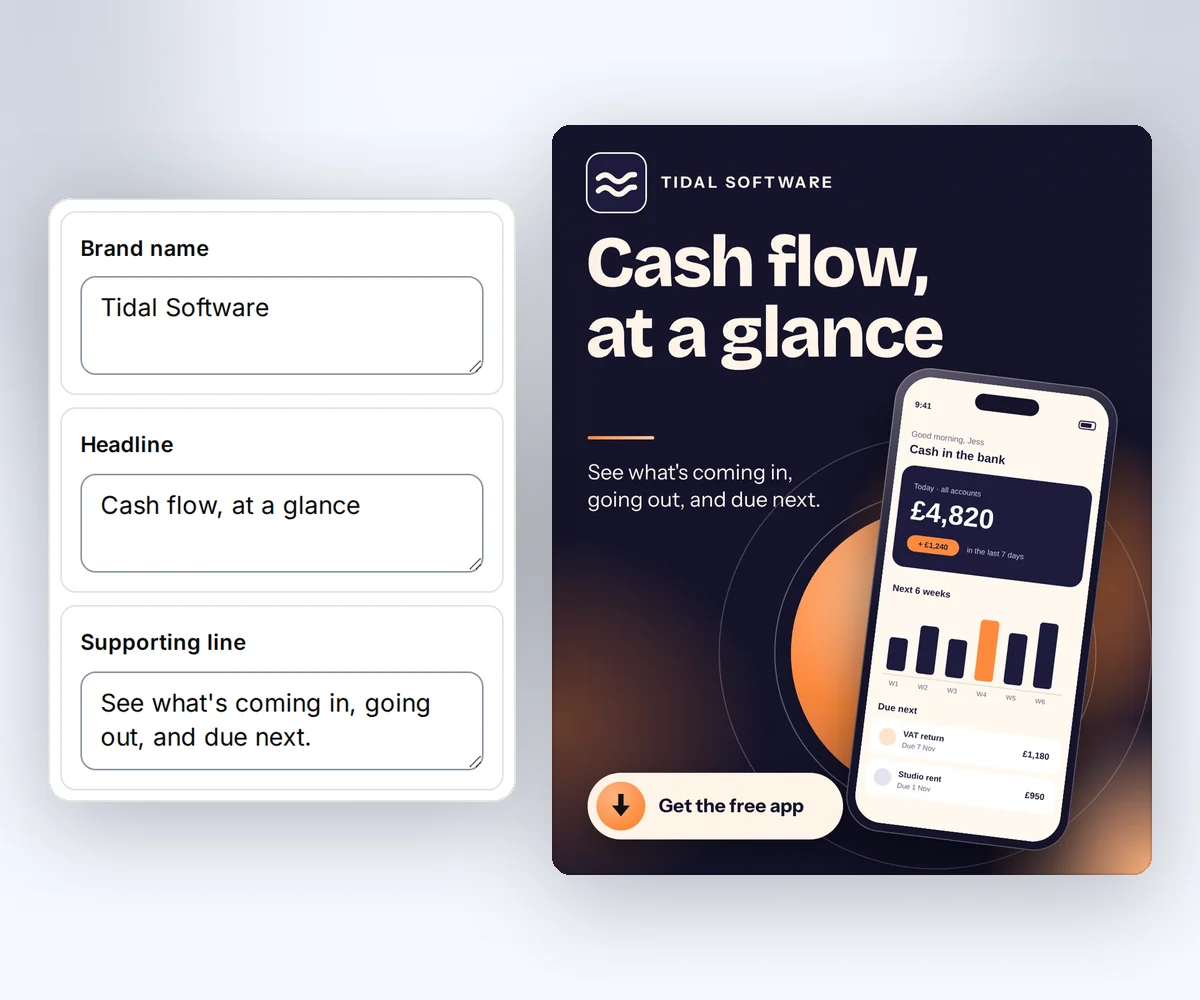
- Open the App screenshot ad template and click Use this template. Sign in and verify your account first if you need to.
- Open the Data tab and type your app's name, the headline, the supporting line, and the button text. Add a screen from your own app. Click Preview with data above the canvas to see the ad. The preview is free.
- Click Export, then Save and export PNG, and click Download image.
When you want Lovable chat to make the next ad or file for you while you build, add the thirds.ai MCP server to Lovable.
How do I add thirds.ai to Lovable as an MCP server?
You add thirds.ai to Lovable in three steps: create a key, open the custom MCP form, and fill in five settings. You need a thirds.ai account and a Lovable account. The Lovable custom MCP guide (checked 27 September 2026) says custom MCP servers work on all Lovable plans. The same guide says Lovable uses OAuth by default. For these steps, you choose bearer token or API key sign-in instead.
- Create an API key on the API keys page.
- In Lovable, open Connectors, click +, and choose MCP server.
- Fill in these values, then click Add server.
| Setting | Value |
|---|---|
| Server name | thirds |
| Connection | Direct connection |
| Server URL | https://thirds.ai/mcp |
| Authentication | Bearer token or API key |
| Secret | YOUR_API_KEY |
Paste your thirds.ai API key as the secret. If the form asks for a header value, use Bearer YOUR_API_KEY. Lovable's guide says the Connection box shows only when your workspace has more than one route, so you may not see it. Keep the key out of chat messages and shared screenshots.
Connect with only the URL
You can skip the key and sign in on a thirds.ai page. Fill in the same server name and URL, keep OAuth as the authentication, and click Add & authorize, as the Lovable custom MCP guide shows (checked 27 September 2026). When the thirds.ai page opens, sign in if you need to and click Allow.
This connection gets every thirds.ai tool except the two AI image tools. Use an API key when you need those. To stop the connection, open your thirds.ai Settings, find the app under Connected apps, and click Disconnect.
Lovable chat connector or Lovable MCP server?
A Lovable chat connector lets Lovable use your own tools while you build, and thirds.ai is one of those tools. Lovable's chat connectors guide (checked 25 September 2026) says a chat connection is personal to you and works in the project chat and in Chats. The same guide says a chat connection is never part of the app you publish.
The Lovable MCP server works the other way round. Apps such as Claude, ChatGPT, or Cursor connect to https://mcp.lovable.dev to make and change Lovable projects. You don't need it to use thirds.ai in Lovable. If you want thirds.ai in one of those apps instead, follow the Claude Code, ChatGPT, or Cursor setup. If you also build apps with Replit Agent, the Replit MCP setup connects Agent to the same saved designs.
Check the connection and make your first file
You check the thirds.ai connection by asking Lovable chat to list the thirds.ai tools. You should see list_templates, render, and get_status.
Then ask for one file, such as "Use thirds to make an app ad for my budget app with the headline Plan your week in one tap." Read the main MCP guide before your first paid file. It explains credit approval, safe retries, and status checks.
FAQ
Why is MCP server greyed out?
MCP server is greyed out when a workspace admin turns custom MCP servers off. Use a workspace that allows custom MCP, or ask an admin to turn it on.
Can my published Lovable app call thirds.ai this way?
No. Lovable's chat connectors guide says chat connectors only run while you build in Lovable. For a published app, call the thirds.ai API from your own server.
Can my teammates use my connection?
No. Each person adds the server with their own name, URL, and key. Lovable's custom MCP guide says chat connections are per user.
Does connecting spend credits?
No. Connecting and listing tools don't spend credits. AI template work and successful files can. Ask your agent to show the action and the cost before it starts paid work.