
To make static ad variations, copy one image ad design and change one thing in each version: the headline, the offer, or the product photo. In thirds.ai, you copy the Seasonal offer design once, with your logo, colours, and fonts on it, and then ChatGPT, Claude, the editor, or your own code makes every version for you, with story and banner sizes when you need them. This guide covers image ads for social feeds. If you mean Google Ads search ad variations, that's a separate Google Ads feature.


Read the setup prompt
First read https://thirds.ai/blog/make-static-ad-variants-from-one-template, https://thirds.ai/docs/mcp, and the setup guide for ChatGPT or Claude, whichever I use. Guide me through the connection controls and browser sign-in. Never ask me to paste an API key into chat. Make static ad variations. Ask what I sell, where the ads run, and which headline, offer, or photo I want to test. Pick one design and change one idea per ad. Before spending credits, tell me the cost and wait for my approval.
Read the transcript
Here’s how to make static ad variants from one saved template, with a few API calls, and no new layout for each version.
Testing a new headline, a new offer, a new product… that’s the same ad, again and again. But hey, the layout never changes. So copy the Seasonal offer design once, and grab its template ID.
Each request makes one image. Send the template ID, version one, and only the fields you want to change. Give every variant its own idempotency key.
Now send the same request with new data. Variant B tests a new offer… and variant C swaps in your own product photo.
Need a story and a banner too? Send one request to image packs with the sizes you want. Adapting a size is free, and each finished image costs one credit.
Tip: put the variant name in the key and the file name. If the network drops, a retry with the same key gets the same job back, so you never pay twice.
And that’s the real win. Send a pack for each variant, and one saved design gives you nine finished ads for nine credits. Next campaign, your script just sends new words.
Copy the Seasonal offer design and make your first variants at thirds.ai!
Why one ad is never enough
A single ad gives you one data point and no way to learn from it. A set of variations lets the ad platform find the version your audience responds to, and it tells you which idea did the work. Meta's split testing guide says to "select only one variable per test", so you can tell what caused the difference, and that tests with a larger reach, a longer schedule, or a higher budget give more reliable results (Meta for Developers, Split testing, checked 13 October 2026). Google's responsive display ads work the same way: you upload several headlines and images, and Google picks the combination for each ad slot from your performance history (Google Ads Help, About responsive display ads, checked 13 October 2026).
Variations also keep a campaign alive. When the same people see the same image too often, results drop. Meta calls this creative fatigue and flags it in Ads Manager with creative fatigue recommendations (Meta Business Help Center, checked 13 October 2026). A fresh headline or photo in the same layout is a quick fix, because the design is already done.
Plan a set that gives a clean answer
Change one idea per variation and keep the rest of the ad the same. When the layout, logo, and colours never move, a better result most likely comes from the idea you changed. Start with the idea you think matters most, often the headline, then the offer, then the product photo.
The three variations in this post each change one thing against variation A, which keeps the Seasonal offer design's sample headline and offer.
| Variation | Idea it tests | What changes |
|---|---|---|
| A | The headline | Headline: Fresh pages for a fresh start |
| B | The offer | Offer: Buy 2, get 1 free |
| C | The product | Product photo: your own planner |

Make every variation before the test starts, so they all go live on the same day and get the same conditions. Name each file after its variation, so the report in your ad platform matches the images on your disk.
Make the variations from ChatGPT or Claude
The easiest route is your AI assistant. Connect thirds.ai to ChatGPT, Claude, Gemini CLI, or Grok with its guide, which takes a couple of minutes. Then brief it like a colleague: "Copy the Seasonal offer design, put my brand on it, and make three versions, one with each of these headlines." The assistant builds the design with you, writes headlines for you to approve if you like, and hands you the finished files. Every version comes from the same template, so the price stays where it is and the font stays yours. An AI image generator changes both on every try. Ask for the story and banner sizes in the same message and it makes those too.
Make the variations in the editor
Use the editor when you want to see each ad before you export it. You need a free thirds.ai account.
- Open the Seasonal offer template and click Use this template. Sign in first if you need to.
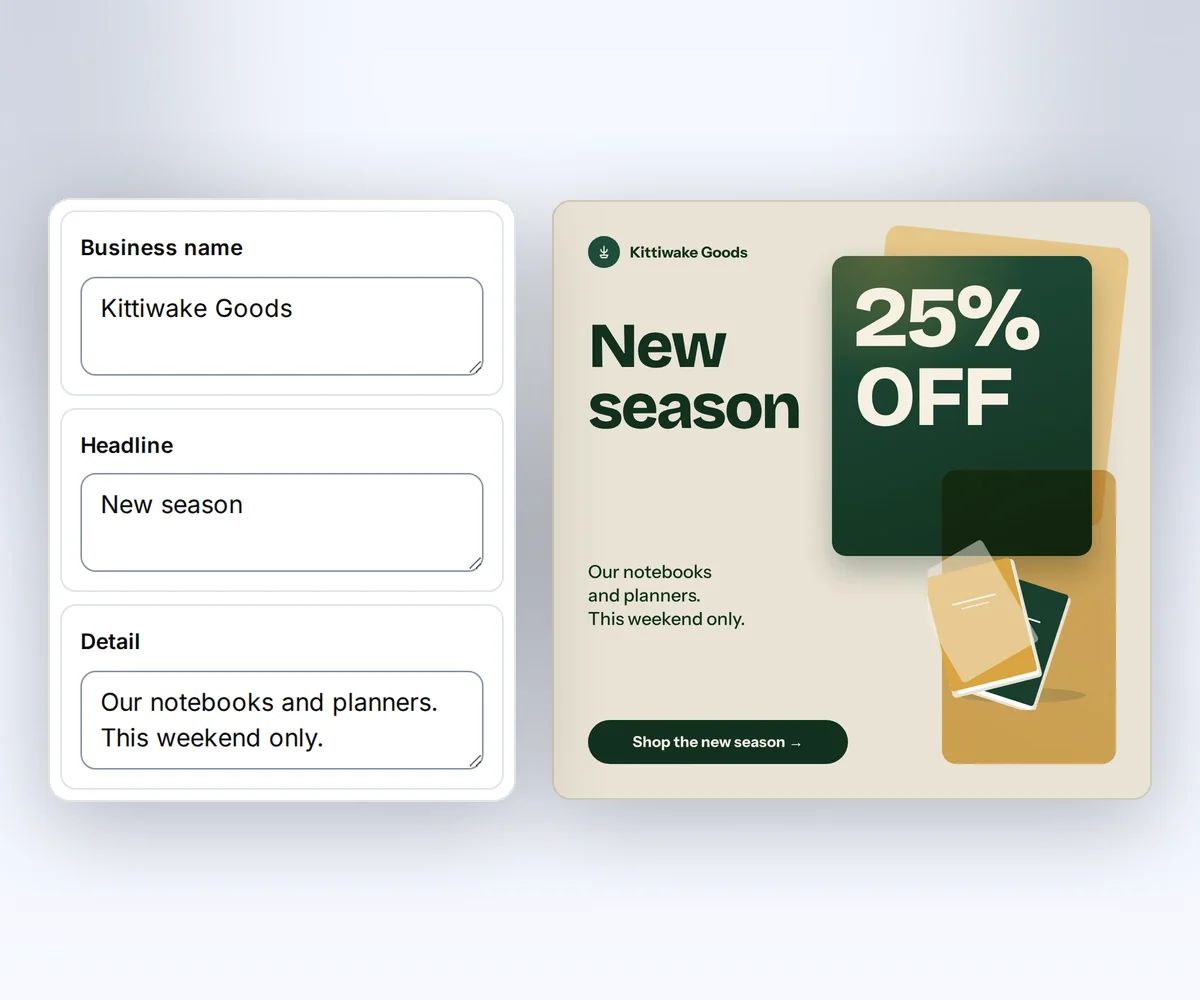
- Open Data and type your business name, headline, and offer. Click Preview with data above the canvas to check the ad. The preview is free.
- Click Export, pick the file type, and click Save and export PNG. Each image you export costs one credit. Then change the headline or the offer in Data and export the next variation.
To put your own logo, colours, and fonts on the ad in one step, pick your kit under Brand kit. Brand kits shows how to set one up from your logo. The template editor page shows the rest of the workspace, and how to make a template you can reuse covers building your own ad design.
For a bigger set, click Batch at the top of the editor. The Batches page shows a table with one column for each field on the ad. Paste one row per variation, check the cost, and click the button that shows your file count, such as Make 10 files. You get one ZIP with every ad. The batch guide lists the row limits for each plan.
Make the variations from your own code
Your code sends one request to POST /v1/image for each variation, with only the fields that change. This is the route for a script that reads headlines from a spreadsheet, or an automation that makes a new set each week. You need an API key and the ID of your copy of the Seasonal offer design. Copy the ID with the Copy button in the editor's Template menu.
The design has seven optional fields. Each one has a default from the sample, so you send only what changes.
| Field | What it changes |
|---|---|
business_name | The small name beside the logo |
headline | The main line under the name |
offer | The large offer text, which shrinks to fit its box |
detail | The one or two sentences under the offer |
action | The text on the dark bar |
logo | An uploaded image reference or a public image URL for the logo |
product_image | An uploaded image reference or a public image URL for the product photo |
Text shrinks to fit its box within limits, so check a very long headline in the preview before you send the set. Upload a product photo once with POST /v1/image-assets and use the returned asset:// reference in product_image. Set PDF and image options shows the upload.
Give each variation its own Idempotency-Key and send version: 1, so a later save never changes a retry. This request makes variation A.
curl --fail-with-body --silent --show-error https://thirds.ai/v1/image \
  -H 'Authorization: Bearer YOUR_API_KEY' \
  -H 'Content-Type: application/json' \
  -H 'Idempotency-Key: autumn-sale-variant-a' \
--data '{"template_id":"tpl_00000000000000000000000000000000","version":1,"data":{"headline":"Fresh pages for a fresh start","offer":"25% off","detail":"Our full range of notebooks and planners. This weekend only.","action":"Shop the new season"},"image":{"format":"png","width":1200,"height":1200},"wait":false}'const response = await fetch("https://thirds.ai/v1/image", {
method: "POST",
headers: {
"Authorization": "Bearer YOUR_API_KEY",
"Content-Type": "application/json",
"Idempotency-Key": "autumn-sale-variant-a"
},
body: JSON.stringify({
"template_id": "tpl_00000000000000000000000000000000",
"version": 1,
"data": {
"headline": "Fresh pages for a fresh start",
"offer": "25% off",
"detail": "Our full range of notebooks and planners. This weekend only.",
"action": "Shop the new season"
},
"image": {
"format": "png",
"width": 1200,
"height": 1200
},
"wait": false
}),
redirect: "error",
signal: AbortSignal.timeout(30000),
});
if (!response.ok) throw new Error(`HTTP ${response.status}; Retry-After: ${response.headers.get("retry-after") ?? "none"}`);
console.log(await response.text());import json
from urllib.error import HTTPError
from urllib.request import HTTPRedirectHandler, Request, build_opener
class NoRedirect(HTTPRedirectHandler):
def redirect_request(self, req, fp, code, msg, headers, newurl):
return None
request = Request("https://thirds.ai/v1/image",
method="POST",
headers={
"Authorization": "Bearer YOUR_API_KEY",
"Content-Type": "application/json",
"Idempotency-Key": "autumn-sale-variant-a"
},
data=json.dumps({
"template_id": "tpl_00000000000000000000000000000000",
"version": 1,
"data": {
"headline": "Fresh pages for a fresh start",
"offer": "25% off",
"detail": "Our full range of notebooks and planners. This weekend only.",
"action": "Shop the new season"
},
"image": {
"format": "png",
"width": 1200,
"height": 1200
},
"wait": False
}).encode("utf-8"),
)
try:
with build_opener(NoRedirect()).open(request, timeout=30) as response:
print(response.read().decode("utf-8"))
except HTTPError as error:
retry = error.headers.get("Retry-After", "none")
raise RuntimeError(f"HTTP {error.code}; Retry-After: {retry}") from NoneVariation B tests the offer, so only the offer and its detail line change. Send the same request with the key autumn-sale-variant-b and this data.
{
  "headline": "Fresh pages for a fresh start",
  "offer": "Buy 2, get 1 free",
  "detail": "Mix any notebooks and planners. This weekend only.",
  "action": "Shop the new season"
}
Variation C tests the product, so it keeps the words from variation A and swaps in your uploaded photo. Send the key autumn-sale-variant-c and this data.
{
  "headline": "Fresh pages for a fresh start",
  "offer": "25% off",
  "detail": "Our full range of notebooks and planners. This weekend only.",
  "action": "Shop the new season",
  "product_image": "asset://asset_0123456789abcdef0123456789abcdef"
}
Poll GET /v1/image/{id} until the job is succeeded, failed, or cancelled, then read download.url and save each file under its variation name. Put the variation name in the key too: a retry with the same key and data returns the same job for 24 hours, so a network error never costs a second credit. Retry requests and download files covers polling, errors, and Retry-After. For a whole spreadsheet of headlines, send the rows in one POST /v1/batches request instead, as the batch guide shows.
The same request works from a Zapier, Make, or n8n HTTP step, so a new row in a sheet can become a new ad with no one at the screen. The n8n, Zapier, and Make guide has the setup for each tool.
Add story and banner sizes
Each variation can also run as a story or a banner, made from the same square. In the editor, click Smart resize, add Story / vertical video, Web banner, and any other sizes you need, then click Export pack. The layout adapts from the original square. Resizing is free, each finished image costs one credit, and Retry failed sizes reruns only the sizes that failed.
Your code does the same with one request to image packs. Send the saved version, the data for this variation, and the size ids. original is the version's own canvas.
curl --fail-with-body --silent --show-error https://thirds.ai/v1/image-packs \
  -H 'Authorization: Bearer YOUR_API_KEY' \
  -H 'Content-Type: application/json' \
  -H 'Idempotency-Key: autumn-sale-pack' \
--data '{"template_id":"tpl_00000000000000000000000000000000","version":1,"data":{"headline":"Fresh pages for a fresh start","offer":"25% off"},"format":"png","sizes":["original","story","web-banner"]}'const response = await fetch("https://thirds.ai/v1/image-packs", {
method: "POST",
headers: {
"Authorization": "Bearer YOUR_API_KEY",
"Content-Type": "application/json",
"Idempotency-Key": "autumn-sale-pack"
},
body: JSON.stringify({
"template_id": "tpl_00000000000000000000000000000000",
"version": 1,
"data": {
"headline": "Fresh pages for a fresh start",
"offer": "25% off"
},
"format": "png",
"sizes": [
"original",
"story",
"web-banner"
]
}),
redirect: "error",
signal: AbortSignal.timeout(30000),
});
if (!response.ok) throw new Error(`HTTP ${response.status}; Retry-After: ${response.headers.get("retry-after") ?? "none"}`);
console.log(await response.text());import json
from urllib.error import HTTPError
from urllib.request import HTTPRedirectHandler, Request, build_opener
class NoRedirect(HTTPRedirectHandler):
def redirect_request(self, req, fp, code, msg, headers, newurl):
return None
request = Request("https://thirds.ai/v1/image-packs",
method="POST",
headers={
"Authorization": "Bearer YOUR_API_KEY",
"Content-Type": "application/json",
"Idempotency-Key": "autumn-sale-pack"
},
data=json.dumps({
"template_id": "tpl_00000000000000000000000000000000",
"version": 1,
"data": {
"headline": "Fresh pages for a fresh start",
"offer": "25% off"
},
"format": "png",
"sizes": [
"original",
"story",
"web-banner"
]
}).encode("utf-8"),
)
try:
with build_opener(NoRedirect()).open(request, timeout=30) as response:
print(response.read().decode("utf-8"))
except HTTPError as error:
retry = error.headers.get("Retry-After", "none")
raise RuntimeError(f"HTTP {error.code}; Retry-After: {retry}") from NonePoll GET /v1/image-packs/{id} until each size has succeeded or failed, then download archive_url. The ZIP keeps the requested order, with names such as 01-original.png. One pack per variation turns three variations into nine finished ads. See the image packs reference and Set PDF and image options.
Read next
- The static ads page shows the ad workflow from brief to file.
- Static ad examples gives you 15 more ad layouts to start from, with the size of each one.
- Rebuild an image as an editable template turns an ad you already run into a design you can vary.
- Make a YouTube thumbnail for each episode and Make Open Graph images from HTML use the same one-design, many-files approach.
- Create branded templates for PDFs and images covers every way to start a design.
- For TikTok, choose from ten slideshow sets, follow the slideshow guide, pick a story from ten ideas for app marketing, and check your text with the TikTok safe-zone guide.
- To compare tools, read the ranked list of Bannerbear alternatives or the Bannerbear, Templated, AdKit, Placid, and Orshot comparisons. Plans and credit packs shows what a campaign set costs.
Start free to copy the Seasonal offer design and make your first three variations with the 50 free credits you get every month.


