
Best Bannerbear alternatives for repeat images
The main Bannerbear alternatives for repeat campaign images are Placid, Templated, Orshot, thirds.ai, Robolly, APITemplate.io, HTML/CSS to Image, and CraftMyPDF. Pick Placid, Templated, or Orshot if you want to build each design in a layer editor and need video, Canva import, or social posting from the same tool. Pick thirds.ai if you'd rather have the AI draft the design from a sentence or an uploaded picture, with your logo, colours, and fonts saved once in a brand kit, and then let ChatGPT, Claude, or your own automations make every file from it. One credit makes a whole PDF, not one page of it, or one image. Stay with Bannerbear if its video and app links already work for your team.


Watch the comparison
Best Bannerbear alternatives for repeat images: 8 tools, ranked
Read the transcript
Eight Bannerbear alternatives, ranked, and one catch before you pack.
Your templates don't move as files, so you'll rebuild each design. Keep your finished images, though: you'll want them at number four.
We rank by how you build the design, then app connections, then file types. We make thirds.ai, so we have a stake.
Placid puts a design editor inside your own app, with video. Templated brings in your Canva designs. Orshot keeps design and publishing in one place.
Number four is us. No video, no social posting, no Canva or Figma import. Upload a finished image, and the AI rebuilds it as an editable template in your brand.
Robolly, if Google Sheets fills your templates and you need video. APITemplate.io, for a cheap PDF-only plan. HTML/CSS to Image, when your developers own the HTML. CraftMyPDF, when documents come first.
Now, that menu you packed. In thirds.ai, choose Image, then Start from an image. Attach last week's menu and pick your brand kit.
Back comes a template in your brand, with the dishes, price, and date ready to change. Next week, type the new dishes and date, then save and export the PNG.
From then on, ChatGPT, Claude, or a spreadsheet makes every menu.
If Bannerbear's video and app links already work for your team, stay. Moving? Bring one finished image and start free.
Our rule
How we rank the tools
We put a visual way to build designs first, then app connections, then the range of file types. This is our opinion for teams leaving Bannerbear. It isn't a measured ranking of quality or price, and a narrower tool can be the right choice for your job. We left out tools such as ThumbAPI. They make a fresh AI image from a prompt each time, which is a different job from filling a saved design. We make thirds.ai, so we have a stake here. Features of other tools are vendor claims. A Bannerbear template doesn't move as a file, so you rebuild each design in whichever tool you pick. In thirds.ai you can upload the finished Bannerbear image instead and let the AI rebuild it as an editable template. We rechecked Placid, Templated, Robolly, APITemplate.io, HTML/CSS to Image, CraftMyPDF, and Bannerbear on 12 October 2026. We rechecked Orshot and ThumbAPI on 13 October 2026.
The shortlist
Facts at a glance
| Rank | Tool | What it does | Choose it when |
|---|---|---|---|
| 1 | Placid | Dynamic templates, an editor SDK, and image, PDF, and video APIs (vendor claim) | You want to put a design editor inside your own app, with video from the same templates. |
| 2 | Templated | AI and visual template creation, Canva import, and workflow connections (vendor claim) | You want to bring Canva designs into a template automation workflow. |
| 3 | Orshot | Canva and Figma imports, smart resize, and social publishing (vendor claim) | Your design and publishing work should stay in one service. |
| 4 | thirds.ai | AI-drafted designs, brand kits, ChatGPT or Claude, and an API (our own product) | You have a Bannerbear image to upload and want the AI to rebuild it as an editable template in your brand. |
| 5 | Robolly | Template-based image, PDF, and video automation (vendor claim) | You fill your templates from Google Sheets and need video next to your images. |
| 6 | APITemplate.io | Reusable image and PDF templates (vendor claim) | You want a cheap PDF-only plan now, with images added later if you need them. |
| 7 | HTML/CSS to Image | HTML, URL screenshots, and saved templates (vendor claim) | Your developers already own the HTML or need to capture public pages. |
| 8 | CraftMyPDF | Visual templates for data-filled PDFs and images (vendor claim) | Documents are your main job, with image output alongside them. |
Tool by tool
What each one is for
Placid
Choose Placid when you want to put a design editor inside your own app, with video from the same templates.
Before you choose Placid, know its credit rules: an image is 1 credit, a PDF page is 2, and every 10 seconds of video is 10, and the editor SDK starts on the Business plan (vendor claim). Read the full Placid comparison.
Templated
Choose Templated when you want to bring Canva designs into a template automation workflow.
Templated caps the templates you can keep: 15 on Starter and 100 on Scale, and an image or a PDF page each costs one credit (vendor claim). Count your designs before you pick a plan. Read the full Templated comparison.
Orshot
Choose Orshot when your design and publishing work should stay in one service.
Orshot charges one credit per image, per PDF page, and per second of video (vendor claim, checked 13 October 2026), so a long document or a clip adds up fast. Read the full Orshot comparison.
thirds.ai
Choose thirds.ai when you have a Bannerbear image to upload and want the AI to rebuild it as an editable template in your brand.
You can't make video, post to social sites, or import Canva or Figma files in thirds.ai. Your first AI design in a chat costs 50 credits, each later text change costs 25, and a file that fails costs nothing. See pricing and file limits.
Robolly
Choose Robolly when you fill your templates from Google Sheets and need video next to your images.
Robolly makes images, PDFs, and video from one set of templates, and takes its data from Google Sheets, Airtable, Zapier, or Make (vendor claim). Individual is $39 a month and Business is $129 (vendor price). Read the full Robolly comparison.
APITemplate.io
Choose APITemplate.io when you want a cheap PDF-only plan now, with images added later if you need them.
APITemplate.io keeps image templates and PDF templates in separate editors, and its PDF-only plans start at $19 a month while the image and PDF plans start at $29 (vendor claim). Pick the plan that holds the type you need. Read the full APITemplate.io comparison.
HTML/CSS to Image
Choose HTML/CSS to Image when your developers already own the HTML or need to capture public pages.
HTML/CSS to Image keeps each image link for as long as your account is active, and a very large image, which it calls jumbo, uses extra credits (vendor claim). Its free plan makes 50 images a month, and Basic starts at $14 a month for 1,000 images (vendor price). Read the full HTML/CSS to Image comparison.
CraftMyPDF
Choose CraftMyPDF when documents are your main job, with image output alongside them.
CraftMyPDF is built for documents first. Its image API makes JPEG and PNG, and its free plan makes 50 files a month with 3 templates (vendor claim). Read the full CraftMyPDF comparison.
No code needed
How do you make your next campaign image in thirds.ai?
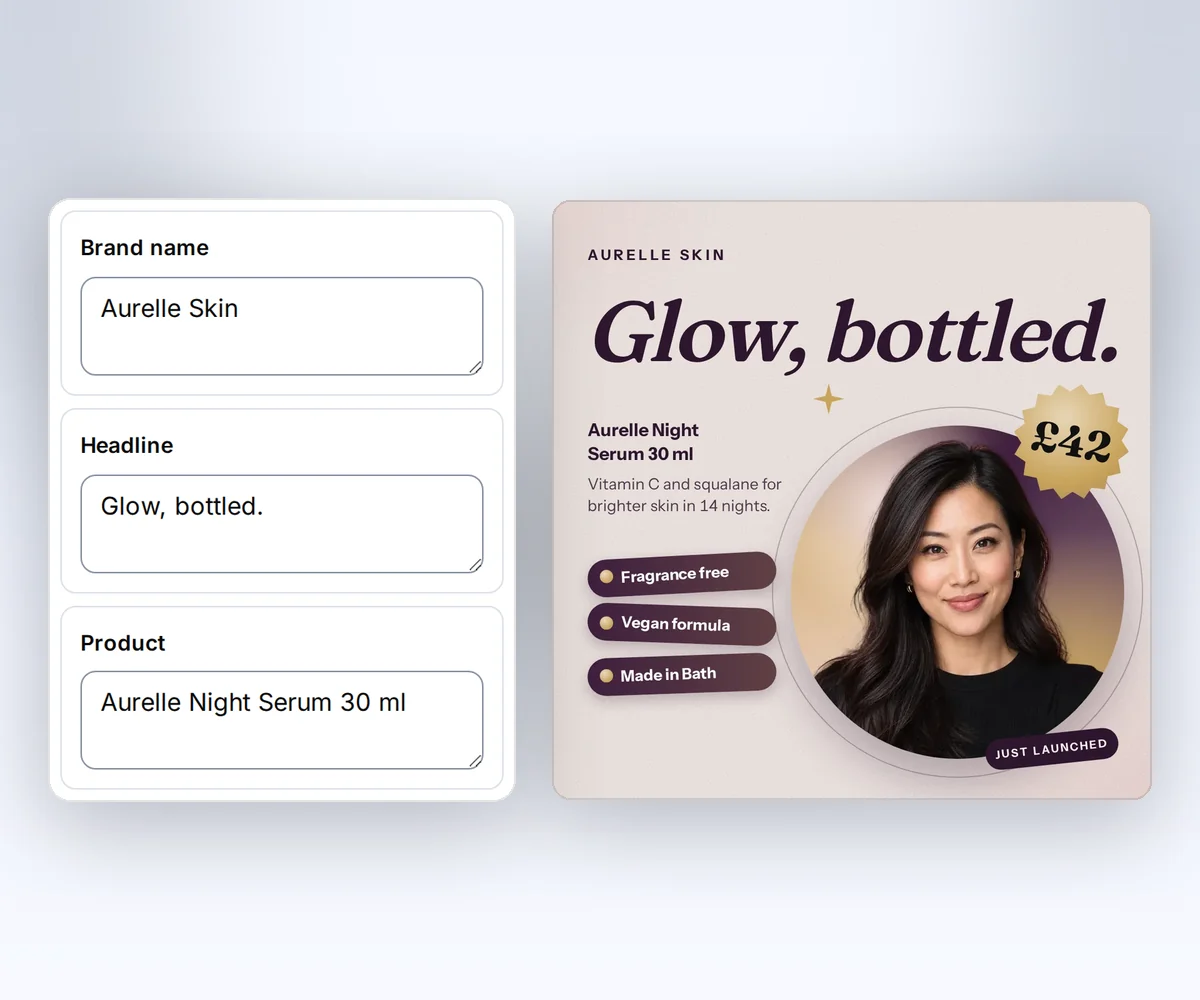
Start from the Skincare serum launch design, and your brand kit puts your logo, colours, and fonts on it in one step. Type your product details and download the file. From then on, ChatGPT, Claude, or a spreadsheet batch can make the next ones from the same design.
- Open the Skincare serum launch template and click Use this template. If you've saved a brand kit, its logo, colours, and fonts go on at once.
- Type your headline and price, and swap in your own photo. Your launch post is ready to share.
- Click Save and export PNG to download it. Each finished file uses one credit.
Before you switch
Compare the same sample across tools
Use your longest text, your real fonts, and the size you need. Check the finished file, whether every field filled in right, what a failed file costs, how long the tool keeps your files, and the total credits used. Bannerbear has no free plan. Its pricing page offers a free trial with 30 API credits and no card, and paid plans start at $49 a month for 1,000 API credits (vendor claim, checked 12 October 2026). The thirds.ai Free plan gives you 50 credits every month with no card. Each full comparison shows the plan prices side by side.
Checked and dated
Sources
- Placid pricing, plans, credit rules, editor SDK, and Zapier and Make claims checked 12 October 2026.
- Templated pricing, plans, credits, template caps, Canva import, and AI template claims checked 12 October 2026.
- Orshot and Orshot pricing, credit rules, Canva and Figma imports, smart resize, and social publishing claims checked 13 October 2026.
- thirds.ai, product contract and pricing reviewed 12 October 2026.
- Robolly pricing, plans, prices, and image, PDF, and video claims checked 12 October 2026.
- APITemplate.io pricing, plans, prices, and the separate image and PDF editors checked 12 October 2026.
- HTML/CSS to Image pricing and API docs, plans, link retention, and jumbo image credits checked 12 October 2026.
- CraftMyPDF and CraftMyPDF pricing, plans, free plan, and JPEG and PNG image claims checked 12 October 2026.
- Bannerbear, vendor image, video, PDF, and integration claims checked 12 October 2026. Bannerbear pricing, plans, credits, and free trial checked 12 October 2026.
- ThumbAPI, vendor source checked 13 October 2026, cited to explain why AI-prompt thumbnail generators sit outside this list.
Try it yourself
Try the matching template
Upload one of your Bannerbear images and let the AI rebuild it in your brand, or start from the Skincare serum launch design below. A developer can then make the next one from code with the templates with data guide.

Free to try
Make your first file free
Start from a designer-made template and download a real file for free. Sign up, and ChatGPT or Claude can make the next one in your brand.