
PDF API for n8n, Zapier, and Make: one HTTP request per report, invoice, or ad
You can make a PDF or image from n8n, Zapier, or Make with one HTTP request to thirds.ai. thirds.ai is a web app where you save a design once, such as a report, an invoice, or an ad, with your logo, colours, and fonts. Then you send it new details and get a finished PDF or image back. Your workflow sends one HTTP request with the new values, so you stop copying numbers into a document by hand. Every file keeps the same brand, and each finished file costs one credit. A verified free account gets 50 credits each month.
Give this prompt to your AI agent. The agent does the task for you.
Read https://thirds.ai/docs/integrations/api-workflows and help me map my report, invoice, or ad data to a saved template and run this recipe with one approved render and safe retries
Your workflow supplies the data, and the recipes on this page make the file and check it. thirds.ai doesn't connect to your reporting tool, accounting system, or ad account for you. To try the same designs without a workflow, start in the editor.
Make it without code
You can make a branded report, invoice, or ad in the thirds.ai editor without n8n, Zapier, or any code. It takes three steps, and you need a free thirds.ai account. Try the Campaign results report template first, because it's the same design that the n8n, Zapier, and Make request fills.
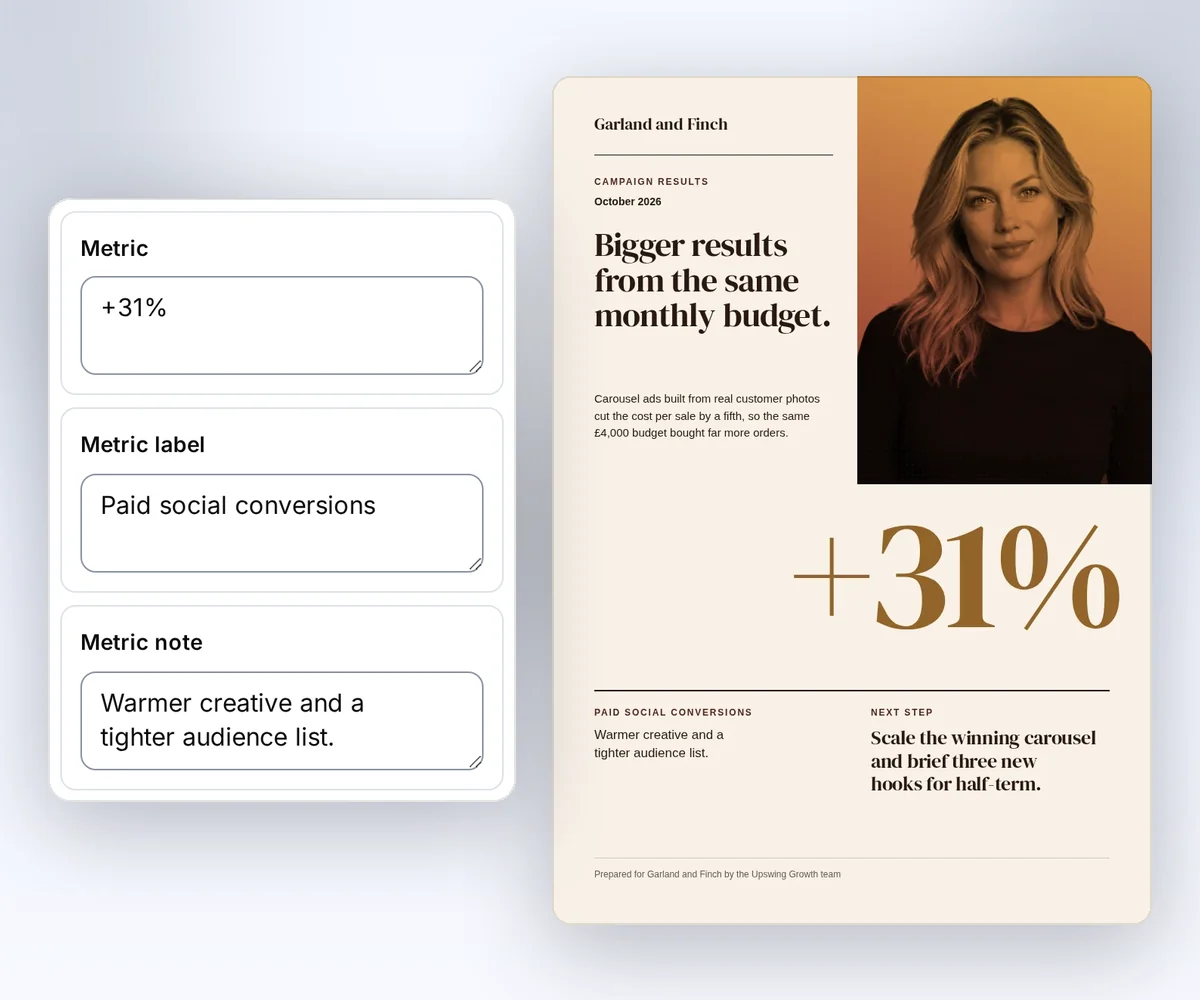
- Open the Campaign results report template and click Use this template. Sign in first if you need to.
- Open the Data tab and type your month, your headline, and your numbers. The preview shows your changes.
- Click Export, then Save and export PDF, and download the file.
To make many files at once from a spreadsheet, follow the CSV batches guide. You upload a CSV and click the button that shows your file count, such as Make 3 files.
How do I generate a PDF in n8n, Zapier, or Make?
You generate a PDF in n8n, Zapier, or Make with the tool's own HTTP request step, which sends your data to a saved thirds.ai template. The thirds.ai Zapier app, Make app, and n8n community node do the same job without a hand-built request, and you pick your design from a list. For the HTTP request step, you need a thirds.ai API key, a saved template ID and version, and the values for this file. We checked each tool's action names in its own help pages on 25 September 2026:
| Tool | Action to use |
|---|---|
| n8n | HTTP Request node |
| Zapier | Webhooks by Zapier, the Custom Request action |
| Make | HTTP app, the Make a request module |
Zapier's help page says Webhooks by Zapier needs a paid Zapier plan (checked 25 September 2026).
To compare thirds.ai with other tools that have Zapier and Make apps, our Bannerbear comparison shows when that tool is the better fit, and our Placid comparison does the same for Placid's Zapier, Make, and n8n apps. For a weekly schedule with Make or Power Automate, including the exact module and action setup, see Automate weekly report PDFs and images with Make or Power Automate.
Set the method to POST, the URL to https://thirds.ai/v1/pdf, and add an Authorization: Bearer YOUR_API_KEY header with Content-Type: application/json. Send your saved template's ID, version, and data as the JSON body. Copy the ID with the Copy button in the editor's Template menu or on your Templates page. Point the same request at the image endpoint instead when you want a PNG or JPEG file. This body fills the Campaign results report template:
{
  "template_id": "tpl_00000000000000000000000000000000",
  "version": 1,
  "data": {
    "period": "October 2026",
    "title": "Monthly campaign report",
    "summary": "A clear view of this month's campaign performance.",
    "metric_label": "Paid social conversions",
    "metric": "+31%",
    "metric_note": "Warmer creative and a tighter audience list.",
    "next_step": "Scale the winning carousel.",
    "footer": "Prepared by your team",
    "primary_colour": "#0a46ff"
  },
  "wait": false
}
Read status from the response. Poll GET /v1/pdf/{id} with a delay until it reads succeeded, failed, or cancelled. Give each workflow run its own Idempotency-Key header, such as the report period or invoice number. Then a retried step never bills a second file. When many workflow runs start at once, keep each API key to 8 live jobs, as API rate limits explains. The invoices and reports pages show what you can make with each design, and each template's Template HTML and sample data page lists every value it takes. For more on sending spreadsheet rows or other values to a template, read the mail merge guide. The HTML to PDF page covers the request and response rules that every document shares.
Save your template through the API
You save a template through the API when you want your own code to create it instead of the editor. It takes two commands, and the result is a template ID and version that every later request uses. If you already saved the design in the editor, skip this step and copy its ID there. You need curl and jq on macOS or Linux. Set THIRDS_API_KEY through your secret store using a key from your account. Keep the key, request data, and work folders private and outside source control.
Choose the report, invoice, or ad template. Open its Template HTML and sample data link and copy the HTML into /private/work/report.html. Create /private/work first, or use a private directory on your server. This command wraps the HTML in a request body. It makes no AI call and no render:
umask 077
jq --raw-input --slurp '{source: .}' /private/work/report.html \
  > /private/work/report-template.json
Save the prepared template through the API:
curl --fail-with-body --silent --show-error https://thirds.ai/v1/templates \
  -H "Authorization: Bearer $THIRDS_API_KEY" \
  -H 'Content-Type: application/json' \
  --data-binary @/private/work/report-template.json \
  --output /private/work/report-template-result.json
Keep the returned template id and latest_version with your workflow. This save does not render an output. If the save response is lost, check your template list before you save another copy. Use an exact version in each render so a later edit does not change a retry.
Map a report
To map a report, match each value in your approved campaign summary to the field of the same meaning in the Campaign results report template. The result is an A4 PDF for your client or team.

| Source value | Template data field |
|---|---|
| Reporting month | period |
| Report heading and summary | title, summary |
| Metric name, value, and explanation | metric_label, metric, metric_note |
| Approved next action | next_step |
| Team name and brand colour | footer, primary_colour |
The picture shows the gallery's sample values. Replace them with facts from your report. The recipe does not calculate or verify campaign performance.
Map an invoice
To map an invoice, match each final value from your billing system to a field in the Client invoice template, and you get an A4 PDF for your customer. The template repeats one row for each item in items, so you send each order's item list as it is.

| Source value | Template data field |
|---|---|
| Sender name and email | business_name, business_email |
| Customer name and email | client_name, client_email |
| Invoice reference and date | invoice_number, issued_on |
| Each item description and amount | items[].description, items[].amount |
| Calculated amounts | subtotal, tax, total |
| Due terms and payment reference | payment_terms, payment_note |
Copy this template's HTML in the prepare step. Your billing system owns taxes, currency, and totals. The template displays those values. Check its source and currency format before you save it for your business.
Map an ad
To map an ad, match each part of your approved product offer to a field in the Product photo ad template, and you get a 1080 × 1080 PNG for your creative review. The template also takes your own product picture and logo as image links.

| Source value | Template data field |
|---|---|
| Brand name | brand |
| Offer headline and supporting text | headline, supporting_line |
| Pack size or price label | price_label |
| Display price | price |
| Action text | action |
| Product picture and graphic logo | product_image, logo |
Copy this template's HTML in the prepare step, and send the create request to /v1/image. The sample uses a bundled product picture and logo. Set product_image and logo to public HTTPS image URLs for assets you own. Changing the text alone does not change those pictures. The recipe creates an image. It doesn't publish or buy an ad.
Create and check the file
You create the file with one request, then read the job until it ends, download the file, and check its size and SHA-256. That's four steps, and you need the template ID and version from your saved template. Put your values in the data object. Use the fields from the template's sample data. Replace the ID and version with the values from your saved template. Choose one Idempotency-Key for this output, such as the report period, and save it with your source record.
Review the request before you run it. This command starts a billed render. See credits and billing for costs.
curl --fail-with-body --silent --show-error https://thirds.ai/v1/pdf \
  -H 'Authorization: Bearer YOUR_API_KEY' \
  -H 'Content-Type: application/json' \
  -H 'Idempotency-Key: report-2026-10' \
--data '{"template_id":"tpl_00000000000000000000000000000000","version":1,"data":{"period":"October 2026","title":"Monthly campaign report","summary":"A clear view of campaign performance this month.","metric_label":"Paid social conversions","metric":"+31%","metric_note":"Warmer creative and a tighter audience list.","next_step":"Scale the winning carousel.","footer":"Prepared by your team","primary_colour":"#0a46ff"},"wait":false}'const response = await fetch("https://thirds.ai/v1/pdf", {
method: "POST",
headers: {
"Authorization": "Bearer YOUR_API_KEY",
"Content-Type": "application/json",
"Idempotency-Key": "report-2026-10"
},
body: JSON.stringify({
"template_id": "tpl_00000000000000000000000000000000",
"version": 1,
"data": {
"period": "October 2026",
"title": "Monthly campaign report",
"summary": "A clear view of campaign performance this month.",
"metric_label": "Paid social conversions",
"metric": "+31%",
"metric_note": "Warmer creative and a tighter audience list.",
"next_step": "Scale the winning carousel.",
"footer": "Prepared by your team",
"primary_colour": "#0a46ff"
},
"wait": false
}),
redirect: "error",
signal: AbortSignal.timeout(30000),
});
if (!response.ok) throw new Error(`HTTP ${response.status}; Retry-After: ${response.headers.get("retry-after") ?? "none"}`);
console.log(await response.text());import json
from urllib.error import HTTPError
from urllib.request import HTTPRedirectHandler, Request, build_opener
class NoRedirect(HTTPRedirectHandler):
def redirect_request(self, req, fp, code, msg, headers, newurl):
return None
request = Request("https://thirds.ai/v1/pdf",
method="POST",
headers={
"Authorization": "Bearer YOUR_API_KEY",
"Content-Type": "application/json",
"Idempotency-Key": "report-2026-10"
},
data=json.dumps({
"template_id": "tpl_00000000000000000000000000000000",
"version": 1,
"data": {
"period": "October 2026",
"title": "Monthly campaign report",
"summary": "A clear view of campaign performance this month.",
"metric_label": "Paid social conversions",
"metric": "+31%",
"metric_note": "Warmer creative and a tighter audience list.",
"next_step": "Scale the winning carousel.",
"footer": "Prepared by your team",
"primary_colour": "#0a46ff"
},
"wait": False
}).encode("utf-8"),
)
try:
with build_opener(NoRedirect()).open(request, timeout=30) as response:
print(response.read().decode("utf-8"))
except HTTPError as error:
retry = error.headers.get("Retry-After", "none")
raise RuntimeError(f"HTTP {error.code}; Retry-After: {retry}") from NoneFor the ad, send the same body to /v1/image and add "image":{"format":"png","width":1080,"height":1080}.
Save the returned job id with your source record. If the response gets lost, send the same command again with the same key and body. You get the same job back, and you pay once. The key protects you for 24 hours. After that, check your renders before you create again.
Read the job until status is succeeded, failed, or cancelled. Wait between reads and stop at your own deadline:
curl --fail-with-body --silent --show-error \
  https://thirds.ai/v1/pdf/pdf_00000000000000000000000000000000 \
-H 'Authorization: Bearer YOUR_API_KEY'const response = await fetch("https://thirds.ai/v1/pdf/pdf_00000000000000000000000000000000", {
method: "GET",
headers: {
"Authorization": "Bearer YOUR_API_KEY"
},
redirect: "error",
signal: AbortSignal.timeout(30000),
});
if (!response.ok) throw new Error(`HTTP ${response.status}; Retry-After: ${response.headers.get("retry-after") ?? "none"}`);
console.log(await response.text());import json
from urllib.error import HTTPError
from urllib.request import HTTPRedirectHandler, Request, build_opener
class NoRedirect(HTTPRedirectHandler):
def redirect_request(self, req, fp, code, msg, headers, newurl):
return None
request = Request("https://thirds.ai/v1/pdf/pdf_00000000000000000000000000000000",
method="GET",
headers={
"Authorization": "Bearer YOUR_API_KEY"
},
)
try:
with build_opener(NoRedirect()).open(request, timeout=30) as response:
print(response.read().decode("utf-8"))
except HTTPError as error:
retry = error.headers.get("Retry-After", "none")
raise RuntimeError(f"HTTP {error.code}; Retry-After: {retry}") from NoneWhen the job succeeds, copy download.url from the response and add https://thirds.ai before it. The download doesn't need your API key:
curl --fail --silent --show-error \
  'https://thirds.ai/v1/downloads/YOUR_SIGNED_DOWNLOAD_TOKEN' \
--output report.pdfimport { writeFile } from "node:fs/promises";
const response = await fetch("https://thirds.ai/v1/downloads/YOUR_SIGNED_DOWNLOAD_TOKEN", {
method: "GET",
headers: {},
redirect: "error",
signal: AbortSignal.timeout(30000),
});
if (!response.ok) throw new Error(`HTTP ${response.status}; Retry-After: ${response.headers.get("retry-after") ?? "none"}`);
await writeFile("report.pdf", Buffer.from(await response.arrayBuffer()));import json
from urllib.error import HTTPError
from pathlib import Path
from urllib.request import HTTPRedirectHandler, Request, build_opener
class NoRedirect(HTTPRedirectHandler):
def redirect_request(self, req, fp, code, msg, headers, newurl):
return None
request = Request("https://thirds.ai/v1/downloads/YOUR_SIGNED_DOWNLOAD_TOKEN",
method="GET",
headers={
},
)
try:
with build_opener(NoRedirect()).open(request, timeout=30) as response:
Path("report.pdf").write_bytes(response.read())
except HTTPError as error:
retry = error.headers.get("Retry-After", "none")
raise RuntimeError(f"HTTP {error.code}; Retry-After: {retry}") from NoneCheck the file against the job's artifact.byte_size and artifact.sha256 before you deliver it. On macOS, use shasum -a 256 for the second command:
wc -c report.pdf
sha256sum report.pdf
Open the file and check its content too. Keep the job ID, byte size, and SHA-256 with your source record.
If a job fails, follow retry and download recovery. Don't start a new render just because polling or a download stops. Read the same job again for a fresh link, then download it again.
After collection, store the file in S3 or R2, or use webhook delivery for a server workflow. To stop polling, build a webhook receiver that hears when each file is ready.
Run this workflow with an AI agent
An AI agent can make the same report, invoice, or ad through the thirds.ai MCP server, with the same template, data, and retry rules as the HTTP recipe. Connect your client with the MCP setup guide. For a chat on grok.com, the Grok MCP setup adds thirds.ai as a custom connector. Give the agent your saved template ID, exact version, and approved data through your private workspace. Ask it to show the proposed output and cost before it calls render.
For a weekly example, the OpenClaw event poster page has a prompt that makes one poster for each new listing from a saved design, and the OpenClaw MCP setup shows how to connect OpenClaw. For a monthly client report on a schedule, the Hermes Agent MCP setup connects Hermes and shows how to set a repeat job. For an order-driven example, the Grok Bot invoice page shows how xAI's Grok Bot makes one PDF invoice for each new order, and the Grok Bot MCP setup shows how to connect it. If you build your app with Replit Agent, the Replit MCP setup connects Agent to the same templates.
For this task, the agent uses render with the same template data, saves its idempotency_key and returned job ID, then reads get_status until the job ends. It collects and verifies the successful file. A timeout resumes the same operation. It doesn't authorize another render. API and MCP use the same account credits. Keep the source record linked to one job when switching clients.
Use this prompt after you supply your saved report template ID, version, and private data file:
Use my saved report template and its exact version to make one PDF.
Read my approved data from the private file I provide.
Show the template ID, version, data mapping, and expected credit cost first.
Wait for me to approve the one-credit sample render before you call render.
Save one idempotency key and the returned job ID with this source record.
If the call loses its response, reuse that key and the same arguments.
Do not retry an uncertain create after its 24-hour protection ends.
Use get_status to check the same job until it ends.
Download the successful file and check its size and SHA-256.
Show me the file before any customer delivery.
Do not create or publish a template, call an AI build tool, or start another render.
For a direct client check, the MCP Inspector CLI supports Streamable HTTP, saved server configuration, and tool calls. Configure a server named thirds with the URL https://thirds.ai/mcp, transport streamable-http, and your authorization header in a private file. Follow the Inspector configuration reference for secret handling. Do not put your key in a shell argument or source control.
npx @modelcontextprotocol/inspector --cli \
  --config /private/work/mcp.json --server thirds --method tools/list
The tested client is MCP Inspector CLI 2.6.0. This is the private configuration shape for /private/work/mcp.json. Replace the placeholder through your secret store and restrict the file to your user:
{
  "mcpServers": {
    "thirds": {
      "type": "streamable-http",
      "url": "https://thirds.ai/mcp",
      "headers": {
        "Authorization": "Bearer YOUR_API_KEY"
      }
    }
  }
}
Listing tools does not spend credits. A render tool call does. Use the same template, data, retry key, and collection steps from the HTTP recipe when you approve a client render.
Use another source record
You can make a quote, a receipt, or an event ticket with the same create and check steps when your data comes from another system. The CRM quote recipe uses the same create and check steps for an approved quote. The Stripe receipt recipe starts after your verified event worker looks up the order. Both map a local sample first, then keep one retry key and one job ID per intended PDF. The event ticket recipe follows the same steps for each registration and uses the confirmation code as its retry key. For an old renderer, the wkhtmltopdf alternative guide starts with one invoice and a layout comparison.