
thirds.ai vs self-hosted Puppeteer or Playwright
Self-hosted Puppeteer or Playwright gives your code full control of the browser that prints the PDF, and you run the servers it needs. As a Puppeteer alternative for PDF generation, thirds.ai runs the browser on our servers and gives you the design too. AI builds it from a sentence, your own HTML, or a picture of a document you already send, in your logo, colours, and fonts. Then your code, ChatGPT, or Claude fills in the details, and each finished PDF or image costs one credit. A file that fails costs nothing, and 50 credits a month are free.
We aren't connected to Puppeteer, Playwright, Google, or Microsoft. Their names are trademarks of their owners.
Watch the comparison
Puppeteer alternative: your PDFs without the browser to run
Read the transcript
This Puppeteer alternative keeps your PDFs, and takes away the building they stand on. It does the same for Playwright.
The library's free. But under it, you run the browser, its container, the service around it, and all the upkeep. That's a lot of building under one report.
If your code has to drive that browser, to sign in, click, or run scripts, keep it. If you just want the PDF, thirds.ai runs the browser on our servers.
Send the HTML you print today, and move your print options into the PDF object. Back comes your file, with a download link. Compare it with your old print. It's Chromium on our side too, so most pages should match.
Save it as a design, with a field for each value. Only have an old PDF? Upload a picture, and the AI rebuilds it. Pick the client's brand kit, and their logo and colours land in one step.
Then each month, give ChatGPT or Claude the new numbers. It writes the summary and hands you the PDF. Your code can do the same.
Now the building holds reports, not machines, and there's no browser to run.
Try it on your next report. Start free at thirds.ai.
- 1 credit
- makes 1 PDF or image
- 50 credits
- free every month, no card
- $29
- a month for Starter, with 2,500 credits
- 4 formats
- PDF, PNG, JPEG, and WebP
Feature by feature
What's different
| What you need | thirds.ai | Self-hosted Puppeteer or Playwright |
|---|---|---|
| Who runs the browser | We do. A fixed version of Chromium runs on our servers, and nothing is installed on yours. | You do. Installing Puppeteer downloads a Chrome for Testing build of about 280 MB on Linux (project docs), and the servers, containers, browser updates, and crashes are yours to handle. |
| Inputs | Describe it to the AI, pick a designer-made gallery template, paste your own HTML, or upload a picture that the AI rebuilds as a design you can edit. Your code can also send plain HTML without saving a design. It can't load a page URL. | Your code sets the page content or navigates to a URL, and can sign in, click, and run scripts before it prints (project docs). The design itself is HTML your team writes. |
| Outputs | PDF, PNG, JPEG, and WebP, all from the same design. | page.pdf() prints the page with the print CSS media type, and screenshots come out as PNG, JPEG, or WebP in Puppeteer (project docs). |
| Who builds the design | The AI, from a sentence or a picture, in your brand. Or pick a designer-made template from the gallery. | Your team, in HTML and CSS, and every design change is a code change (our reading). |
| Brand kits | Save your logo, colours, and fonts once, or build the kit from your website address. Pick the kit on any design, and the file comes out in your brand. | None. Your brand lives in your CSS, and a second brand means more CSS (our reading). |
| AI assistants | Connect ChatGPT, Claude, or any other AI you use, and ask it for the design and then for each file. | None in the libraries. An assistant can write Puppeteer code for you, but someone still deploys and runs it (our reading). |
| Browser control | You set page size, orientation, margins, headers, footers, page ranges, a password, and image size. You can't drive the browser step by step. | Your code controls navigation, page content, JavaScript, media type, headers, footers, page ranges, scale, screenshots, and every PDF option (project docs). |
| Languages | Any language that can send an HTTPS request can use the REST API. The quickstart shows curl, Node, and Python, and HTML to image in Python makes a PNG, WebP, or JPEG with requests. | Puppeteer is a JavaScript library. Playwright has libraries for Node.js, Python, Java, and .NET (project docs). |
| API and delivery | A REST API and an MCP server, a queue, idempotency keys for safe retries, polling, signed webhooks, and expiring downloads. | A programming API inside your process. Your team builds the network API, authentication, queue, retries, idempotency, webhooks, storage, and downloads (our reading). |
| Many files at once | Upload a CSV and get one PDF or image per row, every size of an image with smart resize, and every language your assistant writes. | A loop in your code, and the workers, memory, and queue to run it (our reading). |
| Limits | A PDF of up to 100 pages and 25 MiB, an image of up to 32,000,000 pixels, and 30 seconds per file. A file that hits a limit costs nothing. See limits. | None in the libraries. Your machine, timeouts, memory, and browser stability set the practical limits (our reading). |
| Security work | We handle it. Each file runs in isolation with hard time, memory, and size limits, and the browser can't reach private or reserved addresses. | Yours. Puppeteer's Docker image needs the SYS_ADMIN capability for the sandbox, and Playwright says its image is for testing and development and isn't recommended for untrusted websites (project docs). |
| Pricing model | One credit makes one PDF or image. Starter is $29 a month for 2,500 credits, and extra credits cost $0.015 each on a paid plan. | Both libraries use the Apache License 2.0, so the software is free (project licence). You pay for the servers, the build work, and the hours that keep it running (our reading). |
| Where it fits | Teams that want repeat PDFs and images in their brand, built by AI or picked from the gallery, and made from an assistant, a spreadsheet, or code, with no browser to run. | Engineering teams that must drive the browser itself and already own the servers and the operating work (our judgment). |
Pricing
How much does self-hosted Puppeteer or Playwright cost compared with thirds.ai?
The cheaper tool depends on how many files you make each month and what kind they are. Here's what self-hosted Puppeteer or Playwright and thirds.ai each cost, and how each one counts a file.
- We checked both licences and our pricing on 12 October 2026. Puppeteer and Playwright are free under the Apache License 2.0 (project licence). What you pay for is the browser hosts, the service code around the library, the security work, and the hours that keep it running. Those costs depend on your team and your system, so count them with the table in How to compare the total cost.
- One thirds.ai credit makes one PDF of up to 100 pages, or one image. Starter is $29 a month for 2,500 credits, Growth is $79 for 10,000, and Scale is $199 for 40,000. Extra credits cost $0.015 each on a paid plan. A file that fails costs nothing. See credits and billing.
- The AI uses thirds.ai credits too: 50 to build a design or rebuild one from a picture, 25 for a later text or HTML change, and 50 for a change with a new picture. You spend them once per design, not on every file. Editing by hand in the editor is free.
- The thirds.ai free plan gives 50 credits a month with no card, enough for one AI-built design or 50 files from a gallery template. Self-hosting is free to try on your own machine. The cost starts when it has to run on a server for real traffic (our reading).
Where thirds.ai wins
No browser to install, update, or keep alive
With Puppeteer or Playwright, the PDF needs a browser on your servers. Installing Puppeteer downloads a Chrome for Testing build of about 280 MB on Linux, and Puppeteer's Docker image needs the SYS_ADMIN capability and an init process so the browser's processes get cleaned up (project docs, checked 12 October 2026). Playwright says its Docker image is for testing and development and isn't recommended for untrusted websites (project docs). After that, browser updates, memory spikes, and crashes are yours to handle.
With thirds.ai there is nothing to install. A fixed version of Chromium runs on our servers, every file runs in isolation with hard time, memory, and size limits, and the browser can't reach private or reserved addresses. You send the HTML or the details, and a finished file comes back. If your HTML depends on signing in, clicking, or page scripts, that's the case for keeping your own browser.
Where thirds.ai wins
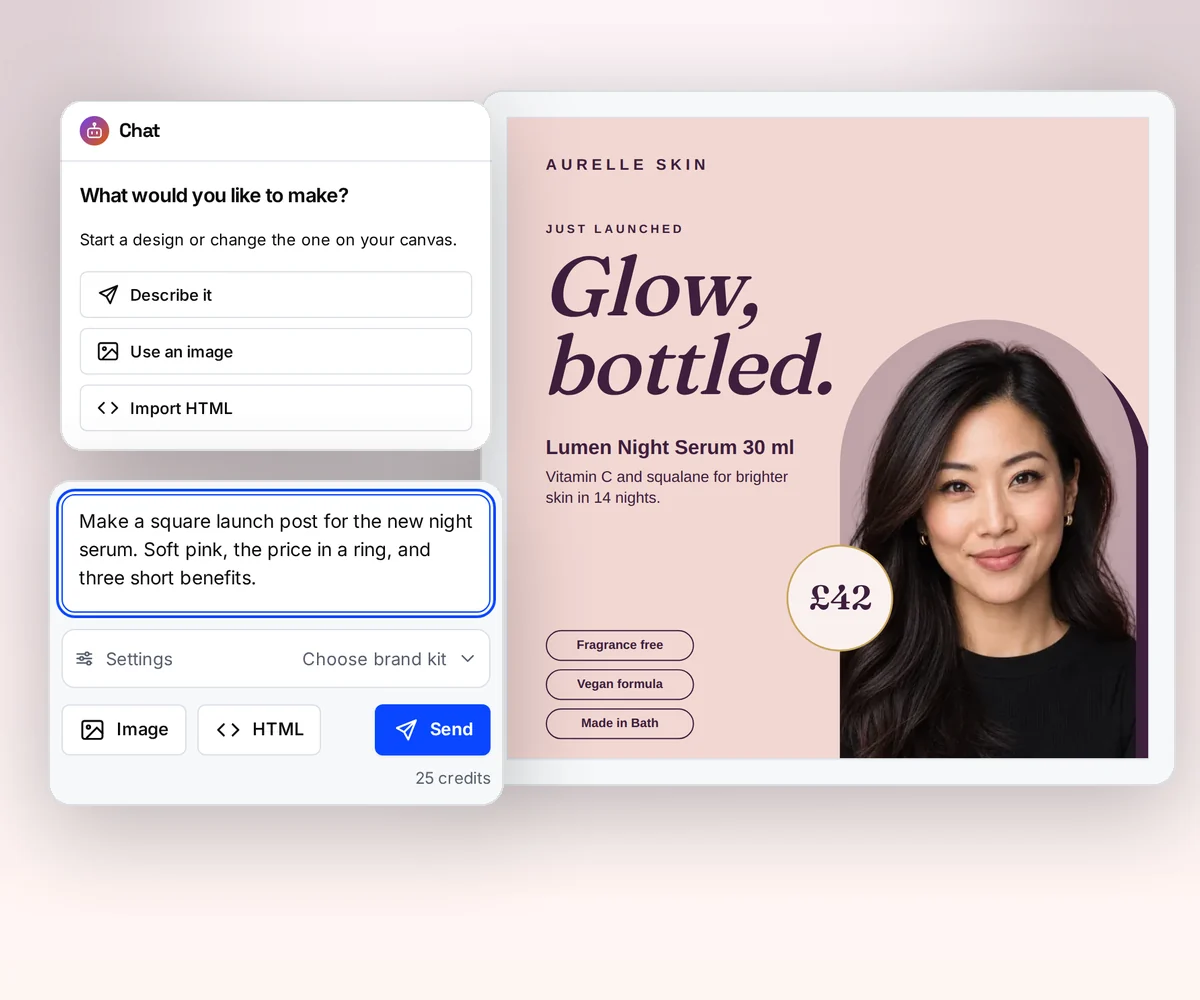
AI builds the design, so nobody writes the HTML
With a browser library, the design exists only once someone writes the HTML and CSS, and a new report layout or a new client's colours is a code change (our reading, 12 October 2026). In thirds.ai the AI builds the design for you, in your logo, colours, and fonts, and a change is a sentence to the AI, not a pull request.
If you already send a report or invoice today, upload a picture of it. The AI rebuilds it as a design you can edit, in your brand. Try it on the AI template generator page, or turn a picture into a template. Your HTML still works too: paste it, and the editor and the API fill it with data.
Where thirds.ai wins
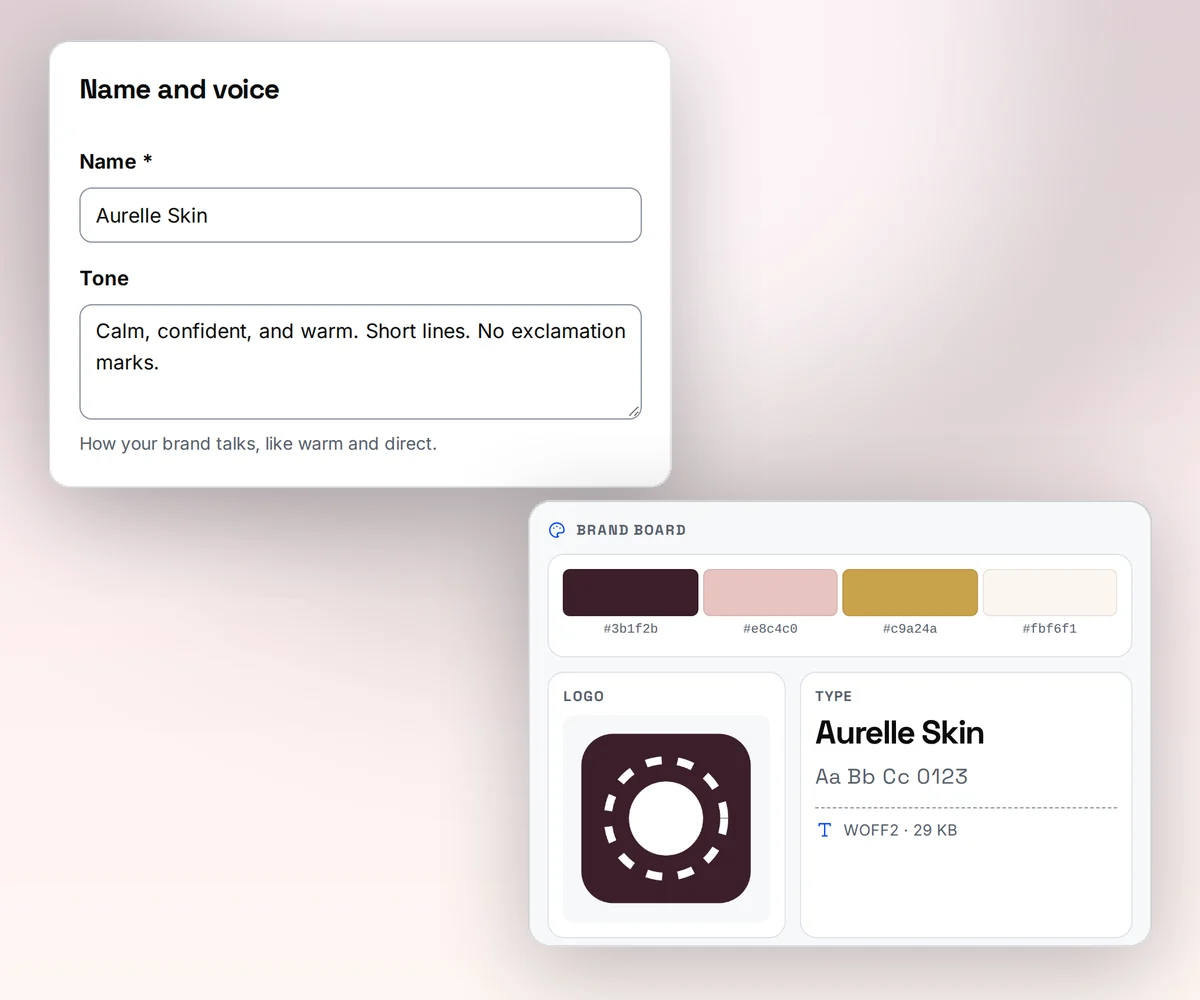
Your brand on every file in one step
Save your logo, colours, and fonts once as a brand kit, or type your website address and thirds.ai builds the kit from what it finds there. Pick the kit on any design, and the colours and logo land where they fit. An agency keeps one report design and switches the kit for each client.
When you host Puppeteer or Playwright yourself, your brand lives in your CSS, and each new brand is more CSS and another round of checking the output (our reading, 12 October 2026).
Where thirds.ai wins
Ask ChatGPT or Claude for this period's PDF
Connect thirds.ai to ChatGPT, Claude, Gemini, Grok, or any other AI you use. Then ask for the file in plain words: make September's campaign report for Harbor & Pine with 48,200 visits, 1,310 sign-ups, and $6,400 spent. The assistant fills the design, writes any text you leave to it, and hands you the finished PDF in your brand. Upload a CSV instead, and you get one file per row.
An assistant can write Puppeteer or Playwright code for you, but the code still needs a server, a browser, and someone to run it (our reading, 12 October 2026).

Where thirds.ai wins
How to compare the total cost
Add up five kinds of cost over the same period for both options and divide by the good PDFs you make. The free library licence is only one part of that cost. Record running costs with real documents, include failed work, and label any cost you estimate instead of measuring.
| Cost to measure | What to record |
|---|---|
| Compute | Browser hosts, warm idle capacity, peak concurrency, memory, CPU, temporary disk, and retries. |
| Storage and transfer | Inputs, finished files, backups, retention, and customer downloads. |
| Build work | API, auth, templates, queue, idempotency, webhooks, storage, limits, and admin tools. |
| Safety work | Browser sandbox, container policy, URL and redirect checks, network rules, secrets, and abuse controls. |
| Ongoing work | Browser and library updates, visual checks, alerts, incident response, capacity changes, and customer support. |
For self-hosting, spread the one-time build across the period and add compute, storage, transfer, and operating hours for that period. For thirds.ai, include the integration work, the plan, and your own download and support work over the same period. Don't charge a whole build to one month while spreading the other option's setup across a year. Keep staff time as measured hours at the rate your business uses. To run your own numbers, use the Python calculator in whether self-hosted Puppeteer PDF generation is cheaper than a PDF API.
Self-hosting can cost less when spare capacity, browser skills, and the service code already exist. It costs more when the renderer still needs the security and operations work, or when the designs still need writing. Measure your case instead of assuming either result.
No code needed
How do you make a PDF report in the thirds.ai editor without code?
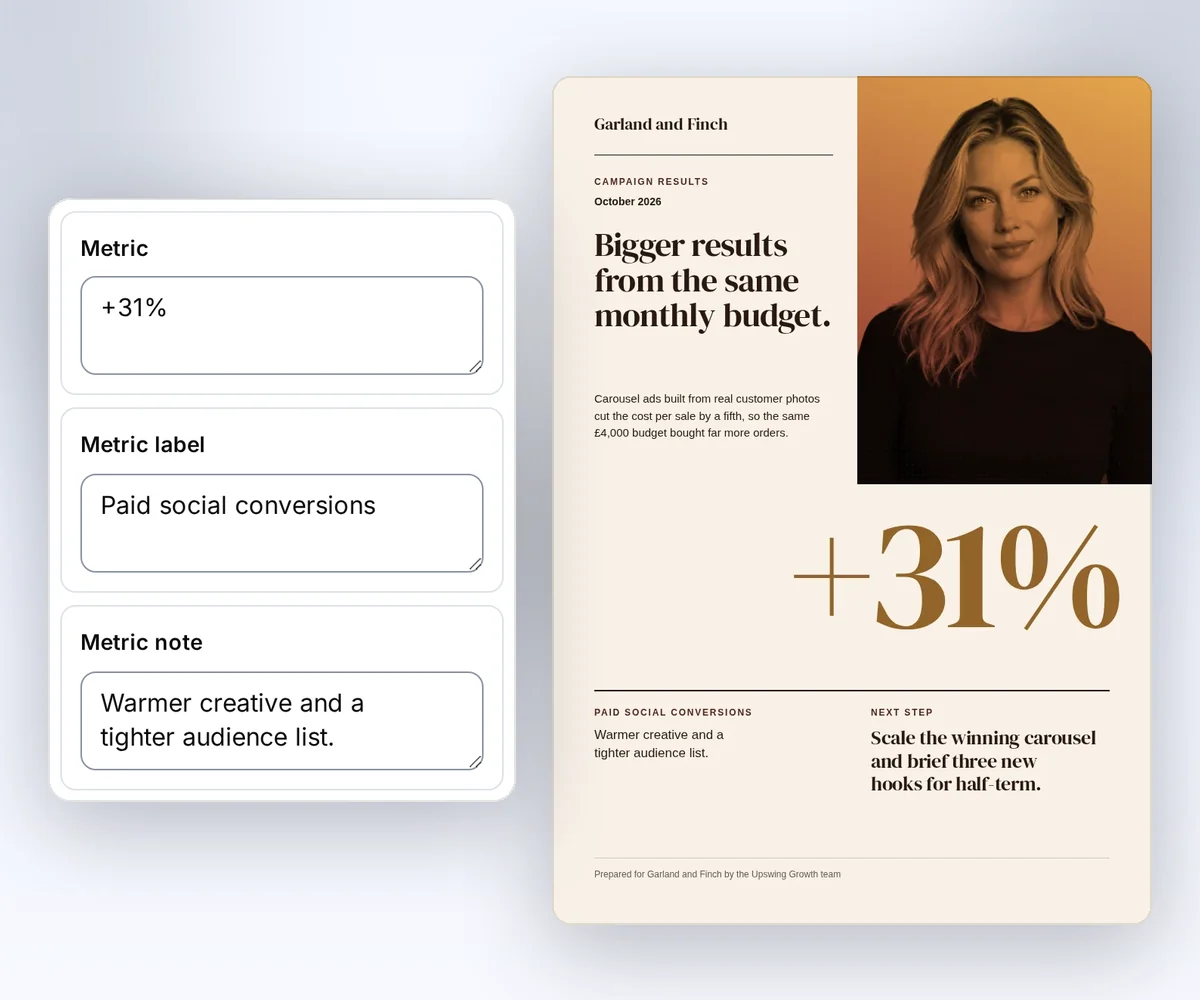
Open a designer-made report in the gallery, type your results into the boxes beside it, and download the PDF. No code, no browser to run, and a free account is enough to start.
- Open the Campaign results report and click Use this template, or describe your own report to the AI, or paste the HTML you print with Puppeteer today.
- Type your period, title, summary, and results into the boxes beside the report. Pick your brand kit, and it switches to your logo and colours.
- Click Save and export PDF to download it for one credit. Next period, ask ChatGPT or Claude for the new report and give it the new numbers.
Your developers can send the same details to the same saved design from their own code later. The Use templates with your data guide shows how.
Switching
Moving from self-hosted Puppeteer or Playwright
thirds.ai also prints your HTML in Chromium, so most pages should come out the same (our reading). Move one document at a time. Start with one: its HTML, data, fonts, assets, PDF or screenshot options, and a file you know is right. Send the HTML straight to thirds.ai with Generate your first PDF with the API and compare the two files. Puppeteer's format, landscape, margin, printBackground, headerTemplate, footerTemplate, and pageRanges (project docs, checked 12 October 2026) map to the pdf object in a thirds.ai request, such as pdf.format, pdf.landscape, and pdf.margins; the PDF and image options guide lists each one. A request that depends on page.goto(), cookies, selectors, or page scripts needs a new input path, because thirds.ai doesn't expose those browser steps. Keep your own browser for those documents, or prepare the HTML in your app and send it with absolute asset URLs.
Then decide whether the HTML stays stateless or becomes a saved design. For repeat work, replace the values with fields, add sample data, check the preview, and save it; the Use templates with your data guide shows the steps. Or skip the HTML: upload a picture of an old PDF and let the AI rebuild it in your brand. Replace local file writes with the API response, a signed webhook, and the expiring download. To compare thirds.ai with other hosted services, read the ranked list of HTML to PDF APIs, or the PDFShift comparison for a tool that fetches a page URL. If your old PDFs came from wkhtmltopdf, which wkhtmltopdf alternative to use compares Chromium with print engines such as WeasyPrint and Prince, and the wkhtmltopdf move guide maps each old option to a thirds.ai request.
Checked and dated
Sources
We checked the project docs, licences, and operating guides on 12 October 2026. Facts marked (project docs) come from the projects, and thirds.ai prices come from our pricing page on the same day. Lines marked (our reading) or (our judgment) are our opinion.
- Puppeteer overview, checked 12 October 2026, for what Puppeteer is and the browsers it drives
- Puppeteer PDF generation, checked 12 October 2026
- Puppeteer
Page.pdf()andPDFOptions, checked 12 October 2026, for the print media type and the PDF options - Puppeteer
ImageFormat, checked 12 October 2026, for the PNG, JPEG, and WebP screenshot types - Puppeteer installation, checked 12 October 2026, for the Chrome for Testing download size
- Puppeteer Docker guidance, checked 12 October 2026, for the
SYS_ADMINcapability and the init process - Puppeteer Apache 2.0 licence, checked 12 October 2026
- Playwright Page API, checked 12 October 2026, for
page.pdf(),page.goto(),page.setContent(), and screenshots - Playwright supported languages, checked 12 October 2026
- Playwright Docker and sandbox guidance, checked 12 October 2026, for the testing-only note and the sandbox
- Playwright Apache 2.0 licence, checked 12 October 2026
- thirds.ai facts come from our pricing page, API reference, billing guide, and limits page.
Free to try
Make your first file free
Open the Campaign results report, type in your own results, and download the PDF for free. If you already have HTML, start with Generate your first PDF with the API and send it without saving a design first.
Start from a designer-made template and download a real file for free. Sign up, and ChatGPT or Claude can make the next one in your brand.