
Turn an image or photo into an editable template
Upload a picture of a design you like, and thirds.ai rebuilds it as a template you can edit, with your logo, colours, and fonts in place of the old ones. A flat picture is stuck the way it is, so a new price means someone remakes the whole thing. Here the headline, the price, and the photo frame come back as separate parts you can move, retype, and mark as the bits that change. It's a rebuild, not a copy, so read it over before you save. From then on your AI assistant, a spreadsheet, or your own code makes each new file from it.
Free to start, and you don't need a card.
Image to editable template
Turn an image into a reusable design
Read the transcript
Got an ad you like? Make it a design you can reuse.
Drop it into the AI chat, and start from there.
Pick your brand, and let the AI rebuild it.
There it is! Change any part of it right in the chat.
Type a change, and out comes a new version!
Reuse it for your next campaign, and download each one.
Make your image a reusable design at thirds.ai!
How it works
How do I turn an image into a template?
You need one PNG, JPEG, or WebP picture of the design and a brand kit. The AI reads the picture, lays out text boxes, picture frames, and shapes so the design reads the same, and swaps the old brand for yours. It then makes a real file from its draft, checks it, and fixes it up to five times before you see it. The rebuild usually takes a minute or two.
- On the New template page, choose PDF document or Image, then click Start from an image and pick your kit in the Brand kit box.
- Click Attach, choose Rebuild a picture as a design, and pick one PNG, JPEG, or WebP up to 10 MiB.
- Check the price on the Send button and send it.
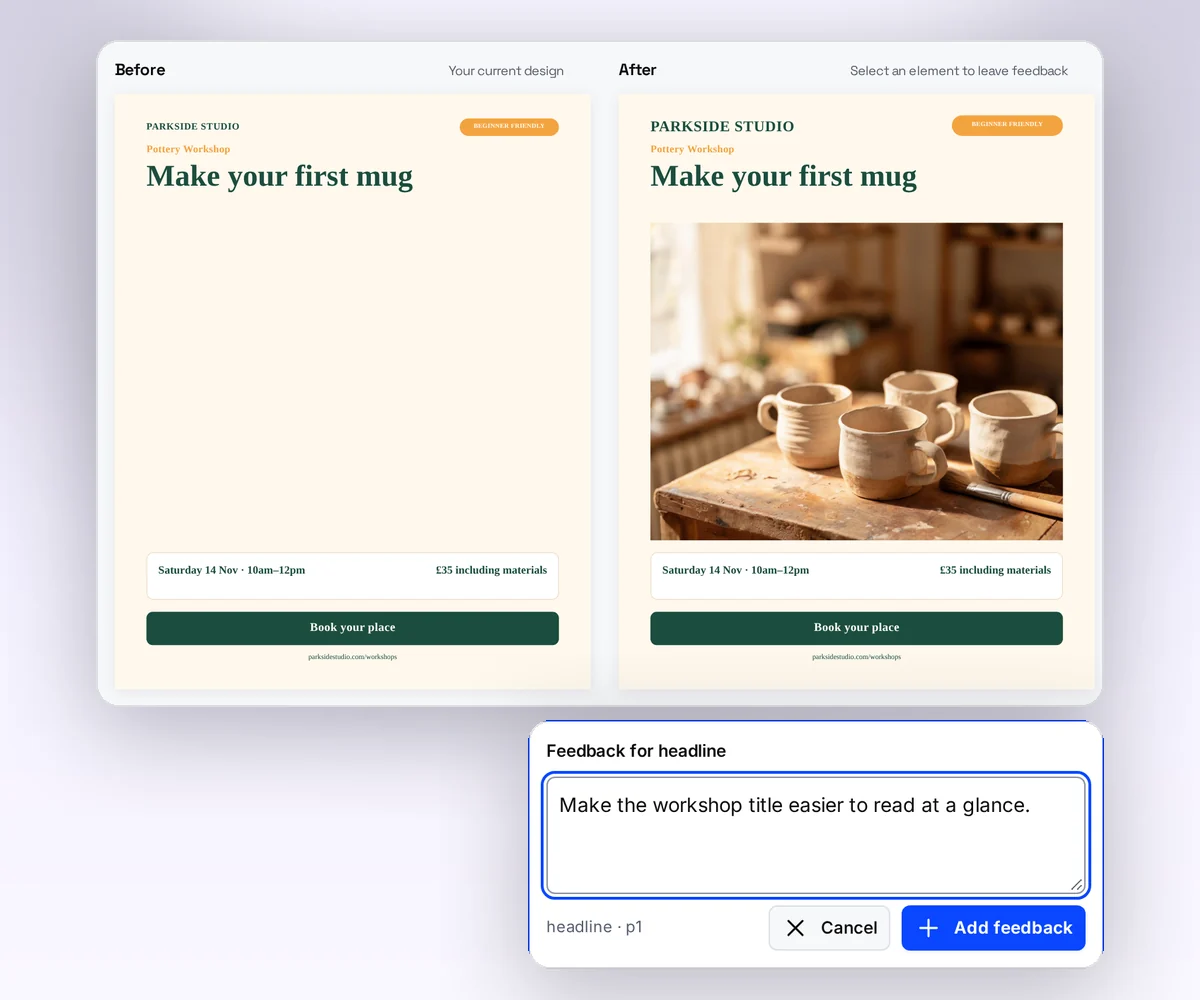
- Compare Before and After. Read every word and check the logo, then click Apply changes.
- Fix the text, the photo frame, and the spacing on the canvas, then click Save.

- 50 credits
- rebuilds one picture in your brand
- Up to 5
- checks of its own draft before you see it
- 1 credit
- makes each new file from it
What comes back
Text you can retype, frames you can fill, colours you can change
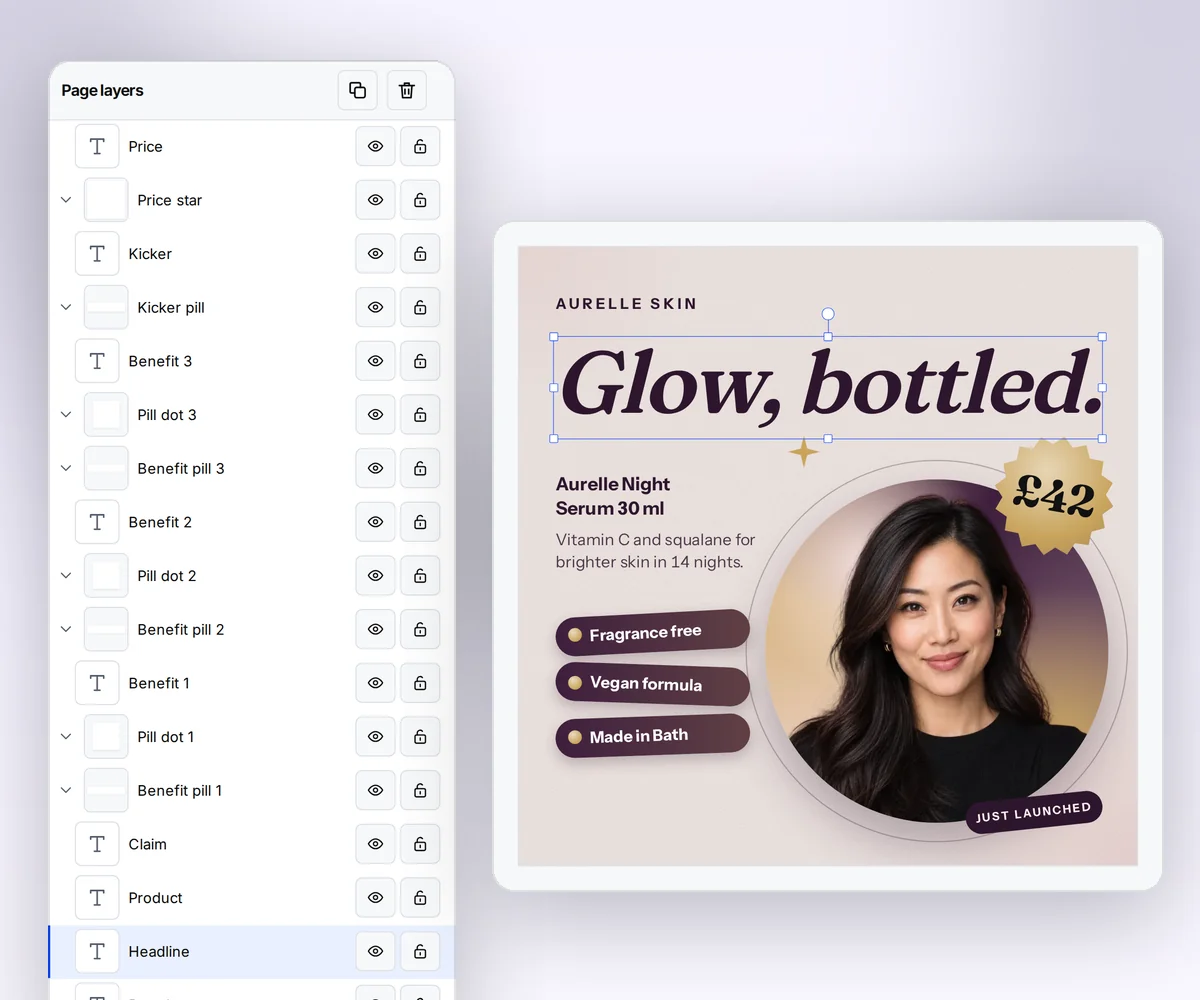
The rebuild hands you a design in layers, not one flat picture. Each line of text is a text box in your kit's font. Each shape has a colour from your kit. The picture's own size becomes the design's size, so a square post stays square. The old photo doesn't come along, so its spot is an empty frame for a picture of your own. Mark the headline and the price as the parts that change, and from then on each new file is a new headline and a new photo while the layout stays put.
- Ask the chat for a change in plain words, or move things yourself on the canvas.
Your brand
How your brand kit replaces the brand in the picture
The AI gets your kit's name, colours, font names, and main logo, not every file in it, and it's told to put your brand and your name where the old ones were. So a design you found in someone else's green comes back in your blue with your logo in the corner. Compare Before and After and check two things first: that the company name is yours everywhere, and that the logo sits where you want it.
- Keep a kit for each client, and the same picture comes back in each client's brand.
- Rebuild an old flyer of your own, and it comes back in the colours and the logo you use now.
One creative, many files
One rebuild, then every size, language, and offer
The import is a one-time job. Once the rebuilt design is saved with its fields marked, nobody designs the next post. Smart resize carries the same layout into the story, the banner, and every other size you post to. Ask ChatGPT or Claude for the same design in Spanish, or upload a spreadsheet of products and get a file for every row, with nobody at the screen.
- Every size downloads together as one ZIP.
- Your own app, Zapier, Make, or n8n can make the files too.

From your AI assistant
Hand the picture to ChatGPT or Claude and get the design back
Found the design in a chat with ChatGPT, Claude, Gemini, Grok, or another AI? Stay there. Once your assistant is connected to thirds.ai, give it the picture and the name of your brand kit, and it runs the rebuild and shows you the draft in the same conversation. From then on, say what each new file is for, and it fills the design and hands you the file.
- Ask it for the same design in another language or another size, and it makes that file from your rebuilt template.

Designer-made templates
No picture to rebuild? Start from a designer-made template
When there's no design to copy, pick one of the gallery templates instead. Designers made every one, your brand kit puts it in your colours, and it opens in the same editor as a rebuild, with the fields already marked. Change what you like and make your first file today.
Bistro evening menuPDF · A4 Festival line-up posterImage · 1200 × 1600 Course completion certificatePDF · A4 landscape Product launch squareImage · 1200 × 1200
For developers and agents
Convert images to templates through the API or MCP
Send the picture as base64 with your brand kit's ID and an Idempotency-Key, and the response is the new template with its first message. Poll the message until it succeeds, read the draft, and publish it as the first version. Image output keeps the picture's own size unless you set both width and height. From ChatGPT, Claude, or your own agent, the create_template tool on the MCP server takes the same image input.
curl --fail-with-body --silent --show-error \
  https://thirds.ai/v1/templates \
  -H "Authorization: Bearer YOUR_API_KEY" \
  -H "Content-Type: application/json" \
  -H "Idempotency-Key: import-autumn-offer-card" \
  --data @- <<EOF
{
  "message": {
    "brand_kit_id": "kit_YOUR_BRAND_KIT",
    "input": {"type": "image", "base64": "$(base64 -w0 autumn-offer.png)"},
    "output": {"type": "image", "format": "png"}
  }
}
EOF{
"servers": {
"thirds": {
"type": "http",
"url": "https://thirds.ai/mcp",
"headers": {
"Authorization": "Bearer YOUR_API_KEY"
}
}
}
}{
"jsonrpc": "2.0",
"id": 1,
"method": "tools/call",
"params": {
"name": "create_template",
"arguments": {
"brand_kit_id": "kit_YOUR_BRAND_KIT",
"idempotency_key": "import-autumn-offer-card",
"input": {
"type": "image",
"base64": "<your PNG, JPEG, or WebP as base64>"
},
"output": { "type": "image", "format": "png" }
}
}
}Questions people ask before they upload
Make a sample imageWhat kind of image works best for an editable template?
A flat design with clear text and simple shapes: a poster, a menu, a flyer, a certificate, or a social post. A screenshot or an exported picture gives the AI sharper text than a phone photo of a print, so if a photo is all you have, crop it to the design and keep it straight. Text on a curve, shapes that overlap tightly, and a photo that carries the whole message need more fixing by hand. The file is a still PNG, JPEG, or WebP up to 10 MiB and 7,680 by 4,320 pixels. If your design is a PDF, save the page as a PNG first. Save a PDF page as a PNG with the free converter. Describe a design instead with the AI template generator.
Is the result an exact copy of my picture?
No. It's a design inspired by your picture, not a pixel copy, so expect a close match with your kit's fonts and colours in place of the old ones. For an exact match, paste your HTML instead. To change a picture's file type or size, use a free tool. See the free image tools. See how a rebuild differs from AdKit.
Do I need a brand kit first?
Yes. Pick a brand kit before you upload, and the rebuild comes out in it, with your name in place of the old one. A brand kit is free to make, and you can build one from your website address in about a minute. Set up your brand kit.
What does a rebuild cost?
Rebuilding one picture costs 50 credits, and the Send button shows the price before you click. After that, a chat message with words or HTML costs 25 credits, and one with a new picture costs 50. Fixing the draft by hand, previewing, and saving are free. A rebuild that fails costs nothing, and the free monthly credits cover the first import.
What should I check and fix after the rebuild?
Four things. The text: read every word, because a small label, a number, or a line break can come back wrong. The spacing: give each box room for the longest words you'll use. The photo: select the empty frame, click Upload image, and set Image fit. The fonts: your kit's font can run wider or narrower than the one in the picture, so check each heading. Fix any of them on the canvas for free, or ask the chat. Follow the step-by-step image rebuild guide.
Can I make the same design at several sizes?
Yes. Add the sizes you need to the saved design, and the layout fits each one for free. Make static ads from one design. Make social images from one design.
Can I upload any design I find?
Upload a design you own or have the right to use. The Terms of Service make that your warranty, and the rebuild replaces the brand in the picture with yours. Read the Terms of Service.
What happens to the picture I upload?
We check the file on our own server first and strip its metadata, then send it with your brand details to our AI provider, OpenRouter, and the model host it selects, so the design can be rebuilt. That provider may use the picture to improve its models. We never log it, and we keep it with your chat until you close your account. The privacy policy has the details. Read the privacy policy.
Image to editable template
Get the design you like in your brand today
Upload one picture, and it comes back as a template in your brand with the text and the photo frame ready to change.