
How to create a PDF from a template: common questions
To create a PDF from a template, you open a saved design in thirds.ai, type in your details, and export the finished file. You save your invoice, report, certificate, social post, or ad once with your logo, colours, and fonts, so you never rebuild the layout by hand. Each finished PDF or image costs one credit, and a verified free account gets 50 credits a month without a card. You can make files in the editor, from your own code, or from an AI tool you already use.
Give this prompt to your AI agent. The agent does the task for you.
Read https://thirds.ai/docs/faq and answer my thirds.ai setup question and guide me to the next step for my file, template, brand kit, integration, billing, or account.
Make it without code
You can create a PDF from a template in the thirds.ai editor without writing any code. It takes three steps, and all you need is a free thirds.ai account.
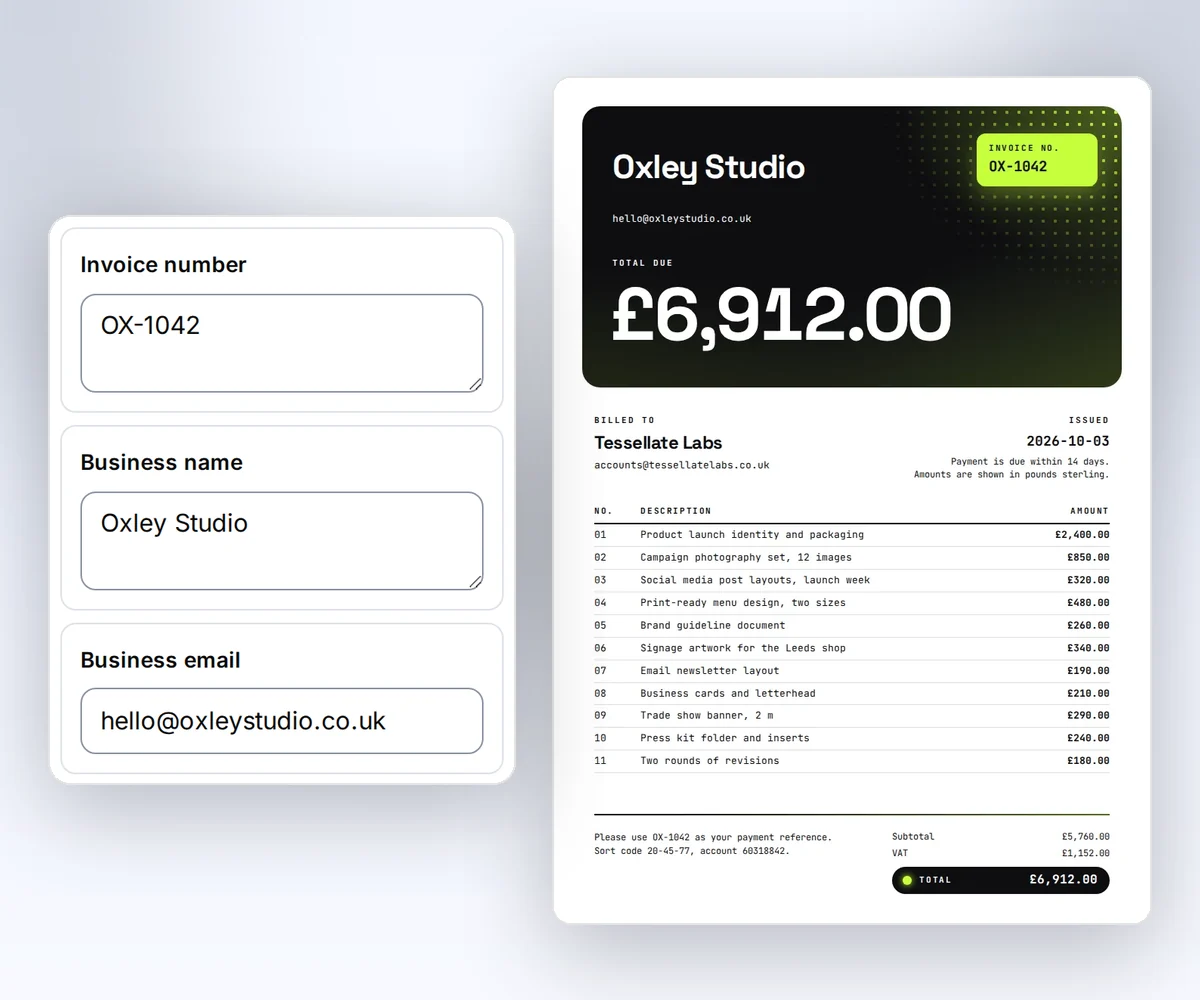
- Open the Client invoice template and click Use this template. Sign in and verify your account first if you need to.
- Open the Data tab and type your business name, your client, and the totals. Click Add row for another line item. Then click Preview with data above the canvas to check the invoice. The preview is free.
- Click Export, then Save and export PDF, and download the file. If the export fails, you don't pay for it.
Next month you open the same design, change the client and the amounts, and export again. Pick another design in the template gallery for a report, a certificate, or a social post.
Your first file
Your first file can be a PDF or an image, and you make it by filling a template with your own details. You need a verified account and one credit, and you can start from the editor or from your own code.
How do I make my first PDF?
Choose a template, fill in your details, and create the file. The quickstart also shows your first API request.
Can I make an image instead?
Yes. Choose PNG, JPEG, or WebP and set the width and height. See image options.
Where do I find the finished file?
Open Renders in the app to see every file you made. From your own code, read the result with the API, and a finished file gives you a download link. See download and keep the file.
Templates
A template is a saved design that you fill with new details each time, such as a new client, date, or price. The layout stays the same on every file, and only your details change. A template suits a file you make again and again, like a monthly invoice or a weekly post.
How do I create my own PDF template?
Start from a gallery design, describe what you need to the AI chat, paste your own HTML, or upload a picture you already have. Manual edits are free, and a new AI build costs 50 credits, as credits and billing shows. How to make a template you can reuse shows each way to start.
Can I fill many rows from a CSV?
Yes. Open Batches and load your CSV. Its first row holds the names of your details, such as name or date, so each column fills the detail with the same name. Then click the button that shows your file count, such as Make 3 files. The page shows the cost first. Each successful file costs one credit. See CSV batches.
Can I export slides as images?
Yes. Open a PDF design with two or more pages, then click Export. Choose the slides and export a PDF or a ZIP of images. See carousels. For a TikTok photo post, see how to make a slideshow on TikTok.
Can I use my own HTML?
Yes. You can make a file from your HTML right away, or save it as a template for work you repeat. See templates with data.
How do I change text for each customer?
Mark the text that changes, such as the name or the price. In the editor, you type the new values in the Data tab. From your own code, you send them with each request. The template guide shows how values and data rules work.
Can I edit a design after AI creates it?
Yes. Compare Before and After, click parts of the draft to add feedback, and choose Apply changes when you want to use it. You can also edit by hand. Open How to make a template you can reuse for the full flow. To write a first prompt that keeps your changing details apart from the design, read how to prompt the AI for a template you can reuse.
Can I generate a picture for my design?
Yes. Choose AI image, pick an aspect ratio, and draw a frame. Enter your prompt in the popup, then confirm the 50-credit cost. Select the image later to edit its prompt, regenerate it, or restore a saved version. See AI images.
Brand kits
A brand kit saves your logo, colours, and fonts, plus a few words on how your brand talks, so each design you make starts on brand. You choose the kit for each design. Picking a kit doesn't change colours and fonts that are written into your own HTML, so your HTML has to read them from the kit.
How do I reuse my logo and colours?
Save them in a brand kit, then select that kit for your design. See set up your brand kit. A logo must be a PNG, JPEG, or WebP file, so turn an SVG logo into a PNG with the free SVG to PNG converter. The guide to converting SVG to PNG without losing quality shows the steps.
Can I use a custom font?
Yes. Add a licensed font to your brand kit. For direct HTML, use a web font. See fonts and assets.
Can I turn an image into a branded template?
Yes. Image import rebuilds a source image as an editable template and applies your brand kit. See How to make a template you can reuse, or follow a worked example in how to turn an image into an editable template.
API
The thirds.ai API lets your own code create PDFs and images from HTML or from a saved template with your data. You need an API key and a server that keeps the key private. The editor and the API use the same templates, so a design you save in the app works in your code.
How do I connect my app?
Create an API key and send it in the Bearer header. Follow the API guide.
How do I avoid a duplicate charge after a timeout?
Reuse the same Idempotency-Key and input. Keep the returned job ID. See safe retries.
What should I do with a 429 response?
Read Retry-After, wait, and send fewer requests at once. See rate limits.
MCP
MCP lets an AI tool such as Claude, Cursor, or ChatGPT make thirds.ai PDFs and images for you. You connect the AI tool to the thirds.ai MCP server once, and then you ask for a file in a chat.
Can my AI tool make a PDF or image?
Yes. Connect it to the thirds.ai MCP server so it can use your templates and make files. Start with connect with MCP, or open a client page:
- Claude Code
- Claude Desktop
- Cursor
- VS Code
- Codex
- Gemini CLI
- Grok
- ChatGPT
- Warp
- Zed
- OpenCode
- Antigravity
- Lovable
- Replit
- Hermes
- Browser agents
- A generic HTTP client
To see prompts you can copy, open the Claude image generator examples. If you use Codex, the Codex MCP server page has prompts you can copy to make an invoice PDF, a post image, and a monthly report from saved designs. If you work in Gemini CLI, the Gemini MCP server setup adds thirds.ai to your settings file with a private key.
Does MCP use the same templates as the app?
Yes. The app, API, and MCP use the same saved templates. See the MCP guide for tool access and setup.
Billing
You pay for files and AI work with your available credits, including free monthly credits. Unused free credits expire when your next monthly grant arrives. See credits and billing for prices and credit packs.
How much does one file cost?
A PDF or image that works costs one credit. AI work has its own fixed credit costs. See credits and billing.
Do failed files cost credits?
No. If a file fails, you get your credit back. Fix the cause before you try again. The error codes show the next step.
What happens when I run out of credits?
New files stop unless your account can use overage. You can buy a credit pack or change your plan. See billing recovery.
Account
Your thirds.ai account keeps your templates, your brand kits, and the files you make. You can download a file again, delete it early, or ask support for help with an error.
How long can I download my files?
On a paid plan, your files stay in your account for up to 365 days. On the Free plan, with credit packs only, or during the $1 Starter trial, they stay for up to 30 days. You can pick a shorter time on the Account page or when you export a file. Each download link lasts 15 minutes, so get a fresh link from Renders or the API when one runs out. See how long we keep your file.
Can I remove a file early?
Yes. Delete the file from Renders or through the API. You don't get the credit back for a file that worked. See delete an output.
How do I get help with an error?
Find the code in the error guide. If you still need help, contact support and include the job ID and request ID from the error. Keep keys, signed links, and private content out of the message.