
Connect an MCP Streamable HTTP client to thirds.ai
You connect any MCP client that speaks Streamable HTTP to thirds.ai with one URL, https://thirds.ai/mcp, and your API key sent as Authorization: Bearer YOUR_API_KEY. With thirds.ai, you save a design once, such as an invoice, a report, a certificate, or a social post, with your logo, colours, and fonts. Then you type in new details and get a finished PDF or image. Once your client has the server, your agent or your own code asks for those files, so you don't lay out each one by hand. Each successful PDF or image costs one credit, and a verified account gets 50 free credits each month.
Give this prompt to your AI agent. The agent does the task for you.
Read https://thirds.ai/docs/mcp/http and help me connect a generic HTTP MCP client to thirds.ai
These steps connect a client to the thirds.ai server. If you want to build your own Streamable HTTP server, the MCP transport spec (checked 25 September 2026) explains how.
| Setting | Value |
|---|---|
| Name | thirds |
| Transport | Streamable HTTP |
| URL | https://thirds.ai/mcp |
| Authorization | Bearer YOUR_API_KEY |
If you use a named product, follow its page instead: Claude Code, Claude Desktop, Cursor, VS Code, Codex, Grok, Grok Bot, ChatGPT, Warp, Zed, OpenCode, Antigravity, Lovable, Replit, or Hermes.
Make it without code
You can make the same branded files in the thirds.ai editor without an MCP client or any code. It takes three steps, and you need a free thirds.ai account.
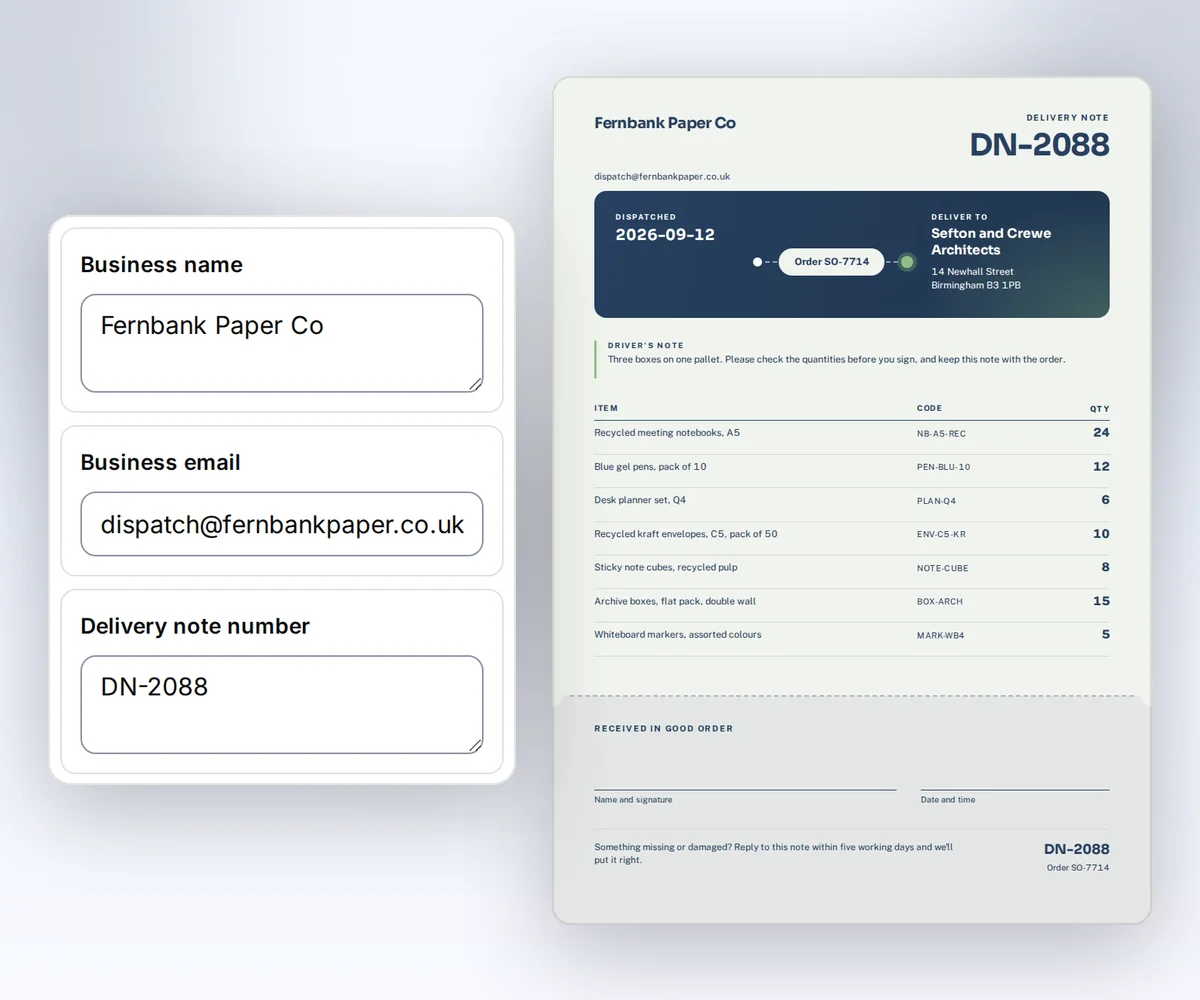
- Open the Delivery note template and click Use this template. Sign in and verify your account first if you need to.
- Open the Data tab and type your business name, the customer's name and address, the order number, and each item. Click Preview with data above the canvas to see the delivery note. The preview is free.
- Click Export, then Save and export PDF, and click Download PDF.
When you want your own agent or service to fill in a delivery note like this for each new order, connect it to the thirds.ai MCP server.
How do I connect an MCP client over Streamable HTTP?
You connect an MCP client to thirds.ai over Streamable HTTP in three steps: create a key, keep it in a secret store, and add one server entry with the URL and the Authorization header. You need a thirds.ai account and a client that supports remote Streamable HTTP servers and custom request headers. If your client supports MCP authorization instead, it needs only the URL, and you click Allow on a thirds.ai page. The main MCP guide explains that sign-in.
- Create an API key on the API keys page.
- Store the key in your client's secret store or an environment variable.
- Add the server. Many clients accept an entry like this one. Check your client's field names before you save it:
{
  "mcpServers": {
    "thirds": {
      "type": "http",
      "url": "https://thirds.ai/mcp",
      "headers": {
        "Authorization": "Bearer YOUR_API_KEY"
      }
    }
  }
}
Replace the placeholder through your client's secret store or environment variable feature. Don't save a real key in a shared file or in source control.
Test the connection with curl
You can test the thirds.ai MCP server from a terminal with one curl request that sends an initialize message. It takes two steps, and you need an API key and curl. The server answers with its protocol version, its tools capability, and its instructions, and the test spends no credits.
Save this body as rpc.json:
{
  "jsonrpc": "2.0",
  "id": 1,
  "method": "initialize",
  "params": {
    "protocolVersion": "2025-11-25",
    "capabilities": {},
    "clientInfo": { "name": "thirds-http-test", "version": "1.0" }
  }
}
Set THIRDS_API_KEY in your secret store or shell, then run:
curl https://thirds.ai/mcp \
  -H "Authorization: Bearer $THIRDS_API_KEY" \
  -H "Content-Type: application/json" \
  -H "Accept: application/json, text/event-stream" \
  -H "MCP-Protocol-Version: 2025-11-25" \
  --data-binary @rpc.json
The response selects 2025-11-25. Send that value in the MCP-Protocol-Version header on every later request, including notifications/initialized. The main MCP guide gives the tool list, render, and status examples, and a table of fixes for each error code.
What does the thirds.ai server support in Streamable HTTP?
The thirds.ai MCP server supports Streamable HTTP with protocol versions 2025-11-25 and 2026-07-28. Each POST holds one JSON-RPC object, and the server answers with one JSON object. It doesn't open a GET event stream, keep a session, or accept batch requests. The MCP transport spec (checked 25 September 2026) allows a server to answer with plain JSON and to skip sessions, so a standard client works without changes.
What you send depends on the version you pick:
| Version | How you start | Headers on each request |
|---|---|---|
2025-11-25 | initialize | MCP-Protocol-Version: 2025-11-25 |
2026-07-28 | server/discover | MCP-Protocol-Version: 2026-07-28, MCP-Method set to the method, and MCP-Name on a tools/call |
A 2026-07-28 request also puts the protocol version, the client info, and the client capabilities in params._meta. The main MCP guide lists those three entries. A header that doesn't match the request body returns JSON-RPC error -32020, and a version the server doesn't know returns -32022 with the supported versions.
FAQ
Does thirds.ai support SSE or a GET event stream?
No. Use Streamable HTTP and send one JSON-RPC object in each POST. The server returns JSON and doesn't keep a persistent session. The older HTTP+SSE transport from protocol version 2024-11-05 isn't supported.
Which headers are required?
Send Authorization, Content-Type: application/json, and Accept: application/json, text/event-stream. After initialization, also send the selected MCP-Protocol-Version.
Can browser page code call the MCP URL?
No. Cross-origin browser requests are refused. Connect from an MCP client or your own server. Keep the API key outside browser code.
Does connecting spend credits?
No. Connecting and listing tools don't spend credits. AI template work and successful files can. Ask your agent to show the action and the cost before it starts paid work.