
Hermes Agent MCP setup: connect Hermes to thirds.ai
To use thirds.ai in Hermes Agent, you add one remote MCP server at https://thirds.ai/mcp to ~/.hermes/config.yaml and keep your API key in ~/.hermes/.env. With thirds.ai, you save a design once, such as an invoice, a report, a product label, or a social post, with your logo, colours, and fonts. Then you type in new details and get a finished PDF or image. Once Hermes has the server, you can ask it for those files in a chat or on a schedule. Each successful PDF or image costs one credit, and a verified account gets 50 free credits each month.
Give this prompt to your AI agent. The agent does the task for you.
Read https://thirds.ai/docs/mcp/hermes and help me connect Hermes Agent to thirds.ai with an API key
You stop copying last month's file and fixing it by hand, and every file keeps the same look because each one starts from the same saved design. These steps add thirds.ai to Hermes as a tool. They don't cover running Hermes itself as an MCP server for another app.
See the Hermes Agent use cases for designs and prompts to try after setup.
Make it without code
You can make the same branded PDFs in the thirds.ai editor without Hermes or any setup. It takes three steps, and all you need is a free thirds.ai account. The Monthly KPI report template is a good first try if you send a client the same report every month.
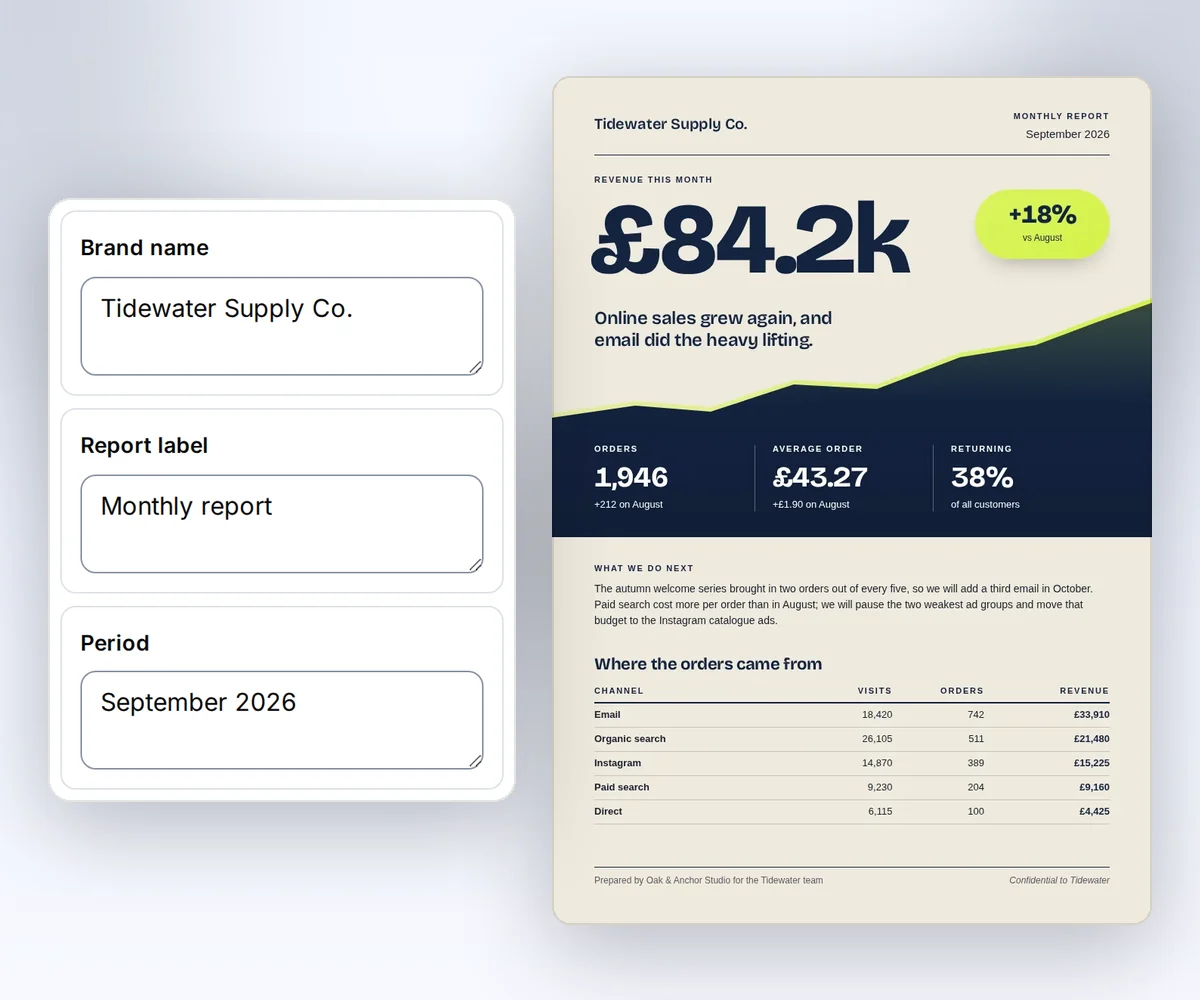
- Open the Monthly KPI report template and click Use this template. Sign in and verify your account first if you need to.
- Open the Data tab and type the client's name, the month, the big number, and each channel's results. Click Preview with data above the canvas to check the report. The preview is free.
- Click Export, then Save and export PDF, and click Download PDF.
To start from your own design instead, follow how to make a template you can reuse. When you'd rather have Hermes fill in the same report for each client, add the thirds.ai MCP server to Hermes.
Add the thirds.ai MCP server to Hermes Agent
You add the thirds.ai MCP server to Hermes Agent in three steps, and you need a thirds.ai account and Hermes on your computer or server. The Hermes MCP guide (checked 25 September 2026) says Hermes connects to remote HTTP servers with a url and headers entry. thirds.ai isn't in the Hermes catalog, so you add the server by hand.
- Create an API key on the API keys page.
- Put the key in
~/.hermes/.envasTHIRDS_API_KEY. - Add this server to
~/.hermes/config.yaml:
mcp_servers:
  thirds:
    url: "https://thirds.ai/mcp"
    headers:
      Authorization: "Bearer ${THIRDS_API_KEY}"
The Hermes MCP guide shows the same headers entry, and Hermes sends it with each request to the server. The Hermes config reference (checked 25 September 2026) says ${THIRDS_API_KEY} and ${env:THIRDS_API_KEY} read the same secret, so your key stays out of config.yaml.
Connect with only the URL
You can skip the key and sign in on a thirds.ai page. Use this entry instead:
mcp_servers:
  thirds:
    url: "https://thirds.ai/mcp"
    auth: oauth
The Hermes MCP guide says that on the first connect, Hermes prints a sign-in link and opens your browser when it can (checked 27 September 2026). When the thirds.ai page opens, sign in if you need to and click Allow.
This connection gets every thirds.ai tool except the two AI image tools. Use the API key setup when you need those. To stop the connection, open your thirds.ai Settings, find the app under Connected apps, and click Disconnect.
Check that Hermes sees the thirds.ai tools
You check the Hermes connection by reloading the MCP servers and then asking Hermes for the thirds.ai tools. Type /reload-mcp in a running Hermes chat, or run this command in a terminal:
hermes mcp test thirds
The Hermes MCP guide says hermes mcp test reports what the server answered, including the HTTP status when a call fails. A wrong or missing key shows up there. Hermes names each tool mcp_<server>_<tool>, so the thirds.ai tools start with mcp_thirds_. Ask Hermes to list them.
Make your first file from Hermes
Your first file from Hermes starts with a plain request in a chat. Ask Hermes to list your saved thirds.ai designs, then ask for one file, such as "Make the September report for Tidewater Supply Co. from my Monthly KPI report design. Show me the cost before you start." Check that file before you ask for more.
When the file looks right, you can ask Hermes to make it again each month. The Hermes scheduled tasks guide (checked 25 September 2026) says Hermes runs one-off or repeat jobs that you describe in plain words. The same guide says each job uses the tools you set for the cron platform in hermes tools, so make sure the thirds.ai tools are on that list. Tell the job where to find each month's numbers, and have it show the file count and cost before it makes files.
Read the main MCP guide before your first paid call. It explains credit approval, safe retries, and status checks.
FAQ
Why does Hermes keep a literal ${THIRDS_API_KEY} in the header?
Hermes keeps the literal ${THIRDS_API_KEY} when THIRDS_API_KEY isn't set, as the Hermes config reference says. Add the key to ~/.hermes/.env or the process environment, then reload MCP servers.
Can I install this from a catalog entry?
No. thirds.ai is a custom remote server. Add the thirds entry to ~/.hermes/config.yaml by hand, then reload MCP servers.
Is this the same as running Hermes as an MCP server?
No. These steps let Hermes use thirds.ai tools. Other projects let a different app call Hermes over MCP, and that is a separate setup.
Does connecting spend credits?
No. Connecting and listing tools don't spend credits. AI template work and successful files can. Ask your agent to show the action and the cost before it starts paid work.