
Best HTML to PDF APIs for repeat documents
The best HTML to PDF API is the one that fits the file you need. We compare DocRaptor, PDFShift, cloudlayer.io, APITemplate.io, thirds.ai, HTML/CSS to Image, PDFMonkey, and PDFCrowd. Pick DocRaptor for print layout, PDF forms, or tagged PDFs. Pick PDFShift when your app already makes the HTML and only needs it turned into a PDF. Pick thirds.ai when you want AI to draft the PDF design from a sentence or a picture, with your logo and colours saved in a brand kit, and then let ChatGPT, Claude, or your own automations make each new file. One credit makes one PDF on thirds.ai. These picks are our judgment from each tool's public pages.


Our rule
How we rank the tools
We rank the tools by the PDF layout you need first, then by what you can send in, and then by how well each one works with saved templates. The order is our opinion from each tool's public pages, not a test of speed, reliability, or price. We make thirds.ai, so we have a stake here, and we place it by the same rule as the other tools. Features of other tools are vendor claims, checked on 12 October 2026.
The shortlist
Facts at a glance
| Rank | Tool | What it does | Choose it when |
|---|---|---|---|
| 1 | DocRaptor | Prince engine for print layout, PDF forms, and tagged PDFs (vendor claim) | Your document needs print layout, forms, or tagged output. |
| 2 | PDFShift | Turns HTML or a URL into a PDF, priced by file size (vendor claim) | Your app already makes the HTML and needs a conversion service. |
| 3 | cloudlayer.io | Drag-and-drop template designer, plus HTML, URL, and template to PDF and image (vendor claim) | You want document templates and a hosted PDF service together. |
| 4 | APITemplate.io | Drag-and-drop and HTML template editors for PDFs and images, with Zapier, Make, and n8n (vendor claim) | You want a drag-and-drop or HTML editor and connections to Airtable or Bubble. |
| 5 | thirds.ai | AI-drafted templates in your brand, plus HTML to PDF, an editor, an API, and ChatGPT and Claude connections (our own product) | You want AI to design the PDF in your brand, then ChatGPT, Claude, or your app fills in each new one. |
| 6 | HTML/CSS to Image | HTML, URL, and template input for images and PDFs (vendor claim) | Your app needs screenshots and images as well as PDFs. |
| 7 | PDFMonkey | Data-filled PDF templates (vendor claim) | You want to write each template in its dashboard and send only the data through its REST API. |
| 8 | PDFCrowd | HTML, URL, and template conversion with language clients (vendor claim) | You want an official library for PHP, Java, Python, or another language to turn HTML or a public URL into a PDF. |
Tool by tool
What each one is for
DocRaptor
Choose DocRaptor when your document needs print layout, forms, or tagged output.
DocRaptor makes the PDF with Prince, not a browser, and says it turns HTML forms into PDF forms and tags PDFs to meet WCAG 2.0 and Section 508 (vendor claim). Test your CSS in DocRaptor first, because a page that looks right in Chromium can lay out differently in Prince. Every account gets unlimited watermarked test documents (vendor claim). Read the full DocRaptor comparison.
PDFShift
Choose PDFShift when your app already makes the HTML and needs a conversion service.
PDFShift counts one credit per document for every 5 MB of output, so a 14 MB PDF costs 3 credits, and its free plan gives 50 credits a month with no card (vendor claim). Check the size of your typical file before you estimate a monthly cost. Read the full PDFShift comparison.
cloudlayer.io
Choose cloudlayer.io when you want document templates and a hosted PDF service together.
cloudlayer.io takes HTML, a page URL, or one of its own templates, and its v2 API keeps each finished file unless you turn storage off in the request (vendor claim). It starts with a 30-day free trial and no card (vendor claim). If you don't want it to keep a copy of each PDF, turn storage off in every call. Read the full cloudlayer.io comparison.
APITemplate.io
Choose APITemplate.io when you want a drag-and-drop or HTML editor and connections to Airtable or Bubble.
APITemplate.io has a drag-and-drop editor and an HTML editor with custom CSS and JavaScript, takes HTML, Markdown, or a page URL, and connects to Zapier, Make, Airtable, Bubble, and n8n (vendor claim). If your PDFs already live in your own HTML, start with its HTML editor. Read the full APITemplate.io comparison.
thirds.ai
Choose thirds.ai when you want AI to design the PDF in your brand, then ChatGPT, Claude, or your app fills in each new one.
You send the HTML itself, because thirds.ai doesn't fetch a page URL. It doesn't make PDF/A files or fillable PDF forms. AI drafts the design from a sentence or a picture, and your brand kit puts your logo, colours, and fonts on it in one step. One credit makes one PDF of up to 100 pages or one image. An AI build costs 50 credits, and each later change 25, or 50 with a new picture. See pricing and file limits, and read more about our HTML to PDF API.
HTML/CSS to Image
Choose HTML/CSS to Image when your app needs screenshots and images as well as PDFs.
HTML/CSS to Image counts its plans in images: the free plan gives 50 a month, and paid plans start at $14 a month for 1,000 (vendor claim). It takes HTML, a live URL, or a saved template, and has an MCP server for AI tools (vendor claim). If PDFs are your main job, check what your plan allows for PDF output first, because it says output formats depend on the plan. Read the full HTML/CSS to Image comparison.
PDFMonkey
Choose PDFMonkey when you want to write each template in its dashboard and send only the data through its REST API.
You build and keep each template in the PDFMonkey dashboard and send the data for each PDF through its REST API, and the free plan gives 20 PDFs a month (vendor claim). Read the full PDFMonkey comparison.
PDFCrowd
Choose PDFCrowd when you want an official library for PHP, Java, Python, or another language to turn HTML or a public URL into a PDF.
PDFCrowd converts a page URL, raw HTML, or a data-driven template, with libraries for PHP, Java, .NET, Python, Node.js, Ruby, and Go, and options for page size, margins, headers, footers, and page numbers (vendor claim). Check that its header, footer, and margin options cover what your PDFs use.
No code needed
How do you make an invoice PDF in thirds.ai without code?
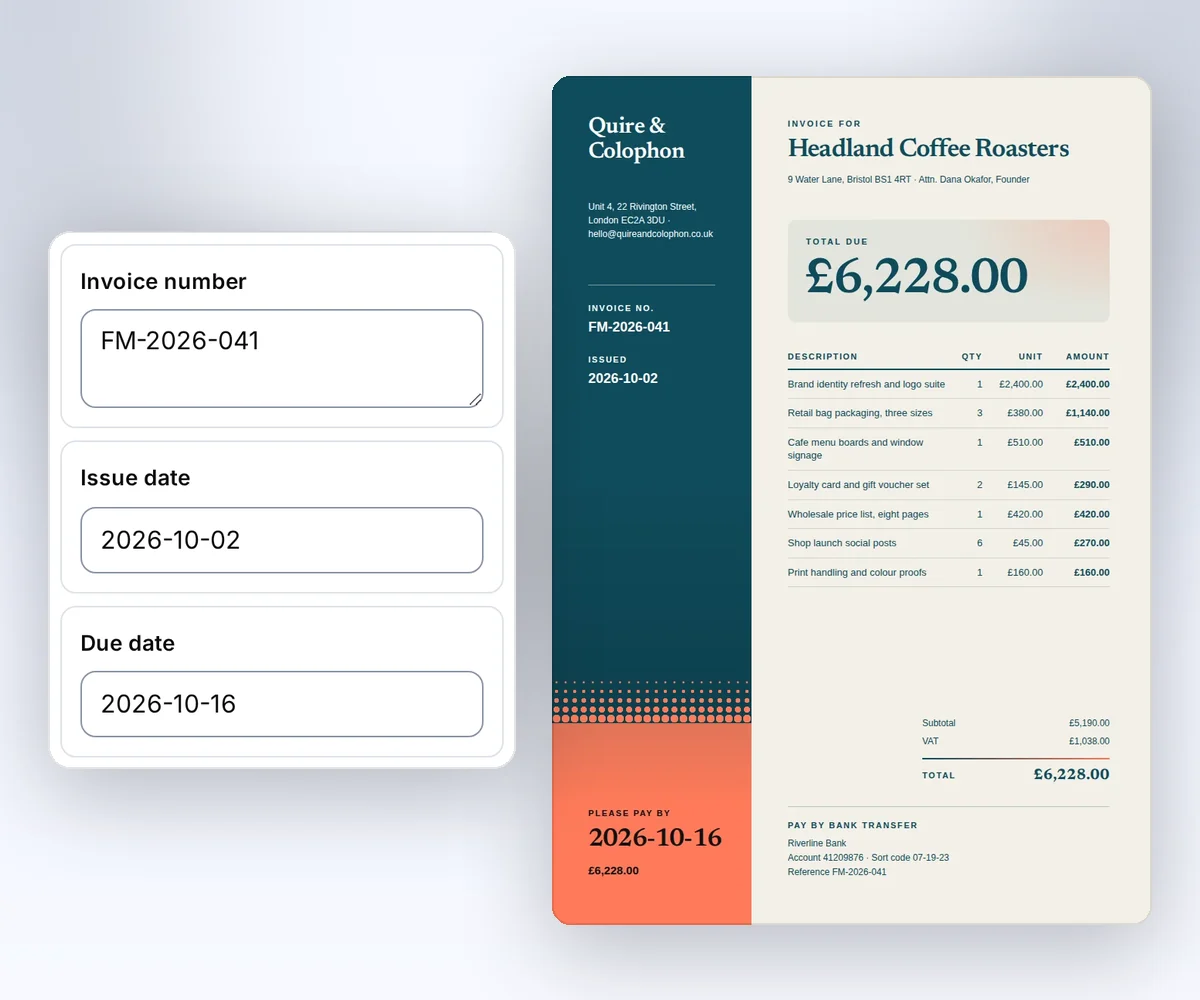
You can make an invoice PDF in the thirds.ai editor without writing code, in three steps. You need a free account and your client's details.
- Open the Design studio invoice template and click Use this template. Sign in first if you need to.
- Open the Data tab and type the client, the invoice number, and the dates into the boxes beside the invoice.
- Click Save and export PDF and download the file.
If you need a whole month of invoices at once, upload a CSV file with one row for each client, check the credit cost, and download a ZIP with one PDF for each row. The CSV batch guide shows each step, and the invoice PDF page shows more ways to bill clients.
Before you switch
Compare the same sample across tools
The best test of an HTML to PDF API is the same sample file made in two or three tools. Use your longest text, your real fonts, and the page size you need. Then compare the finished PDFs, how each tool fills your data into the page, what happens when a file fails, where the files are kept, and what the month would cost. If your template is already a Word, Excel, or PowerPoint file, look at Carbone instead, which fills DOCX, XLSX, and PPTX templates (vendor claim). If you might run your own browser instead of an API, the Puppeteer and Playwright comparison covers the work you take on, and the cost of self-hosted Puppeteer against a PDF API helps you add up the monthly bill. If you are replacing wkhtmltopdf, which wkhtmltopdf alternative to use also covers WeasyPrint and Prince, and the wkhtmltopdf move guide maps each old option to a thirds.ai request. If you need a feature only some tools have, such as fetching a page URL, pick by that feature first. We leave most plan prices off this page because billing periods and units differ. The full comparisons linked above show them.
Checked and dated
Sources
- DocRaptor, vendor source for Prince, PDF forms, tagging, and watermarked test documents, checked 12 October 2026.
- PDFShift pricing, vendor source for the 5 MB credit rule and the free plan, checked 12 October 2026.
- cloudlayer.io, vendor source for inputs, v2 file storage, and the free trial, checked 12 October 2026.
- APITemplate.io, vendor source for its editors, inputs, and app connections, checked 12 October 2026.
- thirds.ai API reference and file limits, checked 12 October 2026.
- Carbone, vendor source for its office-file templates, checked 12 October 2026.
- HTML/CSS to Image, vendor source for inputs, plans, and MCP, checked 12 October 2026.
- PDFMonkey, vendor source for templates and the free plan, checked 12 October 2026.
- PDFCrowd, vendor source for inputs, clients, and page options, checked 12 October 2026.
Try it yourself
Try the matching template
Start from the Design studio invoice template, or have AI design your own in your brand. Then make each new PDF from code with the templates with data guide, or ask ChatGPT or Claude for it. Copying a gallery template is free.

Free to try
Make your first file free
Start from a designer-made template and download a real file for free. Sign up, and ChatGPT or Claude can make the next one in your brand.