
Add thirds.ai as a Claude Desktop MCP server
You add thirds.ai to Claude Desktop as a custom connector with only the URL https://thirds.ai/mcp, and you never copy a key. With thirds.ai, you save a design once, such as an invoice, a certificate, or a social post. Each time you type new details, you get a finished PDF or image with your logo, colours, and fonts. Once Claude Desktop is connected, you ask Claude for the next file in a chat, and you don't have to open a design app or fix an old file by hand.
Give this prompt to your AI agent. The agent does the task for you.
Read https://thirds.ai/docs/mcp/claude-desktop and help me add thirds.ai to Claude Desktop as a custom connector, or with a local bridge and my API key
The same connector works in Claude on the web, and Claude Code can use it too. Each finished PDF or image costs one credit, and a verified free account gets 50 credits a month.
See the Claude image examples for designs and prompts to try after setup. To make post images from another app, see the AI social media post generator guides for every AI tool you can connect.
Make it without code
You can make the same PDFs and images in the thirds.ai editor without Claude Desktop or any setup. It takes three steps, and all you need is a free thirds.ai account. The Meeting agenda template is a good first try, because you fill it in again before every meeting. To see your own agenda first, type it into the free meeting agenda template and make a sample PDF without an account.
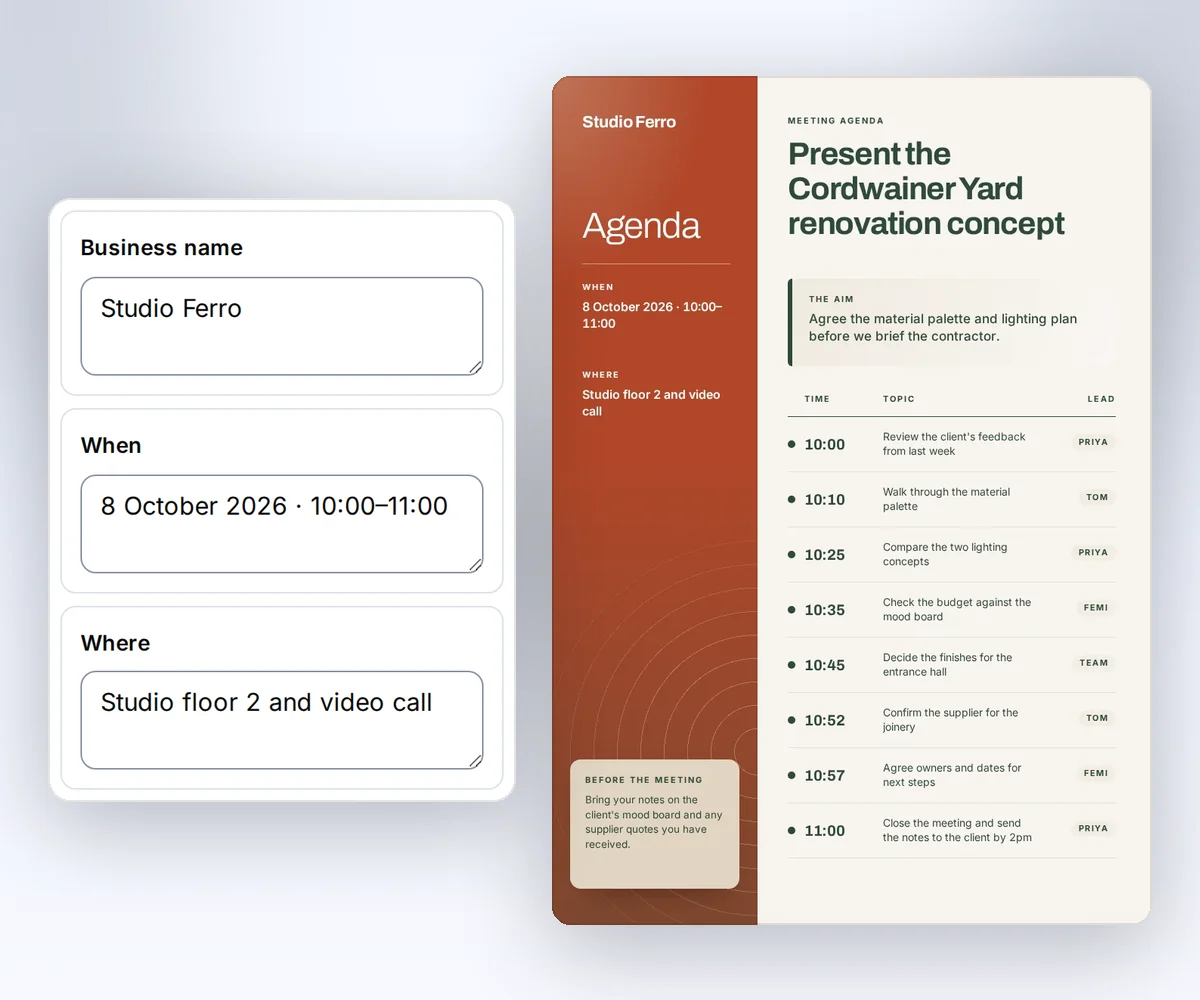
- Open the Meeting agenda template and click Use this template. Sign in and verify your account first if you need to.
- Open the Data tab and type your meeting, the time, the place, and your aim. Click Add row for each agenda item. Then click Preview with data above the canvas to check the page. The preview is free.
- Click Export, then Save and export PDF, and download the file.
When you'd rather have Claude write the agenda from your notes and fill in the same design, connect Claude Desktop to the thirds.ai MCP server.
Add thirds.ai to Claude Desktop
You add thirds.ai to Claude Desktop as a custom connector in four steps. You need a thirds.ai account and a Claude plan that can add custom connectors. Anthropic's custom connector guide, updated on 11 August 2026 and checked on 27 September 2026, says Free, Pro, Max, Team, and Enterprise plans can add them. A Free plan can add one.
- In Claude Desktop, open Customize, then Connectors.
- Click +, then Add custom connector.
- Enter
https://thirds.ai/mcpand click Add. Leave Advanced settings empty. - Click Connect. When the thirds.ai page opens, sign in if you need to and click Allow.
On a Team or Enterprise plan, an owner adds the connector first. The same guide says the owner opens Organization settings, then Connectors, clicks Add, and chooses Custom, then Web. Each member then finds it under Customize → Connectors and clicks Connect.
To stop the connector, open your thirds.ai Settings, find the app under Connected apps, and click Disconnect. The app loses access right away.
Add thirds.ai to Claude on the web
You add thirds.ai to Claude on the web at claude.ai with the same URL, and it takes four steps. Anthropic's custom connector guide says custom connectors work in Claude, Cowork, and Claude Desktop (checked 27 September 2026). You need a thirds.ai account and a Claude plan that can add custom connectors.
- Open claude.ai/customize/connectors. On Team and Enterprise plans, only admins can add a connector there, as Anthropic's Claude Code MCP guide says (checked 30 September 2026).
- Click +, then Add custom connector.
- Enter
https://thirds.ai/mcpand click Add. - Click Connect. When the thirds.ai page opens, sign in if you need to and click Allow.
What the thirds.ai connector can and can't do
The thirds.ai connector lets Claude make PDFs and images from gallery templates and your saved designs, in your own logo, colours, and fonts. Claude works only with the designs, brand kits, and files in the thirds.ai account that clicked Allow. It spends that account's credits, and you can ask Claude to show the cost before each paid step.
The connector can:
- Find gallery templates, your saved designs, and your brand kits by name.
- Make a PDF, PNG, JPEG, or WebP from a design, filled with your client's name, this week's price, or the invoice total.
- Preview a design with your details for free before you spend credits.
- Save your logo, colours, fonts, and tone as a brand kit, and add a logo or font file to it.
- Turn your own HTML, a short description, or a picture you upload into a design you can edit and use again.
- Save a new version of a design and keep the earlier one.
- Make one file for each row of your list, fit one image design to new sizes, or export the carousel slides you pick.
- Check a file's progress and give you its download link.
The connector can't:
- Make AI pictures. Use the thirds.ai editor for those, or connect Claude Desktop with an API key.
- Edit a PDF or Word file you already have.
- Make videos, post to social networks, or send email.
- See another person's thirds.ai account.
Connect with an API key instead
You can also connect Claude Desktop with a thirds.ai API key through a small bridge called mcp-remote. Use the bridge when you need the AI image tools, which a connector doesn't get. It takes four steps. You need Node.js 18 or later, which the mcp-remote setup notes ask for, and a key from the API keys page. The bridge runs on your computer and sends your key with each request.
- In Claude Desktop, open Settings, click Developer, then click Edit Config. On a Mac, the file is
~/Library/Application Support/Claude/claude_desktop_config.json. On Windows, it's%APPDATA%\Claude\claude_desktop_config.json. - Add this entry and replace
YOUR_API_KEYwith your key. If the file already has anmcpServersblock, putthirdsinside it next to your other servers.
{
  "mcpServers": {
    "thirds": {
      "command": "npx",
      "args": [
        "-y",
        "mcp-remote",
        "https://thirds.ai/mcp",
        "--header",
        "Authorization:${THIRDS_AUTH_HEADER}"
      ],
      "env": {
        "THIRDS_AUTH_HEADER": "Bearer YOUR_API_KEY"
      }
    }
  }
}
- Save the file.
- Quit Claude Desktop fully and open it again.
The header has no space after Authorization: on purpose. Claude Desktop on Windows doesn't escape spaces in these arguments, as the mcp-remote setup notes said on 25 September 2026. The no-space form works on a Mac and on Windows.
mcp-remote is a third-party adapter. It changes Claude Desktop's local stdio messages into Streamable HTTP requests to https://thirds.ai/mcp. Read its setup notes before you install it. The Model Context Protocol guide Connect to local MCP servers shows the same Edit Config steps and file paths, as it read on 25 September 2026. Anthropic's custom connector guide calls servers in claude_desktop_config.json a separate way to connect that runs on your computer.
Use the thirds.ai connector in Claude Code
Claude Code can use the thirds.ai connector you added on claude.ai, with no extra setup. Anthropic's Claude Code MCP guide says connectors you add on claude.ai show up in Claude Code when you sign in to Claude Code with the same claude.ai account (checked 30 September 2026). Type /mcp in Claude Code to see thirds.ai in the list.
You can also add thirds.ai to Claude Code with the thirds.ai plugin or with an API key. The Claude Code setup shows both ways. To give Claude Code the steps for a whole file task, such as a report for each client, install a guide from the agent skills library.
Check the connection
You check the connection by finding thirds.ai in the Claude Desktop connector list. Click the + button in the chat box, choose Connectors, and make sure thirds.ai is on. If you used the bridge, restart the app first and look for thirds. Anthropic's local MCP server guide, updated on 30 June 2026, says this list shows each connected server and its tools.
Make your first file from Claude Desktop
Your first thirds.ai file from Claude Desktop takes three prompts, and you approve the cost before anything is made. You need a connected server and at least one credit. If you saved the Meeting agenda template in the editor, Claude can find it in your saved templates.
- Ask Claude: "List the thirds.ai tools and my saved templates." Listing is free.
- Ask for the file: "Use my thirds.ai Meeting agenda template to make a PDF agenda for Thursday's planning meeting from these notes. Show me the tool call and the credit cost first."
- Approve the call. Claude Desktop may ask you to allow a thirds.ai tool the first time Claude uses it. Claude then checks the status until the PDF is ready and gives you a download link. Download the file before the link expires.
Read the main MCP guide before you start paid work. It explains credits, retries, and status checks.
Keep your API key safe
When you use the bridge, your thirds.ai API key sits as plain text in the Claude Desktop config file, so treat that file like a password. Let only your own user account read it. Never commit it to source control or paste the key into a chat. If the key leaks, delete it on the API keys page and make a new one.
If you need a key but don't want a local adapter, connect straight to the thirds.ai server with Claude Code, Cursor, VS Code, Codex, Grok, ChatGPT, Warp, Zed, OpenCode, Antigravity, Lovable, Replit, Kimi Code, or Hermes. To keep the key out of every file too, use Claude Code, Cursor, VS Code, Codex, OpenCode, or Kimi Code. They read the key from an environment variable or a secure input store.
Privacy, terms, and help
When you click Allow, Claude can make files and read and change your designs and brand kits with your thirds.ai account and credits. Our privacy policy says what we keep about each connected app and for how long, and the Terms of Service cover your use of thirds.ai through Claude. For help with the connector or a failed file, contact support.
FAQ
Why is my Claude Desktop MCP server not working?
A Claude Desktop custom connector that stops working needs to connect again. Remove it under Customize → Connectors, add it again, and click Connect. The mcp-remote bridge fails to start when Claude Desktop can't find Node.js 18 or later and npx, or when the config file has a JSON error. Check both, make sure the key has no extra spaces, and restart the app. The Developer settings show each server's status and logs. Keep those logs private because local tools can report command details.
Does the API key bridge work on claude.ai?
No. The mcp-remote bridge works only in Claude Desktop, because servers in claude_desktop_config.json aren't available in Cowork or on claude.ai, as Anthropic's custom connector guide says. On claude.ai, add the custom connector with only the URL.
Does connecting spend credits?
No. Connecting and listing tools don't spend credits. AI template work and successful files can. Ask Claude to show the action and the cost before it starts paid work.