
Antigravity MCP setup: connect Antigravity to thirds.ai
To use the thirds.ai MCP server in Google Antigravity, add https://thirds.ai/mcp to your mcp_config.json file as a serverUrl, with an API key in a header. thirds.ai is a web app. You save a design once, like an invoice, a report, or a project handover, with your logo, colours, and fonts. Once it's connected, you ask the Antigravity agent for the next file, and it fills a saved design with new details and makes the finished PDF or image. Each successful PDF or image costs one credit, and a verified free account gets 50 free credits each month. These steps work in Antigravity IDE and Antigravity CLI, which read the same config file.
Give this prompt to your AI agent. The agent does the task for you.
Read https://thirds.ai/docs/mcp/antigravity and help me connect Antigravity to thirds.ai with an API key
With Antigravity connected, you stop copying an old file and fixing it by hand while you code. Every file keeps the same layout and brand, because each one starts from the same saved design.
Make it without code
You can make the same branded files in the thirds.ai editor without Antigravity or any setup. It takes three steps, and all you need is a free thirds.ai account. The Project handover template is a good first try if you finish work for clients, because you fill it in again at the end of every project.
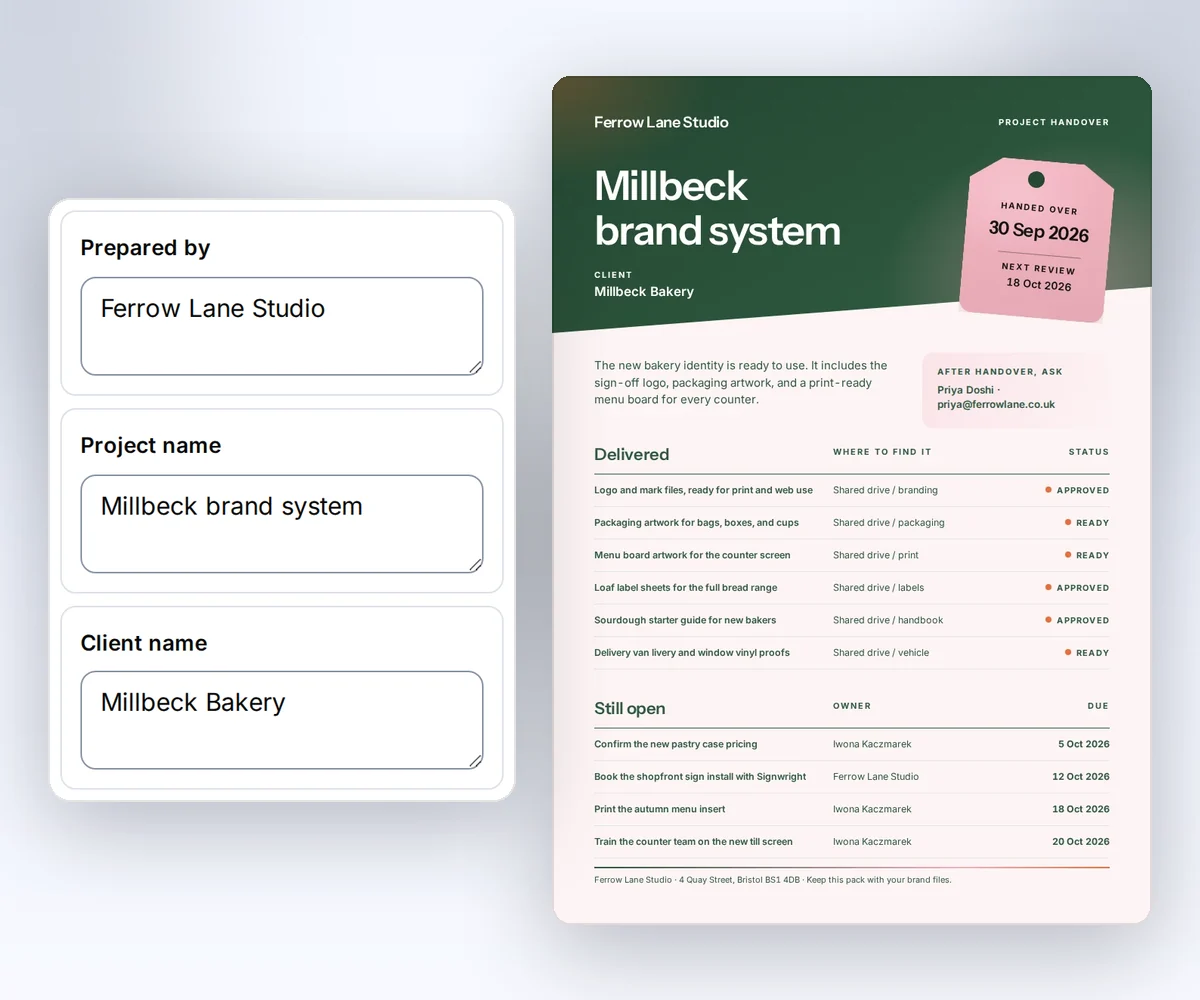
- Open the Project handover template and click Use this template. Sign in and verify your account first if you need to.
- Open the Data tab and type your project name, the client, the summary, and what you delivered. Then click Preview with data above the canvas to check the page. The preview is free.
- Click Export, then Save and export PDF, and click Download PDF.
To start from your own design instead, follow how to make a template you can reuse. When you'd rather have Antigravity fill in the handover for each new project, add the thirds.ai MCP server.
How do I add the thirds.ai MCP server to Antigravity?
You add the thirds.ai MCP server to Antigravity with one entry in mcp_config.json and one private API key. You need a thirds.ai account and Antigravity IDE or Antigravity CLI on your computer. Google's Antigravity MCP guide (checked 25 September 2026) says a remote server must use the serverUrl field.
- Create an API key on the API keys page.
- In Antigravity IDE, click … at the top of the agent side panel and choose MCP Servers. Then click Manage MCP Servers, then View raw config. In Antigravity CLI, open the file in your own editor.
- Add this entry to
~/.gemini/config/mcp_config.jsonto use thirds.ai in all your projects, or to.agents/mcp_config.jsoninside one project:
{
  "mcpServers": {
    "thirds": {
      "serverUrl": "https://thirds.ai/mcp",
      "headers": {
        "Authorization": "Bearer YOUR_API_KEY"
      }
    }
  }
}
Replace YOUR_API_KEY with your key. The same Google guide says Antigravity doesn't read the older url or httpUrl fields for a remote server. It also says the env setting works only for local command servers, so you type the key into the header itself. Restrict the file to your own user, and never commit it.
Connect with only the URL
You can skip the key and sign in on a thirds.ai page. Leave out the headers block, so the entry holds only serverUrl. Google's MCP guide says Antigravity handles the OAuth sign-in by itself for servers that support dynamic client registration, with no more settings (checked 27 September 2026). thirds.ai supports it. When the thirds.ai page opens, sign in if you need to and click Allow.
This connection gets every thirds.ai tool except the two AI image tools. Use the API key setup when you need those. To stop the connection, open your thirds.ai Settings, find the app under Connected apps, and click Disconnect.
Check that Antigravity sees the thirds.ai tools
You check the thirds.ai connection in Antigravity from the MCP Servers list in the IDE, or from the MCP manager in the CLI. You need the config entry first. In Antigravity IDE, open MCP Servers again and look for thirds in the list. In Antigravity CLI, type /mcp in the prompt to open the MCP manager. It shows whether each server is connected, and it lets you reload the config and read the connection logs.
Google's MCP guide says Antigravity runs each new MCP tool in Ask mode, so it asks you before each thirds.ai tool call. Keep it that way while you learn which tools spend credits.
Make your first file from Antigravity
Your first file from Antigravity starts with a plain request to the Antigravity agent. Ask it to list the thirds.ai tools, then ask for one file, such as "Make a handover PDF for the Alder Street website from my Project handover template." Because of the Ask mode in Google's MCP guide, you see what the agent sends before each tool call runs.
Read the main MCP guide before your first paid call. It explains credit approval, safe retries, and status checks.
FAQ
Why does Antigravity ignore a config copied from Cursor?
The Cursor setup uses url, and Antigravity needs serverUrl. Change the field name and keep the same https://thirds.ai/mcp value. Then type your key into the header, because Google's guide doesn't show a way to read it from an environment variable.
I used Gemini CLI before. Which setup do I follow?
Follow this page if you now use Antigravity CLI. Google's MCP guide says Antigravity CLI reads ~/.gemini/config/mcp_config.json and needs serverUrl. The Gemini CLI setup uses a different settings file and the httpUrl field.
Do I need Google credentials for thirds.ai?
No. Google's MCP guide says the google_credentials setting is for Google services. thirds.ai signs you in with your API key in the header, or on its own sign-in page when you give only the URL. Leave out authProviderType, clientId, and clientSecret for this server.
Does connecting spend credits?
No. Connecting and listing tools don't spend credits. AI template work and successful files can. Ask your agent to show the action and the cost before it starts paid work.