
Smart resize makes every size you need from one design
Make a design once on thirds.ai, add every size you post to, and smart resize lays it out again for each shape. It doesn't crop the sides off or stretch the type. The headline, the photo, and the button move to where they fit on a story, a square post, or a wide banner. Adding a size is free, and every size downloads together in one ZIP. Once the design is saved, ChatGPT or Claude can make all of the sizes for you from one message.
Free to start, and you don't need a card.
How it works
How do I resize one design to every size?
You add sizes to an image design in the thirds.ai editor, and each size gets its fitted layout straight away.
- Open an image design in the editor and click Smart resize.
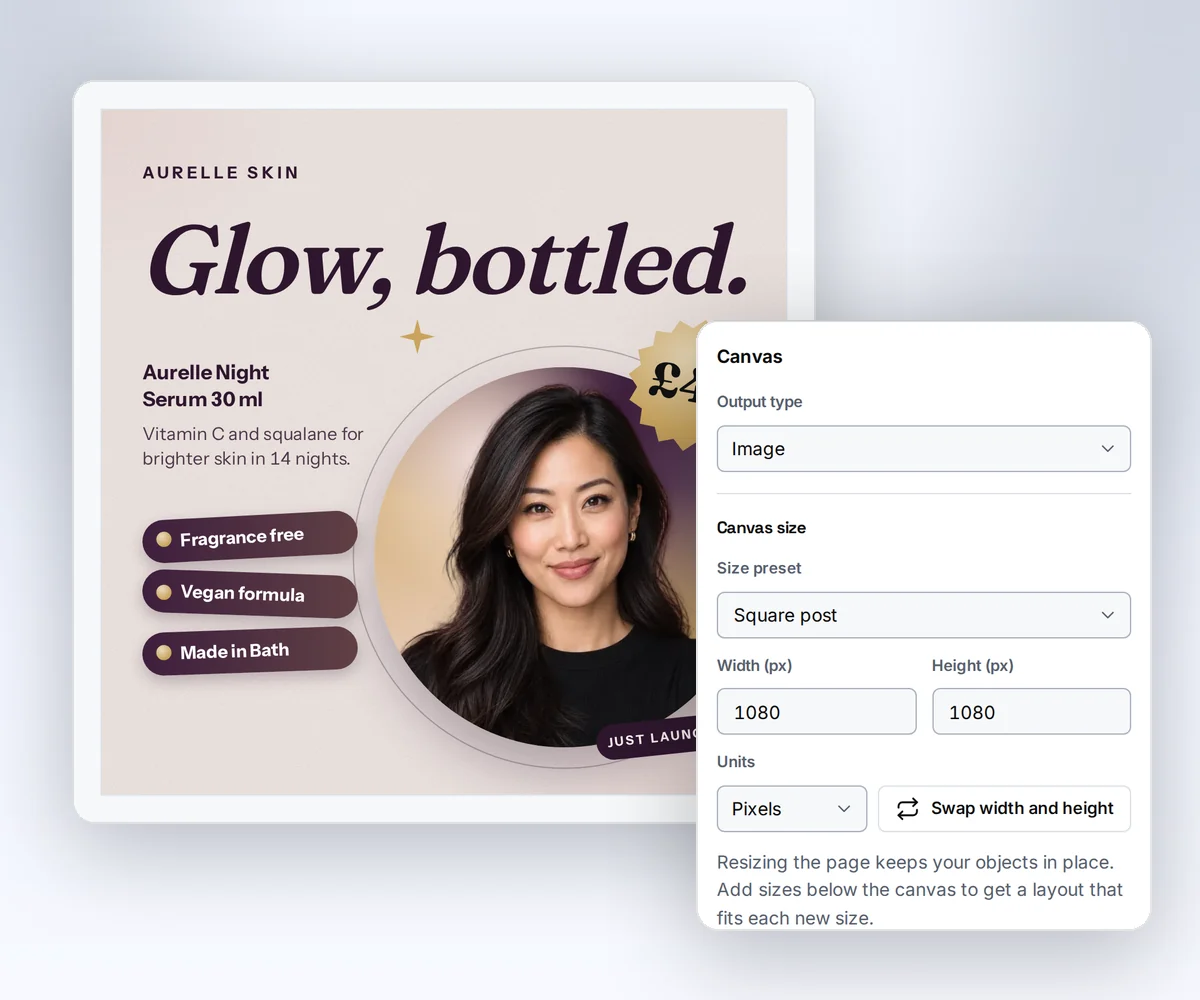
- Pick the sizes you post to, such as Story and Link preview, or type your own width and height. Each size appears under the canvas with its layout already fitted.
- Click a size to check it. Compare shows the original beside it, and you can drag anything where you want it.
- Click Export pack, pick PNG, JPEG, or WebP, and export. When the sizes are ready, click Download ZIP to get them all at once.

- Free
- to add a size and fit the layout to it
- 20 sizes
- on one design, from presets or your own
- 1 ZIP
- with every size, in the order you chose
Laid out again, not cropped
The layout is rebuilt for each shape, so nothing gets cut off
A story is tall and a banner is wide, and a square design can't be squeezed into both without something going wrong. A crop loses the price at the edge, and a stretch makes the headline look odd. Smart resize reads your design as parts: the background, the panels, the headline, the photo, the button. For each new size it puts those parts back together, turns a row into a stack or spreads a stack across, and keeps the gaps in proportion, so the result looks made for that size.
- Your logo keeps its shape on every size, and nothing is cropped off the edge.
- Compare shows the original beside each size, so you see the result before you export.
Fix one size by hand
Change one size by hand, and the others stay automatic
Sometimes a size wants a human touch, like the headline a little bigger on the story. Click that size and move things around like on any canvas. It's marked Edited and keeps your changes when you save. The other sizes stay marked Auto and follow the original, so when you change the headline next month, every automatic size picks it up. Change your mind? Reset to auto brings a size back to the fitted layout.
- The text you type is shared by every size, so you write the headline once. Mark a field Only this size when one size needs a shorter headline.
- When no fitted layout passes the checks, the size says Needs changes, and you lay it out yourself instead of guessing what happened.

From your AI assistant
Ask ChatGPT or Claude for every size, and get the ZIP back
Connect ChatGPT, Claude, Gemini, Grok, or any other AI you use to thirds.ai, and ask for the files the way you'd ask a colleague. Say "Make this week's offer post as a square, a story, and a link preview," and it writes the copy, fits your saved design to each size, and hands you the finished files. It can save the sizes on the design too, so next week's request is one line. Setup takes a couple of minutes, and your assistant can walk you through it.
- Fitting a design to a size is free for your assistant too. It spends 1 credit for each finished image.
- Ask for the same post in another language as well, and it makes every size again in that language.

Templates in every size
Start from a designer-made template, and get it in every size
You can add sizes to any image design in the thirds.ai gallery, whether you start from a product post, a story, a video thumbnail, or a profile banner. Pick one, put your brand on it, and add the sizes you need.
Skincare serum launchImage · 1080 × 1080 Knitwear launch storyImage · 1080 × 1920 Creator video thumbnailImage · 1280 × 720 Business coach bannerImage · 1584 × 396
For developers and agents
Fit a design to sizes and export packs through the API or MCP
Send one saved template version and a list of sizes to /v1/image-packs, and poll it for a ZIP of every size. Each entry is original, a saved size id, a preset slug such as story, or a custom WxH size. Adapting is free, and each finished image costs one credit. /v1/templates/adapt fits raw HTML to up to 20 sizes without saving or rendering anything. Your agent gets the same two things as the adapt_template and create_image_pack tools on the MCP server.
curl --fail-with-body --silent --show-error \
  https://thirds.ai/v1/image-packs \
  -H "Authorization: Bearer YOUR_API_KEY" \
  -H "Content-Type: application/json" \
  -H "Idempotency-Key: autumn-sale-pack-1" \
  --data '{
    "template_id": "tpl_YOUR_TEMPLATE",
    "version": 1,
    "data": { "headline": "Autumn sale" },
    "format": "png",
    "sizes": ["original", "square-post", "story", "1200x628"]
}'{
"source": "<!doctype html>...",
"sizes": [
{ "width": 1080, "height": 1920 },
{ "width": 1920, "height": 600 }
]
}{
"servers": {
"thirds": {
"type": "http",
"url": "https://thirds.ai/mcp",
"headers": {
"Authorization": "Bearer YOUR_API_KEY"
}
}
}
}Questions people ask before they resize a design
Make a sample imageWhat is smart resize?
Smart resize takes one image design and lays it out again for other sizes, so one post becomes a story, a square, a link preview, or a banner without a crop or a stretch. On thirds.ai each size is a real editable design, not a flat picture, so you can change any of them.
Does smart resize use AI?
No. It follows a fixed set of layout rules, so the same design and the same size always give the same result, adding a size costs nothing, and it never rewrites your text or drops a part of the design. AI helps elsewhere on thirds.ai, such as building the design from a sentence. Describe a design with the AI template generator.
How much does smart resize cost?
Adding a size and fitting the layout is free. You spend 1 credit for each finished image you export, and a size that fails costs nothing. Retry failed sizes makes only the ones that failed. The free plan gives you 50 credits a month. See the plans and credits.
Which sizes can I add?
Fifteen presets cover social posts, stories, link previews, video thumbnails, screens, web banners, email headers, and product photos, and you can type your own width and height. One design holds up to 20 sizes.
What happens when a size doesn't look right?
Click it and move things by hand, like on any canvas. It's marked Edited and stays as you left it, while the other sizes keep following the original. When no fitted layout passes the checks, the size says Needs changes, and you lay it out yourself.
Is this the same as the free social image resizer?
No. The free resizer changes the pixels of a finished PNG, JPEG, or WebP: it crops or pads one picture to a new size, and the text can't move. Smart resize works on an editable design, so the headline, the photo, and the button are laid out again for each size, and you can still change them. Resize a finished picture for free.
Does smart resize work on PDFs?
No. It's for image designs. A PDF design has a Page size button instead, for A4, Letter, and the other paper sizes. See how PDFs work on thirds.ai.
Smart resize
Make the design once, and get every size at once
Pick a designer-made template, put your brand on it, and add the sizes you post to. Every size is ready to download in one go, and your AI assistant can make the next batch for you.