
Compare PDF generation tools and image tools
PDF generation tools turn a saved design and your details into a finished PDF, such as an invoice, and image tools do the same for social posts and ads. Some take finished HTML; others keep saved templates you fill with data. Pick the tool you use now to see what it does well and how to switch. In thirds.ai, AI builds the design from a sentence or a picture, or you pick a designer-made template, and a brand kit adds your logo, colours, and fonts in one step. Then ChatGPT, Claude, or your automations make every file from it, on our servers. One file costs one credit, and you get 50 free credits a month, no card needed.
Where we say which tool fits, that’s our opinion.


Start with the tool you know
Image generation tools
- Repeat branded imagesBannerbearthirds.ai is the pick for images and PDFs, because the AI builds the design for you. Bannerbear is the pick for video.Last checked:
- Reusable static ad designsAdKitChoose AdKit for ad research, AI clones, and campaign tools. Choose thirds.ai to turn one ad into every version and size, made by your AI assistant or your automations.Last checked:
- Product and link-preview images from one designHTML/CSS to ImageChoose HTML/CSS to Image for page screenshots and hosted image links. Choose thirds.ai to have AI build the design in your brand and make every size at once.Last checked:
Start with the tool you know
PDF generation tools
- Repeat invoices and reportsPDFShiftChoose PDFShift for finished HTML or page URLs. Choose thirds.ai to have AI build the invoice or report design, put your brand on it in one step, and make each PDF from ChatGPT or Claude.Last checked:
- Repeat client PDFsDocRaptorChoose DocRaptor for forms, tagged PDFs, and Excel from HTML your code builds. Choose thirds.ai to have AI build the design, put your brand on it in one step, and make PDFs and images from ChatGPT or Claude.Last checked:
- Repeat documents from Office or HTML templatesCarboneChoose Carbone for Word and Excel templates and for hosting it yourself. Choose thirds.ai when the AI should build the design in your brand and your assistant should make each file.Last checked:
- Recurring business PDFs and matching static imagesCraftMyPDFChoose CraftMyPDF for a drag-and-drop document editor and PDF forms. Choose thirds.ai to have the AI build the design and your AI assistant make each file.Last checked:
- Repeat PDFs and images from HTML, templates, and datacloudlayer.ioChoose cloudlayer.io to turn page URLs into files or to convert DOCX. Choose thirds.ai to have AI build the design, put your brand on it in one step, and make the files from ChatGPT or Claude.Last checked:
- Repeat branded PDFsPDFMonkeythirds.ai is the pick for branded PDFs and images, because the AI builds the design for you. PDFMonkey is the pick for teams that already write Liquid templates.Last checked:
- Repeat PDFs from HTMLSelf-hosted Puppeteer or PlaywrightChoose self-hosting when your code must drive the browser itself. Choose thirds.ai to skip the browser, have AI build the design in your brand, and make each PDF from ChatGPT, Claude, or your code.Last checked:
Start with the tool you know
Tools for images and documents
- On-brand images and PDFsPlacidChoose Placid for video and an editor inside your own app. Choose thirds.ai to have AI build the design in your brand, and to pay one credit for a whole PDF.Last checked:
- Repeat branded filesTemplatedthirds.ai is the pick when you want your brand saved once and one credit to pay for a whole PDF. Templated is the pick for Canva import and video.Last checked:
- Repeat image and PDF campaignsOrshotChoose Orshot for Canva and Figma imports, video, and social posting. Choose thirds.ai so one credit covers a whole PDF, and the AI builds your design from a sentence or a picture as plain HTML.Last checked:
- Repeat PDFs and images from saved templatesAPITemplate.ioChoose APITemplate.io for ready links to Airtable, Bubble, or Power Automate. Choose thirds.ai to have the AI build the design in your brand, and to make each file from ChatGPT, Claude, or your own code.Last checked:
- On-brand images and PDFsRobollyChoose Robolly for video and image links you can paste anywhere. Choose thirds.ai to have AI build the design in your brand, and for PDFs of up to 100 pages at one credit each.Last checked:
Ranked lists
Compare a shortlist
- 8 tools, rankedBest HTML to PDF APIs for repeat documentsChoose by the PDF layout you need, what you send in, and whether you need saved designs.Checked
- 8 tools, rankedBest Bannerbear alternatives for repeat imagesChoose by how you build the design, the apps it links to, and the file types it makes.Checked
No code needed
How do you make invoice PDFs without code in thirds.ai?
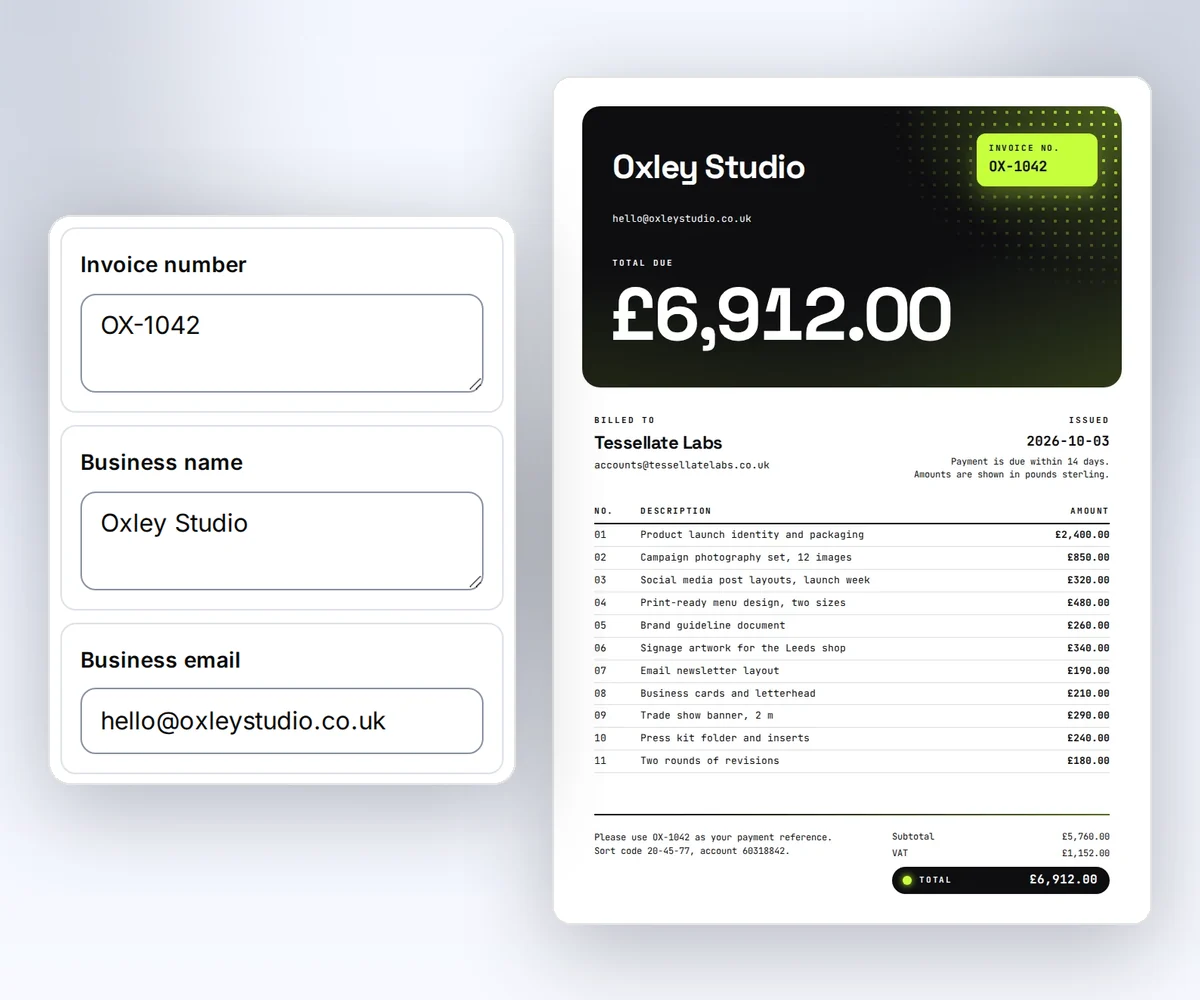
PDFShift and a self-hosted browser need a developer to send the HTML from code. In thirds.ai you fill in an invoice design in the editor, or ask ChatGPT or Claude for it, and download the PDF. A free thirds.ai account is all you need.
- Open the Client invoice template and click Use this template, or choose Use your HTML and paste in an invoice you already use.
- Save your logo, colours, and fonts once as a brand kit. The invoice takes them on in one step.
- Type the client’s name, the invoice number, and the line items into the boxes, then click Save and export PDF to download it.
Next month, ask ChatGPT or Claude for the new invoice, and it fills in the details for you. The same template editor makes images too, such as social posts and ads.
Free to try
Make your first file free
Try a real design for free, and check our plans and credit packs against what you pay now.
Start from a designer-made template and download a real file for free. Sign up, and ChatGPT or Claude can make the next one in your brand.