
thirds.ai vs PDFShift
PDFShift turns HTML from your code, or a public page URL, into a PDF, and it charges one credit per 5 MB of output (vendor claim). thirds.ai makes invoice and report PDFs too, and its AI builds the design for you: from a sentence, or by rebuilding a picture of the invoice you already send, in your logo, colours, and fonts. Or start from a designer-made invoice in the gallery, and your brand kit goes on every file in one step. Then ChatGPT, Claude, or your code fills in each month's details, and each PDF of up to 100 pages costs one credit. At the entry plans, PDFShift Starter is $9 a month for 500 credits (vendor claim) and thirds.ai Starter is $29 for 2,500.
We aren't connected to PDFShift. PDFShift is a trademark of its owner.
- 1 credit
- makes 1 PDF or image
- 50 credits
- free every month, no card
- $29
- a month for Starter, with 2,500 credits
- 4 formats
- PDF, PNG, JPEG, and WebP
Feature by feature
What's different
| What you need | thirds.ai | PDFShift |
|---|---|---|
| Inputs | Describe it to the AI, pick a designer-made gallery template, paste your own HTML, or upload a picture that the AI rebuilds as a design you can edit. Your code can also send plain HTML without saving a design. It can't load a page URL. | HTML text or a public page URL in the source field, and PDFShift loads the URL for you (vendor claim). We didn't find a gallery, image import, or an AI that builds the design (our reading). |
| Outputs | PDF, PNG, JPEG, and WebP. | PDF, PNG, JPEG, and WebP (vendor claim). |
| Size limits | A PDF of up to 100 pages and 25 MiB, for one credit. See limits. | One credit per 5 MB of output, so a 14 MB file costs 3 credits (vendor claim). |
| Template editing | A visual editor and an AI chat work on the same design, so you can drag a box or ask for the change in words. | Saved HTML templates that you create, change, and fill with data through the API or its MCP server (vendor claim). Every change is an HTML change. We didn't find a visual editor (our reading). |
| Brand kits | Save your logo, colours, and fonts once, or build the kit from your website address. Pick the kit on any design, and the file comes out in your brand. | Not shown on the pages we read (our reading). |
| AI assistants | Connect ChatGPT, Claude, or any other AI you use, and ask it for the design and then for each file. | A hosted MCP server at https://api.pdfshift.io/mcp with 11 tools: convert HTML or a URL, manage saved HTML templates, fill one with data, and read credits and logs (vendor claim). Someone writes the HTML template first, by hand or with the assistant. |
| API and webhooks | A REST API at /v1/pdf, /v1/image, and /v1/templates. Each signed webhook event gets up to eight delivery tries over a day. | A REST API at https://api.pdfshift.io/v3 with POST /convert/pdf and POST /convert/png, a sandbox flag that skips credits and adds a watermark, direct export to your own Amazon S3, Google Cloud Storage, or Cloudflare R2 bucket, and a webhook that posts the result or the error (vendor claim). |
| Pricing model | One credit makes one PDF or image. Starter is $29 a month for 2,500 credits. Extra credits cost $0.015 each on a paid plan, and packs start at $10 for 500 credits. | Credits by file size. Starter is $9 a month for 500 credits with overage at $0.04, Boost is $24 for 2,500 with overage at $0.03, and Growth is $39 for 5,000 with overage at $0.025 (vendor claim). |
| Free tier | 50 free credits a month, no card. That's one AI-built design, or 50 files from a gallery template. | 50 credits a month, no card, with a 15 MB file limit and a 30 second timeout (vendor claim). |
| Where it fits | Agencies, small firms, and founders that send branded invoices and reports every month and have no one to write the HTML. | Developers who already have finished HTML or a public page and want a conversion API with many page options (our judgment). Its guides also connect it to Zapier, Make, and n8n (vendor claim). |
Pricing
How much does PDFShift cost compared with thirds.ai?
The cheaper tool depends on how many files you make each month and what kind they are. Here's what PDFShift and thirds.ai each cost, and how each one counts a file.
- We checked both pricing pages on 12 October 2026: PDFShift pricing and our pricing.
- PDFShift Starter is $9 a month for 500 credits, Boost is $24 for 2,500, Growth is $39 for 5,000, and Business is $99 for 25,000, with overage from $0.04 a credit on Starter down to $0.02 on Business (vendor claim). A credit covers 5 MB of output, so a 14 MB file costs 3 credits (vendor claim). For more than 50 but fewer than 500 small files a month, PDFShift is the cheaper tool: its $9 plan is about a third of our $29 Starter. At the same 2,500 credits, PDFShift Boost is $24 and thirds.ai Starter is $29, and you can spend ours on AI-built designs as well as files. A long report with pictures can eat several PDFShift credits, while it stays one credit here up to 100 pages.
- One thirds.ai credit makes one PDF of up to 100 pages, or one image. Starter is $29 a month for 2,500 credits, Growth is $79 for 10,000, and Scale is $199 for 40,000. Extra credits cost $0.015 each on a paid plan, and packs start at $10 for 500 credits. A file that fails costs nothing. See credits and billing.
- The AI uses thirds.ai credits too: 50 to build a design or rebuild one from a picture, 25 for a later text or HTML change, and 50 for a change with a new picture. A new AI picture inside a design also costs 50. You spend them when you build or change a design, not on each file you make from it.
- Both free plans need no card and give 50 credits a month. PDFShift's free files stop at 15 MB and 30 seconds (vendor claim). On thirds.ai the 50 credits buy one AI-built design, or 50 files from a gallery template. Both tools take two months off the yearly price (PDFShift: vendor claim).
Where thirds.ai wins
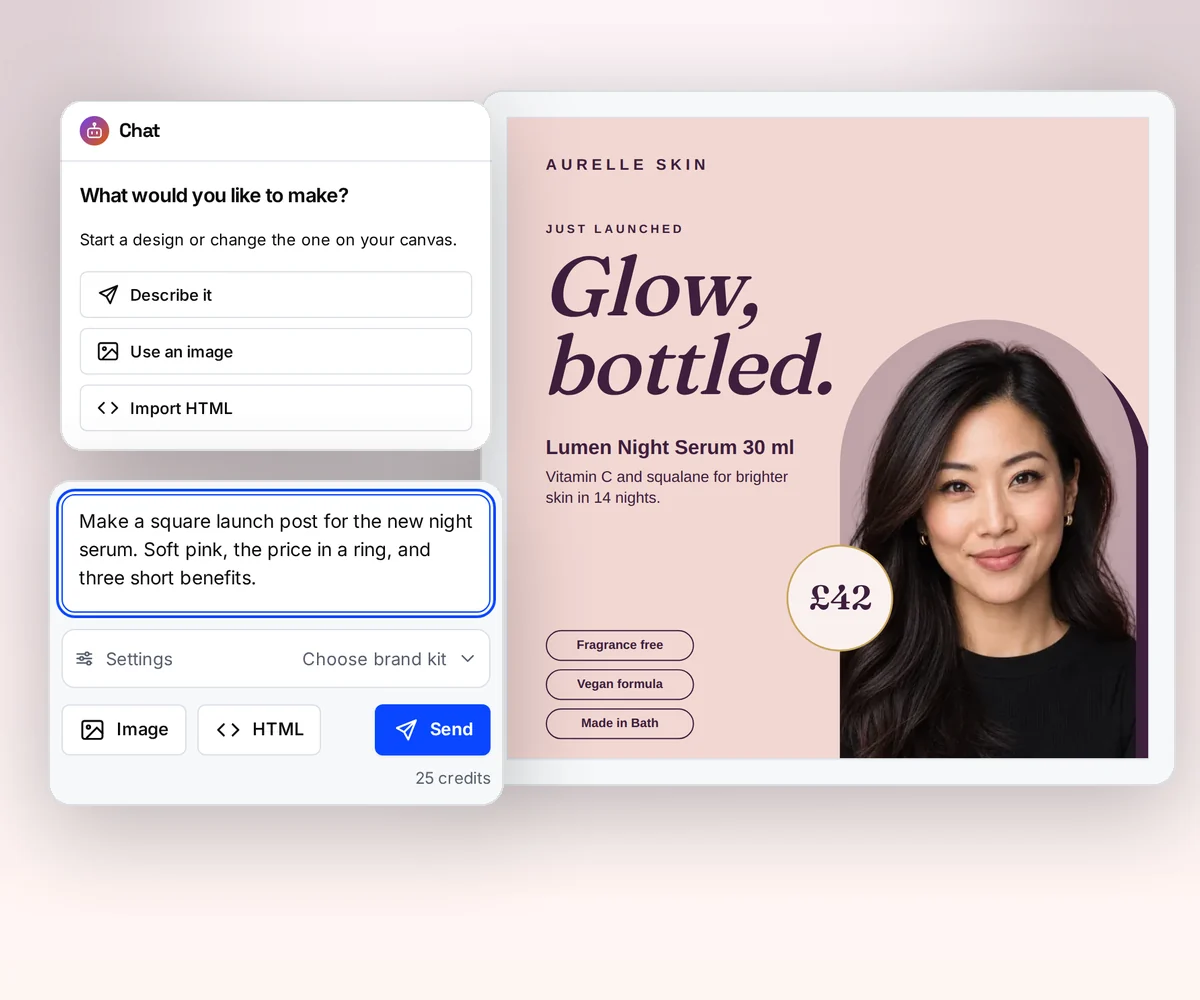
AI builds the invoice design, so nobody writes the HTML
With PDFShift, your code builds the whole invoice in HTML and CSS before the first PDF exists, and every design change is an HTML change, in your code or in a saved template (our reading, 12 October 2026). In thirds.ai the AI builds the design for you, in your logo, colours, and fonts, and a change is a sentence to the AI or a drag in the editor.
If you already send an invoice today, upload a picture of it. The AI rebuilds it as a design you can edit, in your brand. Try it on the AI template generator page, or turn a picture into a template.
Where thirds.ai wins
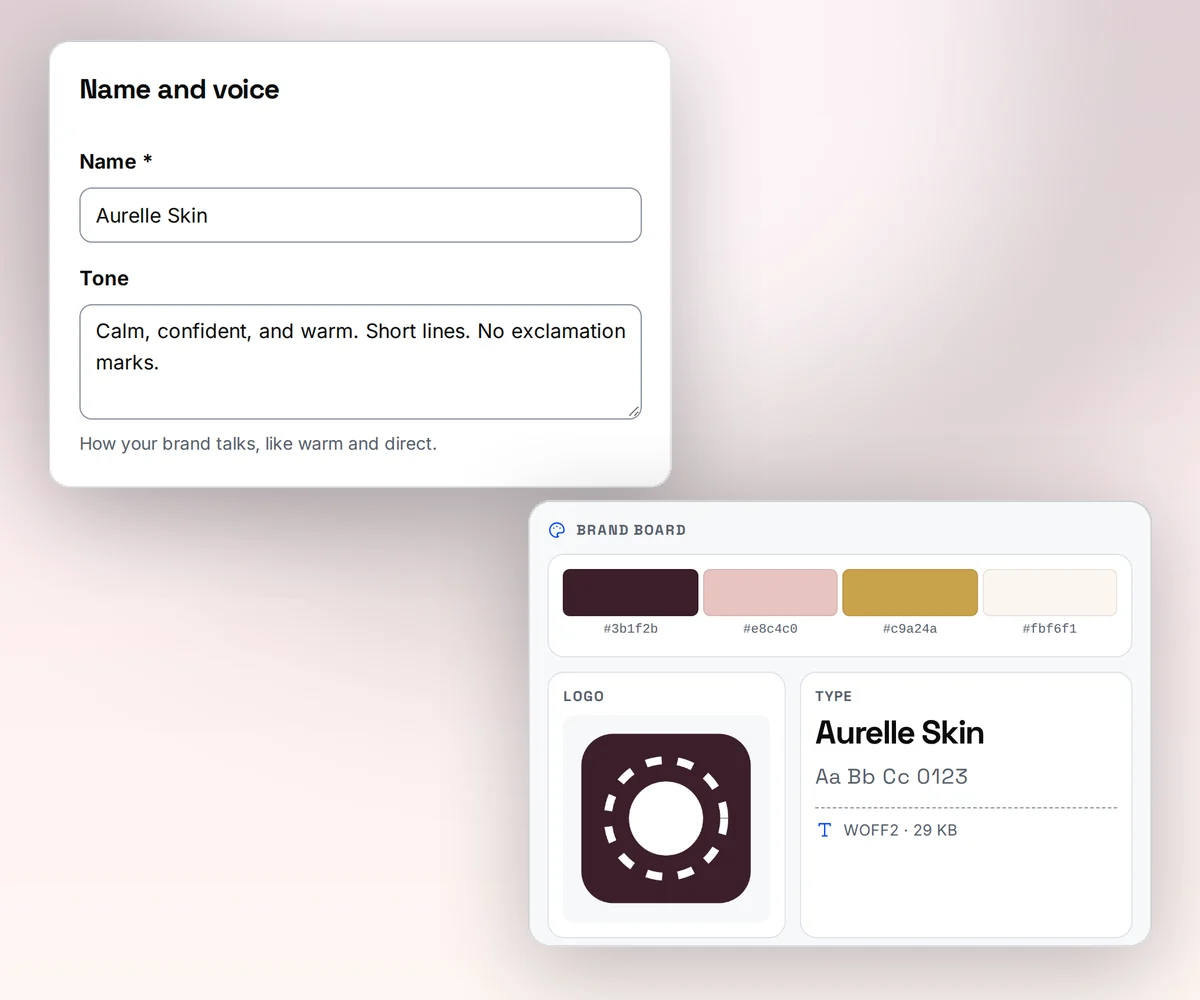
Your brand on every file in one step
Save your logo, colours, and fonts once as a brand kit, or type your website address and thirds.ai builds the kit from what it finds there. Pick the kit on any design, and the colours and logo land where they fit. An agency keeps one report design and switches the kit for each client.
PDFShift converts the HTML you send, so your brand lives in your CSS, and a new client's colours mean an HTML change (our reading, 12 October 2026).
Where thirds.ai wins
Ask ChatGPT or Claude for this month's PDF
Connect thirds.ai to ChatGPT, Claude, Gemini, Grok, or any other AI you use. Then ask for the file in plain words: this month's invoice for this client with these items. The assistant fills the saved design, writes any text you leave to it, and hands you the finished PDF in your brand.
PDFShift has an MCP server too, with 11 tools that convert HTML, manage saved HTML templates, and fill one with data (vendor claim, checked 12 October 2026). The difference is what the assistant starts from. With PDFShift, someone writes the HTML template first, by hand or with the assistant. With thirds.ai the assistant starts from a designer-made or AI-built design that already wears your brand kit.
Where thirds.ai wins
One credit a file, however big the report
PDFShift counts one credit per 5 MB of output (vendor claim, checked 12 October 2026). A monthly report full of charts and photos can cost two or three credits where a one-page invoice costs one.
thirds.ai charges one credit for a PDF of up to 100 pages and 25 MiB, and one credit for an image, so a 40-page report with pictures costs the same as a one-page invoice.

No code needed
Can you make a monthly invoice PDF without writing HTML?
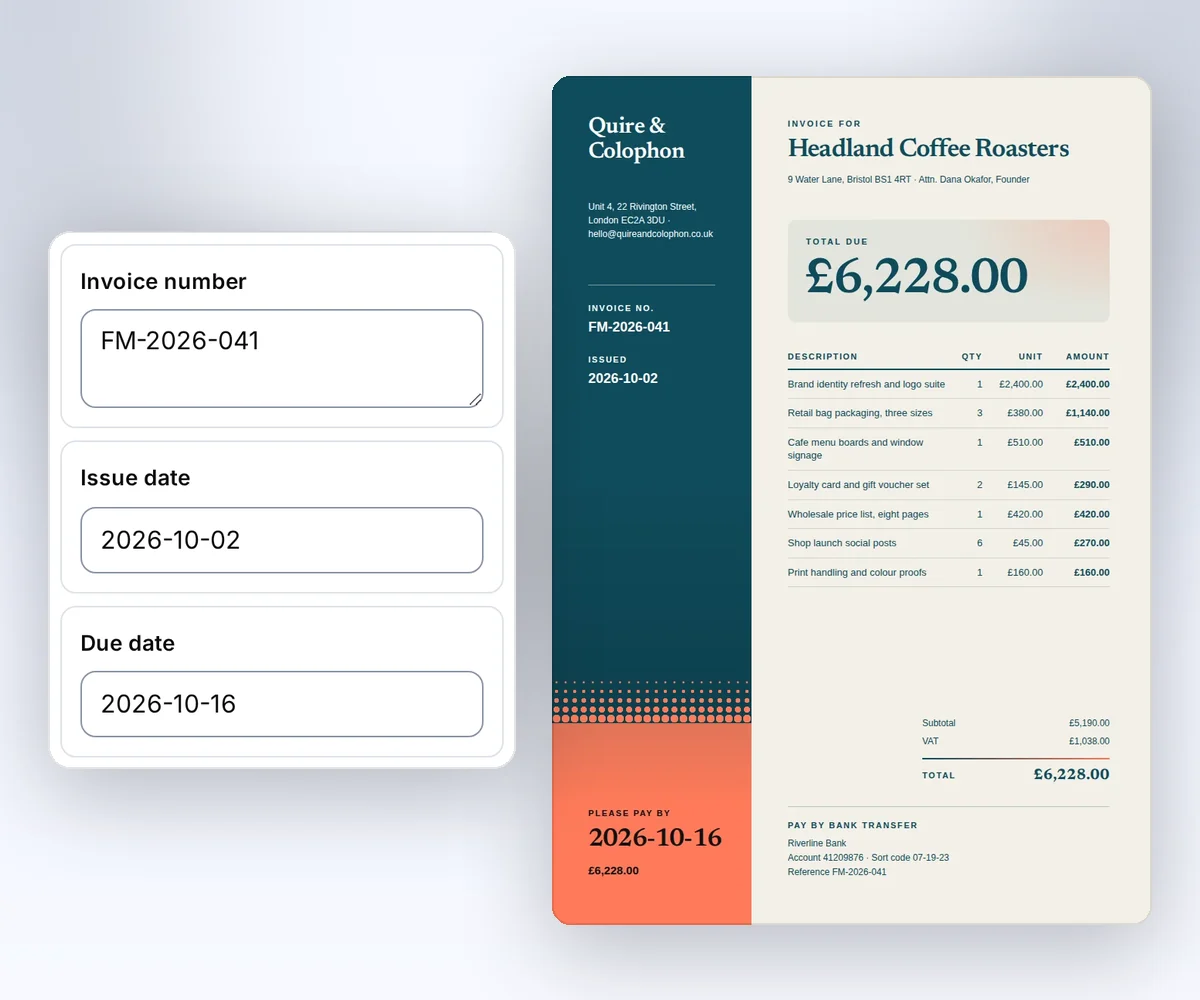
Yes. Open a designer-made invoice in the gallery, type the details into the boxes beside it, and download the PDF. No HTML, no code, and a free account is enough to start.
- Open the Design studio invoice and click Use this template, or describe your own invoice or report to the AI.
- Type your studio name, the client, the dates, and each item into the boxes beside the invoice. The invoice changes as you type. Pick your brand kit, and it switches to your logo and colours.
- Click Save and export PDF to download it for one credit. Next month, open the same saved design and change the details, or ask ChatGPT or Claude for it.
When you're ready, your developers can send the same details to the same saved design from their own code. The Use templates with your data guide shows how.
Switching
Moving from PDFShift
You move from PDFShift to thirds.ai one document type at a time, and most of the work is moving the request fields. You need one sample HTML file, the PDF that PDFShift made from it, and a thirds.ai API key. PDFShift puts the document in source and the page options at the top level, such as format, landscape, and margin (vendor claim). thirds.ai puts the document in html and the page options in a pdf object, such as pdf.format, pdf.landscape, and pdf.margins. PDFShift returns the file in the response body by default (vendor claim), while thirds.ai makes the file in the background and gives you a download link when it's ready. If you use PDFShift's webhook today, register a thirds.ai webhook and handle its signed events for a finished or failed file. If a document runs past 100 pages, split it, because that's the thirds.ai PDF limit.
Follow the pattern in our wkhtmltopdf migration guide: save sample inputs and PDFs, move one document type, compare the output, then move the next. Start with Generate your first PDF with the API, then set page options with the PDF and image options guide. If you load a URL in PDFShift today, prepare the HTML in your app and send it with absolute asset URLs, and make sure it already holds the content that the page's scripts would have loaded. thirds.ai can't fetch the URL for you. Or skip rewriting the HTML: upload a picture of an old PDF and let the AI rebuild it in your brand. If you're weighing more than one switch, the DocRaptor comparison and the cloudlayer.io comparison check two more HTML to PDF tools against the same job.
Checked and dated
Sources
We checked PDFShift's features, prices, credit unit, docs, and AI agent pages on 12 October 2026. Numbers marked (vendor claim) come from PDFShift. Where we say which tool fits, or that we didn't find a feature, that's our opinion.
- https://pdfshift.io/, checked 12 October 2026, for HTML and URL input, image formats, S3 export, and webhooks
- https://pdfshift.io/pricing, checked 12 October 2026, for every plan price, the overage rates, the yearly discount, the free plan limits, and the credit per 5 MB of output
- https://docs.pdfshift.io/, checked 12 October 2026, for the PDF, PNG, JPEG, and WebP endpoints, saved HTML templates, and sandbox mode
- https://docs.pdfshift.io/api-reference/convert-to-pdf, checked 12 October 2026, for the
sourcefield, the page options,sandbox,webhook, ands3_destination - https://docs.pdfshift.io/api-reference/convert-to-png, checked 12 October 2026
- https://docs.pdfshift.io/docs/webhook-events, checked 12 October 2026
- https://docs.pdfshift.io/docs/saving/to-s3, https://docs.pdfshift.io/docs/saving/to-gs, and https://docs.pdfshift.io/docs/saving/to-r2, checked 12 October 2026, for direct export to a customer's own bucket
- https://pdfshift.io/agents, checked 12 October 2026, for the Zapier, Make, and n8n guides
- https://pdfshift.io/agents/mcp, checked 12 October 2026, for the MCP server and its 11 tools
- https://docs.pdfshift.io/api-reference/templates/generate-document-from-template, checked 12 October 2026
- thirds.ai facts come from our pricing page, API reference, billing guide, and limits page.
Free to try
Make your first file free
Open the Design studio invoice, type in your own details, and download the PDF for free. If you already have HTML, start with the PDF quickstart.
Start from a designer-made template and download a real file for free. Sign up, and ChatGPT or Claude can make the next one in your brand.