
OpenCode MCP config for thirds.ai
Your OpenCode MCP config for thirds.ai is one remote server entry in opencode.json, with your API key kept in an environment variable. With thirds.ai, you save a design once, such as an invoice, a report, a certificate, or a social post, with your logo, colours, and fonts. Then you type in new details and get a finished PDF or image. Once OpenCode has the server, you can ask it for those files from your terminal, so you don't have to lay out each one by hand. Each successful PDF or image costs one credit, and a verified account gets 50 free credits each month.
Give this prompt to your AI agent. The agent does the task for you.
Read https://thirds.ai/docs/mcp/opencode and help me connect OpenCode to thirds.ai with an API key
See the OpenCode file workflows for designs and prompts to try after setup.
Make it without code
You can make the same branded files in the thirds.ai editor without OpenCode or any code. It takes three steps, and you need a free thirds.ai account.
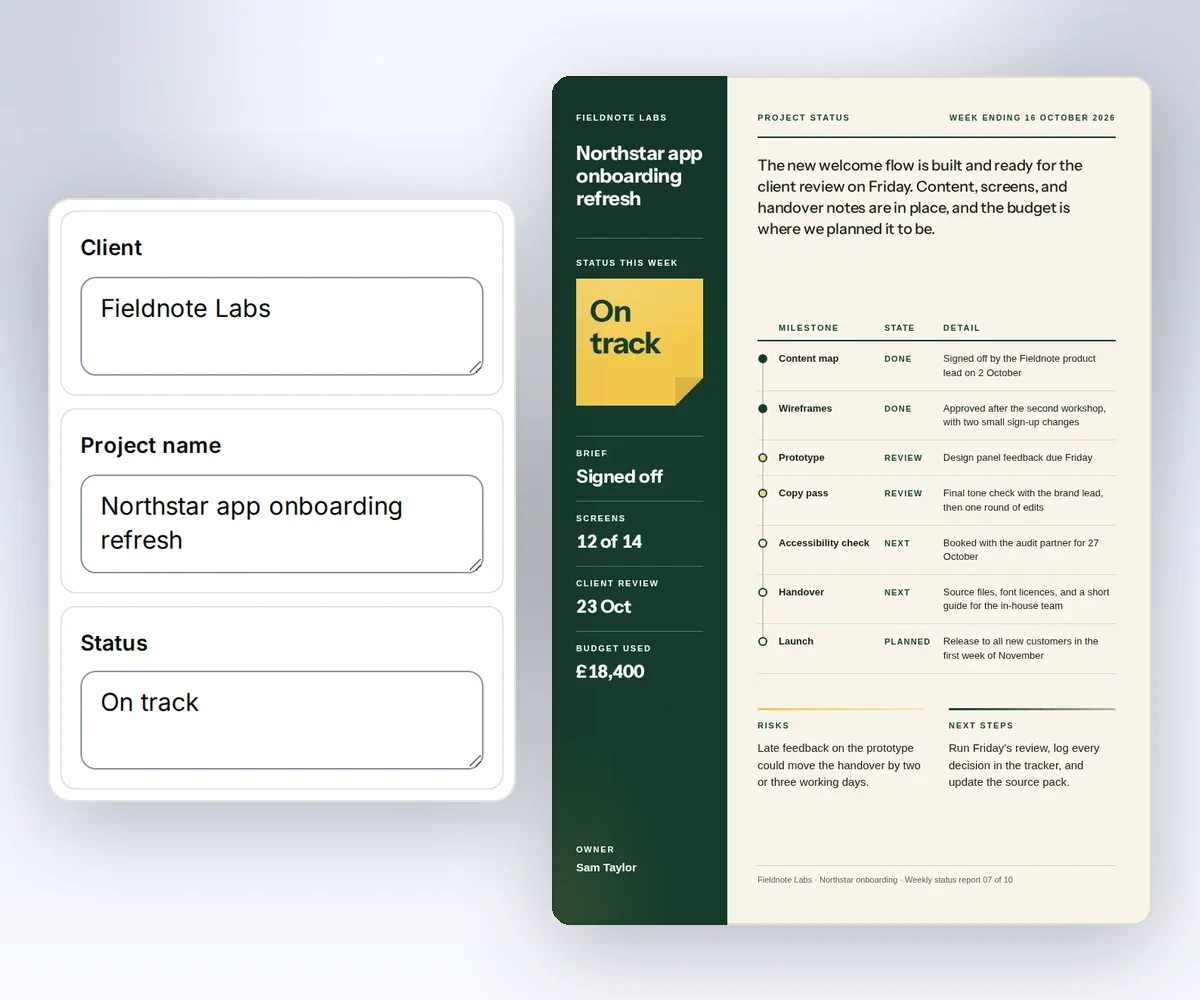
- Open the Project status report template and click Use this template. Sign in and verify your account first if you need to.
- Open the Data tab and type your client, the project name, the week, and each milestone. Click Preview with data above the canvas to see the report. The preview is free.
- Click Export, then Save and export PDF, and click Download PDF.
When you want OpenCode to make next week's report for you, add the thirds.ai MCP server to your OpenCode config.
Where is the OpenCode MCP config file?
The OpenCode MCP config lives in the mcp key of opencode.json. Your global file is ~/.config/opencode/opencode.json, and a project file is opencode.json in the project root. OpenCode's config guide (checked 25 September 2026) says OpenCode merges the files, and the project file wins when both set the same key.
Use the global file when you want thirds.ai in every project. Use a project file when you want to share the server entry with your team. Each person still needs their own API key.
Add the thirds.ai MCP server to your OpenCode config
You add the thirds.ai MCP server to OpenCode in three steps: create a key, store it in an environment variable, and add one server entry to opencode.json. You need a thirds.ai account and OpenCode on your computer.
- Create an API key on the API keys page.
- Set
THIRDS_API_KEYin the environment that starts OpenCode. - Add this remote server to
~/.config/opencode/opencode.json, or toopencode.jsonin one project:
{
  "$schema": "https://opencode.ai/config.json",
  "mcp": {
    "thirds": {
      "type": "remote",
      "url": "https://thirds.ai/mcp",
      "enabled": true,
      "oauth": false,
      "headers": {
        "Authorization": "Bearer {env:THIRDS_API_KEY}"
      }
    }
  }
}
OpenCode's MCP server guide (checked 25 September 2026) says a remote server needs "type": "remote" and a url. The same guide says "oauth": false turns off the OAuth sign-in for servers that use an API key. OpenCode swaps {env:THIRDS_API_KEY} for your key when it connects, so the key stays out of the file and out of source control.
Connect with only the URL
You can skip the key and sign in on a thirds.ai page. Leave out the oauth and headers lines, so the entry holds only type, url, and enabled. OpenCode's MCP server guide says OpenCode starts the OAuth sign-in by itself when a server asks for it, and registers with the server for you (checked 27 September 2026). To start it by hand, run opencode mcp auth thirds. When the thirds.ai page opens, sign in if you need to and click Allow.
This connection gets every thirds.ai tool except the two AI image tools. Use the API key setup when you need those. To stop the connection, open your thirds.ai Settings, find the app under Connected apps, and click Disconnect.
Check the connection in OpenCode
You check the thirds.ai connection in OpenCode with one command, then one question to the agent. Restart OpenCode first if you changed the config or the environment. Then run:
opencode mcp list
The list must show thirds as connected. Then ask OpenCode to list the thirds.ai tools. If thirds doesn't connect, run opencode mcp debug thirds. OpenCode's MCP server guide says this command tests the connection and shows the sign-in status, so a missing key or a typo in the Authorization line shows up there.
Read the main MCP guide before your first paid call. It explains credit approval, safe retries, and status checks.
FAQ
Why does OpenCode start an OAuth flow when I use an API key?
OpenCode tries OAuth for remote servers unless you set "oauth": false. Add that field and keep the bearer header. If you'd rather sign in on a thirds.ai page, let the sign-in run and click Allow.
Does connecting spend credits?
No. Connecting and listing tools don't spend credits. AI template work and successful files can. Ask your agent to show the action and the cost before it starts paid work.