
thirds.ai vs HTML/CSS to Image
HTML/CSS to Image is an API that turns HTML and CSS, a public web page, or a saved template into a PNG, JPG, WebP, or PDF, and hosts it at a link (vendor claim). thirds.ai makes the same kind of images, and its AI builds the design for you: from a sentence, or by rebuilding a picture you already use, in your logo, colours, and fonts. A designer-made gallery gives you a finished look on day one, and your saved brand kit goes on every image in one step. HTML/CSS to Image Basic is $14 a month for 1,000 images (vendor claim). thirds.ai Starter is $29 a month for 2,500 credits, and one credit makes one image or PDF.
We aren't connected to HTML/CSS to Image. HTML/CSS to Image is a trademark of its owner.
- 1 credit
- makes 1 PDF or image
- 50 credits
- free every month, no card
- $29
- a month for Starter, with 2,500 credits
- 4 formats
- PDF, PNG, JPEG, and WebP
Feature by feature
What's different
| What you need | thirds.ai | HTML/CSS to Image |
|---|---|---|
| Who builds the design | AI builds it from a sentence, or rebuilds a picture you upload as a design you can edit, already in your brand. Or start from a designer-made gallery template. | You do, in HTML and CSS or in its visual template editor with text, image, shape, QR code, and HTML blocks (vendor claim). We didn't find a way to start from a sentence or a picture (our reading). |
| Inputs | A sentence, a picture, your own HTML, or a gallery template. Your code can also send plain HTML without saving a design. It can't load a page by URL. | HTML in html with separate css, a public page in url, or a saved template with template_values (vendor claim). |
| Outputs | PDF, PNG, JPEG, and WebP, on every plan including Free. | PNG, JPG, and WebP by changing the file extension on the hosted link, and PDF on paid plans (vendor claim). |
| Template editing | Ask for the change in words, and the AI edits the design. The same editor lets you move a box yourself. | A visual template editor with variables and a version history, limited to 5 templates with no media uploads on the free plan (vendor claim). |
| Brand kits | Save your logo, colours, and fonts once, or build the kit from your website address. Pick the kit on any design, and the image comes out in your brand. | Google Fonts load through a google_fonts field, and colours can be template variables (vendor claim). We didn't find a saved brand kit that applies across templates (our reading). |
| AI assistants | Connect ChatGPT, Claude, or any other AI you use, and ask it for the design and then for each image. | An MCP server with OAuth sign-in for ChatGPT, Claude, Cursor, Gemini CLI, Grok, and other tools. It makes images from HTML and web pages, and saves and lists templates (vendor claim). |
| API | A REST API at /v1/pdf, /v1/image, and /v1/templates, with signed webhook events when a file is ready. | POST https://hcti.io/v1/image with HTTP Basic authentication, viewport, scale, selector, and delay fields, batch create of up to 25 images a request on Basic and Pro, and delivery to your own S3-compatible bucket from the 10,000-image plan (vendor claim). |
| Finished files | A download link that works for 15 minutes. The file stays in your account for up to a year on a paid plan, or up to 30 days on the Free plan, so you can fetch it again. Your app stores the copy it serves. | A hosted link that stays up for as long as your account is active, served from a CDN, so you can put it straight in a page (vendor claim). |
| Link-preview images | A gallery Open Graph card that you fill in the editor, or that your code or your AI assistant fills for each page. | Automatic Open Graph images on paid plans: it reads each page's title and description and makes the picture itself (vendor claim). |
| Integrations | A Zapier app and a Make app, both by invite link, and an n8n community node. | Zapier, Make, n8n, Pipedream, and Cloudflare Workers (vendor claim). |
| Pricing model | One credit makes one PDF or image. Starter is $29 a month for 2,500 credits. Extra credits cost $0.015 each on a paid plan, and packs start at $10 for 500 credits. | Basic is $14 a month for 1,000 images, $29 for 3,000, or $69 for 10,000. Pro starts at $149 for 30,000. Overage is optional at $10 per 1,000 images (vendor claim). |
| Free tier | 50 free credits a month, no card. That's enough for one AI-built design, or 50 images from a gallery template. | 50 images a month, no card, with 5 templates, no media uploads, no PDF, no automatic Open Graph images, and no overage (vendor claim). |
| Where it fits | Teams that want AI to build the design, every size of it at once, and PDFs from the same credits, on the free plan too. | Developers who already write the HTML and want a hosted link back, page screenshots, or automatic Open Graph images (our judgment). |
Pricing
How much does HTML/CSS to Image cost compared with thirds.ai?
The cheaper tool depends on how many files you make each month and what kind they are. Here's what HTML/CSS to Image and thirds.ai each cost, and how each one counts a file.
- We checked both pricing pages on 12 October 2026. Prices can change, so check the HTML/CSS to Image pricing page and our pricing page before you decide.
- HTML/CSS to Image Basic is $14 a month for 1,000 images, $29 for 3,000, or $69 for 10,000. Pro is $149 for 30,000, $249 for 65,000, or $375 for 100,000, and Scale starts at $749 for 200,000 (vendor claim). If you already write the HTML and only need images, it's the cheaper tool: $14 against $29 for about 1,000 a month, and $69 against $79 for 10,000.
- One thirds.ai credit makes one PDF of up to 100 pages, or one image. Starter is $29 a month for 2,500 credits, Growth is $79 for 10,000, and Scale is $199 for 40,000. Extra credits cost $0.015 each on a paid plan, and packs start at $10 for 500 credits. A yearly plan costs the same as 10 months. A file that fails costs nothing. See credits and billing.
- The AI uses thirds.ai credits too: 50 to build a design or rebuild one from a picture, 25 for a later text or HTML change, and 50 for a change with a new picture. A new AI picture inside a design also costs 50. Those are the credits that save you the design work, so count them once per design, not per image.
- HTML/CSS to Image counts one image per request. Its very large size, which it calls jumbo and allows up to 80,000 pixels on a side, uses extra credits (vendor claim). Overage on Basic and Pro is optional at $10 per 1,000 images (vendor claim). Its pages don't say whether a failed image counts, and we didn't find yearly billing on the pricing page (our reading, 12 October 2026).
Where thirds.ai wins
AI builds the design, so nobody writes the HTML
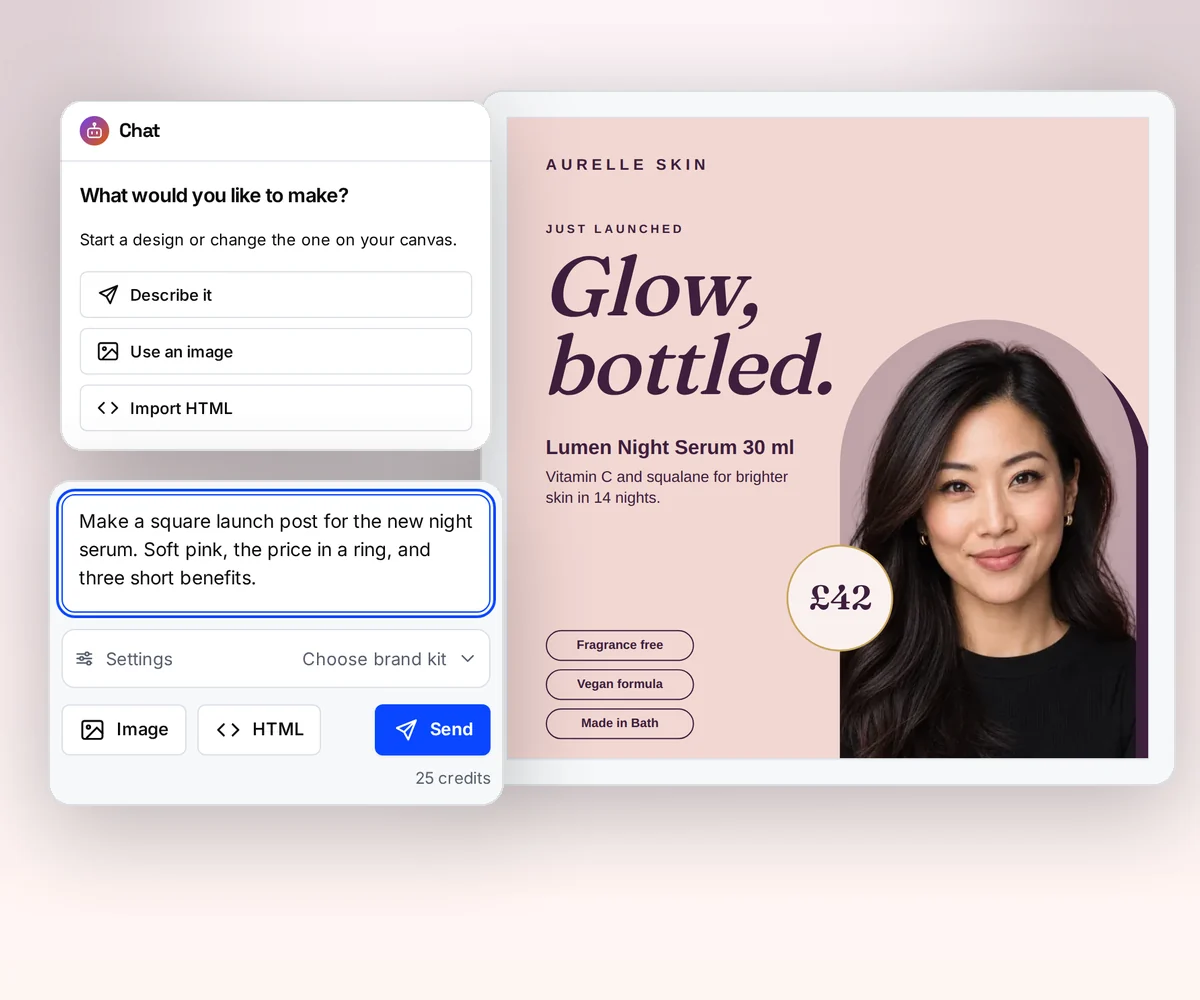
In HTML/CSS to Image you write the HTML and CSS for each design, or build it block by block in its template editor (vendor claim, checked 12 October 2026). In thirds.ai you describe the image, and the AI builds the design already in your logo, colours, and fonts, and changes it in words as often as you ask.
If you already have the product image or share card, upload a picture of it. The AI rebuilds it as a design you can edit, in your brand, so the one creative you like becomes every variant you need. Try it on the AI template generator page, or turn a picture into a template.
Where thirds.ai wins
Your brand on every image in one step
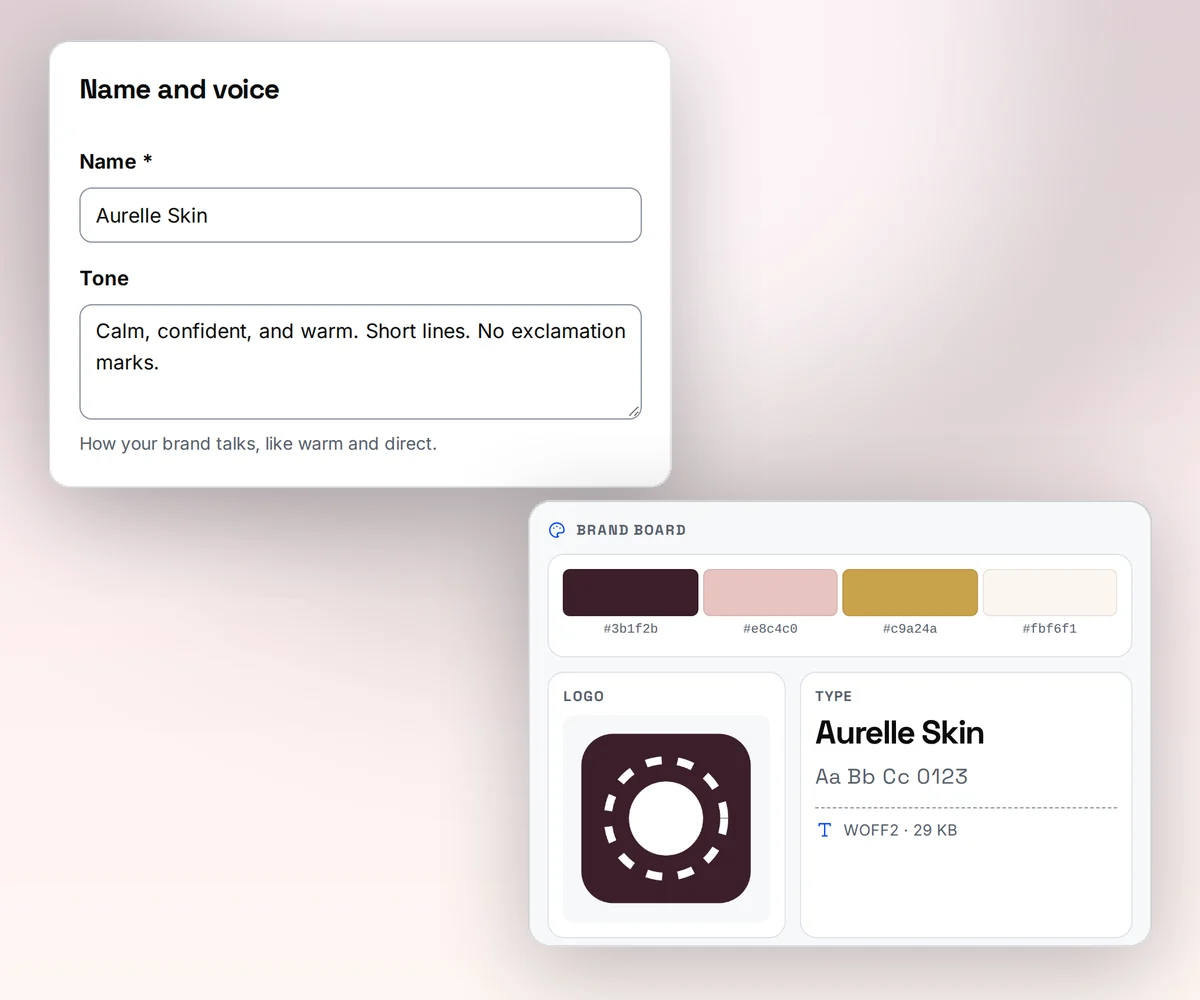
Save your logo, colours, and fonts once as a brand kit, or type your website address and thirds.ai builds the kit from what it finds there. Pick the kit on any design, and the colours and logo land where they fit. One product card design serves every brand you run.
In HTML/CSS to Image, fonts come from a google_fonts field and colours live in each template's variables (vendor claim, checked 12 October 2026). We didn't find a saved brand kit that applies across templates, so a new brand there means restyling each template (our reading).
Where thirds.ai wins
Ask ChatGPT or Claude for the finished image
Connect thirds.ai to ChatGPT, Claude, Gemini, Grok, or any other AI you use. Then ask for the image in plain words: a share card for this blog post, or a product image for each item in this list. The assistant builds the design with you, writes the text, and hands you the finished image in your brand.
HTML/CSS to Image's MCP server also connects ChatGPT, Claude, Cursor, Grok, and other tools, and it turns the HTML you give it into images, takes screenshots, and saves templates (vendor claim, checked 12 October 2026). The difference is what the assistant starts from. There, it starts from HTML or a template you made (our reading). Here, it starts from a designer-made gallery template and your brand kit, so the first image already looks finished.
Where thirds.ai wins
Every size and a whole spreadsheet at once
A product image is rarely one file. Smart resize makes every size of a design at once, so the same card fits the share link, the story, and the ad slot. Hand thirds.ai a spreadsheet, and it makes one image per row in one go. HTML/CSS to Image also makes images in batches, up to 25 at a time on Basic and Pro (vendor claim, checked 12 October 2026). There, your code sends the HTML or the values for each image. Here, you upload the spreadsheet, or ask ChatGPT or Claude to fill the rows.

No code needed
How do you make a link-preview image in thirds.ai without code?
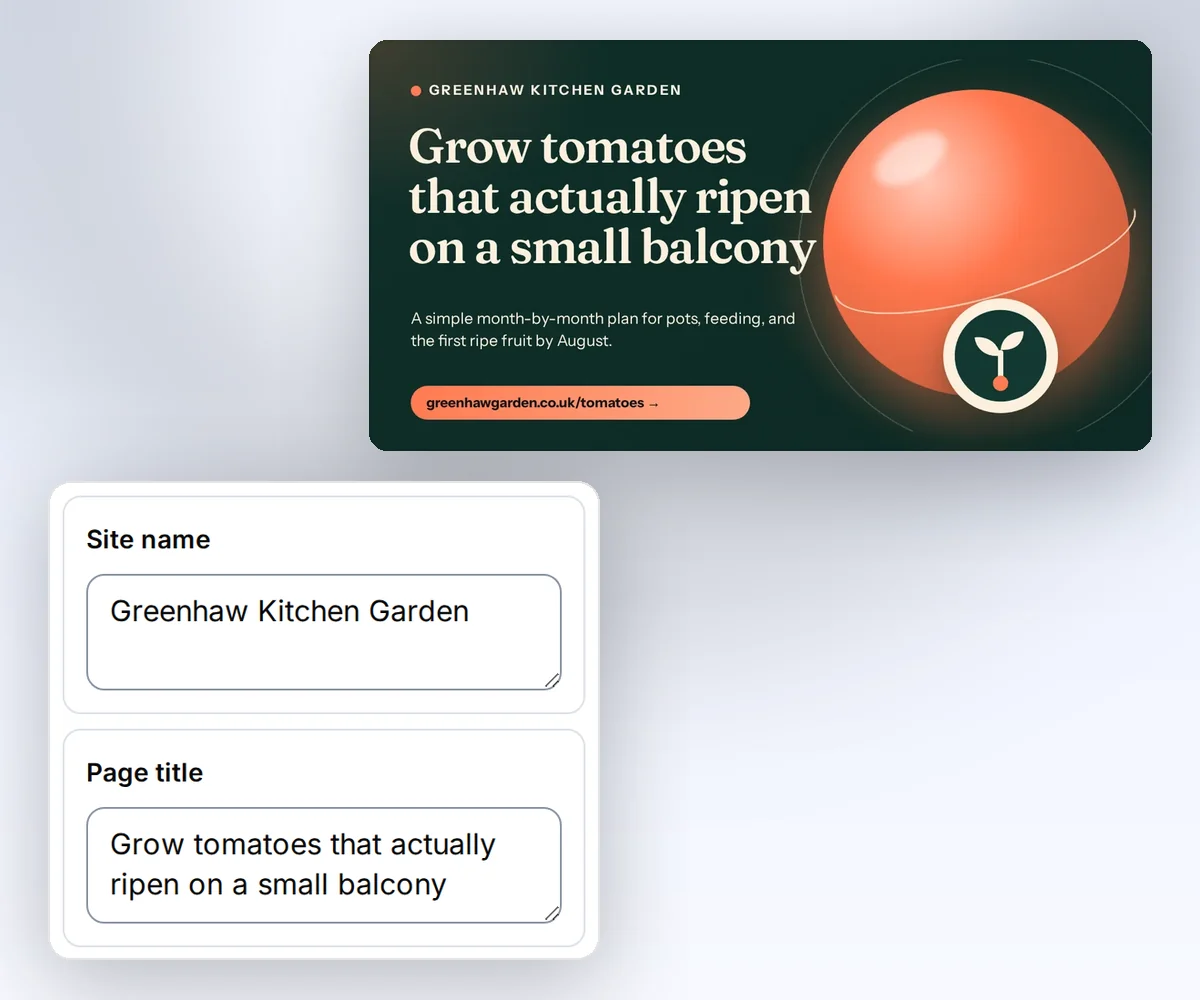
Open the designer-made Open Graph card in the gallery, type your page's title and description into the boxes beside it, and download the image. No code needed, and the free plan's 50 credits a month are enough to start.
- Open the Open Graph card and click Use this template.
- Type your page title, a short description, your site name, and the web address into the boxes. Pick your brand kit, and it switches to your logo and colours.
- Click Save and export PNG to download the 1200 × 630 image for one credit, and add it to your page as its og:image.
For the next page, open the saved card and change only the title and description, or ask ChatGPT or Claude for it. If you already have a share card you like in HTML/CSS to Image, save a picture of it, start a new design in the editor, choose Start from an image, pick your brand kit, and upload the picture. The AI rebuilds it as a design you can edit, for 50 credits.
Switching
Moving from HTML/CSS to Image
You move an HTML/CSS to Image request to thirds.ai in three steps: change the input fields, move the size settings, and add a step that stores each file. Keep one real request and its finished image first, so you can compare the new file with the old one.
HTML/CSS to Image takes html and css as separate fields with viewport_width and viewport_height (vendor claim). thirds.ai takes one html string, so put the CSS in a <style> tag. Put the size in an image object as image.width and image.height, with image.format for png, jpeg, or webp. HTML/CSS to Image returns a hosted url in the response (vendor claim). thirds.ai creates a render job and gives you a signed download link when the job succeeds, or sends a webhook event. Add a step that downloads the file and stores it where your app serves images, such as your own S3 or R2 bucket.
If you use google_fonts today, load the same fonts with a <link> tag or an @font-face rule in the HTML, or upload them to a brand kit and let the design read them. If you send a url today, prepare the HTML in your app and send it with absolute asset URLs, since thirds.ai doesn't fetch a page. Start with Generate your first PDF with the API, then set sizes and formats with the PDF and image options guide. You can also skip the port: upload a picture of the old image and let the AI rebuild it in your brand.
Checked and dated
Sources
We checked HTML/CSS to Image's features and prices on 12 October 2026. Numbers marked (vendor claim) come from HTML/CSS to Image. Where we say which tool fits, or that we didn't find a feature, that's our opinion.
- https://htmlcsstoimage.com/, checked 12 October 2026
- https://htmlcsstoimage.com/pricing, checked 12 October 2026
- https://docs.htmlcsstoimage.com/, checked 12 October 2026
- https://docs.htmlcsstoimage.com/getting-started/using-the-api/, checked 12 October 2026
- https://docs.htmlcsstoimage.com/getting-started/og-images/, checked 12 October 2026
- https://docs.htmlcsstoimage.com/template-editor/, checked 12 October 2026
- https://docs.htmlcsstoimage.com/integrations/, checked 12 October 2026
- https://docs.htmlcsstoimage.com/integrations/mcp/, checked 12 October 2026
- https://docs.htmlcsstoimage.com/faq/, checked 12 October 2026
- thirds.ai facts come from our pricing page, API reference, billing guide, and limits page.
Free to try
Make your first file free
Open the Creator video thumbnail template below, type a video title, and download your first image. The HTML recipe shows how to make and store a link-preview image from your code, and HTML to image in Python does the same from a Python app. If you're leaving Bannerbear, see how both tools compare with six others in our list of Bannerbear alternatives.
Start from a designer-made template and download a real file for free. Sign up, and ChatGPT or Claude can make the next one in your brand.