
To turn HTML into an image in Python, send your HTML to the thirds.ai image API with requests, wait for the file, and download it as a PNG, WebP, or JPEG. Chromium lays out your page on our servers, so you don't install a browser or wkhtmltoimage on your own server. Save the layout as a template, and your app can make the next report card with one request, or you can ask ChatGPT or Claude for it.


Read the setup prompt
Help me follow https://thirds.ai/blog/png-webp-images-from-html-python in ChatGPT or Claude. Read its linked thirds.ai docs before giving steps. Keep API keys and webhook secrets out of chat. Turn my HTML into PNG, WebP, or JPEG in Python. Ask for the HTML and image size. Guide one private API request, check its status, and save the finished image. Before spending credits, tell me the cost and wait for my approval.
Read the transcript
Here’s how to turn HTML into PNG and WebP images in Python… a report card, a social card, or a product shot, straight from your app!
Start with your HTML. Make the page the exact size you want, set the margin to zero… and add a UTF-8 charset, so symbols and names come out right.
In Python, one function posts the HTML to /v1/image, with the format and the size. The Idempotency-Key makes a retry safe… so a dropped connection never costs you a second credit.
The next function waits for the job. It checks every second and a half, slows down when the server sends Retry-After, and stops at a clear deadline.
Then download the file, and check its size and its SHA-256 against the job… before you save it.
Loop over three formats, and run it! There they are… PNG, WebP, and JPEG. Each image costs one credit.
PNG keeps text sharp and supports see-through backgrounds. WebP is made for the web. But no format is always smaller, so compare your own files.
But hey, if you make a new card every week, save the layout once as a template on thirds.ai. Then send just the data… three products, three cards, three credits.
Start free with fifty credits a month, at thirds.ai.
Make it without code
If you'd rather not write Python at all, connect thirds.ai to ChatGPT or Claude and ask for the image. The assistant writes the headline, puts it on the design, and hands you the file. Or use the editor with a free account: start from the designer-made Product spotlight template and add your headline and product picture.
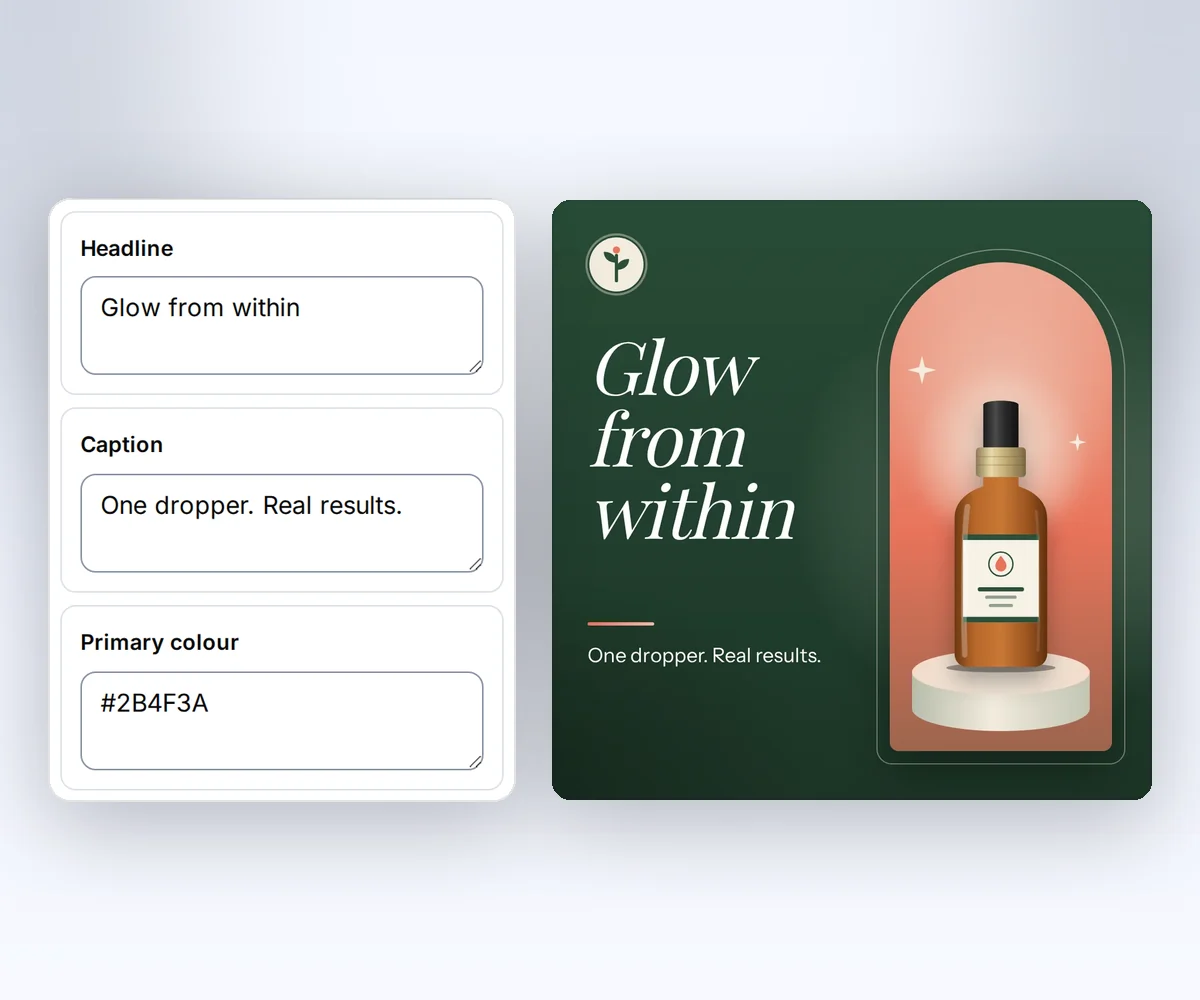
- Open the Product spotlight template and click Use this template. Sign in first if you need to.
- Open the Data tab and type your headline and caption. Click Upload image to add your product picture, or paste its web address and click Use image URL. Your image changes on the canvas as you type.
- Click Export, pick PNG, JPEG, or WebP under File type, then click Save and export PNG (or the type you picked) and download your image.
How to make a template you can reuse walks through the rest of the editor. Use the Python steps below when your app needs to make these images on its own.
Which Python library turns HTML into an image?
If you'd rather not run a browser on your server, a hosted API is the simplest route: you only need requests. Local libraries work too and cost nothing per image, but you install and update the browser yourself.
| Route | What you install | Good fit |
|---|---|---|
| imgkit | The wkhtmltoimage program from wkhtmltopdf | Simple pages on a machine that already has wkhtmltopdf |
| html2image | Chrome, Chromium, or Edge on the same machine | Scripts on your own computer |
| Playwright | Playwright and its browsers | Teams that already run browser tests |
| thirds.ai image API | Only requests | Apps with no browser on the server, or images you also want from ChatGPT, Claude, or a spreadsheet batch |
Be careful with imgkit on a new project. The wkhtmltopdf code was archived on 2 January 2023, and its own status page says the WebKit it ships with hasn't been updated since 2012 (both read on 13 October 2026). So CSS grid, which arrived in Chrome 57, Firefox 52, and Safari 10.1 (Can I use, read on 13 October 2026), isn't in it. html2image needs Chrome, Chromium, or Edge installed, and it takes screenshots at 1920 by 1080 unless you set its size option, according to its README (read on 13 October 2026). Playwright downloads its own browsers with playwright install and takes the picture with page.screenshot() (Playwright for Python, read on 13 October 2026).
If you already make images with another service, read the HTML/CSS to Image comparison or the Puppeteer and Playwright comparison. If you also make PDFs with wkhtmltopdf, the wkhtmltopdf alternative guide helps you choose a new tool, and the wkhtmltopdf move guide maps each old option to a thirds.ai request.
What you need
You need three things, and the free plan covers the key.
- Python 3 and
pip install requests. The Requests quickstart covers installation, JSON requests, and network timeouts (read on 13 October 2026). - A thirds.ai API key.
- Your HTML. The example below is a small card, but a full page with web fonts and grid layout works the same way.
Keep the key in an environment variable such as THIRDS_API_KEY, and never paste it into a script that you commit.
Write the HTML
Give the body the size of the image you want and set its margin to zero. You get exactly the rectangle you ask for at device scale 1. The capture doesn't scroll, so anything outside the rectangle is not in the file. Add <meta charset="utf-8"> so symbols and accented names show up. Save this HTML as card.html.
<!doctype html>
<html lang="en">
  <head>
    <meta charset="utf-8" />
    <style>
      body {
        margin: 0;
        width: 1200px;
        height: 630px;
        background: #0a46ff;
        color: white;
        font: 32px/1.4 sans-serif;
      }
      main {
        padding: 64px;
      }
      h1 {
        font-size: 64px;
        margin: 0 0 24px;
      }
    </style>
  </head>
  <body>
    <main>
      <h1>September report</h1>
      <p>24 orders completed</p>
    </main>
  </body>
</html>
Send the request
POST /v1/image takes the HTML as one string in the html field and the output settings in the image object. Set format to png, webp, or jpeg, and set width and height in pixels. This is the request body for the PNG.
{
  "html": "<!doctype html><html lang='en'><head><meta charset='utf-8'><style>body{margin:0;width:1200px;height:630px;background:#0a46ff;color:white;font:32px/1.4 sans-serif}main{padding:64px}h1{font-size:64px;margin:0 0 24px}</style></head><body><main><h1>September report</h1><p>24 orders completed</p></main></body></html>",
  "image": {
    "format": "png",
    "width": 1200,
    "height": 630
  },
  "wait": false
}
In Python, one function sends the request, one waits for the job, and one downloads the file. The Idempotency-Key header makes a retry safe. The same key with the same body returns the same job for 24 hours, so a dropped connection never costs a second credit.
import hashlib
import os
import time

import requests

API = "https://thirds.ai"
HEADERS = {"Authorization": f"Bearer {os.environ['THIRDS_API_KEY']}"}


def create_image(html: str, fmt: str, width: int, height: int, key: str) -> dict:
    response = requests.post(
        f"{API}/v1/image",
        headers={**HEADERS, "Idempotency-Key": key},
        json={
            "html": html,
            "image": {"format": fmt, "width": width, "height": height},
            "wait": False,
        },
        timeout=30,
    )
    response.raise_for_status()
    return response.json()


def wait_for_job(job: dict, deadline_seconds: int = 120) -> dict:
    stop = time.monotonic() + deadline_seconds
    delay = 1.5
    while job["status"] in ("queued", "running"):
        if time.monotonic() + delay >= stop:
            raise TimeoutError(f"job {job['id']} is still {job['status']}")
        time.sleep(delay)
        remaining = stop - time.monotonic()
        if remaining <= 0:
            raise TimeoutError(f"poll deadline for job {job['id']}")
        response = requests.get(
            f"{API}/v1/image/{job['id']}",
            headers=HEADERS,
            timeout=min(30, remaining),
        )
        retry_after = response.headers.get("Retry-After", "")
        delay = max(1.5, int(retry_after)) if retry_after.isdigit() else 1.5
        if response.status_code in (429, 503):
            continue
        response.raise_for_status()
        job = response.json()
    if job["status"] != "succeeded":
        error = (job.get("error") or {}).get("code", "no output")
        raise RuntimeError(f"{job['status']}: {error}")
    return job


def download(job: dict, path: str) -> None:
    response = requests.get(f"{API}{job['download']['url']}", timeout=60)
    response.raise_for_status()
    data = response.content
    if (
        len(data) != job["artifact"]["byte_size"]
        or hashlib.sha256(data).hexdigest() != job["artifact"]["sha256"]
    ):
        raise ValueError("download does not match the artifact metadata")
    with open(path, "wb") as file:
        file.write(data)
download.url is a relative path such as /v1/downloads/..., so the code adds https://thirds.ai in front of it. The download link lasts 15 minutes and needs no API key, so keep it private. Free accounts keep the file for 30 days, and paid plans keep it for up to a year (the exact rules). The size and checksum checks use if, not assert, so they still run under python -O. If the deadline passes, the image keeps going on our side, so keep the job ID and check it later.
The same HTML in three formats
Run the three formats in one loop. Each finished image costs one credit, so the loop spends three credits. Give each format its own key, because a different body with the same key returns 409 idempotency_conflict.
html = open("card.html", encoding="utf-8").read()

for fmt, extension in (("png", "png"), ("webp", "webp"), ("jpeg", "jpg")):
    job = create_image(html, fmt, 1200, 630, key=f"september-report-{fmt}")
    print("Job ID:", job["id"])
    job = wait_for_job(job)
    download(job, f"september-report.{extension}")
    print(fmt, job["artifact"]["byte_size"], "bytes")
The default size is 1280 by 720. Width can be 320 to 7680 pixels and height can be 200 to 4320 pixels. For a transparent PNG or WebP, set "transparent": true in the image object and leave the HTML background transparent too. For JPEG and WebP, add "quality" from 1 to 100. The default is 80. Set PDF and image options lists every field.
Which format to pick
Pick PNG for sharp text and logos, WebP for web pages, and JPEG for photos and email clients.
| Pick | When |
|---|---|
png | Sharp text, flat colours, logos, and transparent backgrounds. |
webp | Web images with text or photos. Supports transparency and a quality setting. |
jpeg | Photos, email clients, and old tools that do not read WebP. No transparency. |
File size depends on the content and the quality setting, so no format is always smaller. Drop each finished file into the free image compressor and compare the PNG, JPEG, and WebP sizes before you pick a default.
Use a saved template instead of raw HTML
When the layout stays the same, save it with {{ }} fields and send template_id, an optional version (it defaults to the newest saved version), and a data object in place of html. Keep image options in the image object. Then ChatGPT or Claude can make the next card from a chat, and a whole spreadsheet becomes one card per row in a single batch. The Product spotlight card below is a saved template with fields like these, drawn by a designer.

You can also send html with {{ }} fields and a data object in the same request to fill the fields without saving a template. Use templates with your data explains both paths.
Fix the common failures
Image requests usually fail for one of four reasons: a size outside the limits, an image or font we can't reach, a rate limit, or no credits left. A failed image costs nothing, so you can fix the cause and send the request again. Read error.code on a request error, or error.category and error.code on a failed job.
400 invalid_requestwith a field detail: theimageobject has a size outside the limits, ortransparentis true for a JPEG.unsafe_assetorinvalid_inputon the job: an image or font address points at a private host, or the HTML or one of its files didn't load. Fix it and send a new request.429 rate_limited: wait forRetry-Afterand retry with the same key.402 insufficient_credits: buy a credit pack or wait for next month's free credits.
For fonts, use a generic family such as sans-serif, or load a web font through @font-face from a public HTTPS address or from a selected brand kit. The brand kit guide shows how to use its font fields. We can't see a font that's only on your laptop, so upload it to a brand kit or host it. Retry requests and download files covers every code.
The social image workflow shows how the same data pattern fits campaign cards, and the thirds.ai comparisons cover the other image and PDF tools.
Read next
- Build an episode thumbnail from data.
- Verify a webhook when an image is ready.
- The HTML to image page shows what else thirds.ai makes from your HTML.
- Make Open Graph images from HTML makes a link preview card with
curl. - Receive results with webhooks replaces polling when you make many images.
- The thirds.ai docs list every guide for images and PDFs, from CSV batches to MCP.
Start free and make your first image with 50 credits a month.


