
Generate your first PDF with the API
To generate a PDF with an API, you send your HTML to POST /v1/pdf on thirds.ai, check the result, and download the finished file from a link. You don't run a browser or a PDF library yourself. Each finished PDF costs one API credit, a failed one costs nothing, and a free account gets 50 credits a month. Paid plans start at $29 a month. The steps use curl, Node, or Python. To see what else you can do with it, read about the HTML to PDF API.
Give this prompt to your AI agent. The agent does the task for you.
Read https://thirds.ai/docs/quickstart and help me write an integration that creates a PDF from HTML, checks its status, and downloads it.
If you're new to thirds.ai, it's a tool for PDFs and images you make again and again. You save a design once, like a report, an invoice, or a certificate. Then you send in new details and get a finished file with your logo, colours, and fonts. From your code, you stop building page layouts and loading fonts by hand. Anyone on your team can change the design in the editor, and your code stays the same.
Read the transcript
Let's turn raw HTML into a PDF with the thirds.ai API, and download the file!
You need an API key from your account page. Keep it in an environment variable, so it never shows up in your code.
First, pick a design from our template gallery. This one command saves its HTML and sample data as request.json, with wait false, so the API answers right away.
Now send a POST request to /v1/pdf. The bearer header carries your key. The idempotency key is a name you pick for this file, so a retry never makes a second one. And the body is your saved file.
Press Enter. A 202 means the job is waiting in the queue. Keep its ID. The next call needs it.
Now ask for that job by its ID. It's running... ask again, and it's succeeded! In your app, wait between polls, and stop at a deadline you choose.
Put thirds.ai in front of that download path, and save the file as report.pdf. The link is signed, so this call doesn't need your key.
And there's your PDF! One credit, and no browser for you to run.
Download links expire. If one runs out, read the job again, and you get a fresh link.
Copy every command from the quickstart at thirds.ai/docs.
Make it without code
You can make the same monthly report PDF in the thirds.ai editor without writing any code. It takes three steps, and you need a free thirds.ai account. Try one report this way first, so you see the design with your own numbers before you connect your app.
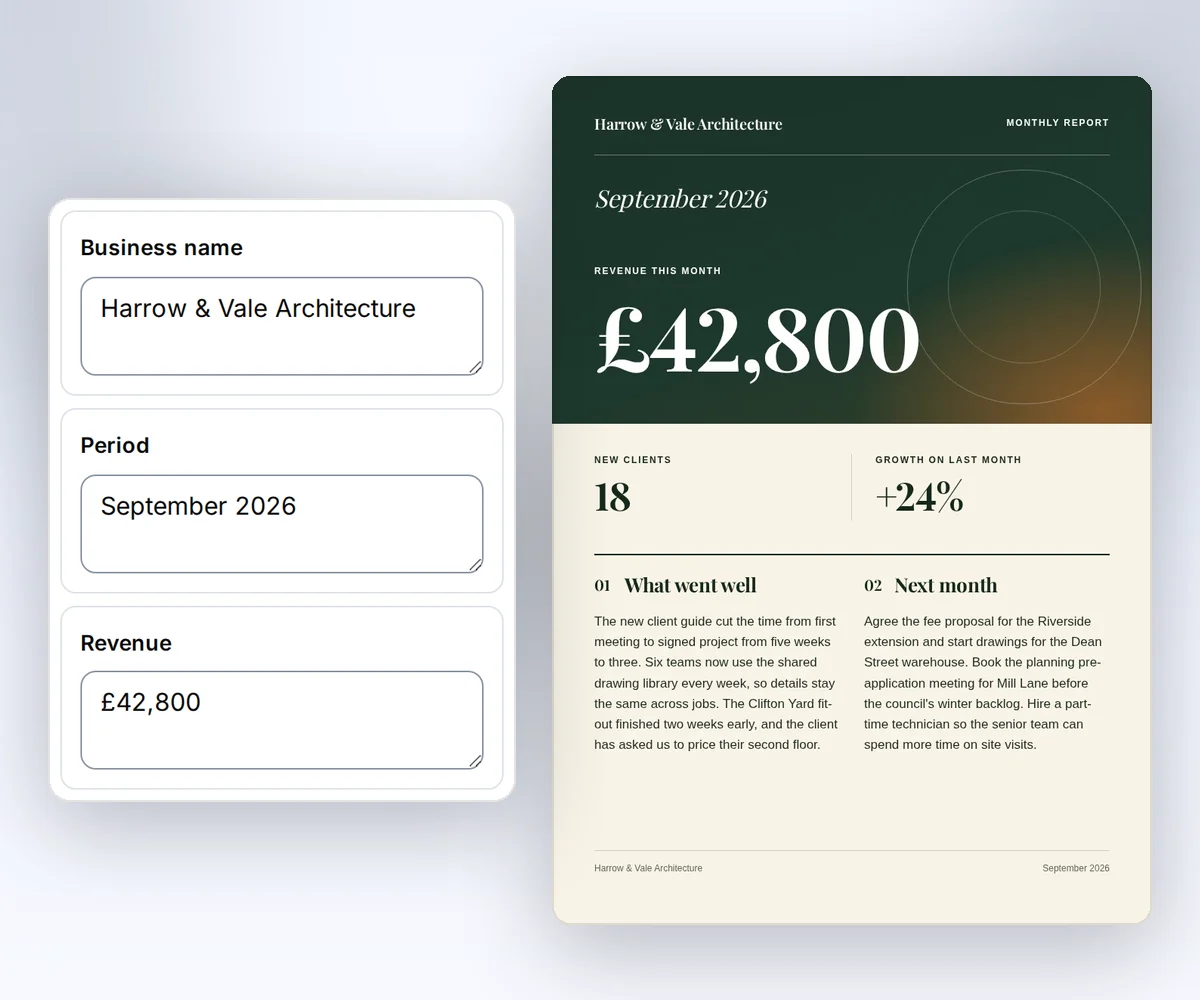
- Open the Monthly report template and click Use this template. Sign in first if you need to.
- Open the Data tab and type your business name, the month, your revenue, new clients, and growth. Then type what went well and your next steps. To see your details on the report, click Preview with data above the canvas.
- Click Export, then Save and export PDF. When the file is ready, click Download PDF.
When you want your own app to make these reports, use the API steps on the rest of this page.
What you need to call the API
To call the thirds.ai PDF API, you need a verified account, an API key, one available credit, and curl, Node 24 or later, or Python 3. The first step also uses jq. Save a Node example as an .mjs file and run it with node. Run a Python example with python3. Each tab sends the same request. Follow API key setup if you don't have a key yet.
The commands use placeholder IDs and credentials. Replace YOUR_API_KEY with your key in a private terminal.
Run a create command only when you're ready to spend a credit. Choose your own Idempotency-Key for each output and reuse that key if you retry the same request. A new key means a new output.
Send HTML to the PDF API
To send HTML to the thirds.ai PDF API, you save your HTML and data in a request.json file, then post that file to POST /v1/pdf. It takes two commands. This example uses the Monthly report design from the template gallery, so you don't need HTML of your own yet.
Download the design's HTML and sample data, and save them together as request.json:
curl --fail --silent --show-error https://thirds.ai/gallery/monthly-report/template \
  | jq '{html: .source, data: .sample, wait: false}' > request.json
In request.json, html holds the design and data fills its fields. "wait": false tells the API to answer as soon as it accepts the job. Now send the file:
curl --fail-with-body --silent --show-error https://thirds.ai/v1/pdf \
  -H 'Authorization: Bearer YOUR_API_KEY' \
  -H 'Content-Type: application/json' \
  -H 'Idempotency-Key: YOUR_UNIQUE_PDF_REQUEST' \
--data @request.jsonimport { readFile } from "node:fs/promises";
const response = await fetch("https://thirds.ai/v1/pdf", {
method: "POST",
headers: {
"Authorization": "Bearer YOUR_API_KEY",
"Content-Type": "application/json",
"Idempotency-Key": "YOUR_UNIQUE_PDF_REQUEST"
},
body: await readFile("request.json"),
redirect: "error",
signal: AbortSignal.timeout(30000),
});
if (!response.ok) throw new Error(`HTTP ${response.status}; Retry-After: ${response.headers.get("retry-after") ?? "none"}`);
console.log(await response.text());import json
from urllib.error import HTTPError
from pathlib import Path
from urllib.request import HTTPRedirectHandler, Request, build_opener
class NoRedirect(HTTPRedirectHandler):
def redirect_request(self, req, fp, code, msg, headers, newurl):
return None
request = Request("https://thirds.ai/v1/pdf",
method="POST",
headers={
"Authorization": "Bearer YOUR_API_KEY",
"Content-Type": "application/json",
"Idempotency-Key": "YOUR_UNIQUE_PDF_REQUEST"
},
data=Path("request.json").read_bytes(),
)
try:
with build_opener(NoRedirect()).open(request, timeout=30) as response:
print(response.read().decode("utf-8"))
except HTTPError as error:
retry = error.headers.get("Retry-After", "none")
raise RuntimeError(f"HTTP {error.code}; Retry-After: {retry}") from NoneThe response contains an id and status. Keep the ID so you can check this render again. If status is succeeded, go to the download step. If it is queued or running, poll for the result. For failed or cancelled, follow recovery.
Wait or poll
You can let the create request wait for your PDF, or you can poll its job with GET /v1/pdf/{id} until the status is succeeded. Because request.json sets "wait": false, the create request answers right away. While the job is queued or running, that answer has status 202. Leave wait out if you want the request to wait briefly for the result instead. It then returns 200 when the job finishes in time, or 202 if it's still running. The wait setting only changes how long the create request waits.
Replace pdf_00000000000000000000000000000000 with the returned job ID.
curl --fail-with-body --silent --show-error \
  https://thirds.ai/v1/pdf/pdf_00000000000000000000000000000000 \
-H 'Authorization: Bearer YOUR_API_KEY'const response = await fetch("https://thirds.ai/v1/pdf/pdf_00000000000000000000000000000000", {
method: "GET",
headers: {
"Authorization": "Bearer YOUR_API_KEY"
},
redirect: "error",
signal: AbortSignal.timeout(30000),
});
if (!response.ok) throw new Error(`HTTP ${response.status}; Retry-After: ${response.headers.get("retry-after") ?? "none"}`);
console.log(await response.text());import json
from urllib.error import HTTPError
from urllib.request import HTTPRedirectHandler, Request, build_opener
class NoRedirect(HTTPRedirectHandler):
def redirect_request(self, req, fp, code, msg, headers, newurl):
return None
request = Request("https://thirds.ai/v1/pdf/pdf_00000000000000000000000000000000",
method="GET",
headers={
"Authorization": "Bearer YOUR_API_KEY"
},
)
try:
with build_opener(NoRedirect()).open(request, timeout=30) as response:
print(response.read().decode("utf-8"))
except HTTPError as error:
retry = error.headers.get("Retry-After", "none")
raise RuntimeError(f"HTTP {error.code}; Retry-After: {retry}") from NoneWhile the status is queued or running, wait between polls and stop at a deadline set by your app. Follow Retry-After if the API rate-limits a request. When you resume, check the same job instead of creating another one. Use webhooks if you want thirds.ai to notify your server when the result is ready.
Download the PDF file
To download the PDF, you fetch the signed link from the finished job and save it as a file. Once status is succeeded, copy download.url from the response. It is a path such as /v1/downloads/.... Add https://thirds.ai before the path, then use that URL in the command below. Anyone with this signed URL can download the file. The download command does not need your API key.
curl --fail --silent --show-error \
  'https://thirds.ai/v1/downloads/YOUR_SIGNED_DOWNLOAD_TOKEN' \
--output report.pdfimport { writeFile } from "node:fs/promises";
const response = await fetch("https://thirds.ai/v1/downloads/YOUR_SIGNED_DOWNLOAD_TOKEN", {
method: "GET",
headers: {},
redirect: "error",
signal: AbortSignal.timeout(30000),
});
if (!response.ok) throw new Error(`HTTP ${response.status}; Retry-After: ${response.headers.get("retry-after") ?? "none"}`);
await writeFile("report.pdf", Buffer.from(await response.arrayBuffer()));import json
from urllib.error import HTTPError
from pathlib import Path
from urllib.request import HTTPRedirectHandler, Request, build_opener
class NoRedirect(HTTPRedirectHandler):
def redirect_request(self, req, fp, code, msg, headers, newurl):
return None
request = Request("https://thirds.ai/v1/downloads/YOUR_SIGNED_DOWNLOAD_TOKEN",
method="GET",
headers={
},
)
try:
with build_opener(NoRedirect()).open(request, timeout=30) as response:
Path("report.pdf").write_bytes(response.read())
except HTTPError as error:
retry = error.headers.get("Retry-After", "none")
raise RuntimeError(f"HTTP {error.code}; Retry-After: {retry}") from NoneOpen report.pdf to check the result and keep your own copy before the file expires. If the download link expires first, read the job again for a fresh link. See download and retention rules.
Create an image
To make a PNG, JPEG, or WebP image instead of a PDF, you send the same kind of request to POST /v1/image with an image object that sets the format and size. This request makes a 1200 by 630 pixel PNG. To turn that size into a branded link-preview card for each page, follow Make Open Graph images from HTML. Use the returned ID to poll GET /v1/image/{id}, then download the file from its signed URL. Save the file with a .png extension.
curl --fail-with-body --silent --show-error https://thirds.ai/v1/image \
  -H 'Authorization: Bearer YOUR_API_KEY' \
  -H 'Content-Type: application/json' \
  -H 'Idempotency-Key: YOUR_UNIQUE_IMAGE_REQUEST' \
--data '{"html":"<h1>Quarterly report</h1><p>Ready to share.</p>","image":{"format":"png","width":1200,"height":630},"wait":false}'const response = await fetch("https://thirds.ai/v1/image", {
method: "POST",
headers: {
"Authorization": "Bearer YOUR_API_KEY",
"Content-Type": "application/json",
"Idempotency-Key": "YOUR_UNIQUE_IMAGE_REQUEST"
},
body: JSON.stringify({
"html": "<h1>Quarterly report</h1><p>Ready to share.</p>",
"image": {
"format": "png",
"width": 1200,
"height": 630
},
"wait": false
}),
redirect: "error",
signal: AbortSignal.timeout(30000),
});
if (!response.ok) throw new Error(`HTTP ${response.status}; Retry-After: ${response.headers.get("retry-after") ?? "none"}`);
console.log(await response.text());import json
from urllib.error import HTTPError
from urllib.request import HTTPRedirectHandler, Request, build_opener
class NoRedirect(HTTPRedirectHandler):
def redirect_request(self, req, fp, code, msg, headers, newurl):
return None
request = Request("https://thirds.ai/v1/image",
method="POST",
headers={
"Authorization": "Bearer YOUR_API_KEY",
"Content-Type": "application/json",
"Idempotency-Key": "YOUR_UNIQUE_IMAGE_REQUEST"
},
data=json.dumps({
"html": "<h1>Quarterly report</h1><p>Ready to share.</p>",
"image": {
"format": "png",
"width": 1200,
"height": 630
},
"wait": False
}).encode("utf-8"),
)
try:
with build_opener(NoRedirect()).open(request, timeout=30) as response:
print(response.read().decode("utf-8"))
except HTTPError as error:
retry = error.headers.get("Retry-After", "none")
raise RuntimeError(f"HTTP {error.code}; Retry-After: {retry}") from NoneYou can also choose jpeg or webp. Use the matching file extension. Read PDF and image options to set quality, backgrounds, fonts, and dimensions.
Reuse a saved template with new data
A saved template lets you make the same design again with new data, without sending the HTML each time. It takes two requests. The first one saves the template, and the second one makes a PDF from it. This request saves the source and schema. It does not create an output or use AI credits.
curl --fail-with-body --silent --show-error https://thirds.ai/v1/templates \
  -H 'Authorization: Bearer YOUR_API_KEY' \
  -H 'Content-Type: application/json' \
--data '{"source":"<h1>{{ title }}</h1>","schema":{"type":"object","properties":{"title":{"type":"string"}},"required":["title"],"additionalProperties":false}}'const response = await fetch("https://thirds.ai/v1/templates", {
method: "POST",
headers: {
"Authorization": "Bearer YOUR_API_KEY",
"Content-Type": "application/json"
},
body: JSON.stringify({
"source": "<h1>{{ title }}</h1>",
"schema": {
"type": "object",
"properties": {
"title": {
"type": "string"
}
},
"required": [
"title"
],
"additionalProperties": false
}
}),
redirect: "error",
signal: AbortSignal.timeout(30000),
});
if (!response.ok) throw new Error(`HTTP ${response.status}; Retry-After: ${response.headers.get("retry-after") ?? "none"}`);
console.log(await response.text());import json
from urllib.error import HTTPError
from urllib.request import HTTPRedirectHandler, Request, build_opener
class NoRedirect(HTTPRedirectHandler):
def redirect_request(self, req, fp, code, msg, headers, newurl):
return None
request = Request("https://thirds.ai/v1/templates",
method="POST",
headers={
"Authorization": "Bearer YOUR_API_KEY",
"Content-Type": "application/json"
},
data=json.dumps({
"source": "<h1>{{ title }}</h1>",
"schema": {
"type": "object",
"properties": {
"title": {
"type": "string"
}
},
"required": [
"title"
],
"additionalProperties": False
}
}).encode("utf-8"),
)
try:
with build_opener(NoRedirect()).open(request, timeout=30) as response:
print(response.read().decode("utf-8"))
except HTTPError as error:
retry = error.headers.get("Retry-After", "none")
raise RuntimeError(f"HTTP {error.code}; Retry-After: {retry}") from NoneKeep the returned template id and latest_version. Put the ID in the request below. Version 1 keeps the source you just saved, and each render can fill it with different data.
curl --fail-with-body --silent --show-error https://thirds.ai/v1/pdf \
  -H 'Authorization: Bearer YOUR_API_KEY' \
  -H 'Content-Type: application/json' \
  -H 'Idempotency-Key: YOUR_UNIQUE_TEMPLATE_RENDER' \
--data '{"template_id":"tpl_00000000000000000000000000000000","version":1,"data":{"title":"Quarterly report"}}'const response = await fetch("https://thirds.ai/v1/pdf", {
method: "POST",
headers: {
"Authorization": "Bearer YOUR_API_KEY",
"Content-Type": "application/json",
"Idempotency-Key": "YOUR_UNIQUE_TEMPLATE_RENDER"
},
body: JSON.stringify({
"template_id": "tpl_00000000000000000000000000000000",
"version": 1,
"data": {
"title": "Quarterly report"
}
}),
redirect: "error",
signal: AbortSignal.timeout(30000),
});
if (!response.ok) throw new Error(`HTTP ${response.status}; Retry-After: ${response.headers.get("retry-after") ?? "none"}`);
console.log(await response.text());import json
from urllib.error import HTTPError
from urllib.request import HTTPRedirectHandler, Request, build_opener
class NoRedirect(HTTPRedirectHandler):
def redirect_request(self, req, fp, code, msg, headers, newurl):
return None
request = Request("https://thirds.ai/v1/pdf",
method="POST",
headers={
"Authorization": "Bearer YOUR_API_KEY",
"Content-Type": "application/json",
"Idempotency-Key": "YOUR_UNIQUE_TEMPLATE_RENDER"
},
data=json.dumps({
"template_id": "tpl_00000000000000000000000000000000",
"version": 1,
"data": {
"title": "Quarterly report"
}
}).encode("utf-8"),
)
try:
with build_opener(NoRedirect()).open(request, timeout=30) as response:
print(response.read().decode("utf-8"))
except HTTPError as error:
retry = error.headers.get("Retry-After", "none")
raise RuntimeError(f"HTTP {error.code}; Retry-After: {retry}") from NonePoll and download as before. Read templates and data for field syntax, schemas, and saved versions. You can also send html with placeholders and a data object in one render request. This fills the fields without saving a reusable template. To send the same saved-template request from n8n, Zapier, or Make, follow the HTTP request guide.
Create with words or a source image
You can build a design in the thirds.ai studio from a few words or a source image, then make PDFs from it with a template_id request to POST /v1/pdf. To build one, follow How to make a template you can reuse. You can start with words or a source image, apply your brand kit, and edit the result before you save. Put the saved template ID in your POST /v1/pdf request. To copy it, open the Template menu in the editor and click Copy beside Template ID. Each card on your Templates page has the same button. Read MCP setup to work through these steps with an agent.