
thirds.ai vs CraftMyPDF
thirds.ai is a CraftMyPDF alternative that builds the invoice or quote design for you, so nobody lays out a template by hand. Describe the document in a sentence, or upload a picture of the one you send today, and the AI gives you an editable design in your logo, colours, and fonts. From then on, ask ChatGPT or Claude for each new PDF in plain words, or let your code send the details. CraftMyPDF is built around a drag-and-drop document editor, and it adds PDF tools such as merge, split, and e-signature (vendor claim). A $29 plan gives you 2,500 PDFs or images a month here, and 1,200 on CraftMyPDF Lite (vendor claim, 12 October 2026).
We aren't connected to CraftMyPDF. CraftMyPDF is a trademark of its owner.
- 1 credit
- makes 1 PDF or image
- 50 credits
- free every month, no card
- $29
- a month for Starter, with 2,500 credits
- 4 formats
- PDF, PNG, JPEG, and WebP
Feature by feature
What's different
| What you need | thirds.ai | CraftMyPDF |
|---|---|---|
| Who builds the design | The AI does. Describe it in a sentence, upload a picture of a document you like, or start from a designer-made gallery template. You get an editable design in your brand, and you ask for changes in the chat. | You do, in its drag-and-drop editor with text, images, tables, charts, QR codes, expressions, custom CSS, and your own JavaScript functions (vendor claim). We found no way to build a design from a sentence or a picture (our reading). |
| Inputs | A sentence, a picture, your own HTML, or a gallery template. Your code can also send plain HTML and get the PDF back without saving a design. | JSON data for a saved template. It can also build a template from an existing PDF, one component per page, and detect its form fields (vendor claim). We found no raw HTML document input in the API pages we read (our reading). |
| Outputs | PDF, PNG, JPEG, and WebP, pixel-perfect from the same design. | PDFs and images from templates, plus PDF merge, split, PDF-to-image, watermark, and e-signature operations (vendor claim). |
| Your brand | Save your logo, colours, and fonts once as a brand kit. Pick it on any design, and all three go on in one step. | Editor controls for images, colours, and custom fonts on each template (vendor claim). We didn't find a saved brand kit that applies them across templates (our reading). |
| AI assistants | Connect ChatGPT or Claude and ask for the design, the wording, and each new file in one chat. | We found no MCP server or AI assistant connection in the docs we read (our reading). |
| API | A REST API at /v1/pdf, /v1/image, and /v1/templates, with webhooks that tell your code when a file is ready. | A REST API for sync and async generation, template management, document operations, and regional endpoints (vendor claim). It also offers editor sessions for embedding its editor in your own app (vendor claim). |
| PDF password | Yes. Set a password in the pdf.password option, and the reader must enter it to open the PDF. See PDF and image options. | Yes, on the Professional plan and above (vendor claim). |
| Integrations | The web app, the API, and MCP. A Zapier app and a Make app that you join from an invite link, and an n8n community node. n8n, Zapier, and Make can also call the API with their own HTTP request step, as the HTTP request guide shows. | Zapier, Make, n8n, Bubble, HubSpot, Coda, FlutterFlow, Backendless, and other ready links (vendor claim). |
| Many files at once | Upload a CSV and get one PDF for each row in one batch, with nobody at the screen. Starter takes up to 50 rows. | One file per API call, or a Zapier or Make flow that runs for each Google Sheets row (vendor claim). We found no spreadsheet upload that makes every file at once in the pages we read (our reading). |
| Pricing model | One credit makes one PDF or image. Starter is $29 a month for 2,500 credits. Extra credits cost $0.015 each on a paid plan, and packs start at $10 for 500 credits. | One PDF or image uses one credit. Lite is $29 a month for 1,200 files and six templates. Professional is $99 for 12,000 files and adds teams, your own storage, and PDF passwords (vendor claim). Other PDF operations use different units. |
| Free tier | 50 free credits a month for a verified account, no card. Spend them on up to 50 files from a gallery template, or on one design the AI builds for you. | 50 PDF or image generations each month, three templates, the REST API, and Zapier, Make, and Bubble, with no card (vendor claim). |
| Where it fits | Teams that want the AI to build the design, their brand saved once, and each new file from ChatGPT, Claude, a spreadsheet, or code. | Teams that want to lay the document out themselves, fill existing PDF forms, embed an editor in their own app, or sign PDFs (our judgment). |
Pricing
How much does CraftMyPDF cost compared with thirds.ai?
The cheaper tool depends on how many files you make each month and what kind they are. Here's what CraftMyPDF and thirds.ai each cost, and how each one counts a file.
- We checked both pricing pages on 12 October 2026. Prices can change, so check the CraftMyPDF pricing page and our pricing page before you decide.
- One thirds.ai credit makes one PDF of up to 100 pages, or one image. The AI uses credits too: 50 to build a new design or rebuild one from a picture, 25 for a later text or HTML change, and 50 for a later message with a new picture or for a picture the AI makes. A file that fails costs nothing. See credits and billing.
- CraftMyPDF says one generated PDF uses one credit regardless of page count, and its pricing table puts PDFs and images under the same monthly allowance (vendor claim). An e-signature request uses 10 credits. A watermark, a merge, and other PDF operations use half a credit each (vendor claim).
- Both have a $29 monthly plan. CraftMyPDF Lite includes 1,200 files and six templates, and thirds.ai Starter includes 2,500 credits with no template limit. If you need PDF passwords, CraftMyPDF charges $99 a month for them on Professional, and thirds.ai includes them on every plan. If you need e-signatures or PDF forms, CraftMyPDF has them and we don't, so don't choose on file count alone.
Where thirds.ai wins
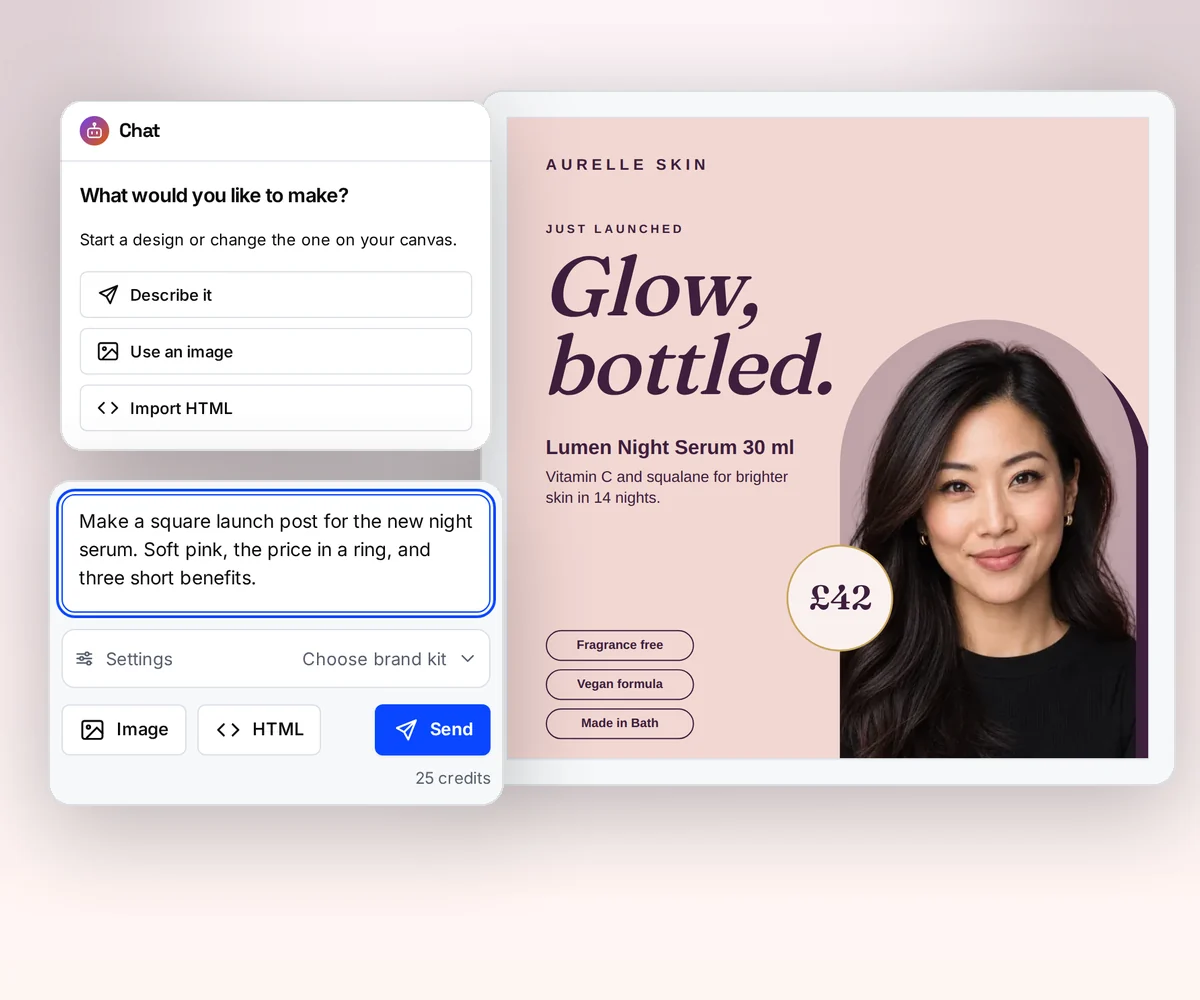
The AI builds the design, so nobody lays out a page
With CraftMyPDF, someone on your team opens the drag-and-drop editor, places each text box, table, and image, and writes an expression such as {{ data.invoice_number }} where each value goes (vendor claim, checked 12 October 2026).
In thirds.ai you tell the AI what the document is for and who gets it, and it builds an editable design in your logo, colours, and fonts. If you already send an invoice you like, upload a picture of it and the AI rebuilds that one in your brand. Ask for changes in the chat, and the AI makes them. Try it on the AI template generator page, or turn a picture into a template.
Where thirds.ai wins
Your brand on every document, saved once
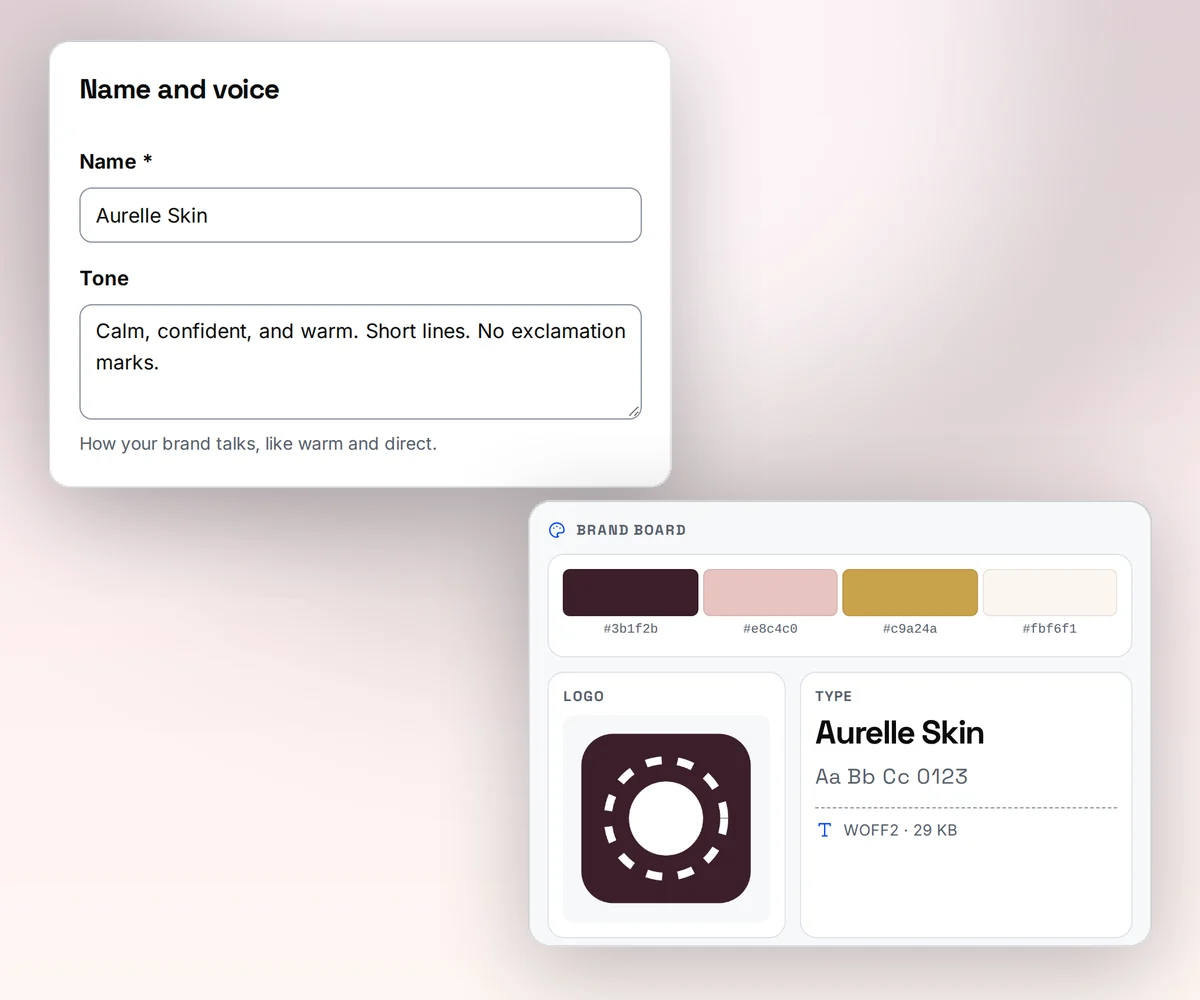
Save your logo, colours, and fonts once as a brand kit, or type your website address and thirds.ai builds the kit itself. Pick the kit on any design, and the AI puts all three on it in one step. When the logo changes, change the kit, and every new file made with it picks that up.
In CraftMyPDF, your logo, colours, and fonts live inside each template. When one of them changes, you open every template and change it there (our reading, 12 October 2026).
Where thirds.ai wins
Your AI assistant makes each invoice
Connect ChatGPT or Claude to thirds.ai, and ask it for the design, the wording, and each new file. It can build the invoice design with you, fill in this month's client and line items, and hand you the PDF, all in one chat. We found no AI assistant connection in the CraftMyPDF docs we read (our reading, 12 October 2026).
For many clients at once, give each one a row in a spreadsheet and get one PDF per row in one batch, with nobody at the screen. Your code and your Zapier, Make, and n8n flows can do the same through the API.

No code needed
How do you make a repeat invoice in thirds.ai without code?
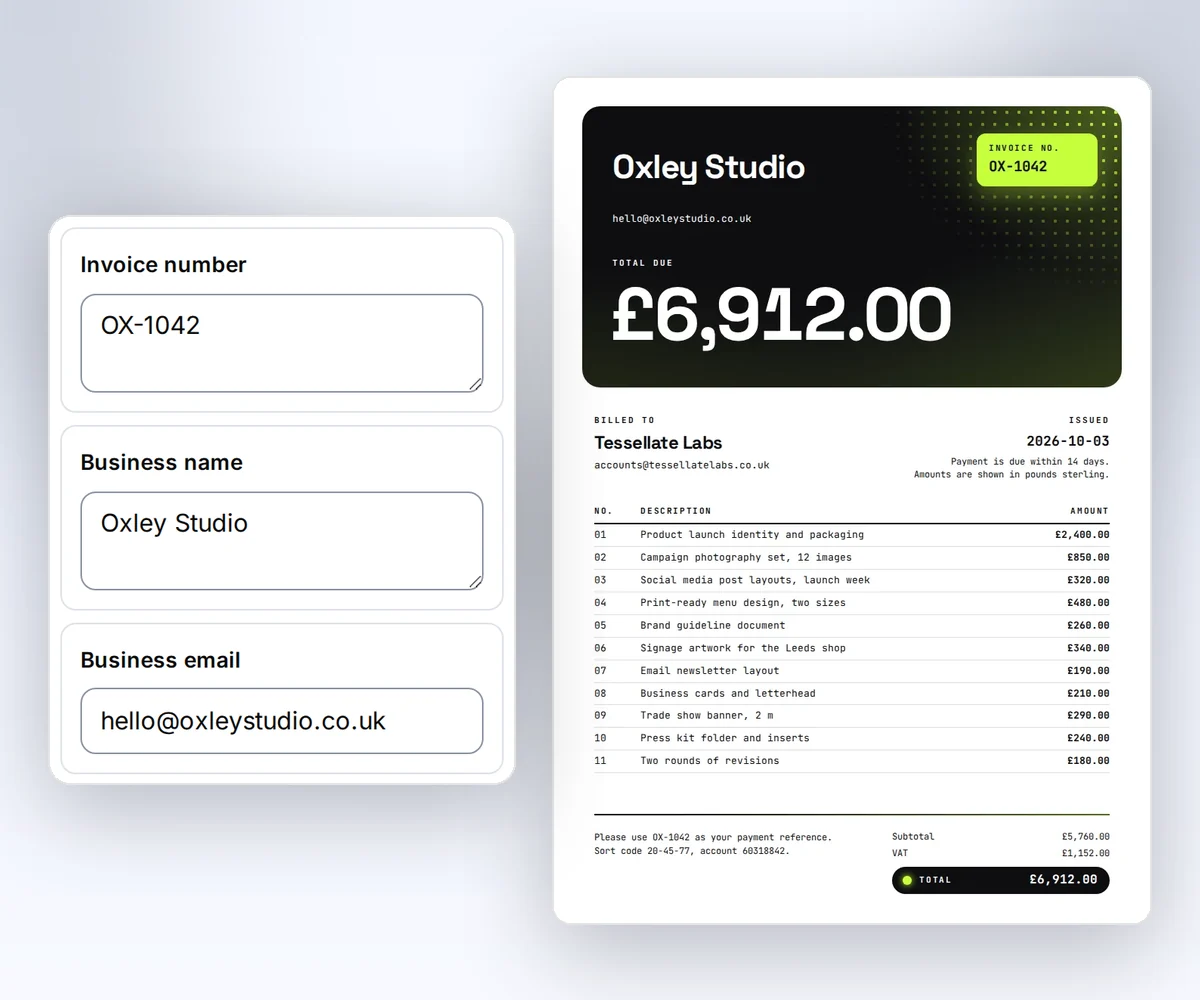
You open a designer-made invoice in the thirds.ai editor, put your brand on it, type the client's details into the boxes beside it, and download the PDF. A free account with 50 credits a month covers it, and each PDF costs one credit.
- Open the Client invoice template below and click Use this template. If you already send an invoice you like, upload a picture of it instead and the AI rebuilds it as a design you can edit.
- Save your logo, colours, and fonts once as a brand kit, and pick it on the invoice. All three go on in one step.
- Type the client's name, the invoice number, the date, and the line items into the boxes, then click Save and export PDF to download it.
Next month, open the saved invoice, change only the details, and click Save and export PDF again. Or skip the editor: ask ChatGPT or Claude for the invoice in plain words, or upload a CSV batch to get one PDF for each client row, up to 50 rows on Starter.
Switching
Moving from CraftMyPDF
You move one CraftMyPDF template at a time, and you need that template and one real row of the data that fills it. CraftMyPDF expressions read values such as {{ data.invoice_number }} (vendor claim, checked 12 October 2026). A thirds.ai template receives the keys directly, such as {{ invoice_number }}, and can check them against a JSON Schema. Where you can, do the calculations in your own system, then compare totals and dates before you send a real file.
CraftMyPDF layouts don't move as HTML, but you don't rebuild them by hand. Export a sample PDF from CraftMyPDF as an image and turn that picture into a template, or start from a close gallery template and ask the AI for the changes. If you use an embedded editor, e-signatures, or a PDF operation today, keep that step until you have a replacement. Then send your code's requests to /v1/pdf, and use the webhook guide to hear when each file is ready.
Checked and dated
Sources
We checked CraftMyPDF's pricing, editor, API, integrations, and PDF form pages on 12 October 2026. Numbers marked (vendor claim) come from CraftMyPDF. Where we say which tool fits, or that we didn't find a feature, that's our opinion.
- https://www.craftmypdf.com/pricing/, plans, free plan, credits, and PDF password claims checked 12 October 2026
- https://support.craftmypdf.com/template-editor-overview, editor components, custom CSS, fonts, and JavaScript functions checked 12 October 2026
- https://support.craftmypdf.com/rest-api-integration, API, document operations, and regional endpoints checked 12 October 2026
- https://www.craftmypdf.com/integrations/, integrations checked 12 October 2026
- https://support.craftmypdf.com/display-data-with-expression, expression syntax checked 12 October 2026
- https://support.craftmypdf.com/component-pdf-page, PDF form import checked 12 October 2026
- https://support.craftmypdf.com/editor-session, embedded editor checked 12 October 2026
- thirds.ai facts come from our pricing page, API reference, and billing guide.
Free to try
Make your first file free
Describe your quote to the AI, or open the Price quote template and type in a test quote. A developer can then follow Use templates with your data to make the next quote from code, or follow make a quote PDF from your CRM data for a full recipe.
Start from a designer-made template and download a real file for free. Sign up, and ChatGPT or Claude can make the next one in your brand.