
thirds.ai vs Carbone
thirds.ai is a Carbone alternative that gives you the finished PDF without laying out a Word file first, and ChatGPT, Claude, or your code can send the details. Carbone takes a Word, Excel, PowerPoint, or HTML file as the template, fills it with your data, and returns a PDF, an Office file, or, from HTML, an image (vendor claim). In thirds.ai you describe it to the AI, or upload a picture of the one you send today, and it comes back as an HTML to PDF design in your logo, colours, and fonts, as in our invoice PDF guide. Then each client's details go in, and 1 credit makes each PDF of up to 100 pages, or each image.
We aren't connected to Carbone. Carbone is a trademark of its owner.
- 1 credit
- makes 1 PDF or image
- 50 credits
- free every month, no card
- $29
- a month for Starter, with 2,500 credits
- 4 formats
- PDF, PNG, JPEG, and WebP
Feature by feature
What's different
| What you need | thirds.ai | Carbone |
|---|---|---|
| Inputs | Describe it to the AI, upload a picture that becomes a design you can edit, paste your own HTML, or start from a gallery template. Your code sends the HTML itself; it can't load a page URL. | A DOCX, XLSX, PPTX, ODT, ODS, ODP, HTML, Markdown, or custom XML file as the template, filled with your JSON data (vendor claim, checked 12 October 2026). |
| Outputs | PDF, PNG, JPEG, and WebP from the same design, in every size you need with smart resize. | PDF, DOCX, XLSX, PPTX, ODT, ODS, HTML, CSV, and Markdown, plus JPG, PNG, and WebP from an HTML template through its Chromium converter (vendor claim, checked 12 October 2026). |
| Render engine | A fixed version of Chromium with print styles and PDF page settings, on our servers. Nothing to install. | LibreOffice by default, with OnlyOffice, Chromium, and its own Carbone ICE as converters you pick per report (vendor claim, checked 12 October 2026). LibreOffice works out the page breaks and fonts from the Office file, so the PDF can break pages differently from Word (our reading). |
| Template design and editing | The AI builds the design from a sentence or a picture, and you ask for changes in the chat. Nobody lays out a page by hand. | You design the layout in Word, Excel, PowerPoint, or LibreOffice and add Carbone tags. Carbone Studio previews the file as you save it and keeps versions. An open-source Carbone Skill teaches an AI coding tool the tag syntax so it can draft the template (vendor claims, checked 12 October 2026). |
| Brand kits | Save your logo, colours, and fonts once as a brand kit, and pick it on any design. | Not shown on the pages we read (our reading, 12 October 2026). Your logo, colours, and fonts live inside each Office template file. |
| API and MCP | A REST API at /v1/pdf, /v1/image, and /v1/templates, plus an MCP server that lets ChatGPT or Claude build the design and make each file. | A REST API at https://api.carbone.io with POST /template, POST /render/{templateId}, and GET /render/{renderId}, using a Bearer token, plus an official MCP server that fills, converts, and manages templates (vendor claim, checked 12 October 2026). |
| Finished files | Your files stay in your account for 30 days on the free plan and up to a year on a paid plan, so you can download one again. | A generated document is available for one hour and can be downloaded once (vendor claim, checked 12 October 2026). |
| Self-hosting | Not offered. We run the service and store your files for you. | An open-source Community Edition you can run with Docker, plus a paid On-Premise Enterprise licence from €1,500 a year for the Fit tier (vendor price, checked 12 October 2026). |
| Entry paid plan | Starter is $29 a month, or $290 a year, for 2,500 credits. One credit makes one PDF or image. | Essential is €29 a month, or €26 a month billed annually, for 1,000 documents, 500 templates, and 2 parallel renders (vendor price and limits, checked 12 October 2026). |
| Free tier | 50 free credits a month for a verified account, no card. That's enough for one AI-built design, or 50 files. | The Cloud Free plan gives 100 documents and 100 templates a month, with 1 parallel render (vendor limits, checked 12 October 2026). The self-hosted Community Edition has no document cap, but you run the servers. |
| Where it fits | Teams who want the design built for them in their brand, images as well as PDFs from one place, and ChatGPT or Claude doing the work. | Teams that already design reports, invoices, or contracts in Word, Excel, or PowerPoint and want that same file filled with data, or who need to host the service themselves (our reading, 12 October 2026). Compare DocRaptor or PDFMonkey instead when your app already builds finished HTML. |
Pricing
How much does Carbone cost compared with thirds.ai?
The cheaper tool depends on how many files you make each month and what kind they are. Here's what Carbone and thirds.ai each cost, and how each one counts a file.
- We checked pricing on 12 October 2026. Prices can change, so check the Carbone pricing page and our pricing page before you decide.
- One thirds.ai credit makes one PDF of up to 100 pages, or one image. The AI uses credits too: 50 to build a new design or rebuild one from a picture, 25 for a later text or HTML change, and 50 for a later message with a new picture or for a picture the AI makes. A file that fails costs nothing. See credits and billing.
- Carbone counts one document each time it fills a template, as long as the data and images are under 1 MB. 1.2 MB of data counts as two documents, and the page count never matters (vendor claim, checked 12 October 2026).
- If you run out on a paid thirds.ai plan, you keep making files at $0.015 each, up to one month of your plan's credits, and you can set a lower cap on any API key. Carbone invoices documents beyond your plan separately at the end of the billing period, and its pricing page shows no per-document rate for the Cloud plans (vendor claim, checked 12 October 2026).
- Carbone prices in euros and thirds.ai in US dollars. Compare each plan with the number of files you really make each month. Carbone's free plan gives you more files for nothing, and thirds.ai Starter gives you more files a month for about the same price as Essential.
Where thirds.ai wins
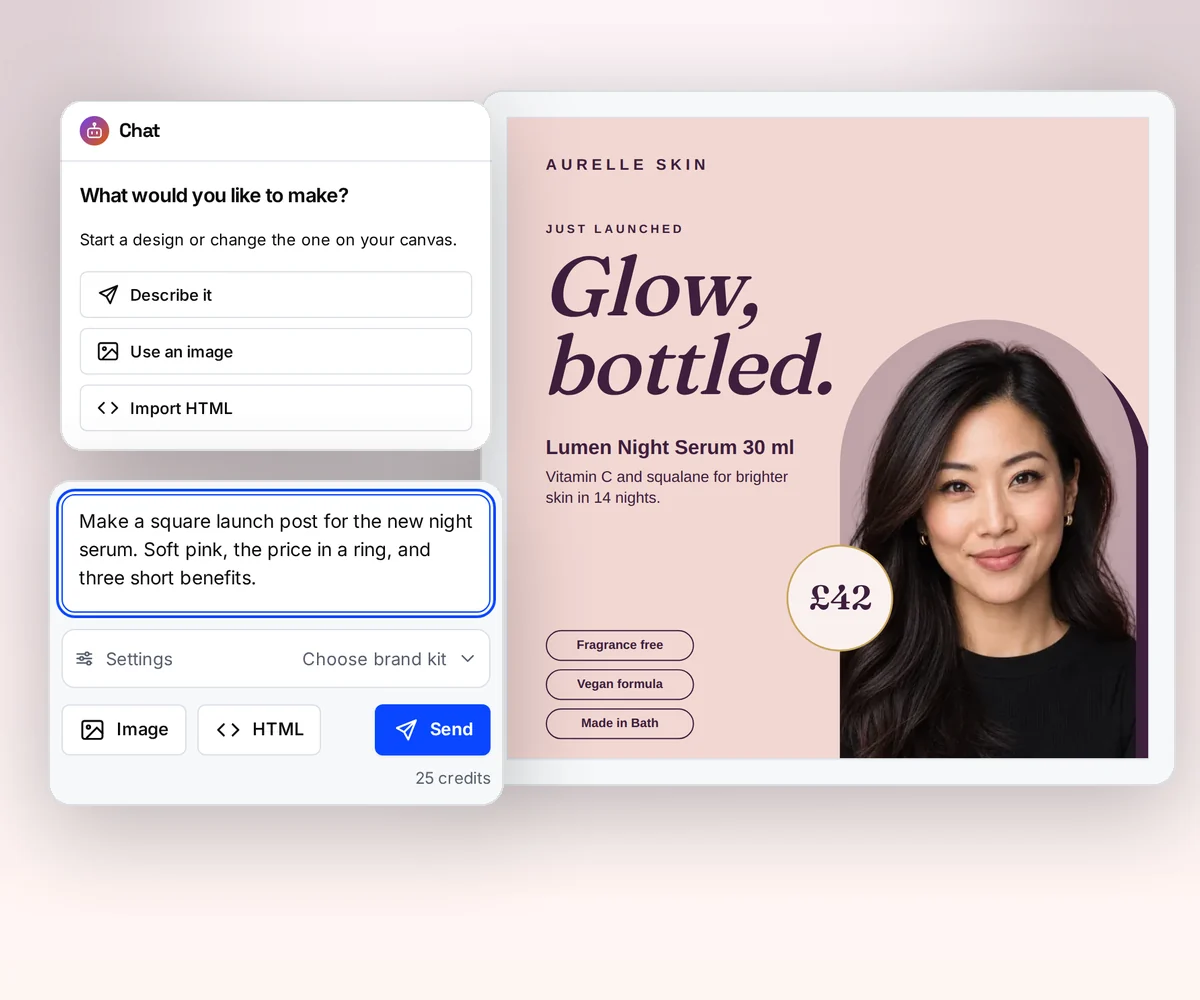
The AI builds the design, so nobody lays out a page
With Carbone, someone on your team opens Word or Excel, lays out the invoice or the report, and adds Carbone tags where the data goes. Its open-source Skill can help an AI coding tool write those tags, but the layout is still yours to make (vendor claim, checked 12 October 2026).
In thirds.ai you tell the AI what the document is for and who gets it, and it builds an editable design in your logo, colours, and fonts. If you already send a document you like, upload a picture of it and the AI rebuilds that one in your brand. Ask for any change in the chat, and the AI makes it. Try it on the AI template generator page, or turn a picture into a template.
Where thirds.ai wins
Your brand on every file, saved once
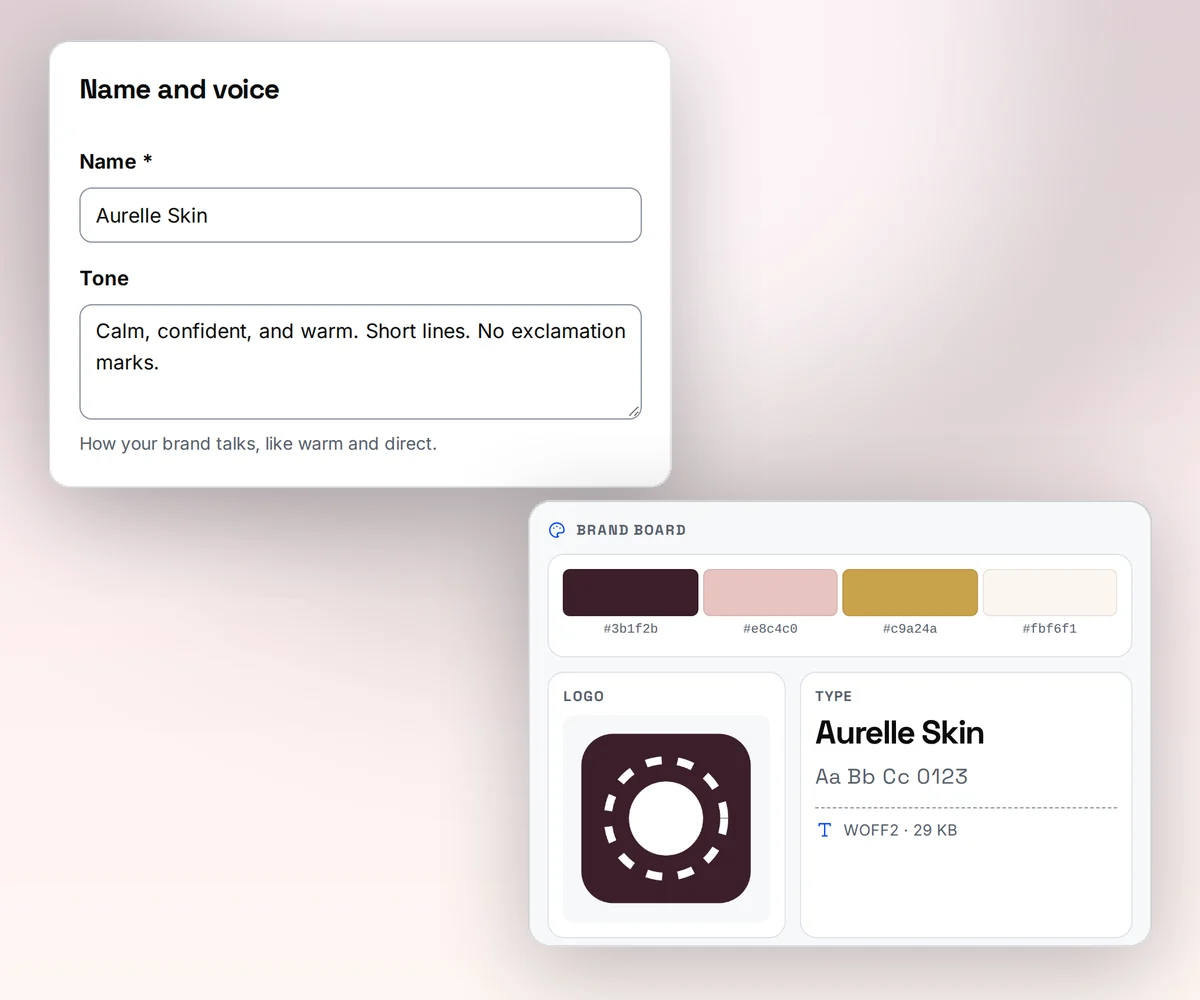
Save your logo, colours, and fonts once as a brand kit, or type your website address and thirds.ai builds the kit itself. Pick the kit on any design, and the AI puts your logo, colours, and fonts on it in one step.
In Carbone, your brand lives inside each Office template file. When the logo or a colour changes, you open every template and change it there (our reading, 12 October 2026).
Where thirds.ai wins
Your AI assistant makes each file
Connect ChatGPT or Claude to thirds.ai, and ask it for the design, the wording, and each new file. It can build the invoice design with you, fill in this month's client and items, and hand you the PDF, all in one chat. Carbone's official MCP server fills, converts, and manages templates you designed already (vendor claim, checked 12 October 2026).
For many clients at once, give each one a row in a spreadsheet and get one file per row in one batch, with nobody at the screen.

No code needed
How do you make the same invoice in thirds.ai without code?
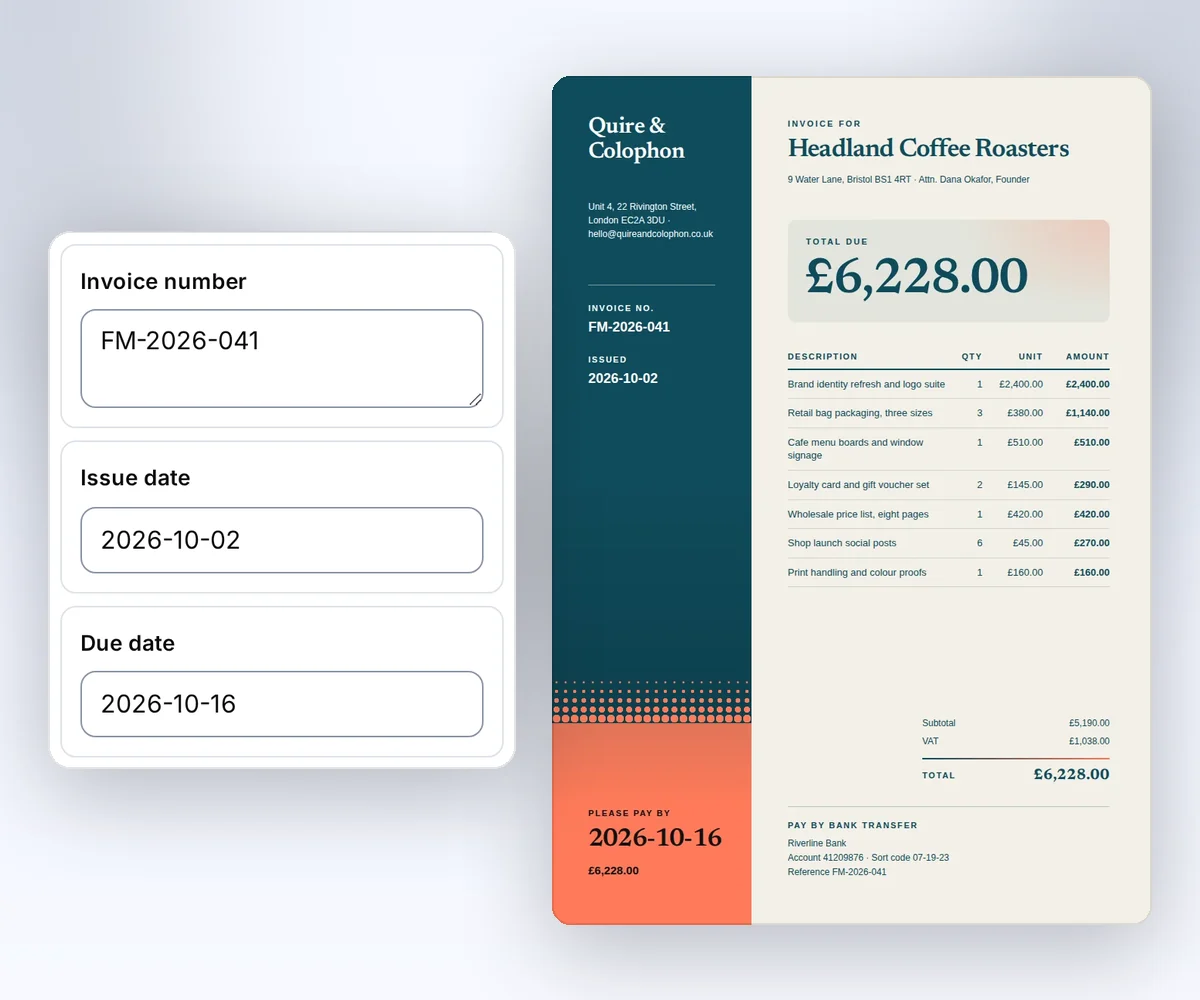
You make the invoice in the thirds.ai editor, with no Word file, no Carbone tag, and no code. A free account is enough.
- Open the Design studio invoice template and click Use this template.
- Type the invoice number, the dates, the client, and the items into the boxes.
- Click Save and export PDF to download it. Next month, open the saved invoice and change only the details.
If your invoice is a Word file today, you can upload a picture of it instead. The AI rebuilds it as a design you can edit. Read how on the image to template page.
Switching
Moving from Carbone
You move from Carbone to thirds.ai one document type at a time. Before you start, save a few sample Carbone files and the data that filled them, so you can check each new PDF against the old one. Carbone stores a DOCX, XLSX, PPTX, ODT, or HTML file as a templateId and fills it when your code posts JSON to POST /render/{templateId} (vendor claim, checked 12 October 2026). thirds.ai stores an HTML template and fills it when your code sends the new details, then gives you a link to the finished file. If your design lives in Word or Excel today, you don't rebuild it by hand: upload a picture of a filled sample and the AI rebuilds it as an editable design, or start from a close gallery template and change it in the visual editor.
Page breaks and fonts change the most when you switch. Carbone turns an Office file into a PDF with LibreOffice by default, so Office rules place the page breaks and fonts (vendor claim, checked 12 October 2026). In thirds.ai the PDF comes from HTML in Chromium, so your CSS sets page breaks, headers, and footers. If your Carbone templates are already HTML through its Chromium converter, the move is small: you send the same HTML and data to thirds.ai. Our wkhtmltopdf migration guide shows the same HTML-to-PDF move step by step. Move one document type, compare the result with your saved samples, and then move the next. Start with Generate your first PDF with the API. If your app already sends finished HTML instead of an Office file, our DocRaptor comparison and PDFMonkey comparison cover that kind of switch.
Checked and dated
Sources
We checked Carbone's features and prices on 12 October 2026. Where we say which tool fits, that's our opinion.
- https://carbone.io/, checked 12 October 2026, for template formats, image output, the MCP server, and the Carbone Skill
- https://carbone.io/pricing.html, checked 12 October 2026, for plan prices, document and template counts, parallel renders, how a document is counted, and the On-Premise tiers
- https://carbone.io/documentation/developer/http-api/introduction.html, checked 12 October 2026, for the API, the token, and the one-hour download
- https://carbone.io/documentation/developer/http-api/generate-reports.html, checked 12 October 2026, for the render workflow, the output formats, and the LibreOffice, OnlyOffice, Chromium, and Carbone ICE converters
- https://carbone.io/documentation/developer/ai/mcp.html, checked 12 October 2026, for what the MCP server does
- https://carbone.io/documentation/developer/ai/skills.html, checked 12 October 2026, for the Carbone Skill
- https://github.com/carboneio/carbone/blob/master/README.md, checked 12 October 2026, for the Community Edition and its Docker image
- https://carbone.io/features/carbone-studio.html, checked 12 October 2026, for Carbone Studio
- thirds.ai facts come from our pricing page, API reference, and billing guide. The pricing page shows how long files stay on each plan.
Free to try
Make your first file free
Describe your invoice to the AI, or upload a picture of the one you send today, and get an editable design in your brand. Or open the Design studio invoice template and start from that. If you already have HTML, or your code should send the details, start with the PDF quickstart.
Start from a designer-made template and download a real file for free. Sign up, and ChatGPT or Claude can make the next one in your brand.