
thirds.ai vs cloudlayer.io
cloudlayer.io turns HTML, web page links, and saved Nunjucks templates into PDFs and images from its API, its Zapier app, or a visual editor (vendor claim). It's a different company from CloudLayer AI. thirds.ai makes the same repeat files, and its AI builds the design for you: from a sentence, or by rebuilding a picture you upload, already in your logo, colours, and fonts. A designer-made gallery gives you a finished look on day one, and your saved brand kit goes on every file in one step. cloudlayer.io Starter is $49 a month for 5,000 documents (vendor claim). thirds.ai Starter is $29 a month for 2,500 credits, and one credit makes one PDF or image.
We aren't connected to cloudlayer.io. cloudlayer.io is a trademark of its owner.
Watch the comparison
cloudlayer.io alternative: one design, every brand, PDFs from your API
Read the transcript
Looking for a PDF generator API for the reports you send every month? Here's how thirds.ai compares with cloudlayer.io, when one design has to fit every client's brand.
Both tools turn HTML and saved templates into PDFs and images. Both have an API, a visual editor, and MCP for AI agents.
The big difference is your brand. cloudlayer.io has colour and logo controls inside each template, but we didn't find one saved brand kit. In thirds.ai, you save each brand once, logo, colours, and fonts, and every design can use it.
Here's one saved report design. Pick a brand kit, and it takes that logo and colour. Switch the kit, and the same design is ready for your next client.
Your code does the monthly job. Send the template, the brand kit, and this month's numbers, and each finished PDF comes back for one credit. Two clients, two credits, and no design work.
When a file is ready, thirds.ai tells your server with a signed webhook, and it tries up to eight times if your server is down. cloudlayer.io's guide says it makes one attempt, so you'd poll for the job instead.
Pick cloudlayer.io to turn page links into files, or for Zapier, official SDKs, and delivery to your own storage. Pick thirds.ai to save each brand once, get webhooks that retry, or even turn a picture into a design.
Start free at thirds.ai!
- 1 credit
- makes 1 PDF or image
- 50 credits
- free every month, no card
- $29
- a month for Starter, with 2,500 credits
- 4 formats
- PDF, PNG, JPEG, and WebP
Feature by feature
What's different
| What you need | thirds.ai | cloudlayer.io |
|---|---|---|
| Inputs | Describe it to the AI, pick a designer-made gallery template, paste your own HTML, or upload a picture that the AI rebuilds as a design you can edit. Your code can also send plain HTML without saving a design. | Raw HTML, a reachable URL, or a saved Nunjucks template with JSON data. Its visual editor starts from a blank canvas or a text description (vendor claim). |
| Outputs | PDF, PNG, JPEG, and WebP. | PDF, PNG, JPEG, WebP, and SVG (vendor claim). |
| Template editing | A visual editor and an AI chat work on the same design, so you can drag a box or ask for the change in words. | A drag-and-drop editor and an HTML code view for one template, with Nunjucks data fields, a live preview, and an AI starting mode (vendor claim). |
| Brand kits | Save your logo, colours, and fonts once, or build the kit from your website address. Pick the kit on any design, and the file comes out in your brand. | Font, colour, image, and logo controls inside each template (vendor claim). We didn't find a saved brand kit that applies them across templates (our reading). |
| AI assistants | Connect ChatGPT, Claude, or any other AI you use, and ask it for the design and then for each file. | An MCP server for Claude Code, Claude Desktop, Cursor, Windsurf, VS Code, and Cline that makes files from HTML, URLs, and saved templates (vendor claim). |
| API and webhooks | A REST API at /v1/pdf, /v1/image, and /v1/templates. Each signed webhook event gets up to eight delivery tries over a day. | A v1 sync API and a v2 job API, webhooks, asset endpoints, and official SDKs for eight languages (vendor claim). Its webhook guide says delivery gets one attempt with no retries, with job polling as the fallback (vendor claim). |
| Integrations | A Zapier app and a Make app, both by invite link, and an n8n community node. | A Zapier app with 10 actions, 3 searches, and 1 trigger, plus Integrately (vendor claim). Its Zapier page says 5,000+ connected apps (vendor claim). |
| Storage | Files stay in your account for up to a year on a paid plan, or up to 30 days on the Free plan, so you can download a report again months later. | A sync response with no storage, managed cloud storage with a retention period that depends on the plan, or your own S3-compatible bucket on Growth and Business plans (vendor claim). |
| Pricing model | One credit makes one PDF or image. Starter is $29 a month for 2,500 credits. Extra credits cost $0.015 each on a paid plan, and packs start at $10 for 500 credits. | One PDF or image is one document regardless of pages or size (vendor claim). Starter is $49 a month for 5,000 documents and 5 GB of cloud storage. Overage is billed at a per-document rate shown in the dashboard, not on the pricing page (vendor claim). |
| Free tier | 50 free credits a month, no card. That's enough for one AI-built design, or 50 files from a gallery template. | A 30-day trial with no card and full editor, API, and template access (vendor claim). We didn't find a monthly free plan on the pricing page (our reading). |
| Where it fits | Teams that want AI to build the design, their brand on every file in one step, files made from ChatGPT or Claude, and webhooks that keep trying. | Teams that capture URLs, convert DOCX, or need SDKs or their own storage bucket (our judgment). |
Pricing
How much does cloudlayer.io cost compared with thirds.ai?
The cheaper tool depends on how many files you make each month and what kind they are. Here's what cloudlayer.io and thirds.ai each cost, and how each one counts a file.
- We checked both pricing pages on 12 October 2026. Prices can change, so check the cloudlayer.io pricing page and our pricing page before you decide.
- cloudlayer.io Starter is $49 a month for 5,000 documents, Growth is $199 for 50,000, and Business is $249 for 100,000 (vendor claim). Per file, cloudlayer.io is cheaper: about 1 cent a document on its Starter plan, against about 1.2 cents a credit on thirds.ai Starter. If you only turn finished HTML into files and make thousands a month, it's the cheaper tool for that job.
- One thirds.ai credit makes one PDF of up to 100 pages, or one image. Starter is $29 a month for 2,500 credits, Growth is $79 for 10,000, and Scale is $199 for 40,000. Extra credits cost $0.015 each on a paid plan, and packs start at $10 for 500 credits. A file that fails costs nothing. See credits and billing.
- The AI uses thirds.ai credits too: 50 to build a design or rebuild one from a picture, 25 for a later text or HTML change, and 50 for a change with a new picture. A new AI picture inside a design also costs 50. Those are the credits that save you the design work, so count them once per design, not per file.
- cloudlayer.io counts each PDF or image as one document regardless of page count or file size (vendor claim). Its pricing page doesn't say whether a failed generation counts (our reading, 12 October 2026).
Where thirds.ai wins
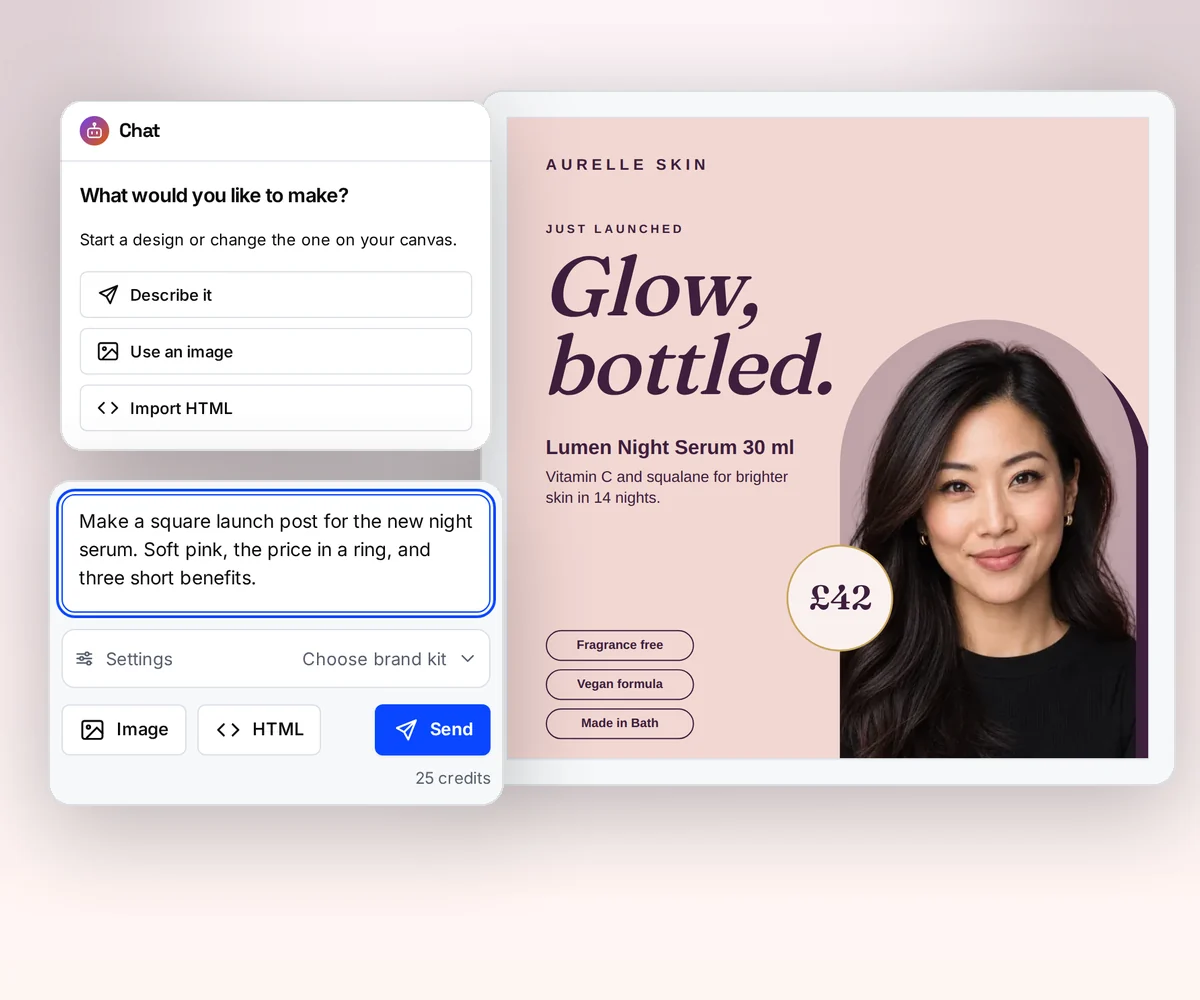
AI builds the design, so nobody writes the template
In cloudlayer.io you build each template in its editor or in Nunjucks HTML, from a blank canvas or a text description (vendor claim, checked 12 October 2026). cloudlayer.io's AI gives you a starting layout. In thirds.ai the AI builds the design already in your logo, colours, and fonts, and keeps changing it as you ask. Change it in words, or drag the boxes yourself.
If the report you send today already exists, upload a picture of it. The AI rebuilds it as a design you can edit, in your brand. Try it on the AI template generator page, or turn a picture into a template.
Where thirds.ai wins
Your brand on every file in one step
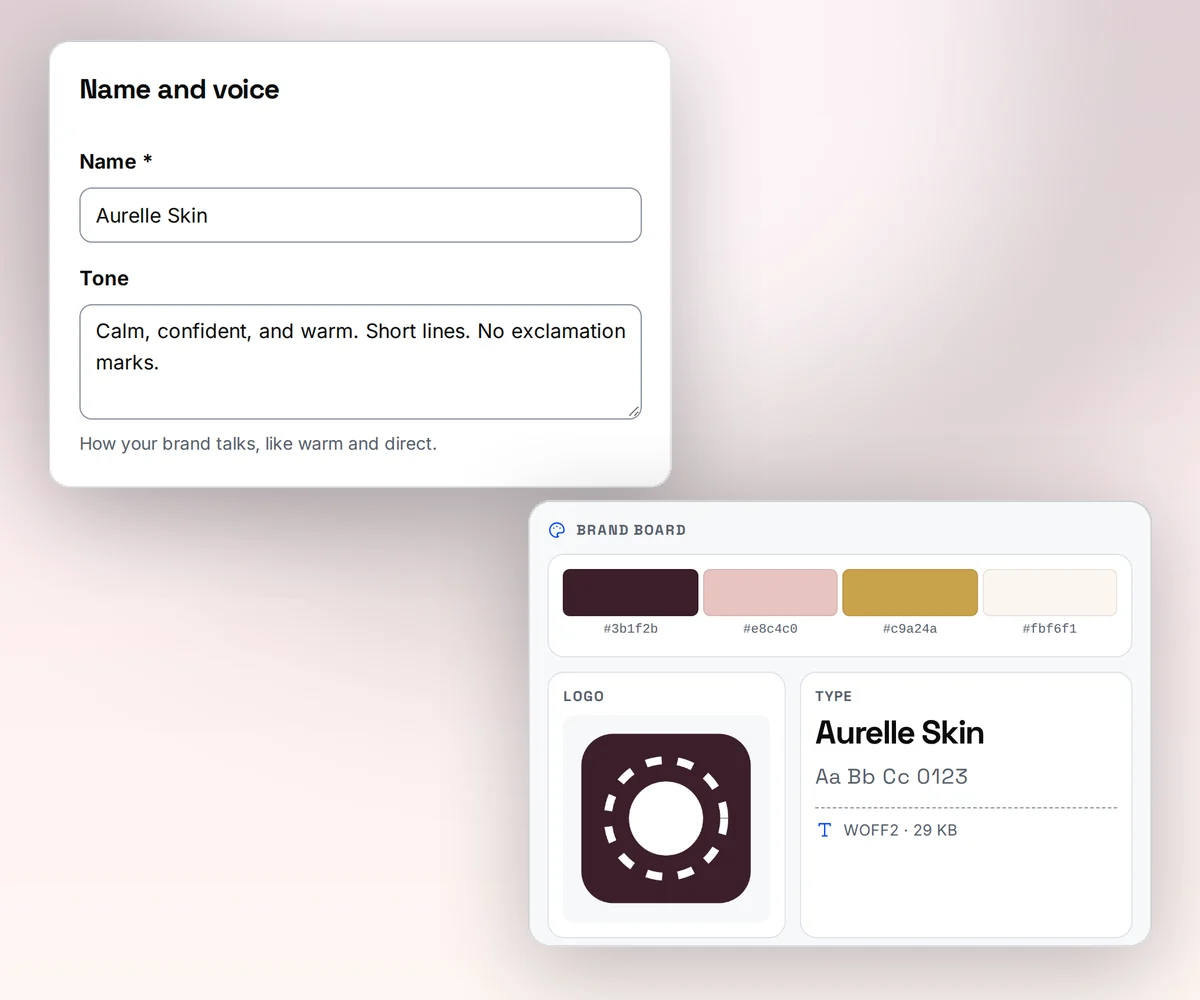
Save your logo, colours, and fonts once as a brand kit, or type your website address and thirds.ai builds the kit from what it finds there. Pick the kit on any design, and the colours and logo land where they fit. An agency keeps one report design and switches the kit for each client.
cloudlayer.io gives you font, colour, and logo controls inside each template, and we didn't find a saved brand kit that applies them across templates (our reading, 12 October 2026). There, a new client means restyling the template.
Where thirds.ai wins
Ask ChatGPT or Claude for the finished PDF
Connect thirds.ai to ChatGPT, Claude, Gemini, Grok, or any other AI you use. Then ask for the file in plain words: the campaign report for this client with this month's numbers. The assistant builds the design with you, writes the text, and hands you the finished PDF in your brand.
cloudlayer.io's MCP server connects coding tools such as Claude Code, Cursor, and VS Code, and makes files from HTML, URLs, and templates you already built (vendor claim, checked 12 October 2026). That suits a developer who already has templates. thirds.ai also builds the design and writes the text, and it works in ChatGPT as well as Claude.
Where thirds.ai wins
Webhooks that keep trying, and files that stay a year
When a file is ready, thirds.ai sends a signed webhook event to your server and tries up to eight times over a day if your server is down. cloudlayer.io makes one delivery attempt with no automatic retries, and its guide suggests polling the Jobs API as a backup (vendor claim, checked 12 October 2026).
Your finished files stay in your account for up to a year on a paid plan, so you can fetch a report again months later. cloudlayer.io's managed storage has a retention period that depends on the plan, and its docs don't give the number (our reading, 12 October 2026).

No code needed
How do you make the same report in thirds.ai without code?
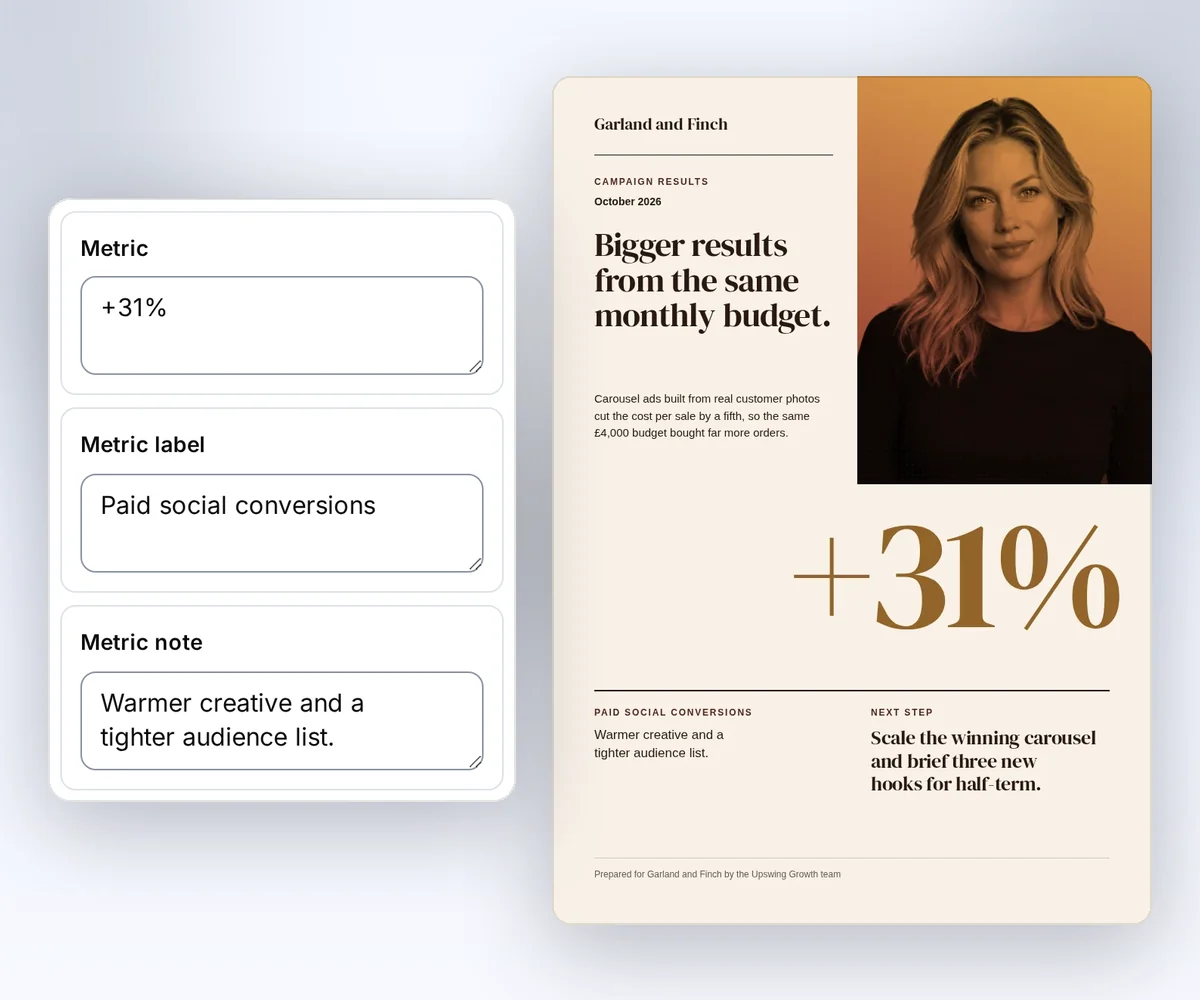
Open a designer-made report in the gallery, type this month's numbers into the boxes beside it, and download the PDF. No Nunjucks, no code, and a free account with 50 credits a month is enough to start.
- Open the Campaign results report template and click Use this template.
- Type the period, the headline number, the summary, and the next step into the boxes. The report changes as you type. Pick your brand kit, and it switches to your logo and colours.
- Click Save and export PDF to download it for one credit. Next month, open the saved report and change only the numbers, or ask ChatGPT or Claude for it.
If you already have the design in cloudlayer.io, save a picture of it. Start a new design in the thirds.ai editor, choose Start from an image, pick your brand kit, and upload the picture. The AI rebuilds it as a design you can edit, in your logo, colours, and fonts, for 50 credits. Read how on the image to template page.
Switching
Moving from cloudlayer.io
You move from cloudlayer.io to thirds.ai one template at a time. You need one saved cloudlayer.io template, the JSON data that fills it, and a finished file to compare the new one against. cloudlayer.io templates use Nunjucks fields and call /v2/template/pdf or /v2/template/image (vendor claim). thirds.ai templates use MiniJinja and call /v1/pdf or /v1/image with template_id, an exact version, and data. Variables, loops, and conditions look much the same, but filters and helper functions can differ, so check each field, font, page break, and output format against the old file.
If you use URL capture, prepare the final HTML in your app before you send it to thirds.ai. If you deliver to your own bucket, collect the thirds.ai file from its download link and save it yourself. Replace the cloudlayer.io job and asset response with the thirds.ai job status, and replace one-attempt callbacks with signed webhook events. Then follow Use templates with your data to pin the version and validate the input. You can also skip the port: upload a picture of the old file and let the AI rebuild it in your brand.
Checked and dated
Sources
We checked cloudlayer.io's features and prices on 12 October 2026. Numbers marked (vendor claim) come from cloudlayer.io. Where we say which tool fits, or that we didn't find a feature, that's our opinion.
- https://cloudlayer.io/pricing/, checked 12 October 2026
- https://cloudlayer.io/docs/api-overview/, checked 12 October 2026
- https://cloudlayer.io/docs/visual-editor/, checked 12 October 2026
- https://cloudlayer.io/docs/template-to-image/, checked 12 October 2026
- https://cloudlayer.io/docs/storage/, checked 12 October 2026
- https://cloudlayer.io/docs/webhooks/, checked 12 October 2026
- https://cloudlayer.io/docs/mcp-setup/, checked 12 October 2026
- https://cloudlayer.io/integrations/zapier/, checked 12 October 2026
- https://www.cloudlayer.ai/, checked 12 October 2026, for CloudLayer AI, a different company with a similar name
- thirds.ai facts come from our pricing page, API reference, billing guide, and limits page.
Free to try
Make your first file free
Open the Campaign results report, type in this month's numbers, and download the PDF for free. Then let ChatGPT or Claude make next month's, or use the template data guide to make it from code.
Start from a designer-made template and download a real file for free. Sign up, and ChatGPT or Claude can make the next one in your brand.