
Add the thirds.ai MCP server to Warp
You connect Warp to the thirds.ai MCP server by pasting one JSON entry into Warp's MCP servers page and sending your thirds.ai API key as a bearer header. With thirds.ai, you save a design once, such as an incident report, an invoice, or a social post, with your logo, colours, and fonts. Then you type in new details and get a finished PDF or image. Once Warp has the server, you can ask Warp Agent for those files from your terminal, so you don't lay out each one by hand. Each successful PDF or image costs one credit, and a verified account gets 50 free credits each month.
Give this prompt to your AI agent. The agent does the task for you.
Read https://thirds.ai/docs/mcp/warp and help me connect Warp to thirds.ai with an API key
Make it without code
You can make the same branded files in the thirds.ai editor without Warp or any code. It takes three steps, and you need a free thirds.ai account. The Incident report template is a good first try if you're on call, because you fill it in again after each incident.
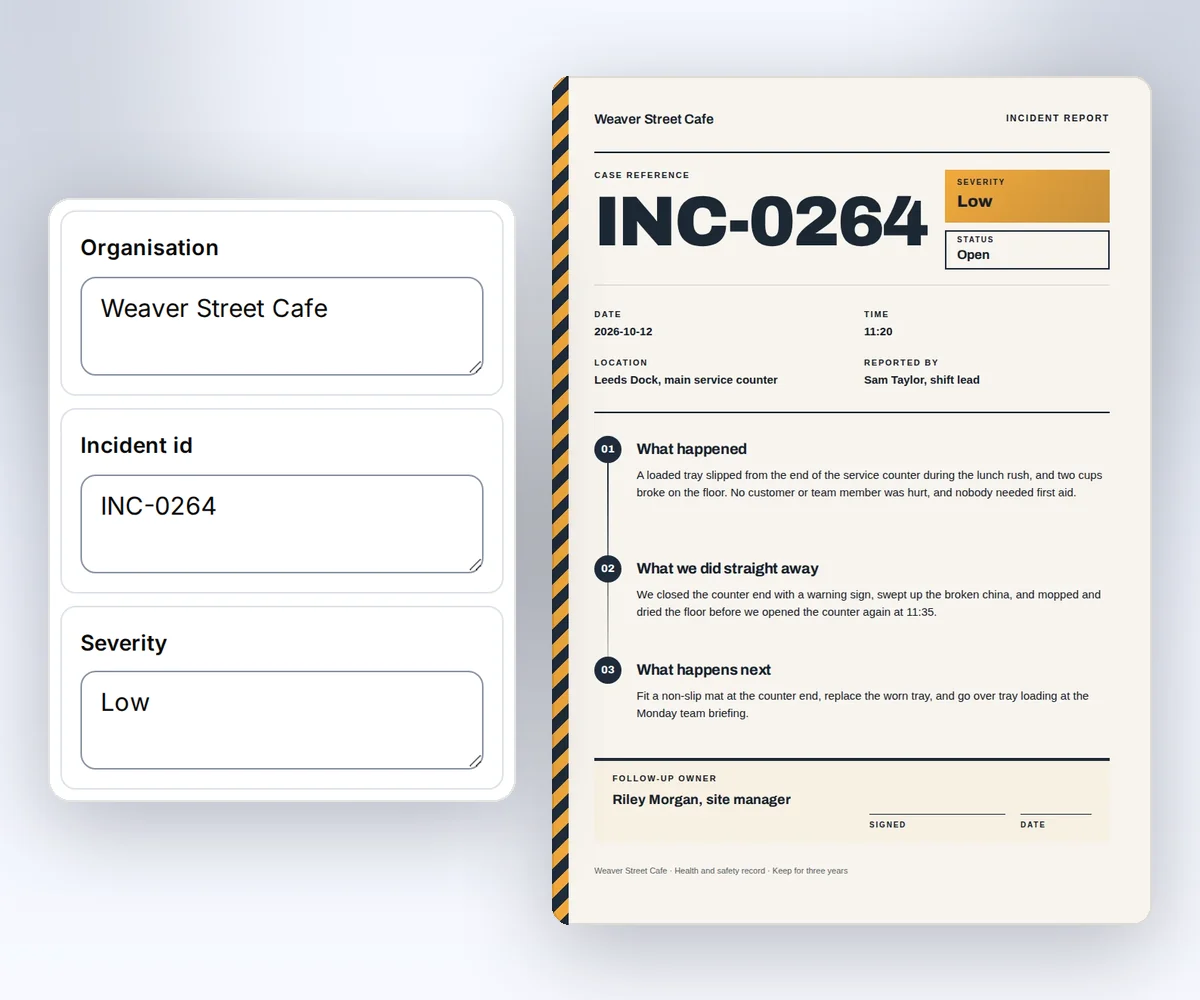
- Open the Incident report template and click Use this template. Sign in and verify your account first if you need to.
- Open the Data tab and type what happened, when, the severity, and who owns the follow-up. Click Preview with data above the canvas to check the page. The preview is free.
- Click Export, then Save and export PDF, and click Download PDF.
When you'd rather have Warp Agent fill in the next report from your terminal, add the thirds.ai MCP server to Warp.
How do I add the thirds.ai MCP server to Warp?
You add the thirds.ai MCP server to Warp in three steps: create a key, paste one server entry on Warp's MCP servers page, and put your key in its header. You need a thirds.ai account and the Warp app. Warp's MCP guide (checked 25 September 2026) says Warp supports Streamable HTTP servers with custom headers, which is how thirds.ai connects.
- Create an API key on the API keys page.
- Open Settings → Agents → MCP servers, click + Add, and paste this entry:
{
  "mcpServers": {
    "thirds": {
      "url": "https://thirds.ai/mcp",
      "headers": {
        "Authorization": "Bearer YOUR_API_KEY"
      }
    }
  }
}
- Replace
YOUR_API_KEYwith your key, then save the server.
The same Warp guide says you can paste configurations from most MCP clients, with each server under mcpServers. The guide doesn't show a way to read the key from an environment variable, so your key sits in Warp's settings. You can also open the MCP servers page from the Command Palette with Open MCP Servers.
Which Warp MCP config should you use?
For thirds.ai, the MCP servers page or your global ~/.warp/.mcp.json file suits most people, because Warp starts those servers on its own and keeps them private to you. Warp has three places for a server, and they differ in who gets the server and when Warp starts it.
| Where you add it | Who gets the server | When Warp starts it |
|---|---|---|
| The MCP servers page | Only you | Again on the next launch if it was running when you closed Warp |
~/.warp/.mcp.json | Only you, in every project | On its own, by default |
.warp/.mcp.json in a repo | Everyone who clones the repo | Only after you turn it on, once in each Warp session |
This table follows Warp's MCP guide (checked 25 September 2026). The guide also says Warp asks you to approve each change to an MCP config file, and that the built-in /agent-add-mcp skill lets Warp Agent write the entry to either file for you. Each person needs their own API key, so never commit a .warp/.mcp.json file that holds your key.
Check that Warp sees the thirds.ai tools
You check the thirds.ai connection on Warp's MCP servers page, and the thirds server must be running with its tools listed. The check spends no credits. Click Start on thirds if it's stopped. Warp's MCP guide says each running server shows its list of tools, so you can see the thirds.ai tools right there.
If thirds doesn't start, click View Logs on the server. A missing key or a typo in the Authorization line shows up there as a 401. Warp's guide warns that the logs can hold API keys, so remove your key before you share them.
Make your first file from Warp
Your first thirds.ai file from Warp starts with a plain request to Warp Agent, and you approve the credit before anything is made. You need a running server and at least one credit. If you saved the Incident report template in the editor, Warp Agent can find it in your saved templates.
- Ask Warp Agent: "List the thirds.ai tools and my saved templates." Listing is free.
- Ask for the file: "Use my thirds.ai Incident report template to make a PDF for last night's outage. Show me the tool call and the credit cost first."
- Approve the call. Warp Agent checks the status until the PDF is ready and gives you a download link. Download the file before the link expires.
Read the main MCP guide before your first paid call. It explains credit approval, safe retries, and status checks. If you also use Claude Code, the Claude Code setup shows the same server in that tool.
FAQ
Do I need mcp-remote?
No. Warp connects to this server with a URL and an Authorization header. Use a local command server only when you want a stdio bridge for another reason.
Does Warp pick up the server I added in Claude Code or Codex?
Yes, if you turn it on. Warp's MCP guide says Warp also reads servers from Claude Code and Codex config files. Warp starts those global servers only after you turn on Auto-spawn servers from third-party agents in Settings → Agents → MCP servers.
Does connecting spend credits?
No. Connecting and listing tools don't spend credits. AI template work and successful files can. Ask your agent to show the action and the cost before it starts paid work.