
 Ember Coffee
 Fieldnote Labs
 Harbour Print
 Kestrel Events
 Lumen Skincare
 Marlow & Co
 Meridian Agency
 Orbit Media
 Signal Studio
 Keystone Coaching
Start from a slide you already posted
Upload the slide, and thirds.ai rebuilds its layout as an editable design in your brand.
Turn a picture into a template

TikTok slideshows
A TikTok slideshow template gives you a set of matching photo slides with your logo, colours, and fonts already on them. Type what each slide says, drop in your photos, and download the set, ready to add to a photo post in TikTok. There's nothing to film or edit, and the first set takes minutes. Post one a day and they all look like yours. Or connect ChatGPT or Claude and ask for a week of slideshows at once. It comes up with the ideas and writes every slide, and each set comes back to you in order, in your look.
Free to start. No card to add.
Real slides from thirds.ai slideshow templates, each in its brand's own colours.
TikTok slideshows
Here's how to make a TikTok slideshow every week from one template you set up once.
Meet Pathnook, a small weekend-trip app. Their marketer needs a new photo slideshow for TikTok every Friday.
But hey, they start with the TikTok travel planner from the gallery. It's five slides at 1080 by 1920, TikTok's full-screen size.
Then they add their name and brand colours, just once. They swap the green sample for their own navy and peach.
For this Friday, they type one short line for each slide. They keep the old-town photo.
They click Export, pick Images ZIP, and get all five slides in order. That's five credits, one for each image.
They upload the slides to a TikTok photo post and add their music there.
Next Friday, they open the same design, type a new story, and drop in a beach photo.
They get a brand-new slideshow in the same look, again for five credits. And they didn't design a single slide from scratch!
Pick a slideshow template and make your first one at thirds.ai.
How it works
Start from a slideshow template, and you'll be adding the slides to TikTok a few minutes later. Or skip the editor and have ChatGPT or Claude make the whole slideshow.
Open any slideshow template in the gallery and click Use this template. Choose your brand kit where it says Brand kit, and every slide takes your colours and fonts at once.
Open the Data tab and give each slide a heading and a short line. Drop in your photos or app screenshots.
Click Export and choose Images ZIP. The slides come down numbered, so you add them to a photo post in TikTok in the right order and pick your music there.
The editor
Yes. There's no timeline and no video to cut. A slideshow template is a set of finished slides, and in the thirds.ai editor you change only the words and the pictures. Type into the boxes beside the slides, and they change as you type. What you download looks like one designer made the whole set.
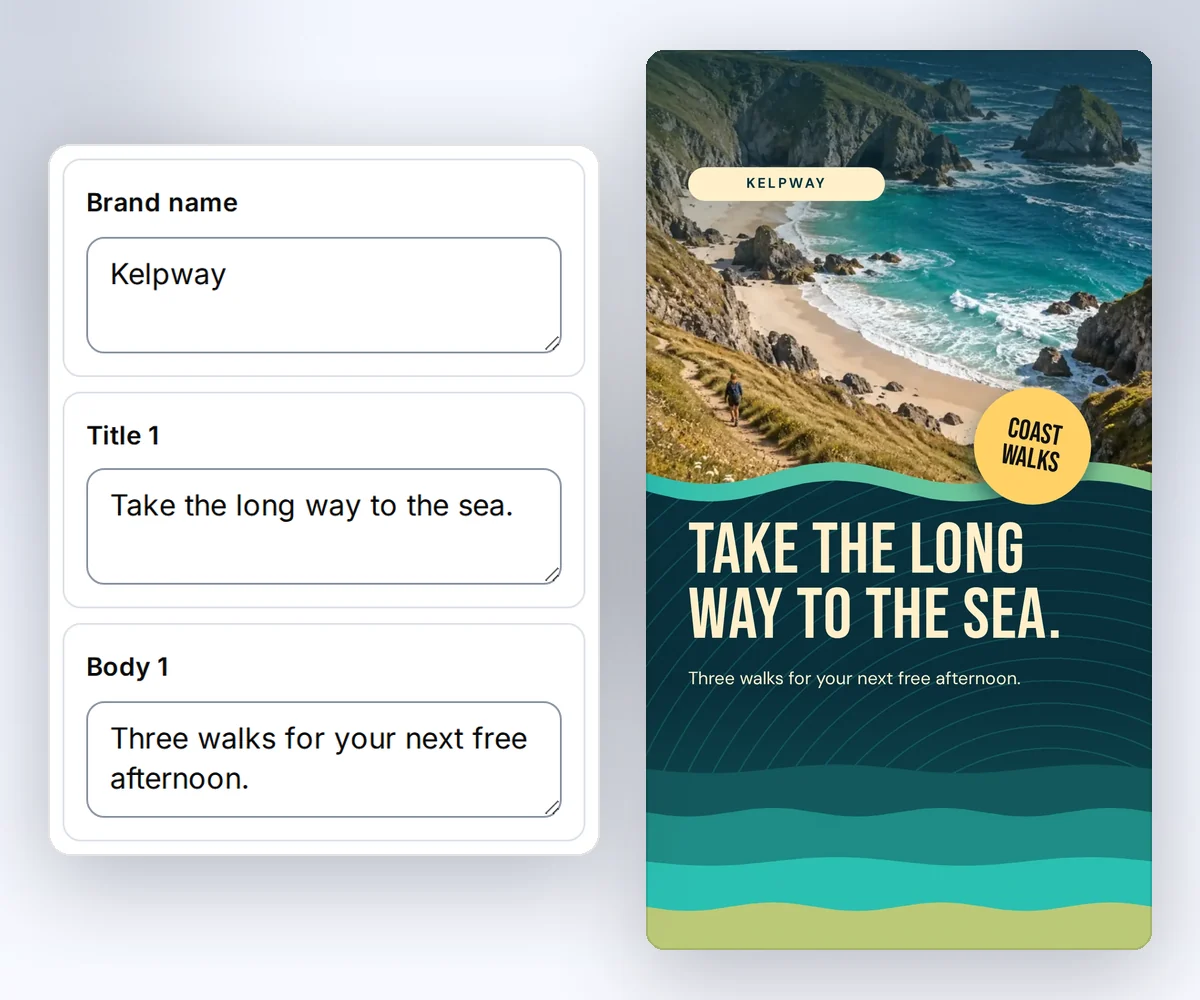
One look
Slides built one at a time never quite match, and after a few posts your feed blends into everyone else's. With thirds.ai you decide the look once, in a saved design with your logo, colours, and fonts. From then on you change the story and the photos, and every slide in every post comes out in that look, so people know a post is yours before they read a word.

From your AI assistant
Connect thirds.ai to ChatGPT, Claude, Gemini, Grok, or any other AI you use, and the assistant does the whole job. Say what your app or shop does and who follows you, and ask for a week of slideshows. It thinks up the stories and writes every slide. Each set comes back in order, in your saved design, and because the design decides the look and where the words go, a set is ready to post the moment it arrives.

Free to copy
Copy any set for free and make it yours. Each one tells one kind of story, from a recipe to a new feature, and you type your own.
A recipe people save for a busy night, one step per slide.
Tips that help on their own, so the viewer trusts the link on the last slide.
A quick routine that people save and come back to.
A trip that starts in pieces and ends on one screen, yours.
Start anywhere
A slide that already did well for you is the quickest start. Upload it, and you get it back as a design you can type new words into.
Upload the slide, and thirds.ai rebuilds its layout as an editable design in your brand.
Turn a picture into a templateDescribe the slides you want, and the AI chat builds a first design for you to finish.
Learn more about AI template chatTen stories for app posts, and when to ask for the download.
Learn more about Slideshow ideas for appsThe steps in the TikTok app, from the first slide to the music.
Learn more about How to post a slideshow on TikTokMake your stories and square posts in the same design as your slides.
Learn more about Social media imagesCustomer stories
Posting every day only works when nobody has to design the post. These teams decided the look once, so a new slideshow is ready as soon as the words are.
For developers and agents
Ship a slideshow with every release, or give every item in your catalogue its own set, from your own code with the thirds.ai API or from an AI agent through the MCP server. Send the text for each slide against a saved design, and one ZIP of numbered slides comes back.
curl --fail-with-body --silent --show-error \
  https://thirds.ai/v1/carousels \
  -H "Authorization: Bearer YOUR_API_KEY" \
  -H "Content-Type: application/json" \
  -H "Idempotency-Key: feature-post-2026-10-02" \
  --data '{
    "template_id": "tpl_YOUR_SLIDESHOW",
    "version": 1,
    "format": "png",
    "pages": ["slide-1", "slide-2", "slide-3", "slide-4", "slide-5"],
    "data": {
      "brand_name": "Weekwell",
      "title_1": "Your week, in one view",
      "body_1": "Plan Monday to Friday on one screen.",
      "title_2": "Tap Plan",
      "body_2": "Pick the days you want to fill.",
      "title_3": "Drag a task",
      "body_3": "Move it to the day it fits.",
      "title_4": "Done means done",
      "body_4": "Tick it off and it leaves the view.",
      "title_5": "Try it free",
      "body_5": "Link in bio."
    }
}'{
"servers": {
"thirds": {
"type": "http",
"url": "https://thirds.ai/mcp",
"headers": {
"Authorization": "Bearer YOUR_API_KEY"
}
}
}
}Good to know
Who it is for
People who post the same kind of set again and again, and don't want to design it each time.
Show one thing your app does per post, and let your assistant write the sets from your real features.
Make your slideshows match the rest of your posts and ads.
Make a set for every release or every product from code or an AI agent.
A slideshow needs a photo and a sentence per slide, so you can post one a day without filming or editing anything, and test more stories than you could on video. The studies on reach disagree, so post both and keep the stories that bring sign-ups. Read what the research says.
An image generator starts from nothing for each slide, so the slides in a set don't match and the words come out wrong. A slideshow template is already designed, with your brand set on it, so the slides match and every word is the one you typed. You can still move or change anything by hand.
Yes. Once thirds.ai is connected, ask it for one slideshow or a week of them. It writes the slides and gives you each set in order, in your logo, colours, and fonts. Connect your AI assistant.
No. A slideshow template makes the still images for a TikTok photo post. You add the music and the caption and publish the post in the TikTok app.
Yes. Copying any gallery template is free, and a verified free account gets 50 credits a month. One finished slide costs one credit, which you can also spend on the AI chat or an import. See the plans.
Yes. Click Export, tick the slides you want, and choose Images ZIP or One PDF. You pick the slides and the order each time. Read about carousels.
Yes. The same set downloads as numbered images or as one PDF, so it can be a carousel on another network too.
TikTok slideshows
Pick a slideshow template and type your first set, or let your AI assistant write it. It's free to start, and today's post can be the first one.