
Connect Grok Bot to thirds.ai with a custom MCP connector
You add a custom MCP server to Grok Bot by asking your Bot for it in a chat, as a Cursor staff answer said on 30 August 2026. Give your Bot the thirds.ai address, https://thirds.ai/mcp, and your thirds.ai key, and it can make your branded PDFs and images. You save your designs in thirds.ai, such as an invoice, an order confirmation, or a sale image. Your Bot fills in the new details, and you get a finished file with your logo, colours, and fonts. Each finished PDF or image costs one credit, and a verified free account gets 50 credits a month, as the pricing page shows.
Give this prompt to your AI agent. The agent does the task for you.
Read https://thirds.ai/docs/mcp/grok-bot and help me connect Grok Bot to thirds.ai as a custom connector and test it before I make files
Grok Bot is xAI's app for AI helpers, called Bots, that work on their own cloud computer. xAI's docs, updated on 21 September 2026, say a Bot keeps working while your laptop is closed, and that Grok Bot comes with every paid individual Cursor plan, the Cursor Teams plan, or a linked SuperGrok plan. So your Bot can make a confirmation for each new order without you opening a design tool. You need a thirds.ai key from the API keys page and one saved design. Try the Grok Bot prompts after setup. For a chat on grok.com, use the Grok setup.
Make it without code
You can make an order confirmation PDF in the thirds.ai editor without Grok Bot or any code. It takes three steps, and you need a free thirds.ai account. Make one file this way first, so you know the design looks right before your Bot uses it.
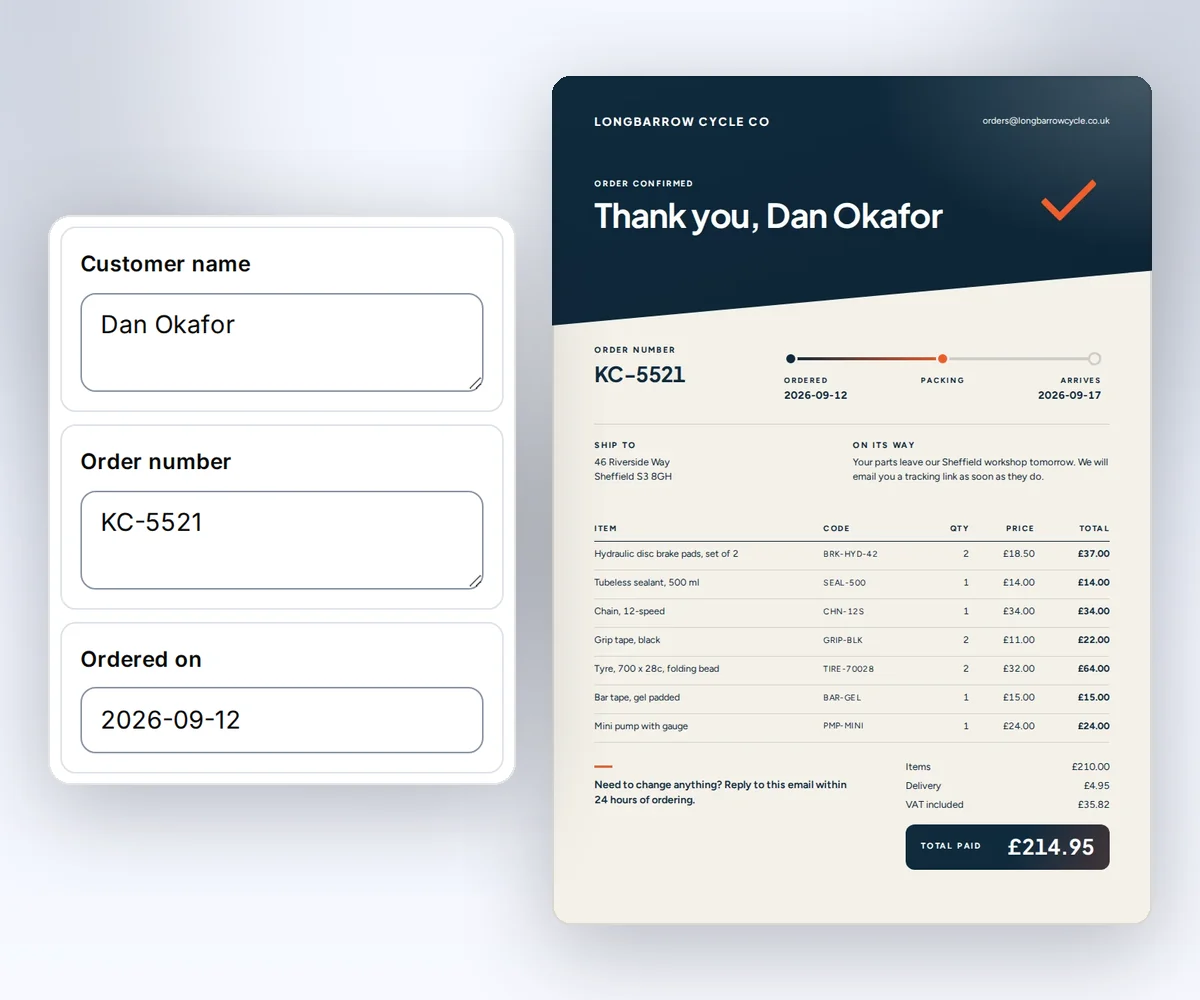
- Open the Sales order confirmation template and click Use this template. Sign in first if you need to.
- Open the Data tab and type the customer, the order number, the delivery date, and the items. To see your details on the page, click Preview with data above the canvas.
- Click Export, then Save and export PDF. When the file is ready, click Download PDF.
Your Bot can use the same saved design after you connect thirds.ai to Grok Bot.
Add thirds.ai in Grok Bot
You add thirds.ai to Grok Bot in three steps, and you need Grok Bot, a thirds.ai key, and a saved design. Grok Bot has no settings form for a custom connector. A Cursor staff answer on the Cursor forum, posted on 30 August 2026, says you tell your Bot to add the server in chat instead. The Bot connects from the cloud, so the server must be on the public internet, and https://thirds.ai/mcp is.
- Open a chat with the Bot that will make your files.
- Send this message:
Add a custom MCP server named thirds at https://thirds.ai/mcp.
It needs the header Authorization: Bearer followed by my thirds.ai API key.
Ask me for the key in a masked secret request. Don't show the key in chat.
- Type your key in the masked secret box when your Bot shows it.
The same Cursor answer says the new tools work from your next message.
| Setting | Value |
|---|---|
| Name | thirds |
| Server URL | https://thirds.ai/mcp |
| Header | Authorization: Bearer YOUR_API_KEY |
xAI's Grok Bot security guide, read on 24 September 2026, says to enter secrets only in a masked secret request and never in ordinary chat. If your Bot asks for the key in the chat itself, create a new key only for Grok Bot. Delete that key on the API keys page when you stop using Grok Bot.
On a Cursor Teams or Enterprise plan, xAI's Grok Bot team guide, read on 25 September 2026, says your team's Cursor connector rules apply to Grok Bot. A blocked connector shows as Disabled by team admin. Ask your admin to allow https://thirds.ai/mcp.
Check the connection
You check the connection when your Bot lists the thirds.ai tools. Open Marketplace, then Your plugins, and look for thirds. xAI's Grok Bot settings guide, read on 24 September 2026, puts your plugins there. In a chat, type @ and attach thirds. Ask your Bot to list the thirds.ai tools. You should see list_templates, render, and get_status.
Ask your Bot to list your saved designs next. Listing is free. Before paid work, ask it to show the file count and the credits. xAI's Grok Bot docs, read on 25 September 2026, say that a Bot shows an action and its details when it needs your approval. Choose Allow once until you trust the setup. The main MCP guide explains credits, retries, and status checks.
Build your own bot on the Grok API
You build your own bot on the Grok API when you want your own code to start each file. The Grok API is xAI's service for developers, and it isn't the Grok Bot app. See the invoice prompts for designs to use.
Install the openai Python package. Set XAI_API_KEY and THIRDS_API_KEY in your server's private environment. Create the thirds.ai key on the API keys page.
This first request only allows the bot to list templates. The xAI model request has its own provider cost.
import os
from openai import OpenAI

client = OpenAI(
    api_key=os.environ["XAI_API_KEY"],
    base_url="https://api.x.ai/v1",
)
response = client.responses.create(
    model="grok-4.7",
    input="List my saved thirds.ai templates.",
    tools=[{
        "type": "mcp",
        "server_url": "https://thirds.ai/mcp",
        "server_label": "thirds",
        "headers": {
            "Authorization": f"Bearer {os.environ['THIRDS_API_KEY']}"
        },
        "allowed_tools": ["list_templates"],
    }],
)
print(response.output_text)
The xAI remote MCP guide owns the supported API options. That guide, read on 25 September 2026, says its Responses API does not support require_approval. Your bot must control which paid calls it permits. Once a render succeeds, your bot reads the finished file through file downloads, the same way any API caller does.
Add order automation
- Connect your order system to your bot.
- Match each order to a saved invoice design.
- Enable
renderandget_statusfor approved work. - Keep the order ID and reuse its render idempotency key on retries.
- Download the finished PDF and store it with that order.
Your bot handles each new order and sends the file on, and thirds.ai makes the file. Follow MCP costs and retries and API workflows before connecting live orders.
FAQ
Does Grok Bot support MCP?
Yes. Grok Bot uses MCP servers as connectors. xAI's Grok Bot guide to apps, read on 25 September 2026, says you add connectors as plugins from Marketplace. For a server that isn't in Marketplace, such as thirds.ai, you ask your Bot in chat. A Cursor staff answer from 30 August 2026 says that server needs a public HTTPS address, because your Bot runs in the cloud and can't reach a server on your own computer.
Why can't Grok Bot reach thirds.ai?
Grok Bot can't reach thirds.ai when the URL or the key is wrong. Check that the URL is exactly https://thirds.ai/mcp and that the header is Authorization: Bearer followed by an active key. If the connector shows Disabled by team admin, your team's connector rules block it. To test the key itself, send one request with curl as the MCP Streamable HTTP client guide shows.
Does connecting spend credits?
No. Connecting and listing tools don't spend credits. AI template work and successful renders can. Ask your Bot to show the action and the cost before it starts paid work.