
thirds.ai vs DocRaptor
DocRaptor turns HTML from your code into a PDF with the Prince engine, and it can add fillable forms and accessibility tags (vendor claim). thirds.ai makes the same client PDFs, and its AI builds the design for you: from a sentence, or by rebuilding a picture of the invoice you already send, in your logo, colours, and fonts. Or start from a designer-made invoice in the gallery, and your brand kit goes on every file in one step. Then ChatGPT, Claude, or your code fills in each client's details, and each PDF of up to 100 pages, or a matching PNG, costs one credit. At $29 a month, DocRaptor gives 325 documents (vendor claim) and thirds.ai Starter gives 2,500 credits.
We aren't connected to DocRaptor. DocRaptor is a trademark of its owner.
Watch the comparison
DocRaptor alternative: one invoice design in every client's brand, no HTML
Read the transcript
Looking for a DocRaptor alternative? DocRaptor turns HTML from your code into a PDF, so someone writes that HTML first, line by line.
In thirds.ai, nobody writes the HTML. You start from a designer-made invoice, or the AI builds one for you.
Meet Esther. She keeps the books for five small businesses, none with a developer, and on the first of every month, each one needs invoices in its own brand.
She opens the Design studio invoice in the gallery and clicks Use this template.
She types in this month's details, then picks Hazel Row's brand kit, and the whole invoice switches to its logo, colours, and fonts in one step.
She clicks Save and export PDF, and Hazel Row's invoice is ready to send.
Next month, she just asks Claude, and gets Larkin's invoice back as a PDF, plus a matching PNG for the email.
That's her first of the month now. One design, five clients, every invoice in its own brand.
DocRaptor is the better choice when your code already builds the HTML and you need fillable forms, accessibility tags, Excel output, or more than a hundred pages.
Got invoices to send in more than one brand? Start free at thirds.ai.
- 1 credit
- makes 1 PDF or image
- 50 credits
- free every month, no card
- $29
- a month for Starter, with 2,500 credits
- 4 formats
- PDF, PNG, JPEG, and WebP
Feature by feature
What's different
| What you need | thirds.ai | DocRaptor |
|---|---|---|
| Inputs | Describe it to the AI, pick a designer-made gallery template, paste your own HTML, or upload a picture that the AI rebuilds as a design you can edit. Your code can also send plain HTML without saving a design. It can't load a page URL. | HTML text in document_content or a public page in document_url (vendor claim). We didn't find a template editor, a gallery, or image import (our reading). |
| Outputs | PDF, PNG, JPEG, and WebP, all from the same design. | PDF, XLS, and XLSX (vendor claim). We didn't find image output (our reading). |
| PDF engine | A fixed version of Chromium on our servers, with print styles and PDF page settings. | Prince on DocRaptor's servers, with its own paged-media CSS and prince_options (vendor claim). |
| Print features | Page size, orientation, margins, headers, footers, page ranges, and a password. No fillable forms or accessibility tags. | Fillable PDF forms, tags for WCAG 2.0, Section 508, and ISO 14289 accessibility, page floats, columns, cross-references, and mixed page sizes in one document (vendor claim). |
| Size limits | A PDF of up to 100 pages and 25 MiB. See limits. | No hard limit on pages, input size, or output size, except 100 MB for hosted documents. One minute for a sync call and ten for an async one (vendor claim). |
| Template editing | A visual editor and an AI chat work on the same design, so you can drag a box or ask for the change in words. | None. You build the HTML in your own code (our reading). |
| Brand kits | Save your logo, colours, and fonts once, or build the kit from your website address. Pick the kit on any design, and the file comes out in your brand. | Not shown on the pages we read (our reading). |
| AI assistants | Connect ChatGPT, Claude, or any other AI you use, and ask it for the design and then for each file. | Client libraries for Java, JavaScript, .NET, Node, PHP, Python, and Ruby (vendor claim). We didn't find an MCP server or an assistant connection (our reading). |
| API and webhooks | A REST API at /v1/pdf, /v1/image, and /v1/templates. Each signed webhook event gets up to eight delivery tries over a day. | A REST API with async jobs, a callback_url, and hosted documents with a download limit and an expiry date (vendor claim). |
| PDF password | Yes. Set pdf.password, and the reader must enter it to open the PDF. See PDF and image options. | Yes, with user_password and owner_password, plus flags that block printing, copying, and changes (vendor claim). |
| Pricing model | One credit makes one PDF or image. Starter is $29 a month for 2,500 credits. Extra credits cost $0.015 each on a paid plan, and packs start at $10 for 500 credits. | One document per file at any size. Basic is $15 a month for 125 documents, Professional is $29 for 325, Premium is $75 for 1,250, and Max is $149 for 5,000. Overage is a per-document price by plan, and the plans page doesn't give the rates (vendor claim). |
| Free tier | 50 free credits a month, no card. | 5 documents a month, plus unlimited test documents with a watermark. No overage and no document hosting on the free plan (vendor claim). |
| Where it fits | Agencies and small firms that send branded invoices and reports and have no one to write the HTML. | Developers who need forms, tagged PDFs, Excel output, or very long documents from HTML their own code already builds (our judgment). |
Pricing
How much does DocRaptor cost compared with thirds.ai?
The cheaper tool depends on how many files you make each month and what kind they are. Here's what DocRaptor and thirds.ai each cost, and how each one counts a file.
- We checked both pricing pages on 12 October 2026: DocRaptor plans and our pricing.
- DocRaptor Basic is $15 a month for 125 documents, Professional is $29 for 325, Premium is $75 for 1,250, and Max is $149 for 5,000 (vendor claim). Every document costs the same at any size, and there's no page limit (vendor claim). Per file, thirds.ai is cheaper: about 1.2 cents a credit on Starter, against about 9 cents a document on DocRaptor Professional at the same $29 (our reading). Two caveats: the AI design credits below come out of the same 2,500, and a DocRaptor document has no page cap while a thirds.ai PDF stops at 100 pages. DocRaptor's overage is a per-document price by plan, and its plans page doesn't give the rates (our reading, 12 October 2026).
- One thirds.ai credit makes one PDF of up to 100 pages, or one image. Starter is $29 a month for 2,500 credits, Growth is $79 for 10,000, and Scale is $199 for 40,000. Extra credits cost $0.015 each on a paid plan, and packs start at $10 for 500 credits. A file that fails costs nothing. See credits and billing.
- The AI uses thirds.ai credits too: 50 to build a design or rebuild one from a picture, 25 for a later text or HTML change, and 50 for a change with a new picture. A new AI picture inside a design also costs 50. You spend them once per design, not on every file.
- Both free plans need no card. DocRaptor gives 5 documents a month plus unlimited watermarked test documents (vendor claim). thirds.ai gives 50 credits a month, enough for one AI-built design or 50 files from a gallery template.
Where thirds.ai wins
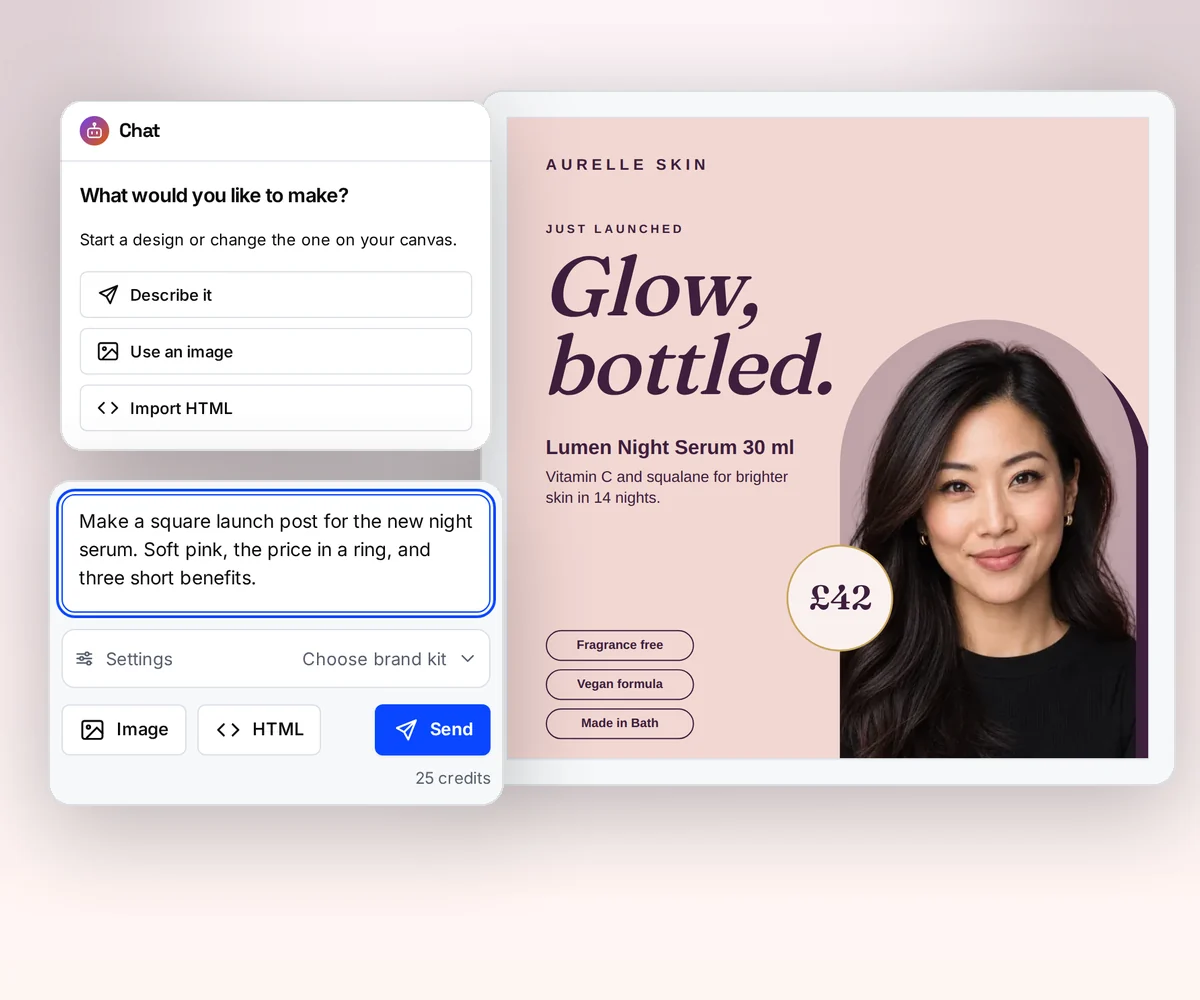
AI builds the invoice design, so nobody writes the HTML
With DocRaptor, your code builds the whole invoice in HTML and CSS before the first PDF exists, and every design change is a code change (our reading, 12 October 2026). In thirds.ai the AI builds the design for you, in your logo, colours, and fonts, and a change is a sentence to the AI, not a code change.
If you already send an invoice today, upload a picture of it. The AI rebuilds it as a design you can edit, in your brand. Try it on the AI template generator page, or turn a picture into a template.
Where thirds.ai wins
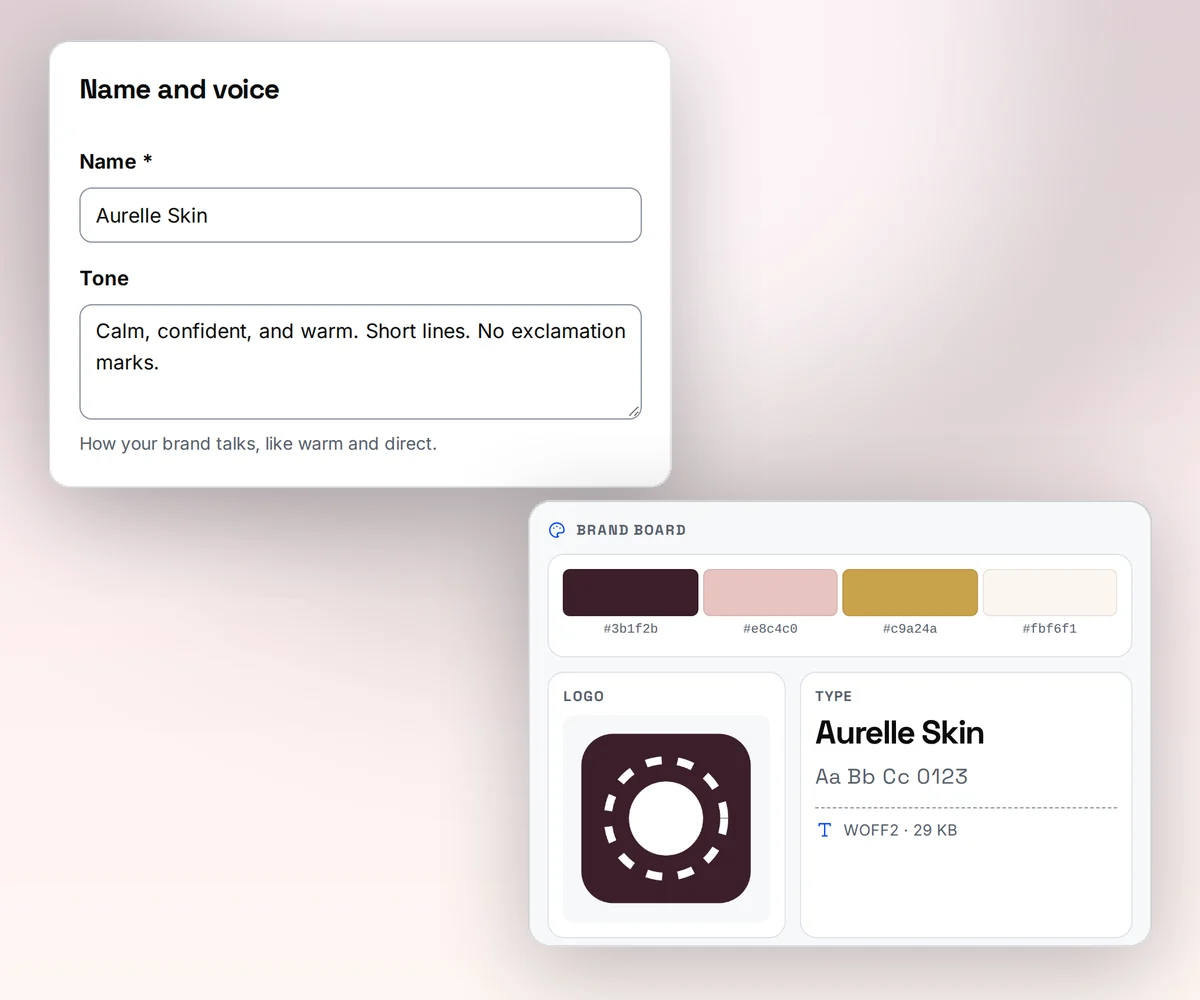
Your brand on every file in one step
Save your logo, colours, and fonts once as a brand kit, or type your website address and thirds.ai builds the kit from what it finds there. Pick the kit on any design, and the colours and logo land where they fit. An agency keeps one invoice design and switches the kit for each client.
DocRaptor turns the HTML your code sends into the PDF, so your brand lives in your CSS, and a new client's colours mean a code change (our reading, 12 October 2026).
Where thirds.ai wins
Ask ChatGPT or Claude for this month's PDF
Connect thirds.ai to ChatGPT, Claude, Gemini, Grok, or any other AI you use. Then ask for the file in plain words: this month's invoice for this client with these items. The assistant fills the design, writes any text you leave to it, and hands you the finished PDF in your brand.
DocRaptor gives you client libraries for seven languages (vendor claim, checked 12 October 2026), so each PDF comes from code someone wrote. We didn't find an assistant connection or an MCP server (our reading).
Where thirds.ai wins
A PDF and a matching image from the same design
DocRaptor makes PDF, XLS, and XLSX (vendor claim). We didn't find a way to get an image (our reading, 12 October 2026). In thirds.ai the same invoice or report design makes a PDF for the client and a PNG for the email or chat message where you send it, or a share card of the report's headline page. Ask for a second size, and smart resize fits the layout to it.

No code needed
How do you make a client PDF in thirds.ai without code?
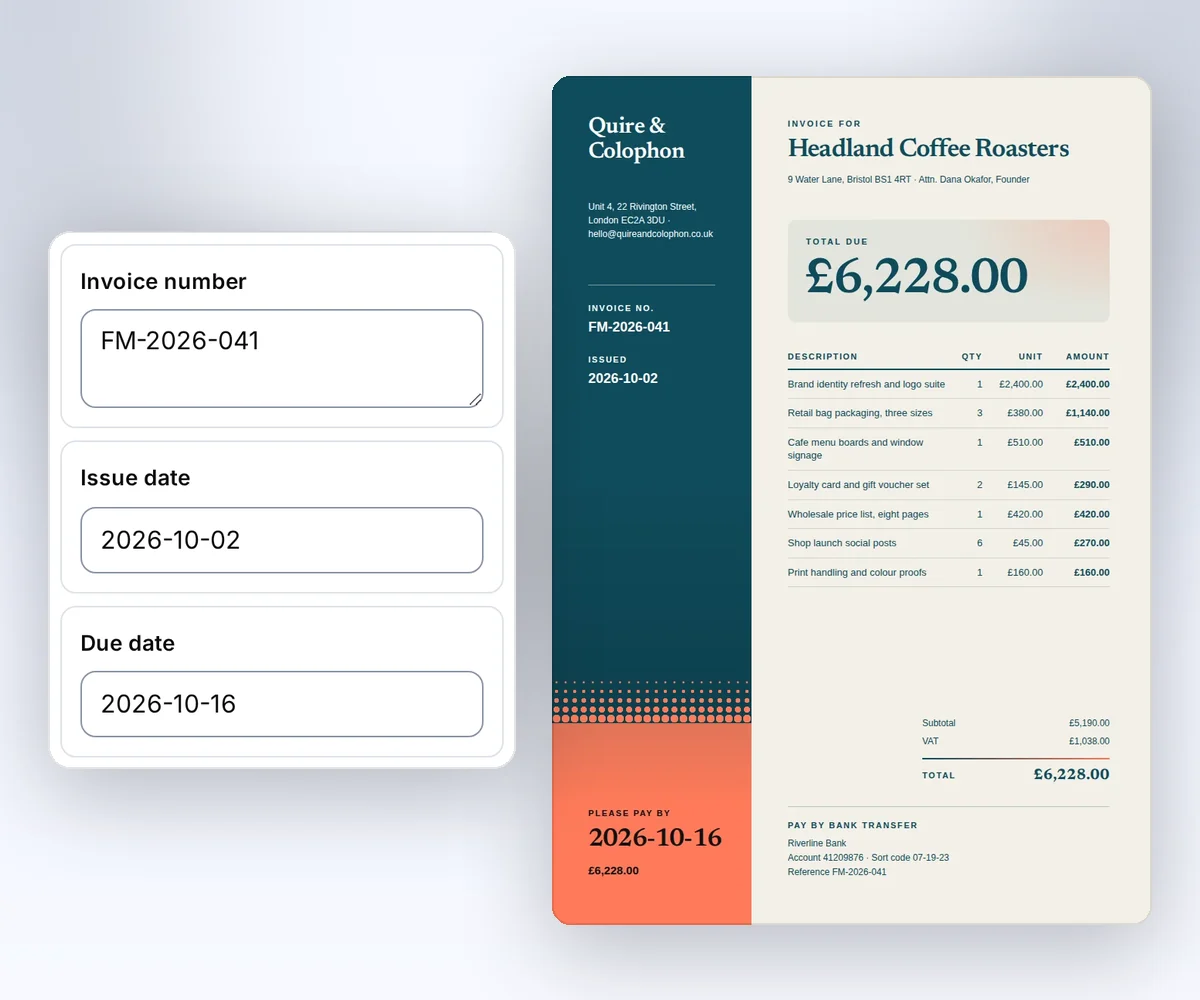
Open a designer-made invoice in the gallery, type the client's details into the boxes beside it, and download the PDF. No HTML, no code, and a free account is enough to start.
- Open the Design studio invoice and click Use this template, or describe your own design to the AI.
- Type your client's name, the dates, and the items into the boxes beside the invoice. The invoice changes as you type. Pick your brand kit, and it switches to your logo and colours.
- Click Save and export PDF to download it for one credit. Next month, open the same saved design and change the details, or ask ChatGPT or Claude for it.
Your developers can send the same details to the same saved design from their own code later. The Use templates with your data guide shows how.
Switching
Moving from DocRaptor
Map the input fields, and check layout and result handling with a real file. DocRaptor puts the HTML in document_content and the type in type (vendor claim). thirds.ai puts the HTML in html and the page options in a pdf object, such as pdf.format, pdf.landscape, and pdf.margins. DocRaptor returns the file in the response body for a sync call (vendor claim), while thirds.ai starts the file and gives you a download link when it's ready. If you use async with a callback_url today, register a thirds.ai webhook and handle its signed events for a finished or failed file. If a document runs past 100 pages, split it, because that's the thirds.ai PDF limit.
The larger change is the engine. Prince reads its own paged-media CSS, and Chromium reads the CSS that a browser reads. Check page breaks, headers, footers, and @page rules first, because those are the rules that differ most (our reading). Our guide to HTML page breaks, headers, and fonts shows the Chromium way to set each one. Follow the pattern in our wkhtmltopdf migration guide: save sample inputs and PDFs, move one document type, compare the output, then move the next. Start with Generate your first PDF with the API, then set page options with the PDF and image options guide. If you load a URL in DocRaptor today, prepare the HTML in your app and send it with absolute asset URLs. A fetched page can depend on scripts or styles that need changes. thirds.ai can't fetch the URL for you; if you need that, our PDFShift comparison covers a tool that does. Or skip rewriting the HTML: upload a picture of an old PDF and let the AI rebuild it in your brand.
Checked and dated
Sources
We checked DocRaptor's features, prices, and limits on 12 October 2026. Numbers marked (vendor claim) come from DocRaptor. Where we say which tool fits, or that we didn't find a feature, that's our opinion.
- https://docraptor.com/, checked 12 October 2026, for the Prince engine, forms, accessibility tags, and output formats
- https://docraptor.com/plans, checked 12 October 2026
- https://docraptor.com/documentation/api, checked 12 October 2026, for the API fields, encryption, hosting, and client libraries
- https://docraptor.com/documentation/api/limits, checked 12 October 2026
- https://docraptor.com/documentation/article/7321187-forms, checked 12 October 2026, for PDF form support
- thirds.ai facts come from our pricing page, API reference, billing guide, and limits page.
Free to try
Make your first file free
Open the Design studio invoice, type in your own details, and download the PDF for free. If you already have HTML, start with the PDF quickstart.
Start from a designer-made template and download a real file for free. Sign up, and ChatGPT or Claude can make the next one in your brand.