
An Open Graph image is the picture that shows up under your link when someone shares your page. With thirds.ai you make one from HTML: write the card once, or start from a designer-made gallery template, and you get a 1200 × 630 pixel PNG, JPEG, or WebP back. Make it in the editor without code, or from your own code with one request per page.


Read the setup prompt
Help me follow https://thirds.ai/blog/open-graph-images-from-html in ChatGPT or Claude. Read its linked thirds.ai docs before giving steps. Keep API keys and webhook secrets out of chat. Make Open Graph images from my HTML. Ask for the card HTML, the fields that change, and one sample title. Check one 1200 × 630 image before reusing the design. Before spending credits, tell me the cost and wait for my approval.
Once it's set up, each new post gets its own card. Your build script sends the title, or ChatGPT or Claude makes the cards for you, and nobody opens a design tool. thirds.ai runs the browser that draws the card on our servers, so there's nothing to install.
How do you make a branded Open Graph image for every blog post automatically?
Keep one HTML card design as a saved template, and send each post's title and details to it. Write the card by hand, or start from the Event promo template. Add your logo, colours, and fonts once as a brand kit, and they go on every card in one step. From then on, your blog build or your AI assistant sends each new post's title and details to that design and gets the card back.
The plain HTML recipe on this page makes one size. If you want the same card as a square post or a story as well, open the saved template in the editor and use Smart resize. If your blog build already runs Python, Generate PNG and WebP images from HTML in Python shows the same recipe as a script.
Make it without code
You can make an Open Graph image from the Event promo template in the thirds.ai editor without writing any HTML. It takes three steps and a free thirds.ai account. Each image you download costs one credit, and a free account gets 50 credits each month.
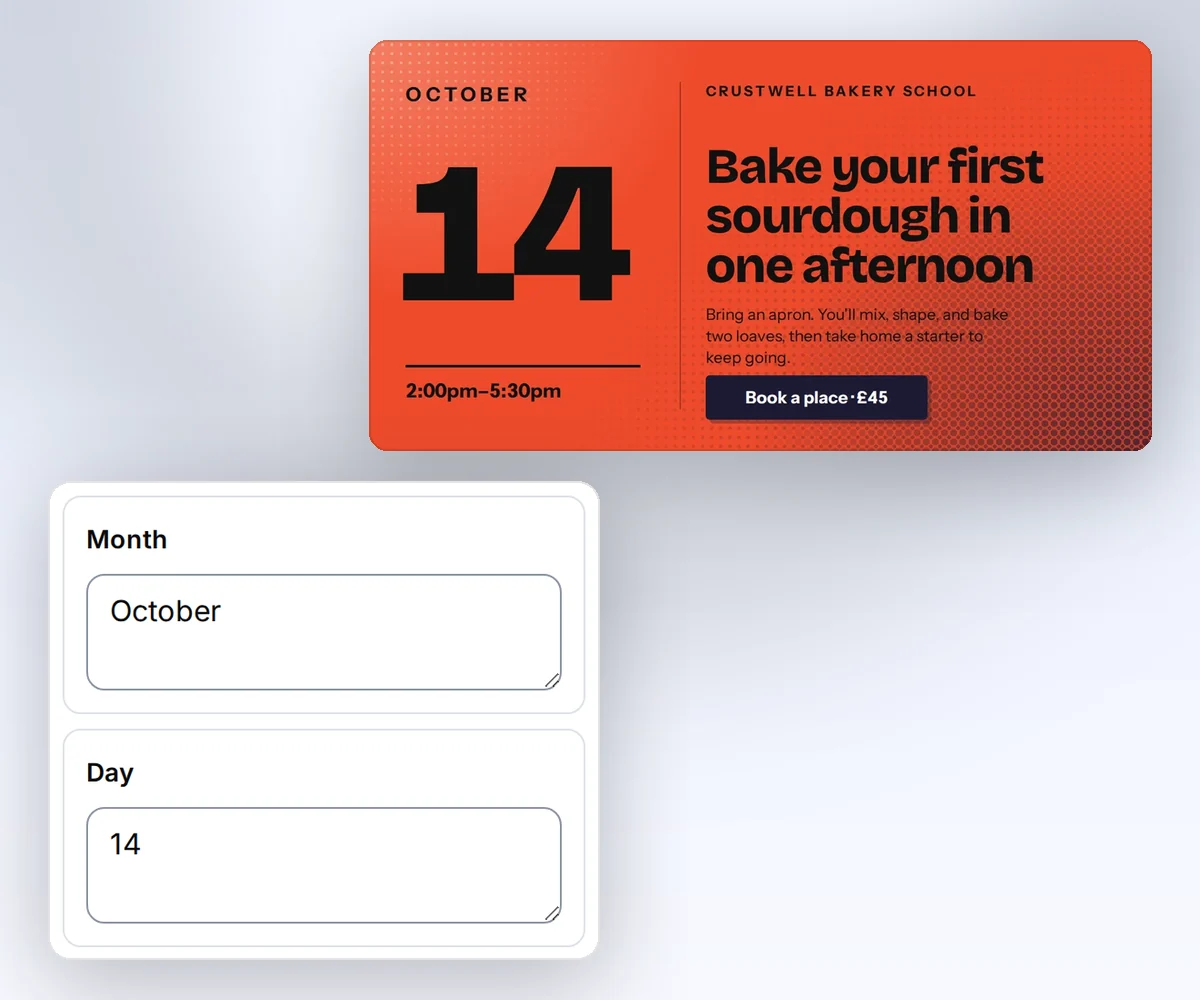
- Open the Event promo template and click Use this template. Sign in first if you need to.
- Open the Data tab and type your event month, day, time, host, title, description, and button text. The card changes as you type.
- Click Export, then Save and export PNG, and download the file. Upload it to your site and point
og:imageat it.
If you'd rather not type each card, connect thirds.ai to ChatGPT or Claude and ask for a card for every post on your blog. The assistant sends each title to the design and hands you the files.
Why 1200 × 630 pixels
Facebook's image guide for link shares asks for at least 1200 × 630 pixels, a ratio as close to 1.91 to 1 as you can, and a file under 8 MB (read on 13 October 2026). The Open Graph protocol itself sets no size, so Facebook's rule is the safe target, and the wide shape leaves room for an event date and a title. Each app shows the card its own way, and some crop a different shape to fit. The Open Graph guide lists each platform's rule, the tags you need, and how to refresh a cached preview.
thirds.ai makes the image at exactly 1200 × 630 and doesn't scroll down for more, so anything outside that rectangle is left out. Give the body that size, set its margin to zero, and keep the text inside the frame. Read Set PDF and image options for every image option.
Write the HTML
Write your Open Graph card as one HTML page that is exactly 1200 × 630 pixels, with every word already in place. This card uses the same fields as the Event promo template in a simpler layout. It has a dark date block on the left, the event details on a blue field, and a white bar for the button words.
<!doctype html>
<html lang="en">
  <head>
    <meta charset="utf-8" />
    <style>
      body {
        margin: 0;
        font-family: Arial, sans-serif;
        color: white;
      }
      .card {
        position: relative;
        width: 1200px;
        height: 630px;
        overflow: hidden;
        background: #0a46ff;
      }
      .card > * {
        position: absolute;
        margin: 0;
        box-sizing: border-box;
      }
      .date {
        left: 0;
        top: 0;
        width: 335px;
        height: 630px;
        background: #0b0b0b;
      }
      .label {
        font-size: 12px;
        font-weight: 700;
        letter-spacing: 1.3px;
        text-transform: uppercase;
      }
      .month {
        left: 58px;
        top: 85px;
      }
      .day {
        left: 50px;
        top: 147px;
        font-size: 170px;
        font-weight: 700;
        line-height: 1.25;
        letter-spacing: -7px;
      }
      .time {
        left: 58px;
        top: 441px;
        width: 225px;
        font-size: 25px;
        line-height: 1.25;
      }
      .host {
        left: 390px;
        top: 63px;
      }
      .title {
        left: 390px;
        top: 139px;
        width: 750px;
        font-size: 63px;
        font-weight: 700;
        line-height: 1.25;
        letter-spacing: -2px;
      }
      .description {
        left: 390px;
        top: 368px;
        width: 720px;
        font-size: 26px;
        line-height: 1.25;
      }
      .bar {
        left: 390px;
        top: 520px;
        width: 710px;
        height: 64px;
        background: white;
      }
      .action {
        left: 415px;
        top: 537px;
        font-size: 24px;
        font-weight: 700;
        color: #0a46ff;
      }
    </style>
  </head>
  <body>
    <div class="card">
      <div class="date"></div>
      <p class="label month">October</p>
      <p class="day">14</p>
      <p class="time">3:00 PM London</p>
      <p class="label host">Fieldnote sessions</p>
      <p class="title">Plan a client launch in one afternoon</p>
      <p class="description">
        A practical workshop for small teams that want one clear story and a
        reusable launch kit.
      </p>
      <div class="bar"></div>
      <p class="action">Save your place</p>
    </div>
  </body>
</html>
Use <meta charset="utf-8"> so accented names and symbols show up. Set a font family that the renderer can load, such as a generic family or a licensed web font through @font-face. The renderer can't see a font that only lives on your laptop.
Send the request
You send the Open Graph card to thirds.ai as one POST /v1/image request. Put the HTML in the html field as one JSON string, and set the format and size in the image object. Send the body with your API key, a Content-Type: application/json header, and an Idempotency-Key of your choice, as Generate your first PDF with the API shows.
{
  "html": "<!doctype html><html lang='en'><head><meta charset='utf-8'><style>body{margin:0;font-family:Arial,sans-serif;color:white}.card{position:relative;width:1200px;height:630px;overflow:hidden;background:#0a46ff}.card>*{position:absolute;margin:0;box-sizing:border-box}.date{left:0;top:0;width:335px;height:630px;background:#0b0b0b}.label{font-size:12px;font-weight:700;letter-spacing:1.3px;text-transform:uppercase}.month{left:58px;top:85px}.day{left:50px;top:147px;font-size:170px;font-weight:700;line-height:1.25;letter-spacing:-7px}.time{left:58px;top:441px;width:225px;font-size:25px;line-height:1.25}.host{left:390px;top:63px}.title{left:390px;top:139px;width:750px;font-size:63px;font-weight:700;line-height:1.25;letter-spacing:-2px}.description{left:390px;top:368px;width:720px;font-size:26px;line-height:1.25}.bar{left:390px;top:520px;width:710px;height:64px;background:white}.action{left:415px;top:537px;font-size:24px;font-weight:700;color:#0a46ff}</style></head><body><div class='card'><div class='date'></div><p class='label month'>October</p><p class='day'>14</p><p class='time'>3:00 PM London</p><p class='label host'>Fieldnote sessions</p><p class='title'>Plan a client launch in one afternoon</p><p class='description'>A practical workshop for small teams that want one clear story and a reusable launch kit.</p><div class='bar'></div><p class='action'>Save your place</p></div></body></html>",
  "image": {
    "format": "png",
    "width": 1200,
    "height": 630
  },
  "wait": false
}
Choose png for sharp text and flat colours. Choose jpeg or webp with a quality value for a photo. With wait: false, the API answers after it accepts the job. Check GET /v1/image/{id} every few seconds, follow Retry-After when it's there, and stop on succeeded, failed, or cancelled. If you give up after a time limit of your own, keep the ID, because the job can still finish.
What the finished card looks like
The Event promo template makes a 1200 × 630 pixel event card with a big day number on the left, the title and a short description on the right, and a dark button, all on a warm gradient with a dotted texture. The HTML recipe on this page is a flat, plainer version of the same card, so your downloaded PNG looks simpler.

Use the file on your page
Put the finished Open Graph image on your page by saving it on your own site and adding its address to the page's og:image tag. Read download.url from the finished job, add https://thirds.ai in front of the path, and download the PNG. That download link lasts 15 minutes, so save the PNG in your own storage and serve it from your site. Then point the page at it.
<meta
  property="og:image"
  content="https://example.com/cards/launch-workshop.png"
/>
<meta property="og:image:width" content="1200" />
<meta property="og:image:height" content="630" />
A failed image costs nothing. If the job fails with invalid_input or unsafe_asset, fix the HTML or the asset address before you send another request. Follow Retry requests and download files for polling, retries, and the other codes.
Make one card for every page
You make one Open Graph card for every page by swapping the fixed text for fields and sending each page's details with its request. Replace the text with fields such as {{ title }} and {{ host }}, and send the same HTML with a data object in each request. The data fills the fields before the image is made, and no template is saved. Save the design as a template when you want to reuse it from the editor or by ID. Use templates with your data explains both paths. If you code in Cursor or Zed, connect thirds.ai there and ask the agent for each card from the saved design.
If you make cards with HTML/CSS to Image today, the HTML/CSS to Image comparison shows what changes when you switch, and the Robolly comparison does the same if you make link images from a Robolly design and a URL today. Plans and credit packs list the prices.
Read next
- Compare self-hosted rendering costs with a PDF API.
- The HTML to image page lists the formats, sizes, and limits.
- The social images page shows more card designs.
- Make static ad variants with a saved design changes the data for three images.
- Create branded templates for PDFs and images introduces every way to start.
Sign in to get 50 free credits a month and make your first card.


