
To create event tickets with thirds.ai, you copy the Event ticket design, type each guest's name, seat, and ticket number, and download a print-ready PDF. Every ticket gets its own QR code, made from its ticket number, so you can scan guests in at the door. You can make one ticket in the editor, a ticket for every row of your guest list from a CSV, or a ticket each time someone signs up, straight from your own code. Your event platform still takes care of sign-ups and payment.


Read the setup prompt
First read https://thirds.ai/blog/event-ticket-pdfs-from-registration-data, https://thirds.ai/docs/mcp, and the setup guide for ChatGPT or Claude, whichever I use. Guide me through the connection controls and browser sign-in. Never ask me to paste an API key into chat. Make event ticket PDFs. Start from the Event ticket template; ask how I store guest names, seats, and unique ticket numbers, then check one ticket and its QR code. Before spending credits, tell me the cost and wait for my approval.
For each guest, you'd normally copy a ticket file, change the name and seat, and make a new QR code by hand. With thirds.ai, a designer has already drawn the ticket, your brand kit puts your logo and colours on it in one step, and your whole guest list comes out of one upload, each ticket with its own QR code. When your event platform sends each new sign-up to your code, the ticket gets made with no one at the screen.

Make it without code
You can create your first event ticket in the thirds.ai editor without writing any code. It takes three steps, and you need a free thirds.ai account. Check one ticket this way before you make tickets for everyone on your list.
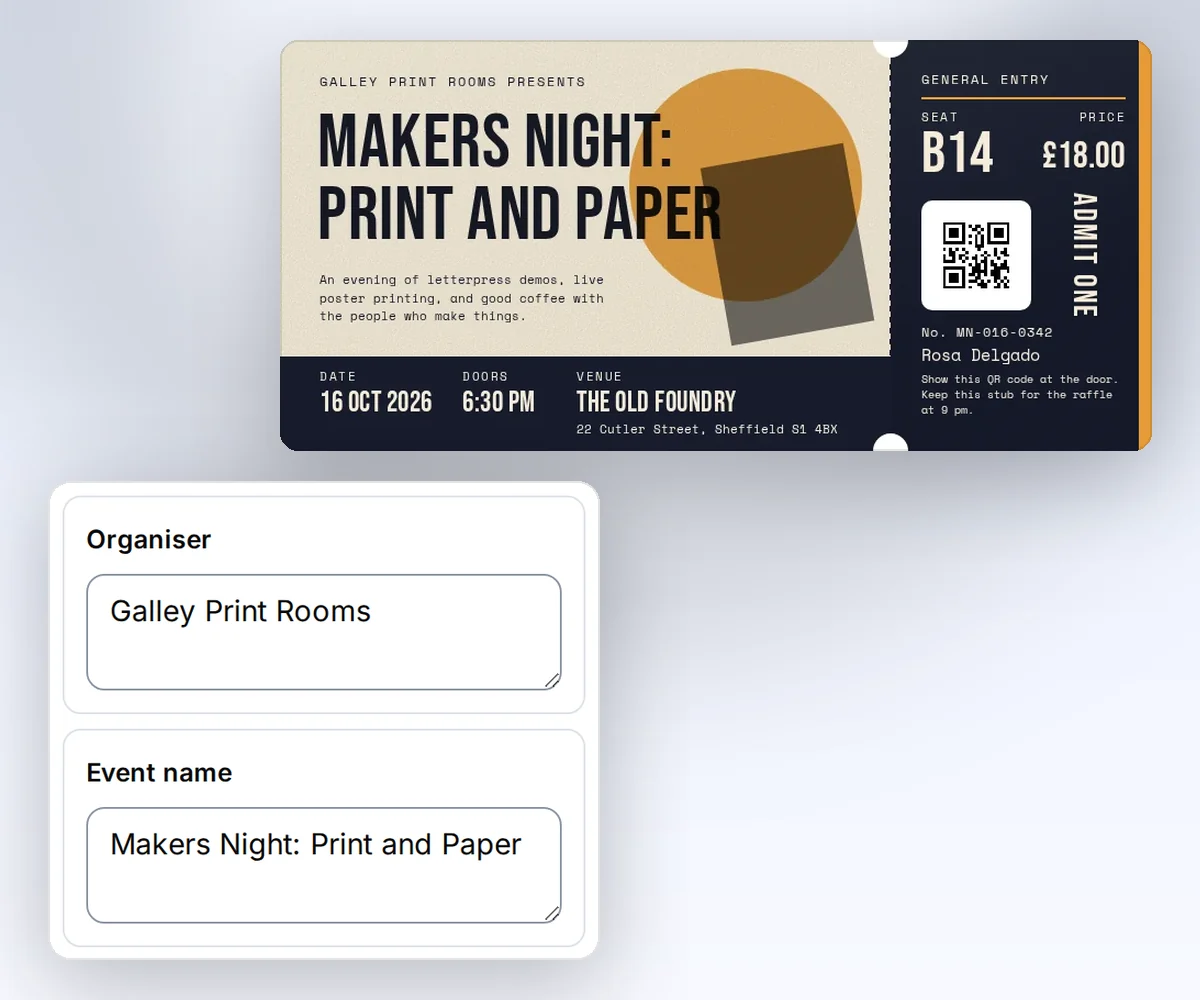
- Open the Event ticket template and click Use this template. Sign in first if you need to.
- Open Data and type your event's name, date, doors time, and venue. Then type one guest's name, ticket number, seat, and price. Click Preview with data above the canvas to see the ticket with its new QR code.
- Click Export and download the PDF. Open the file and check the name, the seat, and the QR code before you email or print it.
Try your longest guest name and your longest venue address first, because the design sets a length limit for each detail. A venue address can have up to 60 characters, and a seat up to 8.
Or connect ChatGPT, Claude, or any other AI you use and ask it for the tickets. It fills the design from your guest details and hands you the PDFs. Start free.
What goes on each event ticket
Each event ticket shows your event, the venue, and the guest's name, with a tear-off stub for the ticket number, the seat, the price, and a QR code. The Event ticket is a long landscape ticket at DL size, 210 by 99 mm. Every ticket needs all 13 details below, with these exact names. The Batches page shows one column for each detail.
| Detail | Rule | Sample value |
|---|---|---|
organiser | 1 to 50 characters | Galley Print Rooms |
event_name | 1 to 60 characters | Makers Night: Print and Paper |
tagline | 1 to 120 characters | An evening of letterpress demos, live poster printing, and good coffee with the people who make things. |
event_date | date, YYYY-MM-DD | 2026-10-16 |
doors_open | 1 to 20 characters | 6:30 pm |
venue_name | 1 to 40 characters | The Old Foundry |
venue_address | 1 to 60 characters | 22 Cutler Street, Sheffield S1 4BX |
ticket_type | 1 to 18 characters | General entry |
holder_name | 1 to 60 characters | Rosa Delgado |
ticket_number | 1 to 14 characters | MN-016-0342 |
seat | 1 to 8 characters | B14 |
price | number, 0 to 100000 | 18 |
stub_note | 1 to 120 characters | Show this QR code at the door. Keep this stub for the raffle at 9 pm. |
The QR code holds the ticket number, so your check-in app can look each guest up by that number. It's a QR code, not a 1D barcode, so check that your scanner reads QR codes.
How do I create event tickets for my whole guest list?
You create event tickets for a whole guest list by uploading the list as a CSV to Batches, and you get one ticket PDF for each row in a single ZIP. You need your saved copy of the Event ticket design and a spreadsheet with one row for each guest. The Batches page already has a column for each of the 13 details, so you only add the rows. In a CSV file, put quotes around any cell that has a comma in it.
organiser,event_name,tagline,event_date,doors_open,venue_name,venue_address,ticket_type,holder_name,ticket_number,seat,price,stub_note
Galley Print Rooms,Makers Night: Print and Paper,Letterpress demos and live poster printing.,2026-10-16,6:30 pm,The Old Foundry,"22 Cutler Street, Sheffield S1 4BX",General entry,Rosa Delgado,MN-016-0342,B14,18,Show this QR code at the door.
Galley Print Rooms,Makers Night: Print and Paper,Letterpress demos and live poster printing.,2026-10-16,6:30 pm,The Old Foundry,"22 Cutler Street, Sheffield S1 4BX",General entry,Tomas Reyes,MN-016-0343,B15,18,Show this QR code at the door.
- Open Batches and choose your ticket design. Click Download a starter CSV if you want a file that already has the right first row.
- Fill in one row for each guest, save the list as a CSV, and drop it on the page. You can also type in the table or paste the cells straight from your spreadsheet.
- Check the rows and the cost on the page, then click Make 2 files. The number on the button matches your rows.
- Download the ZIP when the files are ready. The files follow your row order, such as
001.pdf.
Your plan sets how many rows fit in one batch: 10 on Free and on credit packs with no plan, 50 on Starter, 100 on Growth, and 200 on Scale. For a bigger event, split your guest list into more than one CSV. You can retry failed rows without paying again for the tickets that worked. PDF mail merge from a CSV has the full details. For a trip with a plan for each day, make a travel itinerary PDF for every guest the same way.
How do I make a ticket PDF from my own code each time someone registers?
This section is for developers. You make a ticket each time someone registers by sending that person's details from your own code to your saved ticket design, then downloading the PDF. The recipe has three steps: a small script shapes the registration record, one request makes the file, and a download step checks it. You need Python 3, curl, an API key, and the ID and version of your saved copy of the Event ticket template.
If your event platform sends a webhook or an export row when someone registers or pays, that record is your starting point. The example runs on macOS or Linux, and the script uses only the Python standard library. Set THIRDS_API_KEY through your secret store, and set THIRDS_TEMPLATE_ID and THIRDS_TEMPLATE_VERSION to your saved copy of the Event ticket template.
Prepare the registration record
Your platform's export or webhook must supply the shape below. Save it as registration.json in a private folder and set THIRDS_WORK to that folder.
{
  "organiser_name": "Galley Print Rooms",
  "title": "Makers Night: Print and Paper",
  "tagline": "An evening of letterpress demos, live poster printing, and good coffee with the people who make things.",
  "session_date": "2026-10-16",
  "doors_time": "6:30 pm",
  "location_name": "The Old Foundry",
  "location_address": "22 Cutler Street, Sheffield S1 4BX",
  "tier": "General entry",
  "first_name": "Rosa",
  "last_name": "Delgado",
  "confirmation_code": "MN-016-0342",
  "seat_assignment": "B14",
  "amount_paid": 18,
  "check_in_note": "Show this QR code at the door. Keep this stub for the raffle at 9 pm."
}
Save this script as prepare-ticket.py. It checks each field against the template's own limits before it writes a request, so a bad export fails here instead of at the API.
"""Map one registration record to the saved Event ticket template."""
import json
import sys
from datetime import date
from pathlib import Path

LIMITS = {
    "organiser": 50, "event_name": 60, "tagline": 120, "doors_open": 20,
    "venue_name": 40, "venue_address": 60, "ticket_type": 18,
    "holder_name": 60, "ticket_number": 14, "seat": 8, "stub_note": 120,
}

fixture_path, template_id, version, output_path = sys.argv[1:]
try:
    reg = json.loads(Path(fixture_path).read_text())
    holder_name = f"{reg['first_name']} {reg['last_name']}".strip()
    data = {
        "organiser": reg["organiser_name"],
        "event_name": reg["title"],
        "tagline": reg["tagline"],
        "event_date": date.fromisoformat(reg["session_date"]).isoformat(),
        "doors_open": reg["doors_time"],
        "venue_name": reg["location_name"],
        "venue_address": reg["location_address"],
        "ticket_type": reg["tier"],
        "holder_name": holder_name,
        "ticket_number": str(reg["confirmation_code"]),
        "seat": str(reg["seat_assignment"]),
        "price": float(reg["amount_paid"]),
        "stub_note": reg["check_in_note"],
    }
    for name, limit in LIMITS.items():
        if not 1 <= len(data[name]) <= limit:
            raise SystemExit(f"field_too_long: {name}")
    if not 0 <= data["price"] <= 100000:
        raise SystemExit("invalid_price")
    request = {"template_id": template_id, "version": int(version),
               "data": data, "wait": False}
    Path(output_path).write_text(json.dumps(request, indent=2, allow_nan=False) + "\n")
except (KeyError, TypeError, ValueError, OSError):
    raise SystemExit("invalid_input") from None
Make the file
The mapping command writes a local request. The first curl command creates one PDF and costs one credit on success. Use the confirmation code as the Idempotency-Key, so a repeated webhook delivery never makes a second ticket:
umask 077
python3 "$THIRDS_WORK/prepare-ticket.py" \
  "$THIRDS_WORK/registration.json" \
  "$THIRDS_TEMPLATE_ID" "$THIRDS_TEMPLATE_VERSION" \
  "$THIRDS_WORK/request.json"
curl --fail-with-body --silent --show-error https://thirds.ai/v1/pdf \
  -H "Authorization: Bearer $THIRDS_API_KEY" \
  -H 'Content-Type: application/json' \
  -H 'Idempotency-Key: ticket-MN-016-0342' \
  --data @"$THIRDS_WORK/request.json"
Save the id from the response with your registration record. Read the job until status is succeeded. Replace the sample ID with yours.
curl --fail-with-body --silent --show-error \
  https://thirds.ai/v1/pdf/pdf_00000000000000000000000000000000 \
  -H "Authorization: Bearer $THIRDS_API_KEY"
Copy download.url from that response and add https://thirds.ai before it. The download needs no API key.
curl --fail --silent --show-error \
  'https://thirds.ai/v1/downloads/YOUR_SIGNED_DOWNLOAD_TOKEN' \
  --output "$THIRDS_WORK/ticket.pdf"
shasum -a 256 "$THIRDS_WORK/ticket.pdf"
The hash must match artifact.sha256 in the job, and the file size must match artifact.byte_size.
Open ticket.pdf before you email or print it. Keep one folder and one key per confirmation code. If a webhook delivery retries, send the same request with the same key, and you get back the same ticket instead of a duplicate.
Resolve errors
| Code or state | Next step |
|---|---|
field_too_long or invalid_price | Fix the source field named in the error before you retry. |
invalid_input | Check the registration record for a missing or malformed field. |
template_data_invalid | Check the field names and limits against your saved template version. |
idempotency_conflict | Use the original request with its key. A changed registration needs a new key. |
For polling deadlines, download links, and file retention, read Retry requests and download files. To hear when each ticket is ready without polling, build a webhook receiver. To download each finished ticket from those events, set up a webhook endpoint that collects finished files.
Put your brand on the ticket
Pick your brand kit, and your logo, colours, and fonts land on the ticket in one step. The same kit works on your badges and receipts, so every file for the event matches. It takes four steps in the editor.
- Open the Event ticket template and click Use this template to save a copy to your account.
- Pick your brand kit in the Brand kit box.
- Change any wording you like, such as the stub note.
- Click Save.
If you send tickets from your own code, Use templates with your data shows how to point each request at your newest saved design.
What event tickets cost
Each event ticket PDF costs one credit, so tickets for 120 guests cost 120 credits. A ticket that fails costs nothing. Every thirds.ai plan gives you every tool. Your plan sets how many files you make each month and how many guests fit in one batch.
Comparing thirds.ai with Robolly? The Robolly comparison shows how to make a festival pass in thirds.ai and how each tool counts PDF credits.
A verified free account gets 50 credits a month, and you don't need a card. For larger venues, pricing starts with Starter at 2,500 credits a month. Start free, copy the Event ticket design, and check your first ticket before the guest list arrives.


