
A quote template is a saved quote layout that you fill with your client, the work, the prices, and the date your offer ends. You can fill the Price quote template in the thirds.ai editor and download a PDF, or send an approved deal from your CRM and get the same PDF from your own code.


Read the setup prompt
Help me follow https://thirds.ai/blog/quote-estimate-pdfs-from-crm in ChatGPT or Claude. Read its linked thirds.ai docs before giving steps. Keep API keys and webhook secrets out of chat. Make quote PDFs from my CRM. Start from the Price quote template. Ask which deal fields are approved, how totals are stored, and when a quote should be made. Check one sample. Before spending credits, tell me the cost and wait for my approval.
Your CRM can make a quote for each approved deal without anyone opening a design app. thirds.ai starts from a designer-made quote layout, your brand kit puts your logo, colours, and fonts on it in one step, and a short script sends each approved deal from your CRM to the API. Each approved deal becomes a quote PDF ready for review, and nobody retypes a client, a line, or a price.
What should a quote template include?
A quote template should include a quote number, your business details, your client's details, the date you send it, and the date the offer ends. It also needs each line item with its quantity and price, the subtotal, the tax, the total, and your terms. The Price quote template holds all of these, plus a short intro and a footer line. A quote gives the price before the work starts, and an invoice asks for payment after it. Prices change, so a quote says how long the offer stands.
Give each quote its own number, and add a revision to it when the price changes. Then your client and your CRM both know which version of the quote is the one they said yes to.
Where can I find quote templates?
The Price quote template includes client details, line items, a validity date, terms, and totals. You can also try five quote designs on the free quote generator and download one as an A4 PDF with no account. On the Price quote template page, click Use this template to open it in the editor.

Before you connect a CRM, check the longest client name and all item descriptions in the PDF. The Price quote template takes one to ten item rows. A longer quote needs a layout that has room for the extra rows.
Make it without code
You can make your first quote PDF in the thirds.ai editor without writing any code. It takes three steps, and you need a free thirds.ai account. Filling one quote by hand first shows you that the design fits your details before you connect your CRM.
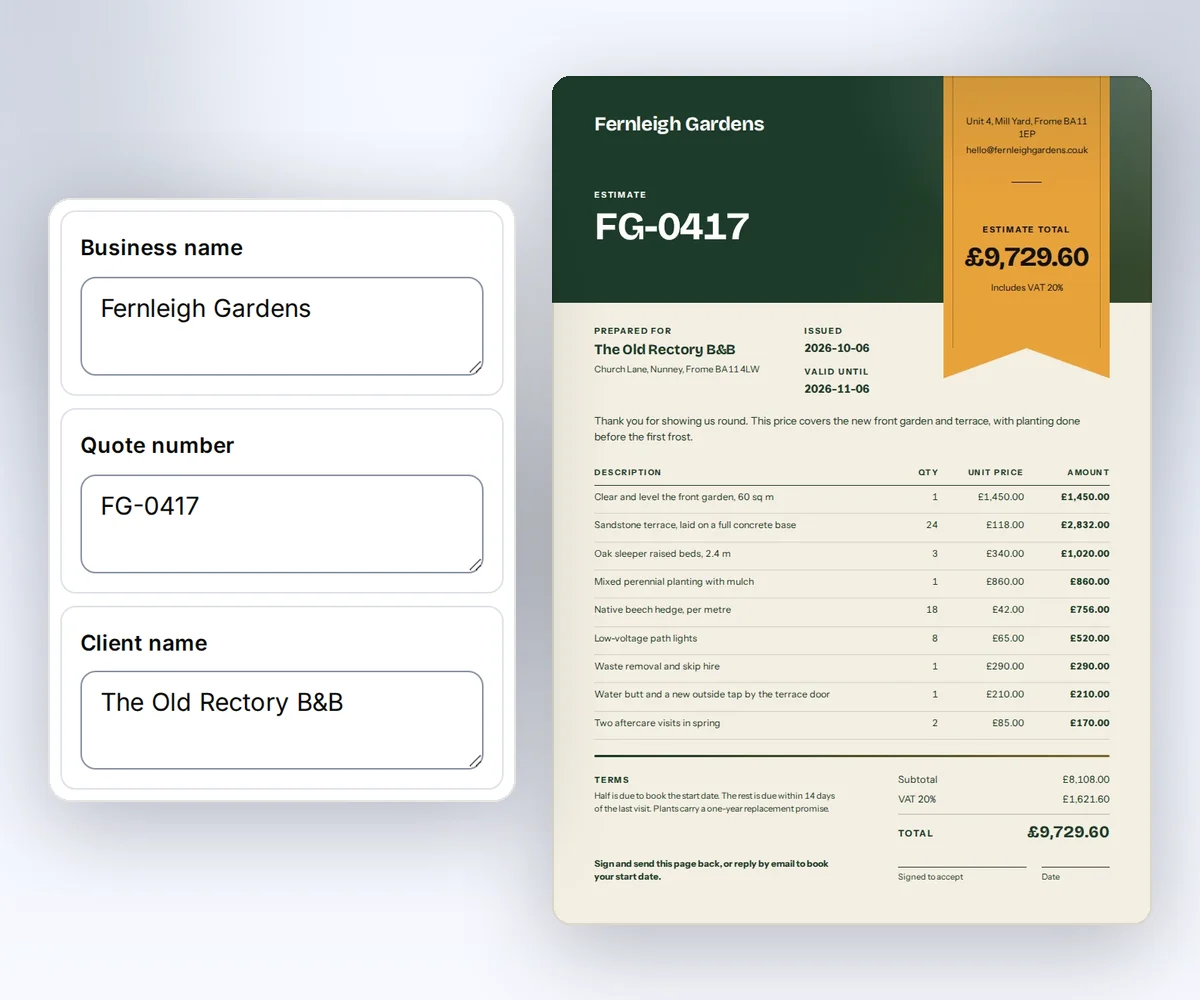
- Open the Price quote template and click Use this template. Sign in first if you need to.
- Open Data and type your business, your client, the quote number, and the dates. Use Add row and Remove row to change the lines of work. To see the lines on the page, click Preview with data. Pick your kit in the Brand kit box, and your logo, colours, and fonts land on the quote at once, at no cost. Then click Save.
- Click Export, then Export PDF. Check the prices, the total, and the valid-until date in the PDF itself.
Your first file is free. After that, each quote PDF costs one credit, and a free account gets 50 credits a month, as the pricing page shows. How to make a template you can reuse walks through the rest of the editor.
Once the design is saved, you don't have to open the editor for the next quote. Connect ChatGPT or Claude to thirds.ai, tell it the client, the lines, and the prices, and the finished PDF comes back in the chat.
How do I make a quote PDF from my CRM data?
You make a quote PDF from your CRM data by mapping an approved deal to your saved copy of the Price quote template, then sending one request to the thirds.ai API. You need an API key, Python 3, curl, and a saved copy of the template.
Click Use this template for your own copy, then Save it once, and keep its source and schema as they are so the code below still fits. The template data guide explains fields and exact versions. The certificate recipe shows the same one-template, many-records pattern for a different document, and the product spec sheet recipe fills one sheet design for each SKU.
Prepare the CRM record
This example uses Python 3 and curl on macOS or Linux. The script uses only the standard library. Set THIRDS_API_KEY through your secret store and set THIRDS_TEMPLATE_ID and THIRDS_TEMPLATE_VERSION to your saved Price quote copy. To get the template ID, open the Template menu in the editor and click Copy beside Template ID. The version shows as v2 beside the design's name, so set THIRDS_TEMPLATE_VERSION to the number alone, such as 2.
Export the approved deal from your CRM in the shape below. This example works with any CRM, since it starts from the exported file. Save it as quote-input.json in a private folder and set THIRDS_WORK to that folder.
{
  "approved": true,
  "currency": "usd",
  "quote_number": "Q-SAMPLE-1042",
  "issued_on": "2026-10-12",
  "valid_until": "2026-11-12",
  "seller": {
    "name": "Fieldnote Studio",
    "address": "Sample studio address",
    "email": "hello@fieldnote.example"
  },
  "customer": {
    "name": "Northline Team",
    "address": "Sample client address"
  },
  "intro": "A sample quote for a campaign image set.",
  "lines": [
    {
      "name": "Campaign image layout",
      "quantity": 1,
      "unit_price_cents": 25000
    },
    {
      "name": "Image variant",
      "quantity": 3,
      "unit_price_cents": 5000
    }
  ],
  "tax_cents": 0,
  "tax_label": "Sample tax",
  "total_cents": 40000,
  "terms": "Sample terms: half before work, half on delivery. Amounts are in USD.",
  "footer": "Reply to discuss this sample quote. It is not a payment receipt."
}
Only a trusted approval step should set approved. The code checks that field, but a JSON value can't prove who approved the quote. Let only your approval step set it, before this script runs.
Map the approved values
Save this script as prepare-quote.py. It uses whole USD cents for calculations and checks the final total against the approved CRM value. The tax amount comes from the CRM. The script doesn't work out tax rates or decide which tax applies.
"""Map one approved USD CRM quote to a saved price-quote template."""
import json
import sys
from pathlib import Path

fixture_path, template_id, version, output_path = sys.argv[1:]
try:
    deal = json.loads(Path(fixture_path).read_text())
    if deal["approved"] is not True:
        raise SystemExit("quote_not_approved")
    if deal["currency"] != "usd":
        raise SystemExit("unsupported_currency")
    items = []
    subtotal = 0
    for line in deal["lines"]:
        quantity, unit = line["quantity"], line["unit_price_cents"]
        if type(quantity) is not int or quantity < 1 or type(unit) is not int or unit < 0:
            raise SystemExit("invalid_amount")
        amount = quantity * unit
        subtotal += amount
        items.append({"description": line["name"], "quantity": quantity,
                      "unit_price": unit / 100, "amount": amount / 100})
    tax, total = deal["tax_cents"], deal["total_cents"]
    if any(type(value) is not int or value < 0 for value in [tax, total]):
        raise SystemExit("invalid_amount")
    if subtotal + tax != total:
        raise SystemExit("quote_total_mismatch")
    data = {
        "business_name": deal["seller"]["name"],
        "business_address": deal["seller"]["address"],
        "business_email": deal["seller"]["email"],
        "client_name": deal["customer"]["name"],
        "client_address": deal["customer"]["address"],
        "quote_number": deal["quote_number"],
        "issued_on": deal["issued_on"],
        "valid_until": deal["valid_until"],
        "intro": deal["intro"], "items": items,
        "subtotal": subtotal / 100, "tax_label": deal["tax_label"],
        "tax": tax / 100, "total": total / 100,
        "terms": deal["terms"], "footer": deal["footer"],
    }
    request = {"template_id": template_id, "version": int(version), "data": data,
               "pdf": {"format": "A4"}, "wait": False}
    Path(output_path).write_text(json.dumps(request, indent=2, allow_nan=False) + "\n")
except (KeyError, TypeError, ValueError, OSError):
    raise SystemExit("invalid_input") from None
The code maps seller and customer names, quote dates, item quantities, and prices to the saved design. It converts cents to the numeric dollar values that the template's currency filter prints. This adapter accepts whole item quantities and USD. For another currency or part quantities, change the script and the template to match.
Make the file
The mapping command writes a local request. The first curl command creates one PDF. Use the quote number and revision as the Idempotency-Key:
umask 077
python3 "$THIRDS_WORK/prepare-quote.py" \
  "$THIRDS_WORK/quote-input.json" \
  "$THIRDS_TEMPLATE_ID" "$THIRDS_TEMPLATE_VERSION" \
  "$THIRDS_WORK/request.json"
curl --fail-with-body --silent --show-error https://thirds.ai/v1/pdf \
  -H "Authorization: Bearer $THIRDS_API_KEY" \
  -H 'Content-Type: application/json' \
  -H 'Idempotency-Key: quote-Q-SAMPLE-1042-rev-1' \
  --data @"$THIRDS_WORK/request.json"
Save the id from the response with your quote record. Read the job until status is succeeded. Replace the sample ID with yours.
curl --fail-with-body --silent --show-error \
  https://thirds.ai/v1/pdf/pdf_00000000000000000000000000000000 \
  -H "Authorization: Bearer $THIRDS_API_KEY"
Copy download.url from that response and add https://thirds.ai before it. The download needs no API key.
curl --fail --silent --show-error \
  'https://thirds.ai/v1/downloads/YOUR_SIGNED_DOWNLOAD_TOKEN' \
  --output "$THIRDS_WORK/quote.pdf"
shasum -a 256 "$THIRDS_WORK/quote.pdf"
The hash must match artifact.sha256 in the job, and the file size must match artifact.byte_size.
Open quote.pdf. The sample has one layout at USD 250.00 and three variants at USD 50.00 each, for USD 400.00 total. Check the validity date and terms before delivery.
Keep one folder and one key per quote number and revision. If a create request times out, send it again with the same request and key. For a price change, approve a new quote revision and give it its own folder and key. Don't overwrite the original record or send a file before review. The API workflows guide covers this repeat-use pattern.
Resolve errors
| Code or state | Next step |
|---|---|
quote_not_approved | Return the quote to your approval step. |
quote_total_mismatch | Reconcile line totals and tax with the approved total. |
unsupported_currency | Use the correct currency adapter and template. |
invalid_amount or invalid_input | Fix missing fields, negative values, or invalid types. |
template_data_invalid | Check required fields, string lengths, and the ten-row limit. |
idempotency_conflict | Use the original request with its key. Give a new approved revision its own key. |
Is there a quote template in Word?
Yes, you can make a quote layout in Word and save it as a reusable template. Microsoft's template guide explains how (read on 13 October 2026). Word suits a quote you edit by hand each time. A thirds.ai quote template suits a CRM that sends each approved deal straight to the API, so each approved deal becomes a branded quote PDF without anyone filling it in by hand.
The CRM recipe in this post fills your saved copy of the gallery design and doesn't import a Word file. If you want your app to fill a Word file with each deal, read our Carbone and thirds.ai comparison to see which tool suits that.
Does Google Docs have a quote template?
Google Docs has a template gallery and a Make a copy command, but not every account shows a quote template there. Google's template help explains both, and it says some template features need a work or school account (read on 13 October 2026). Check your own gallery, or copy a quote layout you already own.
Use the Price quote template when your CRM should make every quote for you. When the client accepts, the invoice workflow turns the job into an invoice PDF. To make each client's invoice PDF from the same kind of data, follow Generate invoice PDFs from template data. The quotes and receipts page lists the quote designs and the receipt flow. When your client pays through Stripe, you can make a branded receipt PDF from the Stripe payment.


