
To convert an SVG to a PNG, open the free SVG to PNG tool, drop in your SVG, type the width and height you need, and click Download. The tool draws your SVG fresh at that size, at any width from 320 to 7,680 pixels, so the PNG comes out as sharp as the drawing. It runs in your browser, so the file never leaves your computer. The tool is a free part of thirds.ai, which turns a logo like yours into finished posts, ads, and PDFs: you add the PNG to a brand kit once, and ChatGPT or Claude makes each new file on a designer-made template in your brand.
Read the transcript
Here’s how to convert SVG to PNG, right in your browser... and then turn that PNG into a new post every week!
Drop your SVG on the free SVG to PNG tool, type the width you need, and click Download. It all runs in your browser, so the file never leaves your computer.
That’s the free part. But hey, a logo on its own isn’t a post. Every week, it needs to sit next to new words, and you don’t want to build that card again each time.
So save one branded design on thirds.ai. Copy the Share card template, and drop your PNG in where the sample picture was.
Set your colours once. Then type the words for this post... and next week, just change the words. The logo and layout stay right where they are.
Click Export, and you get a finished image for one credit. Keep going, and one design gives you every post you need!
Convert your SVG for free, then start your first design at thirds.ai!
How to convert SVG to PNG in three steps
All you need is a still SVG file up to 10 MB and a web browser.
- Open the SVG to PNG tool and drop your SVG on the page, or click Choose an SVG file to pick it from your computer.
- Type the Width (px) you want. Leave Keep the same shape ticked, and the height follows, so your logo doesn't squash.
- Under Download as, leave PNG and click Download. The button shows the size you'll get, such as Download 1280 × 1280.
The size boxes start at your SVG's own size, as long as it sits between 320 × 200 and 7,680 × 4,320. The file name keeps your SVG's name and adds the size, such as logo-1280x1280.png, so you can tell two versions apart later.
How do I convert SVG to PNG without losing quality?
You keep the quality by picking the size before you download, not after. An SVG is a set of shapes, so it looks the same at any size. A PNG is a grid of pixels at one size, and it only loses quality when something stretches it. The SVG to PNG tool draws the shapes straight onto the grid at the width and height you type, so the edges stay crisp even when the PNG is far bigger than the drawing.
So make the PNG at the size where it will show, or a little bigger. If you make a small one and stretch it later in another app, the edges go soft. Widths run from 320 to 7,680 pixels and heights from 200 to 4,320, so a 4K PNG at 3,840 × 2,160 fits. Width times height can't go over 32 million pixels, so 7,680 × 4,320 is just too big, and a very large size may not work on some computers. Keep your SVG, and make a new PNG whenever you need another size.
Does the PNG keep a transparent background?
Yes. Every empty part of your SVG stays clear in the PNG, so you can drop it on any colour. A JPEG can't be see-through, so when you pick JPEG, a Background picker appears. It starts on white and fills those empty parts.
Pick PNG for a logo or an icon that sits on different backgrounds. Pick JPEG only when the place you're uploading to won't take a PNG. For that, the free SVG to JPG converter starts on JPEG, and you pick the background colour before you download.
Why won't my SVG open?
An SVG won't open in the SVG to PNG tool when it has a script, an animation, a photo or other picture inside it, a link to another file, or an effect such as a blur or a drop shadow. The tool opens only plain, still SVG files up to 10 MB that are made of shapes and text, and the message under the drop area says whether it found a script or animation, a link to another file, or something it can't draw.
To fix it, open the drawing in the app you made it in and export a plain, still SVG. Take out any photo, turn off blurs and shadows, and try again. A drawing with more than 4,000 shapes won't open either, so simplify a very detailed one first.
Put your new PNG on a share card you can reuse
If you're turning a logo into a PNG for social posts, thirds.ai can put it on a designer-made card in your brand, and your AI assistant makes each new post from it. thirds.ai takes PNG, JPEG, or WebP pictures, so convert your SVG first.
The fastest way is to let the assistant do it. Connect ChatGPT or Claude to thirds.ai, ask it to set up your brand from your logo and colours, and ask for a share card. It builds the design with you, writes the headline, and hands you the finished image in the chat. From then on, you ask it for next week's card, or for the same card in every size and language.
If you'd rather see the design as you fill it in, use the editor. It takes three steps and a free thirds.ai account.
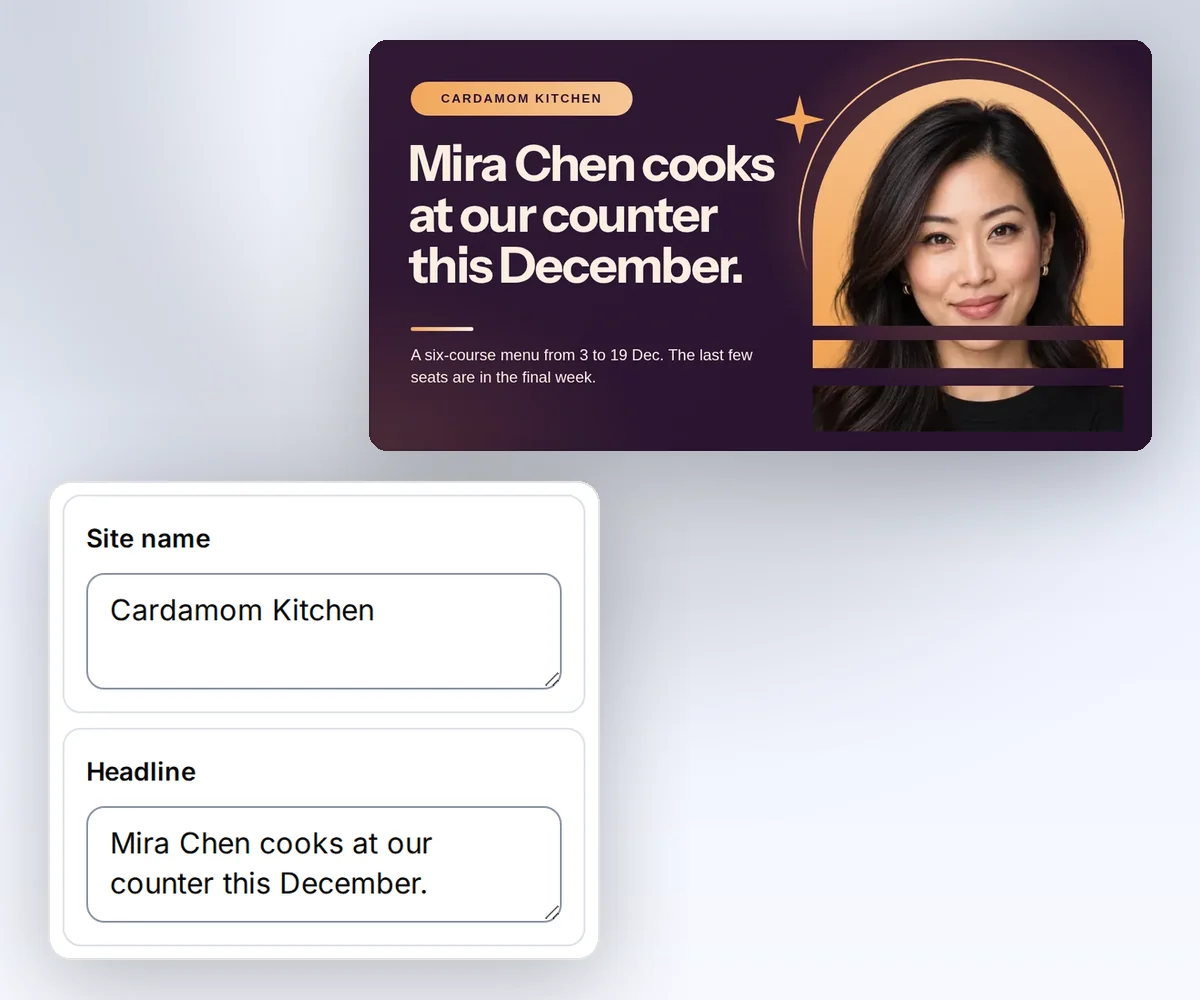
- Open the Share card template and click Use this template. Sign in first if you need to.
- Open the Data tab and type your site name, the headline, and a short description. Under the photo, click Upload image and choose your PNG.
- Click Export, then Save and export PNG, and download the finished image.
Each finished image costs one credit, and a verified free account gets 50 credits each month, as the pricing page shows. When you have a month of posts in a spreadsheet, a batch makes every card at once. Sign in to start free, or read how to make a template you can reuse for the rest of the editor.

Which tool to use next
Use the SVG to PNG tool when your drawing is finished and you just need the file. When the picture goes into many posts, ask ChatGPT or Claude to make each one from a thirds.ai template in your brand. For a finished picture, the free social image resizer fits it to each network's size, and the image compressor shrinks the file without changing its width or height. If your SVG is a logo, build a brand kit around the PNG, your colours, and your fonts. See all our free picture and PDF tools.


