
To generate an invoice PDF with thirds.ai, you fill a saved, designer-made invoice with each client's name, line items, and totals. Type the details in the editor, upload a spreadsheet, or send them from your own code, and thirds.ai sends back the finished PDF in your brand. You can also connect ChatGPT or Claude and ask for each month's invoice in plain words.


Read the setup prompt
First read https://thirds.ai/blog/invoice-pdfs-from-template-data, https://thirds.ai/docs/mcp, and the setup guide for ChatGPT or Claude, whichever I use. Guide me through the connection controls and browser sign-in. Never ask me to paste an API key into chat. Make repeat invoice PDFs. Start from the Client invoice template. Ask which details change and whether I want the editor, spreadsheet, or code, then check one invoice. Before spending credits, tell me the cost and wait for my approval.
A designer drew the thirds.ai invoice, so it looks like studio work without a designer on your side, and your brand kit puts your logo, colours, and fonts on it in one step.
Need just one invoice right now? Open the free invoice generator, pick one of the five designs, and download a PDF free, with no account. When a client has already paid, the receipt generator makes a receipt PDF the same way.
For a full Node.js script, use the Node.js invoice recipe.
Make an invoice PDF without code
You can make a branded invoice PDF in the thirds.ai editor without writing any code. All you need is a free account.
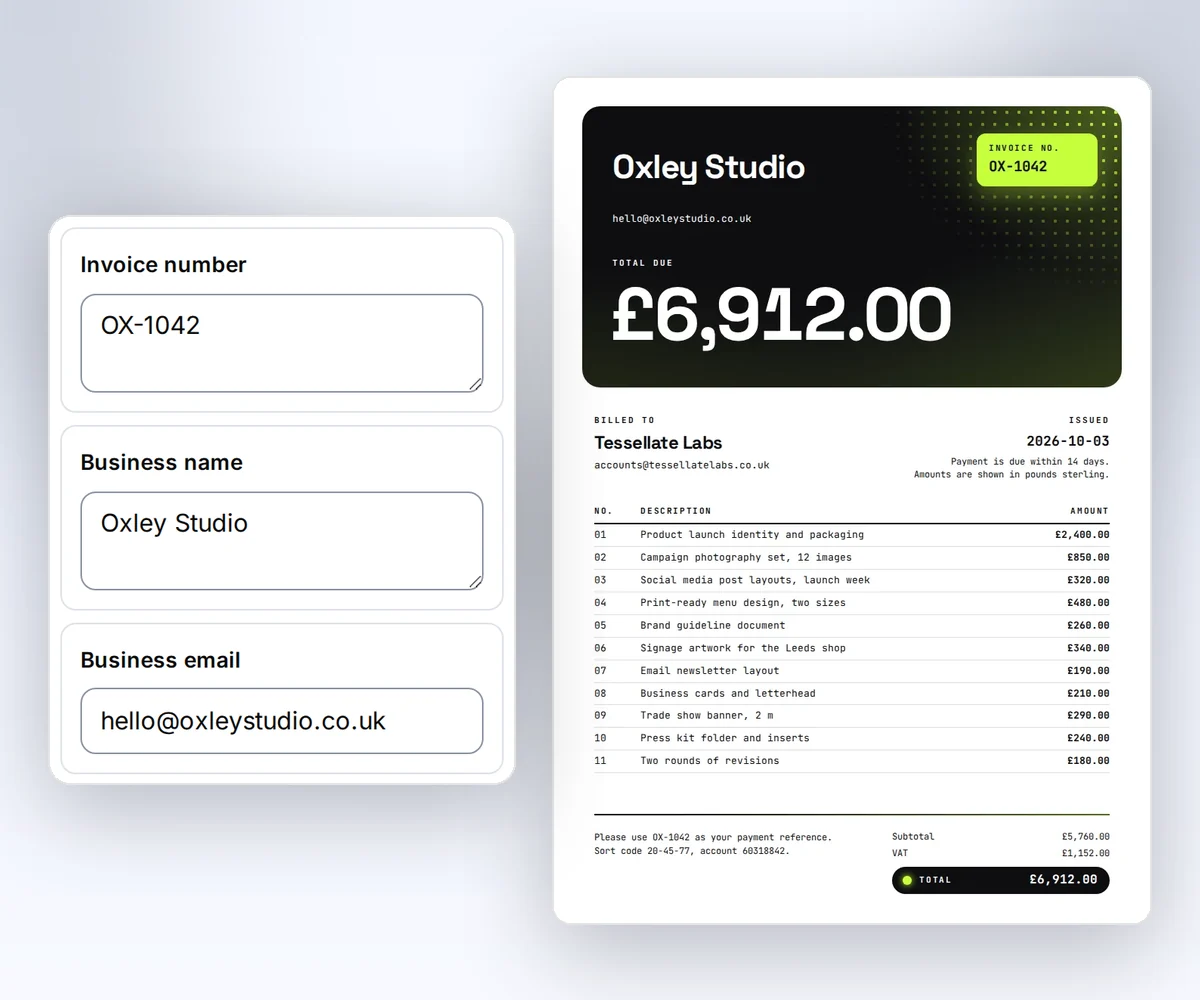
- Open the Client invoice template and click Use this template. Sign in first if you need to.
- Open the Data tab and type your business, the client, the invoice number, the date, and each line item. Add up the subtotal, the tax, and the total yourself, because the invoice prints the numbers you type.
- Click Export and download the PDF. Each invoice PDF you make uses one credit, and a free account gets 50 credits a month. Check it, then send it to your client from your own email.
To put your own logo, colours, and fonts on the invoice, or to start from your own design instead, follow how to make a template you can reuse.
Start from the Client invoice template
To send invoices from your own code, start with your own copy of the Client invoice template. Click Use this template in the gallery, and your copy starts at version 1 and opens in the editor. To get its template ID, open the Template menu and click Copy beside Template ID. The ID starts with tpl_.
The template reads these fields. Its schema requires every one of them, and it rejects extra fields.
| Field | Type | Example |
|---|---|---|
business_name | string, 1 to 80 characters | Northline Studio |
business_email | hello@northline.example | |
client_name | string, 1 to 80 characters | Fieldnote Labs |
client_email | accounts@fieldnote.example | |
invoice_number | string, 1 to 30 characters | NS-1042 |
issued_on | date as YYYY-MM-DD | 2026-09-03 |
items | 1 to 12 objects with description and amount | Product launch design, 2400 |
subtotal | number | 3250 |
tax | number | 650 |
total | number | 3900 |
payment_terms | string, 1 to 120 characters | Due within 14 days |
payment_note | string, 1 to 180 characters | Please use NS-1042 as the payment reference. |
The template shows issued_on with the date filter and each amount with the currency("GBP") filter, so 2400 prints as £2,400.00. To bill in euros, change "GBP" to "EUR" in the template; for dollars, remove the argument. For any other currency, format the text in your app and change the template to print a plain string. Compute the subtotal, tax, and total in your app and send the results, because the template does not do arithmetic. Read Use templates with your data for the full field syntax.
Send each client's data with one request
You make one invoice PDF by sending one POST /v1/pdf request with your template ID, the version, and that client's details. Replace the template ID with your own and replace YOUR_API_KEY with your key in a private terminal. Give each invoice its own Idempotency-Key, such as the invoice number, so a retry returns the same job instead of a second PDF.
curl --fail-with-body --silent --show-error https://thirds.ai/v1/pdf \
  -H 'Authorization: Bearer YOUR_API_KEY' \
  -H 'Content-Type: application/json' \
  -H 'Idempotency-Key: invoice-NS-1042' \
  --data '{
    "template_id": "tpl_00000000000000000000000000000000",
    "version": 1,
    "data": {
      "business_name": "Northline Studio",
      "business_email": "hello@northline.example",
      "client_name": "Fieldnote Labs",
      "client_email": "accounts@fieldnote.example",
      "invoice_number": "NS-1042",
      "issued_on": "2026-09-03",
      "items": [
        { "description": "Product launch design", "amount": 2400 },
        { "description": "Campaign image set", "amount": 850 }
      ],
      "subtotal": 3250,
      "tax": 650,
      "total": 3900,
      "payment_terms": "Due within 14 days",
      "payment_note": "Please use NS-1042 as the payment reference."
    }
}'const response = await fetch("https://thirds.ai/v1/pdf", {
method: "POST",
headers: {
"Authorization": "Bearer YOUR_API_KEY",
"Content-Type": "application/json",
"Idempotency-Key": "invoice-NS-1042"
},
body: JSON.stringify({
"template_id": "tpl_00000000000000000000000000000000",
"version": 1,
"data": {
"business_name": "Northline Studio",
"business_email": "hello@northline.example",
"client_name": "Fieldnote Labs",
"client_email": "accounts@fieldnote.example",
"invoice_number": "NS-1042",
"issued_on": "2026-09-03",
"items": [
{
"description": "Product launch design",
"amount": 2400
},
{
"description": "Campaign image set",
"amount": 850
}
],
"subtotal": 3250,
"tax": 650,
"total": 3900,
"payment_terms": "Due within 14 days",
"payment_note": "Please use NS-1042 as the payment reference."
}
}),
redirect: "error",
signal: AbortSignal.timeout(30000),
});
if (!response.ok) throw new Error(`HTTP ${response.status}; Retry-After: ${response.headers.get("retry-after") ?? "none"}`);
console.log(await response.text());import json
from urllib.error import HTTPError
from urllib.request import HTTPRedirectHandler, Request, build_opener
class NoRedirect(HTTPRedirectHandler):
def redirect_request(self, req, fp, code, msg, headers, newurl):
return None
request = Request("https://thirds.ai/v1/pdf",
method="POST",
headers={
"Authorization": "Bearer YOUR_API_KEY",
"Content-Type": "application/json",
"Idempotency-Key": "invoice-NS-1042"
},
data=json.dumps({
"template_id": "tpl_00000000000000000000000000000000",
"version": 1,
"data": {
"business_name": "Northline Studio",
"business_email": "hello@northline.example",
"client_name": "Fieldnote Labs",
"client_email": "accounts@fieldnote.example",
"invoice_number": "NS-1042",
"issued_on": "2026-09-03",
"items": [
{
"description": "Product launch design",
"amount": 2400
},
{
"description": "Campaign image set",
"amount": 850
}
],
"subtotal": 3250,
"tax": 650,
"total": 3900,
"payment_terms": "Due within 14 days",
"payment_note": "Please use NS-1042 as the payment reference."
}
}).encode("utf-8"),
)
try:
with build_opener(NoRedirect()).open(request, timeout=30) as response:
print(response.read().decode("utf-8"))
except HTTPError as error:
retry = error.headers.get("Retry-After", "none")
raise RuntimeError(f"HTTP {error.code}; Retry-After: {retry}") from NoneAlways send the version number, so a retry makes the same invoice. If you leave it out, thirds.ai uses the newest version, so a later save can change what the request makes. This design uses an A4 layout, which matches the default PDF output size. If your clients print on Letter paper, change the PDF page size and margins in the same request.
Wait for the invoice PDF and download it
You get the invoice PDF by reading the job's status and then downloading the file from download.url. The request waits briefly for the result. Read status even when the HTTP response is 200, because a 200 can still hold a failed job. A 202 response means it is still queued or running. Keep the returned id and poll GET /v1/pdf/{id} with a delay under a time deadline. Stop on succeeded, failed, or cancelled, and follow Retry-After when present. If your deadline ends, keep the ID and check later. The job keeps running.
Then read download.url. It is a relative path, such as /v1/downloads/..., so add https://thirds.ai in front of it before you give it to a download client. The signed link lasts 15 minutes, and anyone with the link can download the file, so keep it private. Free accounts keep the file for 30 days, and paid plans keep it for up to a year (the exact rules). An invoice belongs with your order record, so save it to your own storage, and compare its size and SHA-256 with artifact.byte_size and artifact.sha256 before you mark the invoice as sent. To keep invoices in a private bucket, upload each file to S3 or R2 and check the stored copy. Generate your first PDF with the API shows each command.
This is the Client invoice with its sample data, the layout your clients get.

How do I send my retainer clients a new invoice PDF every month?
You send retainer clients a new invoice PDF each month by filling the same saved invoice with that month's invoice number, line items, and totals. You can do that from your own code, from an AI agent, or from a spreadsheet upload, and with code or an agent, nobody needs to be at the screen on billing day.
From your own code, keep the same template ID and approved version for as long as the layout stays the same. On billing day, send one request per retainer client with that month's invoice_number, items, and totals, each with its own Idempotency-Key. An AI agent can work from a list instead of a request: OpenCode makes an invoice for each client in a notes file, and once you connect Grok Bot, your Bot makes one for each order on your list on its own.
Do you bill many clients on the same day? Open Batches instead and choose your invoice. The table there already has a column for each invoice detail, such as client_name and total, so you type, paste, or upload one row per client. Put the line items as JSON in the items cell. Check the rows and the quoted cost, then click the Make button, such as Make 8 files for 8 clients. You download every PDF in one ZIP. The Free plan takes up to 10 rows in one batch. See PDF mail merge from a CSV.
Your accounting tool still tracks what each client owes, and your billing or email tool still sends the file.
Are you building invoices into your own product? The HTML to PDF API page covers the full request and response contract.
Fix the common invoice PDF failures
You fix most failed invoice PDFs by reading the error code and acting on it. A failed PDF costs nothing, and a request that fails validation never creates a job. Read error.code on a request error, or error.category and error.code on a failed job, and act on the code. The message text can change.
| What you see | What it means and what to do |
|---|---|
400 template_data_invalid | The data fails the schema. The error lists up to 16 field paths, such as data/items/0/amount. Fix those fields. |
template_missing_data | The template reads a field that the data does not include. Send every field the template reads. |
402 insufficient_credits | Add credits or wait for the next monthly grant, then retry with the same key. |
409 idempotency_conflict | The same key was used with different input. Find the original job, or use a new key for a new invoice. |
429 rate_limited | Wait for Retry-After, then retry with the same key. Send fewer requests at once. |
Job category invalid_input | The template or an asset is broken. Fix it in the editor before you create another render. |
Job category renderer_failure | Internal recovery has ended. Start a new job with a retry limit, or contact support with the job and request IDs. |
Check that an empty item list is rejected, then test one item, twelve items, and a long description before you connect live billing. Check the downloaded PDF for wrapped text and room above the totals. For page breaks, headers, and fonts, see how to control them in a PDF. Retry requests and download files and Understand credits and billing explain each error and what it costs.
Keep every invoice safe to retry
You keep every invoice safe to retry by saving its job ID beside the invoice in your own records. When a connection drops, check that job before you send another request. The same account, operation, key, and input return the same job for 24 hours. After that window, check your records before submitting again. You can also register a webhook and let thirds.ai tell your server when the PDF is ready. Before your server trusts that message, verify the webhook signature in Node.js or Python.
If you're still choosing a PDF service, the PDFShift comparison sets the two ways side by side: PDFShift converts the finished HTML your code builds each time, while thirds.ai keeps the saved, branded invoice and you send only the data. The Carbone comparison helps when your invoice template starts as a Word or Excel file instead of HTML. The CraftMyPDF comparison helps when you want a drag-and-drop editor or need to fill an existing PDF form. If you use another service, the PDF generation tools comparisons show every one we checked. Check plans and credit packs against the number of invoices you make each month.
Read next
- How to make quote PDFs from CRM records. To send one price quote before you bill, use the free quote generator.
- Make a custom receipt after a Stripe payment.
- Automate weekly report PDFs and images with Make or Power Automate.
- The invoices page shows the full workflow from design to delivery.
- Use templates with your data explains schemas, versions, and filters.
- Create branded templates for PDFs and images introduces every way to start.
- Make static ad variants with a saved design uses the same data idea for images.
Start free, put your brand on the Client invoice, and make your first invoice PDF.


