
To verify a thirds.ai webhook signature, you check that a message about your finished PDF or image really came from thirds.ai before your app uses the file. Compute HMAC-SHA256 with your webhook secret over the timestamp text, a dot, and the exact request body bytes. Then compare your result with the signature in the header using a constant-time check. Reject any timestamp more than 300 seconds from your clock before you act on the event. You can do all of this with the HMAC tools built into Node.js and Python.


Read the setup prompt
Help me follow https://thirds.ai/blog/verify-webhook-signatures-node-python in ChatGPT or Claude. Read its linked thirds.ai docs before giving steps. Keep API keys and webhook secrets out of chat. Set up a thirds.ai webhook receiver in Node.js or Python. Ask which language I use, read the webhook guide, and help me test valid and invalid signatures before trusting a message. Before spending credits, tell me the cost and wait for my approval.
Say your app sends invoices. thirds.ai runs the browser that turns a saved design into a finished PDF, so you don't install or maintain one yourself. Your brand kit adds your logo, colours, and fonts to the design, and your code sends each client's details to get a finished invoice back. Your code never has to keep asking whether a file is ready, because thirds.ai sends your server a signed message the moment it is. This post shows how to check that signature before your app touches the file.

Read the transcript
Two webhooks just hit your server, and only one came from thirds.ai. Here’s how to verify a webhook signature in Node and Python.
Say thirds.ai posts to your app as each Oxley Studio invoice is ready. Anyone who finds that address can post to it too.
Every delivery carries a thirds-signature header: a timestamp, and a signature. That’s HMAC-SHA256 of the timestamp, a dot, and the raw body, keyed with your secret. Make your own; a match means thirds.ai sent it.
Step one: read the raw body before anything parses the JSON. Parse it and encode it again, and Python slips in one space. One space. Whole new signature. In Express, put a raw parser on this route. In Flask, verify the bytes from get_data(), then parse them.
Step two: check the clock. A copied delivery keeps a valid signature, so reject any timestamp more than 300 seconds off.
Step three: compare in constant time: timingSafeEqual in Node, compare_digest in Python. Only then parse the JSON, save the event ID, and answer fast.
Now prove it. The post’s check signs a sample, then tries a changed body, an old timestamp, and no header. Run it in Node, run it in Python… both print signature_checks_passed.
Then, in the studio, open Webhooks, choose Deliveries and test, and send a test event. From then on, each finished invoice sends your receiver a signed message.
Start free at thirds.ai, and give your receiver something real to verify.
Make the invoice that sends the event
The quickest way to get an invoice design is to ask your AI assistant for one. Connect thirds.ai to Claude or ChatGPT, ask it to set up your brand from your logo and colours, and ask for an invoice template. It builds the design with you and makes each new invoice when you give it a client's details. Once you like the template, your own code sends each client's details through the API and your receiver hears when each PDF is ready. That's the moment the signature check matters.
You can also start from the gallery in the editor. It takes three steps, and you need a free thirds.ai account.
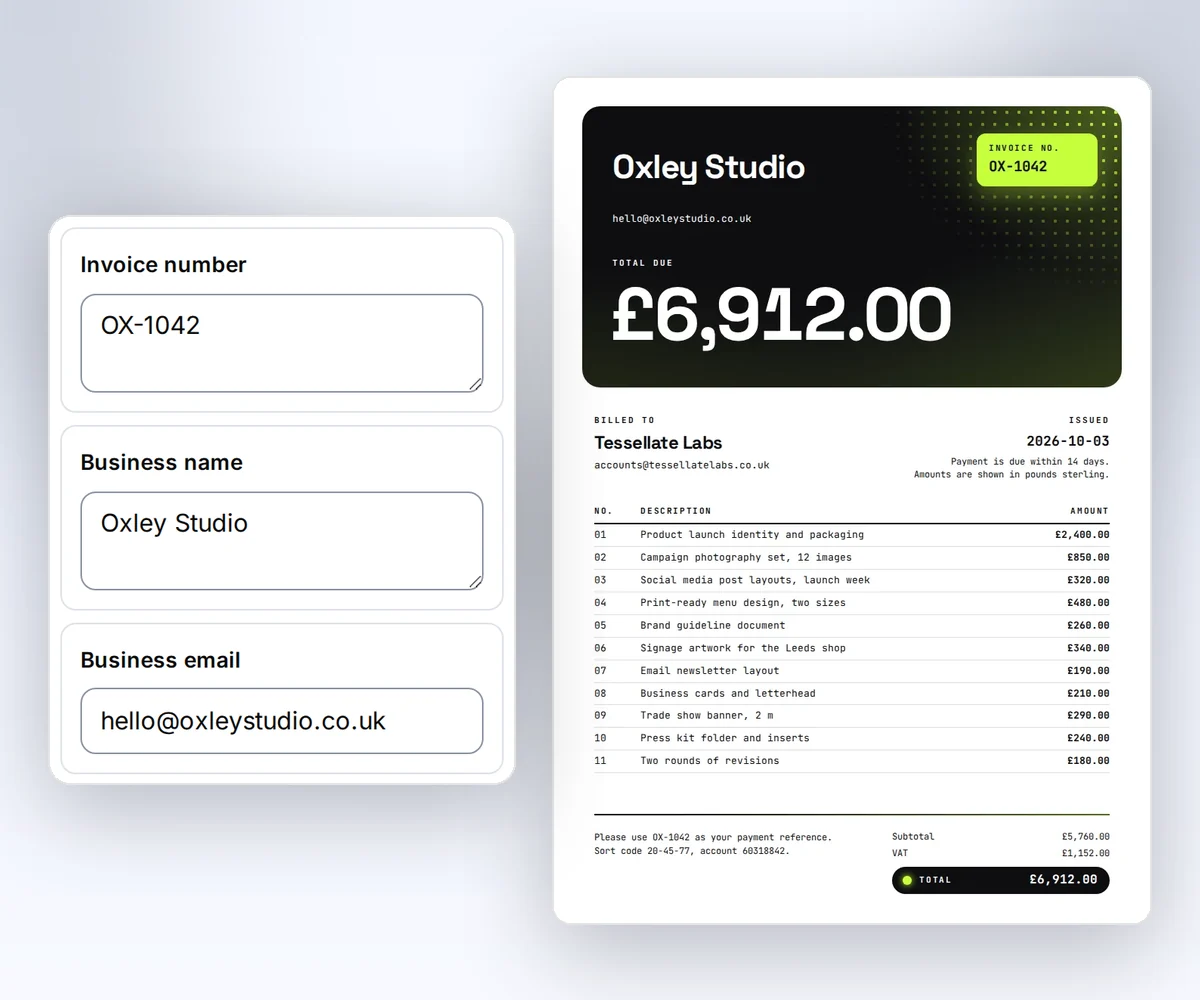
- Open the Client invoice template and click Use this template. Sign in first if you need to.
- Open Data and type your business name, your client, and the invoice number. Use Add row and Remove row to change the line items. To see the lines on the page, click Preview with data above the canvas. Change the colours or the type if you like, and click Save.
- Click Export, then Export PDF. Each file costs one credit, and a verified free account gets 50 credits a month to try it. Check the totals and the spelling in the PDF itself.
Sign in and copy the Client invoice template to try it free. When you're ready to make invoices from your own code, add the signature check below to your receiver. How to make a template you can reuse walks through the rest of the editor.
How do webhooks handle authentication?
thirds.ai webhooks prove who sent them with an HMAC-SHA256 signature in the thirds-signature header. The header carries t=UNIX_SECONDS,v1=HEX_SIGNATURE. The signed input is the timestamp text, a dot, and the exact body bytes. Your receiver checks the signature with the signing secret you got when you registered the destination. Your account API key is separate, and you use it only to read the finished job.
Read the raw bytes before you parse JSON. Parsing and encoding the body again can change its spaces and key order. Check the timestamp against your clock, compute the signature, and use a constant-time comparison. The webhook guide has the complete signing contract and maintained Node.js and Python functions.
How do you verify a webhook signature in Node.js and Python?
You verify a thirds.ai webhook signature in Node.js or Python by calling the verifier functions from the webhook guide with the raw body, the header, and your secret. The runnable check here takes four steps. It creates a signed sample, then tries a changed body, an old timestamp, and a missing header. You need Python 3 and Node.js. The check sends no event, starts no render, and needs no account secret.
Make an empty folder. Open the webhook guide and copy the Node.js function into verify-third.mjs. Copy the Python function into verify_third.py in the same folder.
Save this Node.js check as check-signature.mjs:
import assert from "node:assert/strict";
import { createHmac } from "node:crypto";
import { verifyThirdsSignature } from "./verify-third.mjs";

const body = Buffer.from('{"id":"local-signature-check"}');
const secret = "local-check-only";
const stamp = "1800000000";
const digest = createHmac("sha256", secret)
  .update(`${stamp}.`)
  .update(body)
  .digest("hex");
const header = `t=${stamp},v1=${digest}`;
const cases = [
  [body, header, Number(stamp), true],
  [Buffer.from("{}"), header, Number(stamp), false],
  [body, header, Number(stamp) + 301, false],
  [body, "", Number(stamp), false],
];
for (const [raw, value, now, expected] of cases) {
  assert.equal(verifyThirdsSignature(raw, value, [secret], now), expected);
}
console.log("signature_checks_passed");
Save this Python check as check_signature.py:
import hashlib
import hmac
from verify_third import verify_thirds_signature

body = b'{"id":"local-signature-check"}'
secret = "local-check-only"
stamp = "1800000000"
digest = hmac.new(secret.encode(), stamp.encode() + b"." + body, hashlib.sha256).hexdigest()
header = f"t={stamp},v1={digest}"
cases = [
    (body, header, int(stamp), True),
    (b"{}", header, int(stamp), False),
    (body, header, int(stamp) + 301, False),
    (body, "", int(stamp), False),
]
for raw, value, now, expected in cases:
    if verify_thirds_signature(raw, value, [secret], now) != expected:
        raise SystemExit("signature_check_failed")
print("signature_checks_passed")
Run both checks from that folder:
node check-signature.mjs
python3 check_signature.py
Both checks must print signature_checks_passed. The fixed clock makes this local check repeatable. In your receiver, leave out the now argument so the function uses the current clock. These checks only test signature handling. The small sample body isn't a real render event.
Node supplies HMAC and timingSafeEqual in its node:crypto module, and Python supplies HMAC and compare_digest in its hmac module (both checked on 13 October 2026). Use these library functions rather than writing your own cryptography.
Why does webhook signature verification fail?
Webhook signature verification usually fails because the receiver checks different bytes, a different secret, or a different time than thirds.ai signed. For example, a body parser that reads the JSON first changes the bytes before you check them. A server clock that drifts more than 300 seconds also fails every check, even with the right secret. Run the local check first. If it passes, look for the problem in your receiver or your proxy.
| Cause | Fix |
|---|---|
| A body parser changes the request | Use a route-specific raw body parser before JSON parsing. |
| Your proxy changes the body or drops the header | Forward the raw body and the thirds-signature header unchanged. |
| The secret is wrong or old | Use the secret from registration or the last rotation. |
| A secret rotates | Accept both active secrets during the 24-hour overlap. |
| The server clock is off | Sync the clock. The verifier rejects timestamps more than 300 seconds away. |
Don't log the body, the signature, or the secret while you debug. The durable receiver recipe has a longer fix list for a receiver behind an HTTPS proxy.
Do webhooks require authentication?
Yes, webhooks need authentication. Check the sender of every webhook before your app acts on it. HTTPS protects the connection, but anyone who finds your receiver URL can send it a request, and anyone can make up an event ID. A signature check proves that thirds.ai sent the exact body you received.
After verification, parse the event and check its fields. Save the event ID and the job ID to durable storage, then return a quick 2xx. If you've already stored that event ID, return 2xx and do nothing else. Don't put an API key in a URL, and don't log the body, signature, or secret.
Use the durable receiver recipe to connect this check to file collection. Its receiver listens on localhost behind your HTTPS proxy and saves each verified event. A separate worker then reads the job and checks the download from the thirds.ai API address you already know, never from a link inside the event, so your API key only ever goes to thirds.ai.
What are the downsides of using webhooks?
The main downside of webhooks is that your receiver must stay online and answer quickly. It needs a public HTTPS address, a correct clock, and durable storage. Events can repeat or arrive out of order. A slow receiver can cause retries even when your own work is already underway, so keep the response fast and let a worker handle file collection.
Your receiver has ten seconds to answer each delivery. A failed event gets up to eight attempts before delivery stops. When you repair the receiver and replay the event, you don't get another PDF or spend another credit. While delivery is down, you can still ask the API for the job's result by its ID. See the delivery and replay rules.
| Situation | Next step |
|---|---|
| Delivery repeats | Find the stored event ID and return success without new work. |
| Receiver can't save the event | Return a failure and restore storage before the next delivery. |
| A test event has no downloadable job | Verify it, then acknowledge the sample job ID. |
Next, register your receiver, open Webhooks, choose Deliveries and test for it, and click Send test event. The test uses no credits. Then make one real invoice and follow the file collection recipe to collect it.


