
Self-hosted Puppeteer PDF generation costs less when you already run browser servers and have steady work to keep them busy. A PDF API costs less when looking after Chrome takes more of your team's time than the service fee. The number that decides it is your full cost for each PDF you keep, with your team's time counted in. The calculator below works out that number for you, and one real invoice lets you check the output on both paths. With thirds.ai, the browser runs on our servers, so there is nothing to install or patch, and your time goes into the design and the data.


Read the setup prompt
First read https://thirds.ai/blog/puppeteer-self-hosted-vs-pdf-api-costs, https://thirds.ai/docs/mcp, and the setup guide for ChatGPT or Claude, whichever I use. Guide me through the connection controls and browser sign-in. Never ask me to paste an API key into chat. Help me compare self-hosted Puppeteer with the thirds.ai API. Ask for my monthly PDF count, my hourly cost, my server bill, and my support hours, then run the article's calculator with my numbers. Then make one Client invoice PDF so I can check it against my Puppeteer output. Before spending credits, tell me the cost and wait for my approval.
A server bill that looks small grows once you add the hours spent on failed PDFs, Chrome updates, and file storage. Count them before you compare, because they can decide the answer.
What do you run when you choose Puppeteer?
When you choose Puppeteer for PDF generation, you run the whole service around the browser yourself. Puppeteer controls Chrome and writes a PDF with one call, Page.pdf(), which waits for fonts to load by default, as the Puppeteer PDF guide says (version 25.13.0, read on 13 October 2026). Your team still builds and looks after the queue of PDFs waiting to be made, the limit on browsers running at once, file storage, retries, and access rules.
By default Puppeteer downloads one specific Chrome build that matches its API, and since version 19 it keeps that browser in a shared cache folder, as the Puppeteer configuration guide explains (read on 13 October 2026). Record the package and browser versions together, and check your documents again when you update either one.
| Cost area | Self-hosted Puppeteer | PDF API |
|---|---|---|
| Browser capacity | You size and run the machines. | The provider runs the browsers within its limits. |
| HTML and fonts | You prepare and check the design. | You still prepare and check the design. |
| Failed PDFs | You build recovery and inspect causes. | You handle API errors and decide when to retry. |
| Private input | You control isolation, network access, and retention. | You check the provider's privacy and retention terms. |
| Finished files | You store and deliver the files. | You collect the result, then store and deliver it. |
| Team time | You maintain the browser service. | You maintain the API integration. |
If customers supply HTML or asset URLs, include network controls and resource limits in the self-hosted scope. A plain Puppeteer script loads any address that a customer's HTML points to, including your own private network, so on its own it isn't safe to offer as a public service. For thirds.ai, read the security page and data processing terms before you choose the service for your content.
How do I compare the monthly cost?
You compare the monthly cost of Puppeteer and a PDF API by adding each path's server or service fee to the cost of your team's time, then dividing by the PDFs you make. The Python calculator below does that in one run. You need Python 3 and your own monthly figures. It spreads setup time across the months you choose and adds monthly support time. Its sample inputs are made up, not measured, so change every value before you use the result to choose.
Save this as pdf-costs.py and run python3 pdf-costs.py:
jobs = 5000
hourly_cost = 60
months = 12
plan_price = 29
plan_credits = 2500
extra_credit_price = 0.015
extra_credits = max(0, jobs - plan_credits)
self_hosted = {
    "machines_and_storage": 40,
    "setup_hours": 8,
    "monthly_support_hours": 2,
}
api = {
    "service_and_storage": plan_price + extra_credits * extra_credit_price,
    "setup_hours": 2,
    "monthly_support_hours": 0.5,
}
self_total = (self_hosted["machines_and_storage"]
              + hourly_cost * self_hosted["monthly_support_hours"]
              + hourly_cost * self_hosted["setup_hours"] / months)
api_total = (api["service_and_storage"]
            + hourly_cost * api["monthly_support_hours"]
            + hourly_cost * api["setup_hours"] / months)
for name, total in [("self_hosted", self_total), ("api", api_total)]:
    print(f"{name}: monthly={total:.2f}, per_file={total / jobs:.4f}")
The sample prints 200.00 a month for self-hosting and 106.50 for the API path. Those totals change with your inputs, so add extra storage, failed work, and any other fee that applies to your own case.
The plan numbers in the sample are the thirds.ai prices on 13 October 2026. Starter costs $29 a month and includes 2,500 credits each month. One finished PDF uses one credit, and a PDF that fails on our side costs nothing. Past the included credits, a paid plan puts extra credits on your bill at $0.015 each, up to one more month's worth. So the sample's 5,000 PDFs cost $29 plus $37.50 for 2,500 extra credits, which is the $66.50 service fee the script uses. Growth costs $79 a month and includes 10,000 credits, so put its numbers in when you make more than 5,000 PDFs a month. If you ask AI to build or change the design, that uses more credits than a file does, so include it if your workflow needs it. Pricing and the billing guide hold the current plan and credit rules, so check them when you decide. To compare two services instead, read the PDFShift comparison.
Can I check a real invoice before I choose?
Yes, you can check a real invoice by making the same Client invoice in both Puppeteer and the thirds.ai API, then comparing the two PDFs. The API side takes three requests from your own code: one to start the PDF, one to check on it, and one to download it. You need curl, an API key, and your own copy of the template. The Client invoice template gives you a fixed design, a schema, and a sample record, so you can check the same names, rows, and totals in each system. This recipe checks the output. It doesn't measure speed or capacity.

Click Use this template on the gallery page to save your own copy. Open your copy in the editor. Open the Template menu and click Copy beside Template ID to get the tpl_ value. Its version shows beside its name. Make an API key and set THIRDS_API_KEY through your secret store.
Save this JSON as invoice-request.json. Put your own template ID and version in it. The values are a short version of the template's sample data.
{
  "template_id": "tpl_00000000000000000000000000000000",
  "version": 1,
  "data": {
    "business_name": "Northline Studio",
    "business_email": "hello@northlinestudio.co.uk",
    "client_name": "Fieldnote Labs",
    "client_email": "accounts@fieldnotelabs.co.uk",
    "invoice_number": "NS-1042",
    "issued_on": "2026-10-03",
    "items": [
      {
        "description": "Product launch identity and packaging",
        "amount": 2400
      },
      { "description": "Campaign photography set, 12 images", "amount": 850 },
      { "description": "Social media template pack", "amount": 320 }
    ],
    "subtotal": 3570,
    "tax": 714,
    "total": 4284,
    "payment_terms": "Payment is due within 14 days. Amounts are shown in US dollars.",
    "payment_note": "Please use NS-1042 as your payment reference when you pay."
  },
  "wait": false
}
This request makes one PDF and spends one credit when it succeeds. Choose your own Idempotency-Key and reuse it if you retry, so a retry doesn't make a second PDF.
curl --fail-with-body --silent --show-error \
  https://thirds.ai/v1/pdf \
  -H "Authorization: Bearer $THIRDS_API_KEY" \
  -H 'Content-Type: application/json' \
  -H 'Idempotency-Key: YOUR_UNIQUE_INVOICE_REQUEST' \
  --data-binary @invoice-request.json
Keep the id from the response. Read the job until its status is succeeded, and replace the sample ID with yours:
curl --fail-with-body --silent --show-error \
  https://thirds.ai/v1/pdf/pdf_00000000000000000000000000000000 \
  -H "Authorization: Bearer $THIRDS_API_KEY"
Copy download.url from that response and add https://thirds.ai before it. The download doesn't need your API key.
curl --fail --silent --show-error \
  'https://thirds.ai/v1/downloads/YOUR_SIGNED_DOWNLOAD_TOKEN' \
  --output invoice.pdf
Open invoice.pdf and check the names, rows, and totals. The job's artifact field has the file's byte_size and sha256 if you want to check your download. The recovery guide covers a job that fails or stops, and the thirds.ai docs list the other guides, such as webhooks and CSV batches.
For your own Puppeteer service, use the linked template HTML and sample data as the design reference. Fill its fields in your app before Page.pdf(). Keep paper size, margins, font files, and input values equal. Inspect page count, text wrapping, totals, and image quality before you compare costs.
What can make the comparison unfair?
A Puppeteer and PDF API cost comparison becomes unfair when the two sides use different test documents, fonts, or ways of counting a success. A one-page invoice says little about a large report, so test the document sizes and languages your team actually sends. Count only the PDFs that pass your review. A request that returns an HTTP success code can still end in a failed PDF.
| Problem | Check |
|---|---|
| A PDF wraps differently | Compare paper size, margins, font files, and print styles. |
| A remote image changes | Use a fixed asset version for both outputs. |
idempotency_conflict | Send the original request again, or use a new key for a new output. |
| A PDF fails after HTTP success | Read its terminal status and error before you count a result. |
| Browser work causes support calls | Include that time in the monthly calculation. |
| A plan does not cover your volume | Include overage or the plan that covers your expected work. |
Choose self-hosting when you want full control of the browser and your team has the time to keep it running. Choose an API when its limits and terms fit your documents and the hours you save are worth the fee. For the wider picture, the Puppeteer comparison sets thirds.ai against a self-hosted browser feature by feature, and the ranked list of HTML to PDF APIs weighs the hosted services side by side.
Make the invoice PDF with thirds.ai
The easiest way to run this check is to let your assistant do it. Connect thirds.ai to ChatGPT or Claude, paste the prompt at the top of this page, and it asks for your numbers, runs the calculator, and makes one Client invoice PDF you can lay beside your Puppeteer output. After that, ask the assistant for each new invoice, or send a spreadsheet as a CSV batch and get a whole month of invoices in one go.
If you'd rather see the invoice first, make one in the editor. It takes three steps and a free account, which comes with 50 credits a month as of 13 October 2026, so a few invoices a month may need neither path on this page.
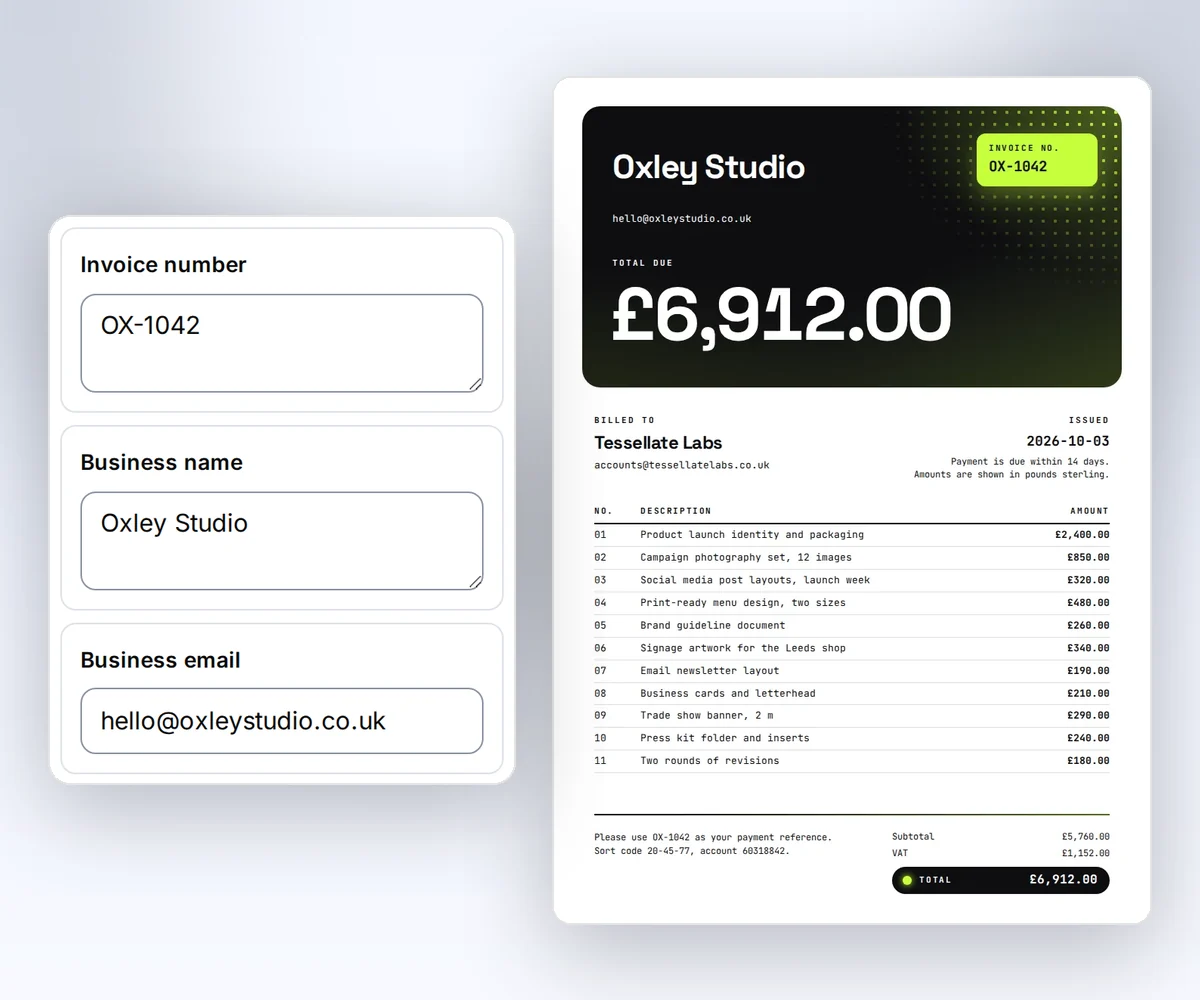
- Open the Client invoice template and click Use this template. Sign in first if you need to.
- Open the Data tab and type your business name, your client, the invoice number, and the totals. Use Add row and Remove row to change the line items. To see the lines on the page, click Preview with data above the canvas.
- Click Export, then Save and export PDF. Open the PDF and check the names, rows, and totals.
Start free and make that first invoice now. Then run the calculator with your own numbers, and you'll know which path is cheaper before you commit to either one.


