
A branded template is a design that carries your logo, colours, and fonts, so each new invoice, report, certificate, or social image only needs its own details. In thirds.ai, designers drew the ones in the gallery, and AI can build one from a sentence or from an image you already have. The words can also mean a slide deck of brand rules, and this guide covers the other meaning, the designs behind the files you make again and again.


Read the setup prompt
First read https://thirds.ai/blog/create-branded-pdfs-and-images, https://thirds.ai/docs/mcp, and the setup guide for ChatGPT or Claude, whichever I use. Guide me through the connection controls and browser sign-in. Never ask me to paste an API key into chat. Create one branded design I can reuse. Ask what file I make often, which details change, and what logo, colours, and fonts I can share. Find a fitting gallery template. Before spending credits, tell me the cost and wait for my approval.
thirds.ai makes those files for you. You pick a design a designer drew from our gallery, or you ask ChatGPT or Claude for one, and you add your brand once. After that, every new file is one step away. Type the details in the editor, ask your assistant for the file in plain words, or paste a spreadsheet and get a file for each row, and every file looks like the same designer made it.
Why a branded template beats remaking the file
Copying an old file is where the mistakes creep in. You change the amounts on last month's invoice, and a long client name wraps and pushes the total out of line, or the logo comes out blurry because it was pasted in years ago. With a template, a long client name shrinks to fit its box instead of wrapping over the total, and your logo stays the file you uploaded once, so it never blurs.
That same fixed design is what makes an AI assistant safe to use for real work. Ask ChatGPT for a social post picture twice and you get two different looks, with the wrong font and a logo it made up. Ask it to fill a thirds.ai template and the design sets the look, so the assistant only supplies the words and the numbers, and every file comes out in your brand.
What goes in a branded template
Your logo, colours, and fonts stay fixed, and you fill in the client, the date, or the headline each time. A gallery design already has those boxes ready, and when you build your own design with the AI, you name the details that change and it keeps each one as a box.
Here's a finished invoice from the Client invoice template. It's ready for your client and your line items, and you'll fill it in below.

Your brand lives in one place, a brand kit with your logo, colours, and fonts. Set it up once in Brand kits, and every design the AI builds for you comes out in it. How to build a brand kit shows what to put in it and how to pick colours that read well together.
How do I create a brand template?
Start from a gallery design, a sentence, your own HTML, or a picture of a design you like. Each start ends in the same editable design, and you can keep changing it by chat or by hand. How to make a template you can reuse walks through each start step by step.
Copy a gallery design. This is the quickest start, because every gallery design is ready to fill. Open one and click Use this template.
Describe it with words. Open Build a template, choose your brand kit, and say what the file must show and which details change each time, such as "a one-page project brief PDF in my brand, with a project name, client, due date, summary, and task list." The AI builds the draft in your kit's colours and fonts. The AI template generator page shows more examples.
Paste your HTML. Open Use your HTML and paste the source you already have. Put a name inside {{ }} wherever a value changes, and you get a box for it. If your HTML came from an old PDF tool, the HTML to PDF page shows how the same source becomes a design you can edit.
Start from a picture. Open Start from an image, choose your brand kit, and attach a PNG, JPEG, or WebP of a design you like. The AI rebuilds the layout as an editable template in your colours, logo, and fonts, so one creative you already have becomes the design for many more. Rebuild an image as an editable template shows a full example.
PDF or image: which should your template make?
Make a PDF when people print, sign, or keep the file, and an image when it goes on a screen. An invoice, a report, a quote, a certificate, or a proposal is a PDF on a page size such as A4 or Letter. A social post, an ad, a link preview, or a YouTube thumbnail is a PNG, JPEG, or WebP at the size the platform wants.
An image template also gives you every size you need. Save a square post once, and Smart resize in the template editor lays it out again as a story and a wide banner in the same brand. You can make a carousel too, one image per slide.

For the day-to-day jobs, the invoices, reports, static ads, and social images pages each have ready-made designs for that job.
How to make it
The fastest way is to let ChatGPT or Claude do it. Connect thirds.ai, give the assistant your logo and colours, the file you make today, and a note on which details change each time, and ask for a template that matches. From then on, ask for each file in plain words, such as "Make this month's invoice for my new client with these three lines," and it hands you the finished PDF. The agent pages have prompts you can copy for each assistant.
If you'd rather see it in the editor first, start from the Client invoice template or any gallery design that fits your job.
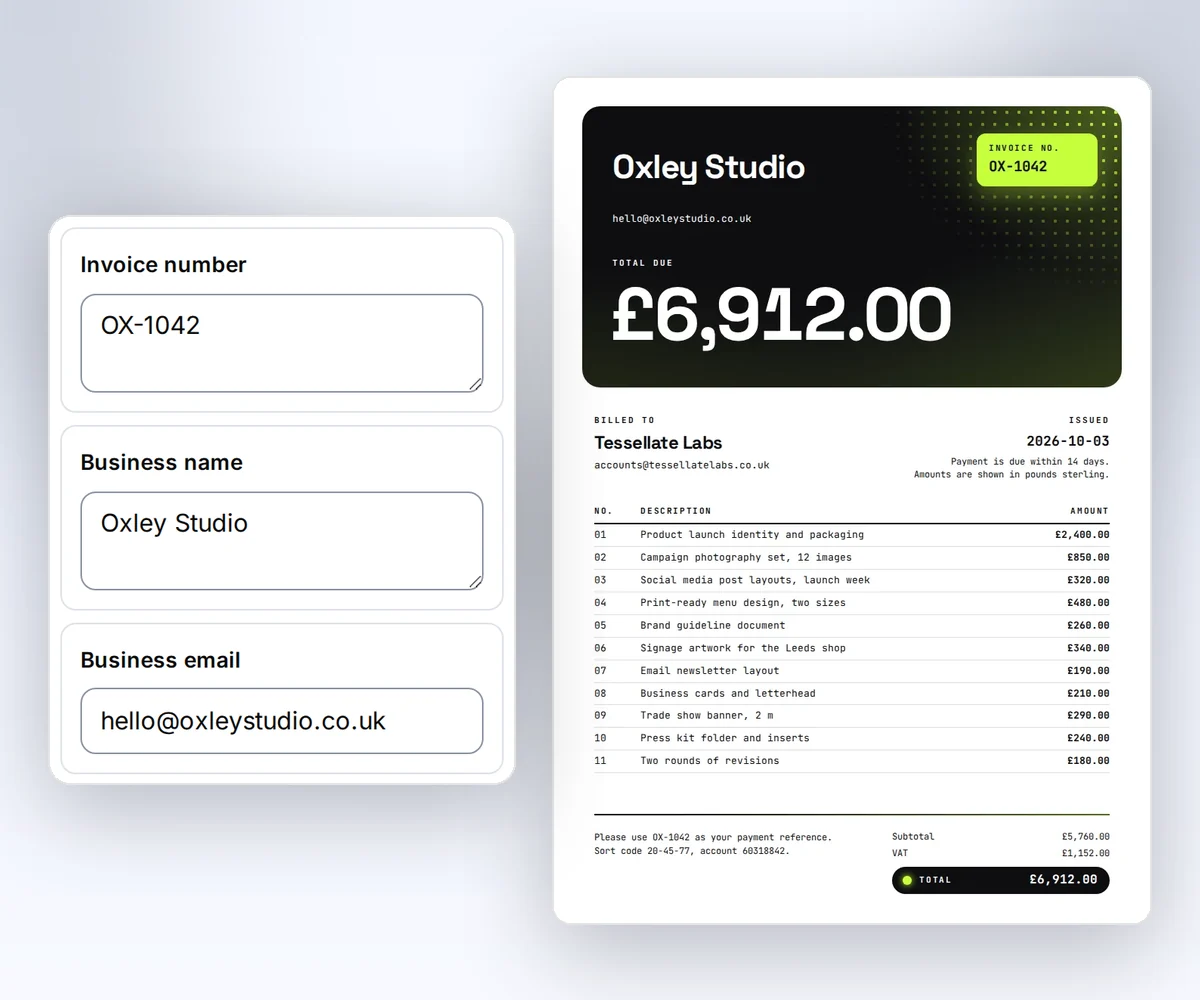
- Open the Client invoice template and click Use this template.
- Open the Data tab and type your business, your client, and the line items. Click Add row for another line, then click Preview with data above the canvas to see the finished invoice.
- Click Export, then Save and export PDF, and download the file.
Add your logo and colours on the canvas and click Save. Each finished file uses one credit, and you can start free.
When the details sit in a spreadsheet, make every file at once. Open Batches, choose your saved design, and paste your rows or load a CSV file. Download a starter CSV gives you a file with the right column names. Check the rows, click Make files, and download the ZIP when the files are ready. PDF mail merge from a CSV shows a full run with a class list.
If your app or website should make the files, send the new details to the saved template from your own code. Generate your first PDF with the API takes you from an API key to a finished file, and Use templates with your data shows how to send the next client's values to a design you saved.
Sign in to make your first branded file with the free monthly credits.


