
To generate a PDF from JSON data in Node.js, you send the invoice details from your Node.js code to a saved thirds.ai invoice design in one request, and you get back a finished, branded PDF. That fills a designed invoice with your data; if you only want to print a raw JSON file as a PDF, a file converter does that. Your app still works out the sums, keeps the invoice records, and sends the PDF to your client.


Read the setup prompt
Help me follow https://thirds.ai/blog/invoice-pdfs-from-json-nodejs in ChatGPT or Claude. Read its linked thirds.ai docs before giving steps. Keep API keys and webhook secrets out of chat. Make invoice PDFs from JSON in Node.js. Start from the Client invoice template, ask for my invoice fields, and guide one private API request through download and review. Before spending credits, tell me the cost and wait for my approval.
Your Node.js app doesn't have to lay out the invoice itself. thirds.ai makes the PDF on our servers, so there's no headless browser to install or keep patched, and your code just sends the invoice details and gets back a finished file with the design's logo, colours, and fonts already in place. You stop writing layout code and loading fonts in your app. When the design changes, you save a new version in the editor and update the version number your code sends; the layout itself never lives in your code.
Make it without code
You can make the same invoice PDF in the thirds.ai editor without writing any code. You need a free thirds.ai account. Try one invoice this way first, so you know how the design looks with your own details before you connect your app.
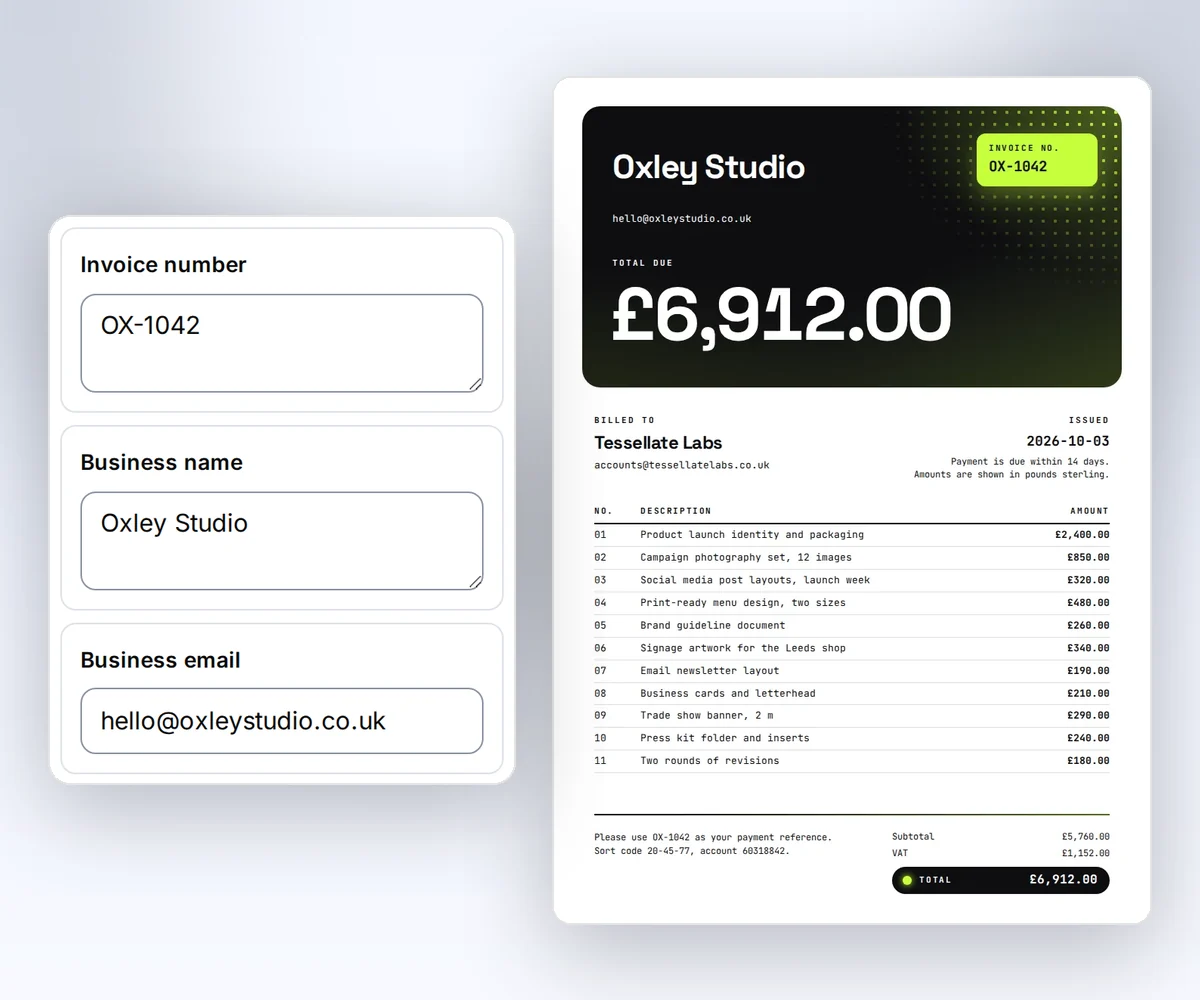
- Open the Client invoice template and click Use this template. Sign in first if you need to.
- Open the Data tab and type your business name and email, your client's name and email, the invoice number, and the date. Click Add row for each line item and type its description and amount, or click Remove row to drop one. Then type your subtotal, tax, total, payment terms, and payment note. To see your line items on the invoice, click Preview with data above the canvas.
- Click Export, then Save and export PDF, and download the file. Check the total and the payment note before you send it.
The design holds up to 12 line items. When you're ready to make invoices from your own app, follow the Node.js steps in the rest of this post.
What you need
You need three things before you run the Node.js code: a Node.js release with built-in fetch, a thirds.ai API key, and your own copy of the Client invoice template.
- A current Node.js release with built-in
fetchandAbortSignal.timeout. The Node.js reference documents both (checked 13 October 2026). - A thirds.ai account with an API key. The PDF generation API guide shows how to create one and keep it safe. The free plan gives you 50 credits a month, and one finished PDF costs one credit.
- A copy of the Client invoice template. Open it in the gallery and click Use this template. Your copy opens in the editor. To get its template ID, open the Template menu and click Copy beside Template ID. The ID starts with
tpl_. To see the five invoice designs with your own details first, fill one in on the PDF invoice generator.
Keep the key in an environment variable such as THIRDS_API_KEY. Never put it in a file that you commit.
The invoice data
The Client invoice template requires twelve fields, and your JSON must use the same names. The template formats 2400 as $2,400.00 with the currency filter and formats issued_on with the date filter. The invoice data guide walks through the fields and the sums with curl.
| Field | Type |
|---|---|
business_name | string, 1 to 80 characters |
business_email | |
client_name | string, 1 to 80 characters |
client_email | |
invoice_number | string, 1 to 30 characters |
issued_on | date as YYYY-MM-DD |
items | 1 to 12 objects with description and amount |
subtotal | number |
tax | number |
total | number |
payment_terms | string, 1 to 120 characters |
payment_note | string, 1 to 180 characters |
Work out the subtotal, tax, and total in your app and send the results. The template prints numbers and doesn't add them up. Here's the JSON that the Node.js code sends.
{
  "business_name": "Northline Studio",
  "business_email": "hello@northline.example",
  "client_name": "Fieldnote Labs",
  "client_email": "accounts@fieldnote.example",
  "invoice_number": "NS-1042",
  "issued_on": "2026-09-03",
  "items": [
    { "description": "Product launch design", "amount": 2400 },
    { "description": "Campaign image set", "amount": 850 }
  ],
  "subtotal": 3250,
  "tax": 650,
  "total": 3900,
  "payment_terms": "Due within 14 days",
  "payment_note": "Please use NS-1042 as the payment reference."
}
Send the request with fetch
You send the invoice JSON to thirds.ai with one POST /v1/pdf request from the built-in Node.js fetch. The request uses the invoice number as its Idempotency-Key, so a retry within 24 hours returns the same PDF instead of making a second one. Keep that key and the full request unchanged on retries.
Put each JavaScript block from this post in invoice.mjs, and save the invoice JSON as invoice.json. Set THIRDS_API_KEY and THIRDS_INVOICE_TEMPLATE in your environment.
const API = "https://thirds.ai";
const headers = {
  Authorization: `Bearer ${process.env.THIRDS_API_KEY}`,
  "Content-Type": "application/json",
};

export async function createInvoicePdf(invoice) {
  const response = await fetch(`${API}/v1/pdf`, {
    method: "POST",
    headers: {
      ...headers,
      "Idempotency-Key": `invoice-${invoice.invoice_number}`,
    },
    body: JSON.stringify({
      template_id: process.env.THIRDS_INVOICE_TEMPLATE,
      version: 1,
      data: invoice,
      wait: false,
    }),
    signal: AbortSignal.timeout(30_000),
  });
  if (!response.ok) {
    const { error } = await response.json();
    throw new Error(`${response.status} ${error.code}`);
  }
  return response.json();
}
Here's the body that request sends.
{
  "template_id": "tpl_00000000000000000000000000000000",
  "version": 1,
  "data": {
    "business_name": "Northline Studio",
    "business_email": "hello@northline.example",
    "client_name": "Fieldnote Labs",
    "client_email": "accounts@fieldnote.example",
    "invoice_number": "NS-1042",
    "issued_on": "2026-09-03",
    "items": [
      { "description": "Product launch design", "amount": 2400 },
      { "description": "Campaign image set", "amount": 850 }
    ],
    "subtotal": 3250,
    "tax": 650,
    "total": 3900,
    "payment_terms": "Due within 14 days",
    "payment_note": "Please use NS-1042 as the payment reference."
  },
  "wait": false
}
Use your approved template version, shown here as 1. If you leave it out, thirds.ai uses the newest version, so a later save can change what the request makes. The invoice design is already A4, so you don't need to set a page size. To print on US Letter instead, set the PDF page size in the request.
Poll the job
You poll the job with GET /v1/pdf/{id} until its status is succeeded, failed, or cancelled. With wait: false, the create request answers 202 as soon as thirds.ai accepts the job, and 200 only when the job has already ended. Each poll answers 200 with the job's current status, so read the status: a 200 can hold a failed or cancelled job. Keep the ID and poll until the job ends or your deadline passes.
const sleep = (ms) => new Promise((resolve) => setTimeout(resolve, ms));

export async function waitForJob(job, deadlineMs = 120_000) {
  const stop = performance.now() + deadlineMs;
  let delay = 1500;
  while (["queued", "running"].includes(job.status)) {
    if (performance.now() + delay >= stop)
      throw new Error(`job ${job.id} is still ${job.status}`);
    await sleep(delay);
    const remaining = Math.floor(stop - performance.now());
    if (remaining <= 0) throw new Error(`poll deadline for job ${job.id}`);
    const response = await fetch(`${API}/v1/pdf/${job.id}`, {
      headers,
      signal: AbortSignal.timeout(Math.min(30_000, remaining)),
    });
    const retryAfter = Number(response.headers.get("Retry-After"));
    delay =
      Number.isFinite(retryAfter) && retryAfter > 0 ? retryAfter * 1000 : 1500;
    if ([429, 503].includes(response.status)) continue;
    if (!response.ok) {
      const { error } = await response.json();
      throw new Error(`${response.status} ${error.code}`);
    }
    job = await response.json();
  }
  if (job.status !== "succeeded") {
    throw new Error(`${job.status}: ${job.error?.code ?? "no output"}`);
  }
  return job;
}
Set a deadline that fits your app. A timeout stops this caller, not the accepted job. Save its ID beside the invoice and check it later. The Retry-After header gives the API's delay in seconds.
Download and check the file
A finished job holds download.url. It is a relative path such as /v1/downloads/..., so add https://thirds.ai in front of it. The signed link lasts 15 minutes and needs no API key, so anyone who has it can fetch the file. Free accounts keep the file in Renders for 30 days, and paid plans keep it for up to a year (the exact rules). An invoice belongs with your order record, so save it to your own storage, and compare its size and SHA-256 with artifact.byte_size and artifact.sha256 before you mark the invoice as sent. The S3 and R2 upload recipe shows that check for a private bucket.
import { createHash } from "node:crypto";
import { readFile, writeFile } from "node:fs/promises";

export async function saveInvoicePdf(job, path) {
  const response = await fetch(`${API}${job.download.url}`, {
    signal: AbortSignal.timeout(60_000),
  });
  if (!response.ok) throw new Error(`download failed: ${response.status}`);
  const bytes = Buffer.from(await response.arrayBuffer());
  const sha256 = createHash("sha256").update(bytes).digest("hex");
  if (
    bytes.length !== job.artifact.byte_size ||
    sha256 !== job.artifact.sha256
  ) {
    throw new Error("the download did not match the artifact metadata");
  }
  await writeFile(path, bytes);
}
Put the three functions together.
const invoice = JSON.parse(await readFile("invoice.json", "utf8"));
const accepted = await createInvoicePdf(invoice);
console.log("Job ID:", accepted.id);
const job = await waitForJob(accepted);
await saveInvoicePdf(job, "invoice.pdf");
Run node invoice.mjs. In your app, store the accepted job ID before polling so you can recover after a restart. If the create reply is lost, retry with the same request and key. Here's the gallery's sample invoice.

Handle the errors you will meet
A request that fails validation never creates a job, and a failed render costs nothing. Read error.code on a request error, or error.category and error.code on a failed job. The message text can change, so branch on the code.
| Code | What to do |
|---|---|
400 template_data_invalid | The data fails the schema. The error lists up to 16 field paths such as data/items/0/amount. |
402 insufficient_credits | Add credits or wait for next month's credits, then retry with the same key. |
409 idempotency_conflict | The same key was used with different input. Use a new key for a new invoice. |
429 rate_limited | Wait for Retry-After, then retry with the same key. |
Test the template with one item, twelve items, and one long description before you connect it to live billing. Retry requests and download files covers every code.
Let a webhook call you instead
You don't have to poll. Register a webhook once with POST /v1/webhooks. When each job ends, thirds.ai posts a signed render.succeeded or render.failed event to your server. Your server verifies the signature, reads the job with its API key, and downloads the file. Every finished file also appears in Renders.

If your app sends invoice HTML to DocRaptor or PDFShift today, you can keep sending HTML or switch to a designer-made invoice in your brand. Those comparisons show the steps and the prices. Use plans and credit packs to budget for your monthly invoice count.
Read next
- Move an invoice from wkhtmltopdf.
- Verify webhook signatures in Node.js and Python.
- Automate weekly report PDFs and images with Make or Power Automate.
- Use templates with your data explains fields, schemas, and versions.
- Make invoice PDFs from template data shows the same flow with
curl. - When a long invoice runs onto a second page, fix page breaks, headers, and fonts so the table and the totals stay tidy.
- The invoices page shows the full workflow from design to delivery.
- When a client pays through Stripe, make a branded receipt PDF from the Stripe payment with the same kind of saved template.
Sign in to copy the Client invoice template and send your first request with the free monthly credits.


