
The TikTok slideshow ideas that work for an app each show one everyday task your viewer wants to get right, like a calm morning or dinner from what's in the cupboard, and end with your app doing it. Here are ten, one for each kind of app, with what to post and why it works. The research on how photo posts perform and how often to post them comes first.
thirds.ai makes the slides for you. Pick a TikTok slideshow template, add your app's name and colours, and every slideshow you post looks like the same designer made it. You type the words in the studio editor, or you ask ChatGPT or Claude for a whole batch of slide sets at once.
Read the transcript
Need TikTok slideshow ideas for your app? Here are ten, and you won’t design a single slide from scratch.
Start with something your app helps people do. One: a calmer morning, for a planner app. Two: a day by the sea, for a travel app. Three: dinner from the cupboard, for a recipe app.
More ideas: a study plan, a weekly spending check, a short workout break, a trip in one place, a shorter task list… and a home for book tips.
And for founders, number ten is the big one: one new feature. Open with what it does for people, not a version number.
Here’s the trick: every idea is a ready-made template. Put in your app’s name, your words, and your colours… then save it for next time.
Each set exports as five images, for five credits. Pick seven ideas and you’ve got a week of slideshows: 35 credits, and your 50 free credits a month cover it.
Then keep the stories that bring you sign-ups. Pick an idea and make your first slideshow at thirds.ai.
Why photo slideshows work for app marketing
A photo slideshow needs a screenshot and a sentence, with no filming and no editing, so a small app team can post one every day. TikTok launched Photo Mode in October 2022 as "a new carousel format available on mobile for photo content" (TikTok Newsroom). Viewers swipe at their own pace, which suits a product with a few clear steps.
The reach studies disagree, so plan for a mix. Fanpage Karma looked at almost 700,000 TikTok posts from January to May 2025 and found carousels got about 3% more reach than videos and more than 81% more engagement (Fanpage Karma, June 2025). Metricool's study of 2.3 million posts in the year to February 2026 found videos got about five times the reach of images and carousels (Metricool, May 2026). Buffer's 2026 report put the median engagement rate at 3.39% for TikTok video and 1.92% for images (Buffer, 2026). So a slideshow may not beat your best video on views, but it's much quicker to make, so you can test more stories and keep the ones that bring installs.
TikTok is also where people find apps. Its 2025 meta-analysis with Adjust, covering North America in 2024, found TikTok drove 19% more assisted app installs than other major platforms, with an 8% lower uninstall rate (TikTok for Business, October 2025).
How to make it
Start from one of our ten TikTok slideshow templates, one for each idea below, or ask ChatGPT or Claude to make a slide set for your app. Your app's name, colours, and fonts go in once, and every set after that matches.
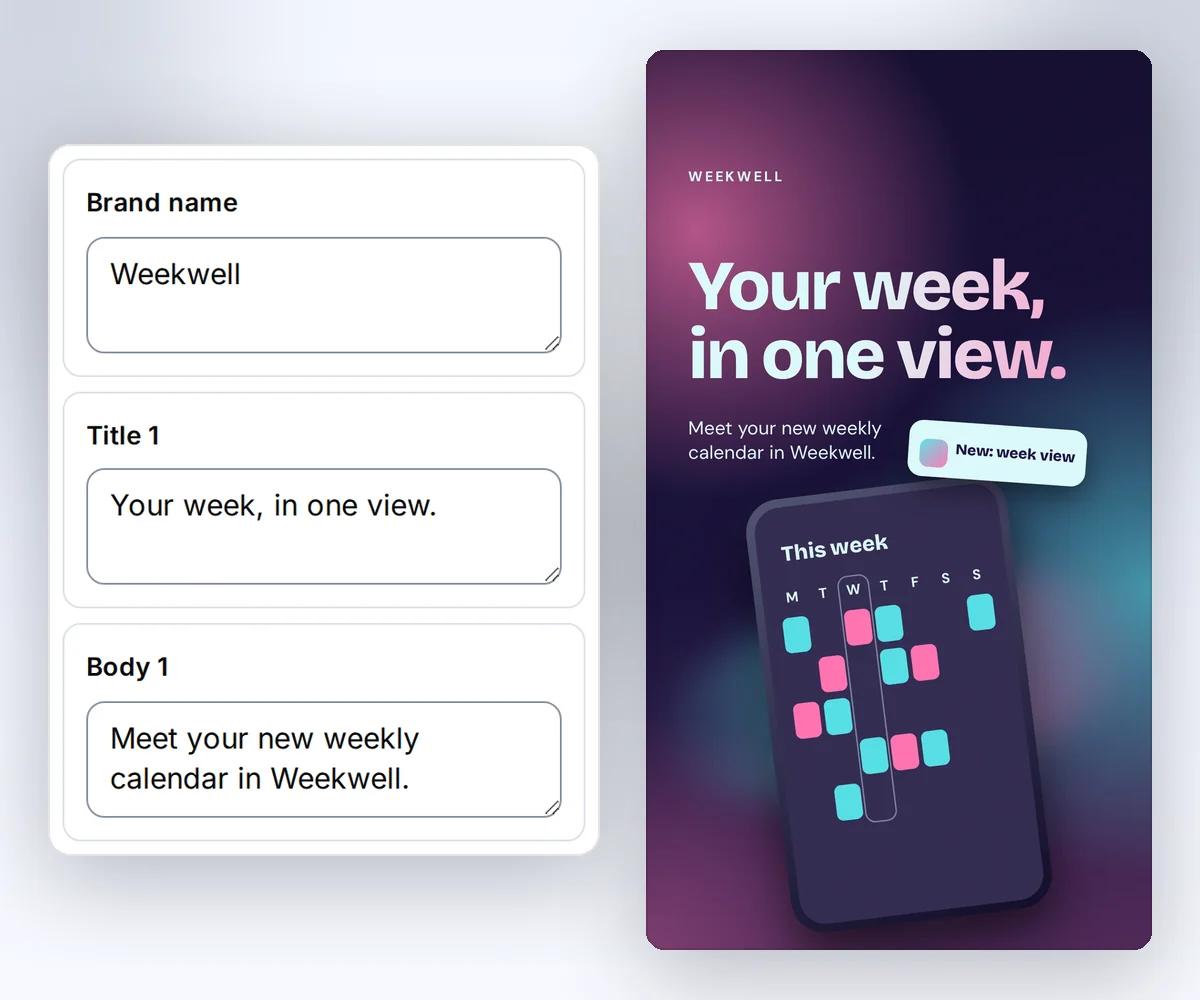
In the studio, open a template such as the TikTok app feature launch and click Use this template. Open the Data tab, type your words for each slide, then click Save and Export. Choose Images ZIP and you get numbered images, ready to add to a TikTok photo post in order. The slideshow guide and the safe-zone guide show how to check the slides at phone size.
The faster way is to connect thirds.ai to ChatGPT or Claude and let the assistant write the slides. Give it your app's screenshots, the slide text from your past posts that did well, with the installs each one brought, and the ideas from this list you want to try. Then ask for a real batch at the pace you'll post, such as "Make 21 slide sets from these ideas, so I can post three a day for a week." The assistant writes the words, and thirds.ai puts them on your slides in your app's look.
If you build the app yourself, give your coding assistant your code base along with the thirds.ai connection. It can read what each feature does and use the real screen and button names, so you don't have to brief it.
How to order the slides
Put a question on the first slide, one step on each middle slide, and what to do next on the last one. Write down the one thing you want your viewer to do after the last slide, and build the set toward it.
- First slide: Ask the question your viewer already has, like "Always rushed in the morning?"
- Middle slides: Give one step per slide. Keep the heading short and put the detail in the line below it.
- Last slide: Show your app doing the task, and ask the viewer to try it or save the post.
TikTok's own ad research says half of an ad's effect on recall happens in the first two seconds (TikTok Creative Center, 2022). On a slideshow, that's your first slide, so give it the whole question. Put your strongest step on slide two, because that slide decides whether they swipe on.
When to ask for the download
Ask for the download when the middle slides have shown your app at work, and ask for a save or a comment when the post is advice first and the viewer meets your app only on the last slide. Use both endings, on different posts, and ask for one thing on the last slide.
TikTok's guide for app advertisers favours plain words such as "Download now" or "Try it free today" (TikTok for Business, mobile app guide). That advice is for paid posts, where the download button sits under the ad. On a free photo post the link lives in your bio, so the direct ending has to say where to go, like "Free on iOS and Android, link in bio." For the soft ending, end with "Save this for Sunday" or "Which step do you skip?" and put your app on the slide as the tool doing the work. A save means the viewer plans to come back, and a comment gives you someone to reply to with the download link.
How often to post slideshows
Post at the pace you can hold for a month, then raise it. TikTok's Creator Academy tells publishers to set "a daily post target you can consistently hit" and notes that the publishers in its success cases post multiple times a day (TikTok Creator Academy, updated July 2026).
A batch is what makes a daily pace possible for a small team. Ask your assistant for 21 slide sets from one template, and you have a week of three posts a day. Mix advice posts with feature posts, and lean toward advice.
Give each post about ten days before you judge it. Metricool found that TikTok posts collect 96% of their total reach within the first ten days (Metricool, May 2026).
When a format is tired
Look for three or four posts in a row, with the same hook and the same look, that get fewer views than your average while your posting pace hasn't changed. TikTok tells advertisers to refresh an ad "when delivery results exhibit a consistently declining trend" (TikTok Ads Help, June 2025), and its mobile app guide tells them to update their videos every one to two weeks (TikTok for Business, mobile app guide).
Watch views and saves in TikTok Analytics. When saves drop while views hold, the story is old. When both drop, change the look too. Open a different template from the TikTok slideshow gallery and apply your brand kit, or ask your assistant for a fresh set in a new layout. Change one thing at a time, so you learn what worked.
For a new story, pick one of the ten ideas below. Each comes as a ready template, or you can give the idea to your assistant and ask for a slide set.
1. A calmer morning for a planner app
Post three small changes that make a morning calmer, like picking tomorrow's tasks the night before, and end with your planner showing a day with the tasks spaced out. It works because a planner is bought to fix mornings, and the advice helps before anyone downloads it. End with a soft ask, like "Save this for tonight." Start from the TikTok morning planner template.
2. A coastal day out for a travel app
Post one day by the sea, one stop per slide with a real place name and a time, and end with the stops saved as one plan in your app. It works because the viewer sees your app plan a whole day, so a direct ask like "Plan yours free, link in bio" feels fair. Start from the TikTok coastal walks template.
3. A meal from the cupboard for a recipe app
Post a dinner made from a few plain ingredients, two steps that look doable on a weeknight, and the finished dish beside the recipe saved in your app. It works because it answers a question people have most evenings, so it earns saves. End with "Save this for a busy night." Start from the TikTok dinner ideas template.
4. A study plan for a learning app
Post a one-week plan for one subject, with one topic a day and a short quiz at the end, and show the plan and the quiz in your app. It works because students look for a plan before a test and will try one that looks ready to use. Ask for a comment, like "Which subject is yours?", and reply to each with your download link. Start from the TikTok study planner template.
5. A weekly spending check for a budget app
Post a simple weekly check: group the purchases into three piles, name the biggest pile, and set one limit for the week ahead, shown in your app. It works because the check repeats every week, so people save it and come back, and your app is where they do it. Use big, round numbers. Start from the TikTok budget tips template.
6. A short activity break for a workout app
Post a five-minute break with one move per slide, the time or the count on each, and end with the session logged in your app. It works because it asks for very little, so people who skip the gym still save it. Use the direct ask when your app has a free plan to start today, and a soft ask when it needs a sign-up first. Start from the TikTok short workouts template.
7. A trip in one place for a travel planner
Post bookings from three different apps coming together on one screen in yours, day by day. It works because the first slide shows the problem your app fixes, and the viewer who swipes to the end has a trip to organise. Use the direct ask. Start from the TikTok travel planner template.
8. A shorter task list for a productivity app
Post three reasons a task list keeps growing, like a task too big to start, with one fix for each, and end with a short list in your app with two items already done. It works because the fixes help on their own, and the last slide shows a list that ends. End with a soft ask, like "Which one is your list?" Start from the TikTok task-list tips template.
9. A book recommendation list for a reading app
Post a short list of books with who suggested each one and a one-line note on why, and end with the list sorted in your app. It works because people get book tips all the time and lose them, and a list they can save fixes that. Use real titles you'd stand behind, and ask for a comment, like "What should go on the list?" Start from the TikTok reading list template.
10. One new feature people can try
Post one thing your app can now do. Open with the result it gives, like "Your weekly plan, in one view," then show the screen where the viewer starts, what they tap, and what they get. It works because it's a demo with a clear payoff, and every slide is your product, so this is the one idea that always ends with the direct ask. Say the price plainly on the last slide, and use the real names of your feature and its buttons so viewers can follow along in your app.

Use installs to choose your next post
Judge each idea by the installs it brings, because views reward the hook and installs reward the story. After ten days, compare installs from your bio link in the days after each post went up. A post with middling views and strong installs is your best idea, so give that set to your assistant as a past winner and ask for more like it. A post with big views and no installs is a good hook attached to the wrong story about your app.


