
A static ad is one still picture, with no video or motion, that sells a product, an offer, or an event. The 15 static ad examples below cover the jobs most campaigns need, from a product photo ad to a job ad, and each one is an editable thirds.ai template at its ad size. Pick the layout that fits your campaign, put in your own words and photos, and export it.


Read the setup prompt
First read https://thirds.ai/blog/static-ad-examples-15-formats, https://thirds.ai/docs/mcp, and the setup guide for ChatGPT or Claude, whichever I use. Guide me through the connection controls and browser sign-in. Never ask me to paste an API key into chat. Choose one static ad template for my campaign. Ask what I sell, where the ad will run, and which photo, offer, and headline I can use. Fill one design and check it at phone size. Before spending credits, tell me the cost and wait for my approval.
Each layout below starts from a designer-made template, and ChatGPT or Claude can write a whole batch of headlines and offers and put them on it for you. You can test more angles because nobody has to redraw the picture for each one.
Read the transcript
Looking for static ad templates? Here are 15 layouts you can edit and use again, for products, offers, reviews, and events.
Selling something? The product photo ad gives your product most of the space. Sale price shows the old and new price together. Countdown is for an offer with a real end date, before and after shows a real change, and the seasonal launch ad brings in a new collection.
Need proof? Use a testimonial or a quote card for a customer’s own words, a key statistic for one sourced number, a comparison for two options, and a feature list for four clear points.
And for everything else: an event invite, a webinar with two speakers, a job ad, a newsletter signup… and an app screenshot in a phone frame.
Tip: pick the layout by where it runs. Square or portrait for the feed, tall for stories, wide for links and banners. A square ad won’t turn into a story by itself.
Now make one yours. Copy the product photo ad from the gallery. In the Data panel, type your brand and headline, set the price, and drop in your own product photo.
Change the colours to match your brand, and save it. Then export a PNG. Each finished image costs one credit.
And here’s the best part: next campaign, you don’t start over. Open the same saved ad, change the words and the photo, and export. Three new candle ads for three credits, and a verified free account gets 50 credits every month.
Pick a layout from the gallery, and make your first ad at thirds.ai!
What size is a static ad?
The static ad examples on this page come in four sizes: 1080 × 1080 square, 1080 × 1350 portrait, 1080 × 1920 tall, and 1200 × 630 wide. Each ad platform publishes its own sizes for each placement.
| Size | Shape | Examples on this page |
|---|---|---|
| 1080 × 1080 | Square | Product photo, before and after, sale price, comparison, quote card, webinar |
| 1080 × 1350 | Portrait | Testimonial, feature list, app screenshot, seasonal launch, job |
| 1080 × 1920 | Tall story | Countdown offer |
| 1200 × 630 | Wide | Key statistic, event invite, newsletter signup |
On Meta, lead with the portrait shape. Meta's ads guide recommends a 4:5 image at 1440 × 1800 pixels for both the Facebook feed and the Instagram feed, as a JPG or PNG (Meta ads guide, Facebook feed and Instagram feed, read on 2 October 2026). The 1080 × 1350 templates here are that 4:5 shape, and the square still works in both feeds. For a story, Meta asks for 9:16 at 1080 × 1920 or more, and says to leave about 14% (250 pixels) at the top and 20% (340 pixels) at the bottom free of text and logos, because the profile name and the button sit there (Meta, design requirements for Instagram Stories ads, read on 2 October 2026).
You don't need a separate design for each shape. Make one, then click Smart resize in the editor and add the sizes you need. You get every shape with your words and layout already in place.
What makes a good static ad?
A good static ad makes one point that someone can read on a phone at a glance, and then asks them to do one thing. You can see it in the examples here, where each ad keeps its words short and large. That's our judgment from designing these 15 templates. The platform limits point the same way.
Meta gives the headline 27 characters in the Facebook feed and 40 on Instagram, and the primary text 125 characters on Instagram before it gets cut (the same Meta ads guide pages). Those fields sit around the picture, so use them. Put the explanation and the terms in the ad copy, and keep the picture for the headline and the button. A picture that tries to carry the whole pitch ends up with type too small to read on a phone.
- Say one thing per ad. If you have three features, make three ads from the same template and let the platform show you which one wins.
- Make only claims you can back up. A price, a saving, a statistic, or a before and after each needs a source or a result you can show.
- Match the picture to the words. Use the real product, the real screen, or the real customer, so the headline and the photo say the same thing.
15 static ad layouts you can edit
Each layout below is a thirds.ai gallery template. Open the one you want and click Use this template to get your own copy, or give the idea to ChatGPT or Claude and ask for an ad in that shape with your brand. How to make it shows both ways step by step.
1. Product photo ad, 1080 × 1080
A product photo ad shows one product with a short headline and a price. The square layout gives the photo most of the space, so use it when the product sells itself and the words only need to name it and price it.

2. Testimonial ad, 1080 × 1350
A testimonial ad puts one customer quote, the customer's name, and their photo in a portrait image. It works because a customer's words carry more weight than yours. Put the full review in the post caption, and shorten the quote on the ad without changing its meaning. The template shows five stars, so use it for a five-star review or ask the AI chat to remove them.

3. Before and after ad, 1080 × 1080
A before and after ad places two photos side by side to show a real change. Keep the framing and the crop the same in both so the comparison stays fair, and use a headline that names the change.

4. Countdown offer ad, 1080 × 1920
A countdown offer ad shows how many days are left on an offer with a real end date. A deadline gives people a reason to act today. The number is part of the picture, so export a fresh one each day the offer runs.

5. Feature list ad, 1080 × 1350
A feature list ad gives four features their own short lines under a headline. The portrait layout keeps the points apart so each one reads on its own. Write each line as what the buyer gets from the feature.

6. Sale price ad, 1080 × 1080
A sale price ad shows the old and new prices together, with the offer terms below. The old price does the selling, because it tells people how good the deal is.

7. App screenshot ad, 1080 × 1350
An app screenshot ad places a real screen from your app inside a phone frame, with a short line above it. Pick the screen that shows the task in your headline. If you build in Lovable, add thirds.ai to Lovable and ask for this ad while you work.

8. Comparison ad, 1080 × 1080
A comparison ad sets two options side by side with the same rows. It works when the buyer is already weighing a choice and you can show, row by row, where you win.

9. Key statistic ad, 1200 × 630
A key statistic ad puts one sourced number in large type with a short line that explains it. It works when the number itself is the news. Say what it measures and the period it covers, and name the source on the ad.

10. Quote card ad, 1080 × 1080
A quote card ad sets a short quote in large type with the speaker's name under it. It suits a line from a talk or a book, where the words are the whole point. Keep the quote short so it stays large.

11. Seasonal product launch ad, 1080 × 1350
A seasonal product launch ad introduces a new collection with its season, a photo, and the release date. It works because the season and the date make the ad feel current, so people act before the moment passes.

12. Event invite ad, 1200 × 630
An event invite ad puts the date beside the event name and the place or link. It works because a reader decides in one glance whether they can come. Add the time zone when people can join from different places.

13. Webinar ad, 1080 × 1080
A webinar ad shows the topic, the date, and the speakers in one square image. Speakers' names and roles are what get people to sign up, so the two cards give each person room.

14. Job ad, 1080 × 1350
A job ad names the open role first and gives three short points for the details that decide whether someone applies, such as the location, the hours, and the pay. It works because people skim job ads for the facts that rule them in or out.

15. Newsletter signup ad, 1200 × 630
A newsletter signup ad tells readers what they get and how often it arrives. Use it as an ad or on a signup page. The email box in the picture is only a picture, so link the ad to the page with your real form.

How to make it
Start from any of the 15 templates above, or ask ChatGPT or Claude to make an ad in one of these shapes with your brand. Either way, you end with a saved design you can send a new headline, price, and photo for each version. The steps use the Product photo ad.
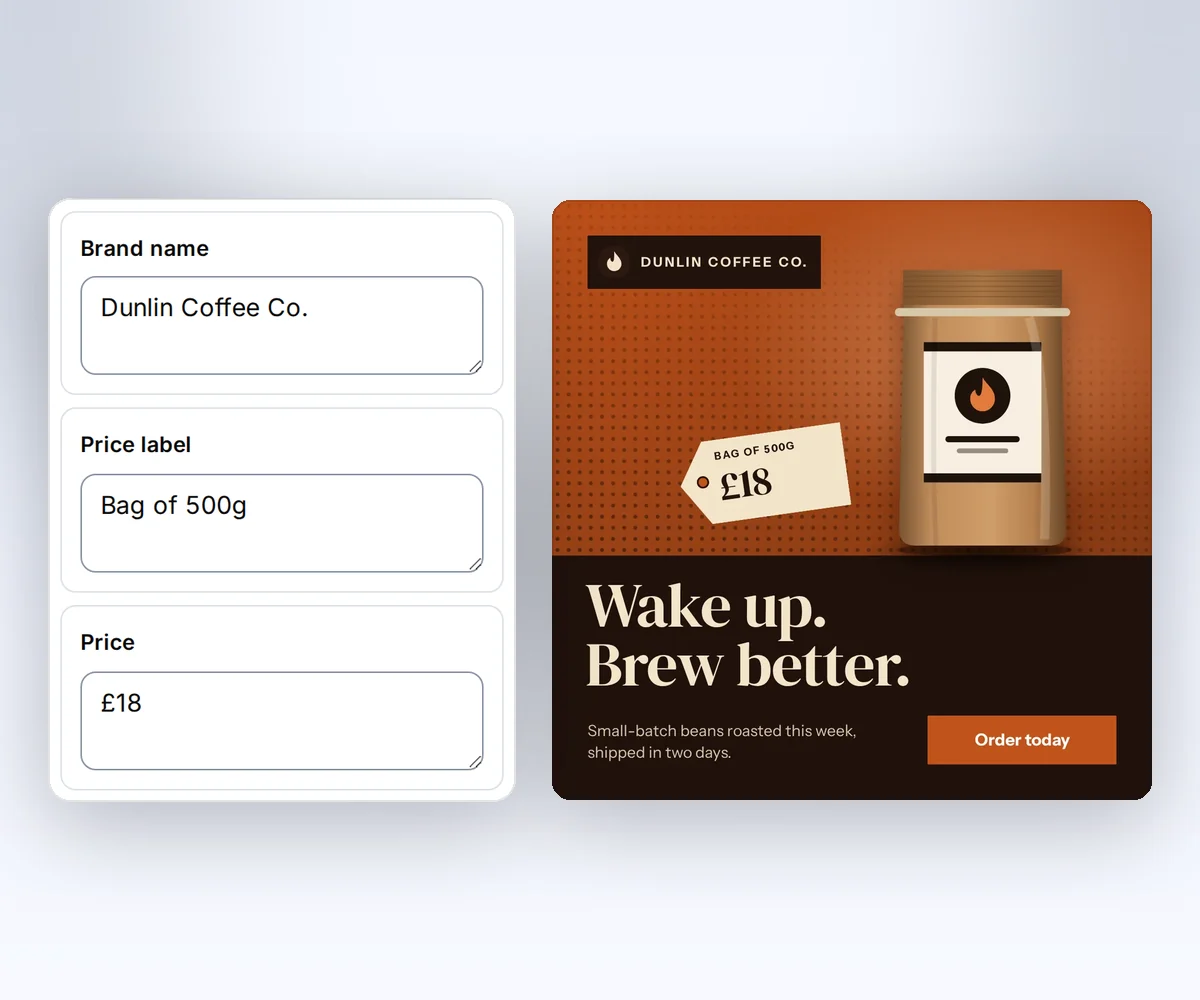
- Open the Product photo ad and click Use this template.
- Open the Data tab and type your brand, headline, and price, and upload your product photo in place of the sample. To put the ad in your colours and fonts, pick your brand kit under Brand kit. Click Preview with data to check it, then Save.
- Click Export, choose PNG, and download the ad.
Each finished ad costs one credit, and a verified free account gets 50 credits a month. The editor walkthrough covers the rest of the editor, and the static ads page shows the whole flow.
The faster way for a campaign is to let your AI assistant write the versions. Connect thirds.ai to ChatGPT or Claude, then give it your product photos, your prices and offer terms, and the ads from past campaigns that did well. Ask for a real set at the pace you'll test, such as "Make five sale price ads for the autumn offer, each with a different headline." The assistant writes the headline and offer copy, and thirds.ai puts it on your saved design in your brand.
When your products or offers sit in a spreadsheet, make the whole set at once. Open Batches, choose your saved ad design, and paste your rows or load a CSV file. Each row becomes one ad, so twenty products give you twenty ads in one ZIP. Make static ad variants with a saved design walks through a three-variant test, and PDF mail merge from a CSV covers larger lists.
Make the whole set from your own code
Your app can make a whole sale campaign with no one at the screen: save one ad design, then send each product's details to POST /v1/image and get back a finished ad in your brand. The request below fills the sale price ad; its data object lists every field the design reads.
curl --fail-with-body --silent --show-error https://thirds.ai/v1/image \
  -H 'Authorization: Bearer YOUR_API_KEY' \
  -H 'Content-Type: application/json' \
  -H 'Idempotency-Key: price-anchor-variant-a' \
--data '{"template_id":"tpl_00000000000000000000000000000000","version":1,"data":{"brand_name":"Northline","product":"Studio desk lamp","old_price_label":"Was","old_price":"$120","new_price_label":"Now","new_price":"$79","savings_label":"You save","savings":"$41","offer_line":"This week only","action":"Shop the offer"},"image":{"format":"png","width":1080,"height":1080},"wait":false}'const response = await fetch("https://thirds.ai/v1/image", {
method: "POST",
headers: {
"Authorization": "Bearer YOUR_API_KEY",
"Content-Type": "application/json",
"Idempotency-Key": "price-anchor-variant-a"
},
body: JSON.stringify({
"template_id": "tpl_00000000000000000000000000000000",
"version": 1,
"data": {
"brand_name": "Northline",
"product": "Studio desk lamp",
"old_price_label": "Was",
"old_price": "$120",
"new_price_label": "Now",
"new_price": "$79",
"savings_label": "You save",
"savings": "$41",
"offer_line": "This week only",
"action": "Shop the offer"
},
"image": {
"format": "png",
"width": 1080,
"height": 1080
},
"wait": false
}),
redirect: "error",
signal: AbortSignal.timeout(30000),
});
if (!response.ok) throw new Error(`HTTP ${response.status}; Retry-After: ${response.headers.get("retry-after") ?? "none"}`);
console.log(await response.text());import json
from urllib.error import HTTPError
from urllib.request import HTTPRedirectHandler, Request, build_opener
class NoRedirect(HTTPRedirectHandler):
def redirect_request(self, req, fp, code, msg, headers, newurl):
return None
request = Request("https://thirds.ai/v1/image",
method="POST",
headers={
"Authorization": "Bearer YOUR_API_KEY",
"Content-Type": "application/json",
"Idempotency-Key": "price-anchor-variant-a"
},
data=json.dumps({
"template_id": "tpl_00000000000000000000000000000000",
"version": 1,
"data": {
"brand_name": "Northline",
"product": "Studio desk lamp",
"old_price_label": "Was",
"old_price": "$120",
"new_price_label": "Now",
"new_price": "$79",
"savings_label": "You save",
"savings": "$41",
"offer_line": "This week only",
"action": "Shop the offer"
},
"image": {
"format": "png",
"width": 1080,
"height": 1080
},
"wait": False
}).encode("utf-8"),
)
try:
with build_opener(NoRedirect()).open(request, timeout=30) as response:
print(response.read().decode("utf-8"))
except HTTPError as error:
retry = error.headers.get("Retry-After", "none")
raise RuntimeError(f"HTTP {error.code}; Retry-After: {retry}") from NonePoll GET /v1/image/{id} with a delay under a time deadline, follow Retry-After when present, and stop on succeeded, failed, or cancelled. On success, download download.url with https://thirds.ai in front of it. The brand_name field is plain text. To put your kit's colours, logo, and fonts on the ad, send brand_kit_id too. The template reads the kit through the reserved brand value, and Use templates with your data lists those fields. For other template-based image tools, read the Templated comparison and the AdKit comparison.
Make matching TikTok photo slides
The same words and photos make a TikTok photo post, with five matching 1080 × 1920 slides from one template. Choose from ten TikTok slideshow sets, follow the slideshow guide, or take a story from ten ideas for app marketing. The TikTok safe-zone guide shows where the app's own controls cover a slide.
Sign in to copy any of these templates and export your first ad.


