
A product spec sheet is a one-page document that gives a buyer the facts about one product, such as its name, SKU, version, size, materials, and key features. Save one spec sheet design in thirds.ai, send it each product's details, and download a branded PDF for that product. Do the same from a spreadsheet when you need a whole product line at once, or let ChatGPT, Claude, or your inventory system make each sheet for you.


Read the setup prompt
Help me follow https://thirds.ai/blog/product-spec-sheet-pdfs-from-html-data in ChatGPT or Claude. Read its linked thirds.ai docs before giving steps. Keep API keys and webhook secrets out of chat. Make one product spec sheet PDF per SKU. Start from the Product spec sheet template. Ask what product facts I have, map one sample product, and check one PDF. Before spending credits, tell me the cost and wait for my approval.
With thirds.ai, the sheet starts from a designer-made template, your brand kit puts your logo, colours, and fonts on it in one step, and a whole product line comes out of one spreadsheet. ChatGPT or Claude can make the sheets for you, or your inventory system can make each one through the API, so nobody retypes a value.
What is a product spec sheet?
A product spec sheet, also called a product specification sheet or a product data sheet, is a short document that states the measurable facts about one product, so a buyer, a reseller, or a support agent can check them without asking you. It covers one product or one version of it, and it lists facts someone can verify, such as dimensions, weight, materials, power, and what the product works with. It doesn't replace a manual, a safety data sheet, or a sales brochure, so it doesn't explain how to use the product or argue why someone should buy it.
Write the sheet for three readers. A buyer compares two products side by side before they choose. A reseller copies the values into a listing or a catalogue. A support agent matches a question to the right unit by its SKU and version. Give all three exact values, and put a unit next to every number.
The internal product spec is different. A product team writes that one before they build, and it describes what the team plans to make, as Atlassian's product specification guide explains (read on 13 October 2026). Keep the two apart, because the internal spec changes while the team builds, and the customer-facing sheet changes only when you release a new version.
What should be on a product spec sheet?
A product spec sheet should hold the product name, the SKU, the version or edition, the date you last updated the sheet, a short overview, a table of specifications, a list of key features, a line that says what the product works with, a support contact, and a footer that names your company. A buyer uses the table to compare products, and a support agent uses the SKU and version to match a question to the right unit, so a sheet that misses one of these sends the reader back to you with a question. These ten parts are the details the thirds.ai Product spec sheet template asks for. The limits in the table come from the template's data rules, which you can read on its source page.
| Part | What you write | Limit in the template |
|---|---|---|
| Product name | The name a buyer sees in the shop. | 100 characters |
| Version | The version or edition, such as "Version 2.1". | 40 characters |
| SKU | Your own stock code for this exact unit. | 40 characters |
| Updated on | The date you last changed the sheet. | 40 characters |
| Overview | A short line that says what the product is and who it's for. | 240 characters |
| Specifications | A label and a value on each row, such as "Weight" and "6.4 kg unboxed". | 1 to 7 rows |
| Key features | One short line for each thing that sets the product apart. | 1 to 6 lines |
| Works with | The products, standards, or inputs this unit pairs with. | 140 characters |
| Support contact | An email address or a phone line. | 140 characters |
| Footer | Your company name and where the product is made or tested. | 180 characters |
Put a measurement, a material, a power rating, or a certification mark in a specification row. Write the unit every time, for example "6.4 kg unboxed". Keep a feature line to one benefit, and start it with a verb or the thing it describes. If a product line shares most rows, keep the shared rows in the same order on every sheet, so a buyer can compare two sheets at a glance.
This design uses a drawn mark in the header instead of a product photo. If you want a photo, open the design in the editor and add a picture to the header.
Start from the Product spec sheet template
Copy the Product spec sheet template into your account, put your own product's details in it, and save it as your design. That takes four steps in the editor, and you need a free thirds.ai account. The template is an A4 portrait page with a dark teal header, a two-column specifications table, and orange-dot feature rows.

- Open the Product spec sheet template and click Use this template. Sign in first if you need to.
- Open the Data tab and change the sample values. Type your product name, SKU, version, overview, specification rows, feature lines, the line that says what it works with, your support contact, and your footer.
- To put your logo, colours, and fonts on the sheet in one step, pick your kit in the Brand kit box. The brand kit guide shows how to set up the kit once for every design you own, and Create branded templates for PDFs and images shows other ways to start a design in your brand.
- Click Save template.
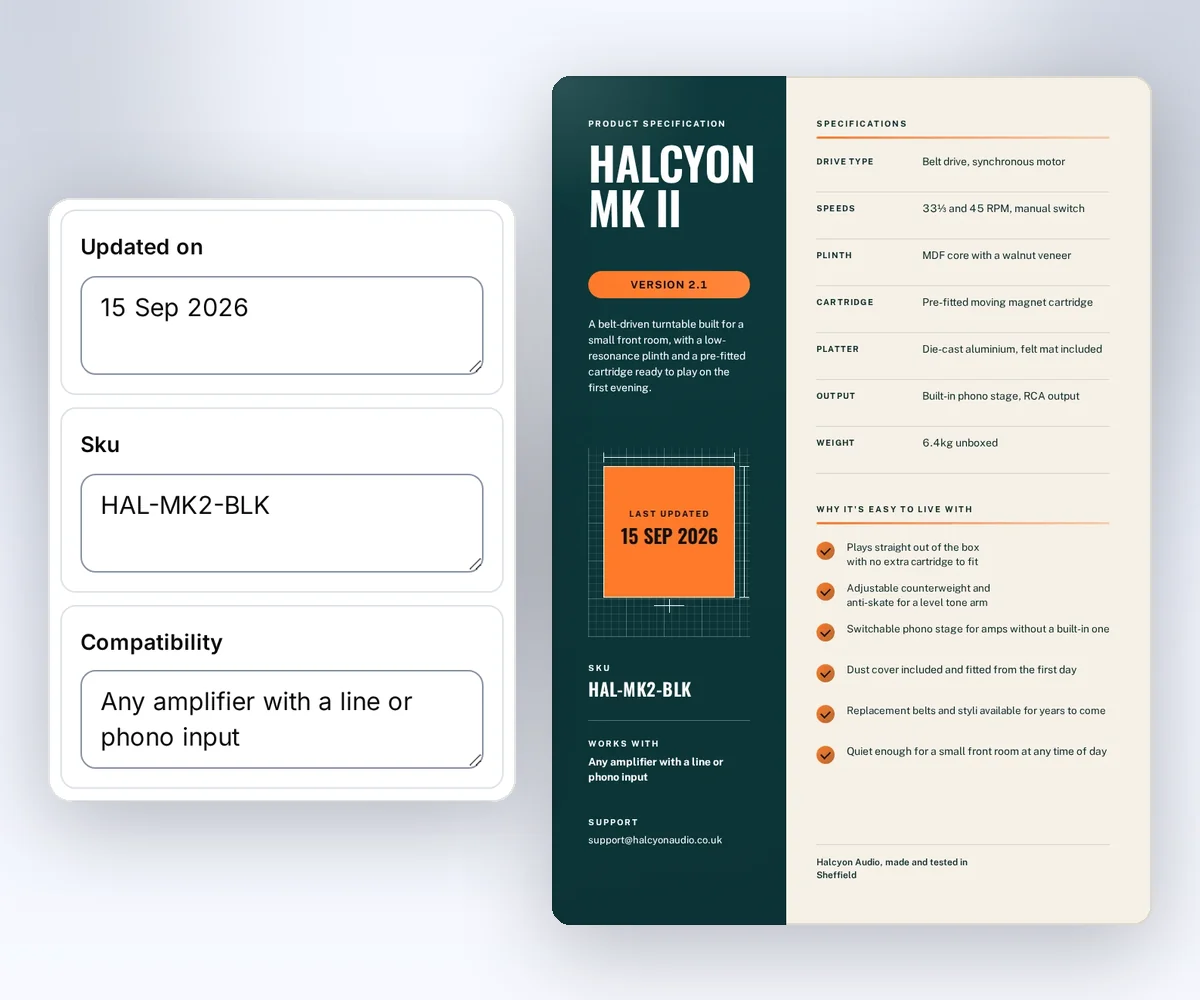
Preview is free, so refresh it until the page looks right. Export makes the PDF and costs one credit when it succeeds; a failed file costs nothing. A verified Free account gets 50 credits each month, as the pricing page shows, so you can check a few sheets before you pay for a plan. Before you connect your product data, put your longest product name and your longest specification value in the sample, and check that both still fit on the page.
How do I make a spec sheet PDF for one SKU from my own code?
Send one product's details to your saved spec sheet design through the thirds.ai API and download the PDF it makes. The recipe has three steps. A mapper shapes your inventory record, a create request makes the file, and a download step checks it. This section is for developers. You need Python 3, curl, an API key, and the ID and version of your saved copy of the Product spec sheet template.
This example runs on macOS or Linux and uses only the Python standard library. Set THIRDS_API_KEY through your secret store, set THIRDS_TEMPLATE_ID and THIRDS_TEMPLATE_VERSION to your saved copy, and set THIRDS_WORK to a private folder.
Prepare the product record
The record below stands in for one product from your inventory export or product database. Save it as sku-input.json in your work folder. It describes a second finish of the turntable in the gallery sample, so the same design gets new values.
{
  "sku": "HAL-MK2-WAL",
  "name": "Halcyon Mk II Turntable",
  "version": "2.1",
  "updated_on": "9 November 2026",
  "summary": "A belt-driven turntable in a walnut finish, built for a small front room, with a pre-fitted cartridge ready to play on the first evening.",
  "attributes": {
    "Drive type": "Belt drive, synchronous motor",
    "Speeds": "33⅓ and 45 RPM, manual switch",
    "Plinth": "MDF core with a walnut veneer",
    "Cartridge": "Pre-fitted moving magnet cartridge",
    "Platter": "Die-cast aluminium, felt mat included",
    "Output": "Built-in phono stage, RCA output",
    "Weight": "6.4 kg unboxed"
  },
  "highlights": [
    "Plays straight out of the box with no extra cartridge to fit",
    "Adjustable counterweight and anti-skate for a level tone arm",
    "Switchable phono stage for amps without a built-in one",
    "Dust cover included and fitted from the first day"
  ],
  "works_with": "any amplifier with a line or phono input",
  "support_email": "support@halcyonaudio.example",
  "maker_line": "Halcyon Audio, made and tested in Sheffield"
}
Map the record to the design
Save this script as prepare-spec-sheet.py. It turns the record into the data the template reads, checks the row limits, and writes a request file. The template accepts one to seven specification rows and one to six feature lines, so the script stops with a clear code when a record has more.
"""Map one product record to the saved Product spec sheet template."""
import json
import sys
from pathlib import Path

record_path, template_id, version, output_path = sys.argv[1:]
try:
    record = json.loads(Path(record_path).read_text())
    specs = [{"label": label, "value": value}
             for label, value in record["attributes"].items()]
    features = list(record["highlights"])
    if not 1 <= len(specs) <= 7 or not 1 <= len(features) <= 6:
        raise SystemExit("too_many_rows")
    if len(record["summary"]) > 240:
        raise SystemExit("summary_too_long")
    data = {
        "product_name": record["name"],
        "version": f"Version {record['version']}",
        "sku": record["sku"],
        "updated_on": record["updated_on"],
        "overview": record["summary"],
        "specs": specs,
        "features": features,
        "compatibility": record["works_with"],
        "support_line": record["support_email"],
        "footer": record["maker_line"],
    }
    request = {"template_id": template_id, "version": int(version),
               "data": data, "wait": False}
    Path(output_path).write_text(json.dumps(request, indent=2, allow_nan=False) + "\n")
except (KeyError, TypeError, ValueError, OSError):
    raise SystemExit("invalid_input") from None
The script keeps the specification rows in the order of your record, so put the rows you want at the top first. The template sets its own page size, so the request sends no page options. Read PDF and image options if you want a password on the file.
Make the file
Run the mapper, then send the request. The create call is the step that spends a credit. Use the SKU and the version as the Idempotency-Key, so a retry of the same request never makes a second file.
umask 077
python3 "$THIRDS_WORK/prepare-spec-sheet.py" \
  "$THIRDS_WORK/sku-input.json" \
  "$THIRDS_TEMPLATE_ID" "$THIRDS_TEMPLATE_VERSION" \
  "$THIRDS_WORK/request.json"
curl --fail-with-body --silent --show-error https://thirds.ai/v1/pdf \
  -H "Authorization: Bearer $THIRDS_API_KEY" \
  -H 'Content-Type: application/json' \
  -H 'Idempotency-Key: spec-HAL-MK2-WAL-v2-1' \
  --data @"$THIRDS_WORK/request.json"
Save the id from the response with your product record. Read the job until status is succeeded. Replace the sample ID with yours.
curl --fail-with-body --silent --show-error \
  https://thirds.ai/v1/pdf/pdf_00000000000000000000000000000000 \
  -H "Authorization: Bearer $THIRDS_API_KEY"
Copy download.url from that response and add https://thirds.ai before it. The download needs no API key.
curl --fail --silent --show-error \
  'https://thirds.ai/v1/downloads/YOUR_SIGNED_DOWNLOAD_TOKEN' \
  --output "$THIRDS_WORK/HAL-MK2-WAL.pdf"
shasum -a 256 "$THIRDS_WORK/HAL-MK2-WAL.pdf"
The hash must match artifact.sha256 in the job, and the file size must match artifact.byte_size. Open the PDF and check the SKU, the version, and every specification value against your record before you attach the sheet to a listing.
When you release a new version of a product, change the version and the date in the record and give the request a new key, such as spec-HAL-MK2-WAL-v2-2. Keep the old PDF, because a buyer who owns the old unit still needs its sheet. The API workflows guide shows how to run this for every new version, and the CRM quote recipe uses the same steps for a quote.
Resolve errors
| Code or state | Next step |
|---|---|
too_many_rows | Cut the record to seven specification rows and six feature lines. |
summary_too_long | Shorten the overview to 240 characters. |
invalid_input | Fix a missing key or a value of the wrong type in the record. |
template_data_invalid | Check the required values and the string lengths in the table above. |
template_missing_data | Your copy of the design reads a value the record doesn't send. Add it. |
idempotency_conflict | Send the original request with its key, or give a changed record a new key. |
How do I make spec sheets for a whole product line at once?
Upload one CSV with a row for each SKU to Batches, and download a ZIP with one PDF for each row that succeeds. That takes four steps. You prepare the CSV, open Batches with your saved spec sheet design, load the CSV, and click Make files. You need a saved copy of the Product spec sheet template and enough credits for the rows. Your plan sets the most rows in one batch, as the CSV batch guide lists. Free accounts and credit packs without a plan get 10, Starter gets 50, Growth gets 100, and Scale gets 200.
The first row of the CSV holds the column names, so each column fills the matching part of the design. Put plain text in most cells. For the specification rows and the feature lines, put the list in the cell as text in square brackets, like the two rows below, which make sheets for the black and walnut finishes of the sample turntable.
product_name,version,sku,updated_on,overview,specs,features,compatibility,support_line,footer
Halcyon Mk II Turntable,Version 2.1,HAL-MK2-BLK,9 November 2026,A belt-driven turntable in a black finish for a small front room.,"[{""label"":""Drive type"",""value"":""Belt drive, synchronous motor""},{""label"":""Weight"",""value"":""6.4 kg unboxed""}]","[""Plays straight out of the box"",""Dust cover included""]",any amplifier with a line or phono input,support@halcyonaudio.example,Halcyon Audio
Halcyon Mk II Turntable,Version 2.1,HAL-MK2-WAL,9 November 2026,A belt-driven turntable in a walnut finish for a small front room.,"[{""label"":""Drive type"",""value"":""Belt drive, synchronous motor""},{""label"":""Weight"",""value"":""6.4 kg unboxed""}]","[""Plays straight out of the box"",""Dust cover included""]",any amplifier with a line or phono input,support@halcyonaudio.example,Halcyon Audio
Open Batches, choose your spec sheet design, and paste or load the CSV. Check the rows in the table, then click the button that names the file count. The page shows the most the batch can cost before you start.
The files in the ZIP follow row order, such as 001.pdf and 002.pdf, so sort the CSV by SKU and keep that list next to the ZIP. If a row fails, fix it and click Retry failed rows; you pay only for the new files. The CSV batch guide shows the same batch from your own code. If a long spec table splits in an odd place, fix page breaks, headers, and fonts before you run the whole line.
Do I need a spec sheet template in Word or Excel?
Use Word or Excel when you write one spec sheet by hand and change it now and then, and use a saved thirds.ai design when the same layout must come out for each SKU with new details. In Word and Excel, the layout and the values live in one file, so for each new product you open a copy, retype the values, and save the PDF yourself. With a saved design, your inventory data fills it through the API or a CSV batch on our servers, and ChatGPT or Claude can run the whole product line for you. A maker with one or two products suits the Word path. A shop, a distributor, or a support team with a product line suits the data path.
Word can save a layout as a reusable template, and Microsoft's template guide explains that path (read on 13 October 2026). Excel is good at a specification table you sort and filter, so it can stay the home of your source values while a saved design makes the PDF. Export the rows you need as CSV, and the batch above turns them into sheets. If you'd rather keep a Word file as the layout and fill it from your data, our Carbone comparison shows when a Word-based tool fits better.
Can I turn my current spec sheet into an editable design?
Yes. Import a picture of your current spec sheet and thirds.ai rebuilds it as an editable design with your logo, colours, and fonts. That takes five steps from Start from an image, and you need a PNG, JPEG, or WebP of the sheet, at most 10 MiB and at most 7,680 by 4,320 pixels, as the source image guide lists.
Open Start from an image, choose your brand kit, attach the picture, choose PDF output, and send it. An image import costs 50 credits. Compare Before and After, and check every number on the sheet, because the rebuilt layout may not match every pixel. The import replaces the source brand with yours, so check the name in the header and the footer too. The image to template page shows the result on other designs.
Once the design is yours, add the specification rows and the feature lines as values in Data, save it, and use it in the recipe or the batch above. A price list or a product catalogue works the same way, and the gallery has a Price list template and a Product catalogue template that you can copy next to your spec sheet.


