
The free YouTube thumbnail template in the thirds.ai gallery is a designer-made 1280 × 720 design, the 16:9 shape YouTube asks for, and your brand kit puts your colours and font on it in one step. After that, ChatGPT or Claude can make each episode's thumbnail for you, and a whole season can come from one spreadsheet. If you'd rather, your own code or automations can make one for each new episode.


Read the setup prompt
First read https://thirds.ai/blog/youtube-thumbnail-template-from-data, https://thirds.ai/docs/mcp, and the setup guide for ChatGPT or Claude, whichever I use. Guide me through the connection controls and browser sign-in. Never ask me to paste an API key into chat. Make YouTube thumbnails from one template. Ask for my channel colours, a real episode title, and a photo I have rights to use. Check one image at small size before reusing it. Before spending credits, tell me the cost and wait for my approval.
How to make a YouTube thumbnail template
The easiest way is to connect thirds.ai to ChatGPT, Claude, or any other AI you use. Ask it for a thumbnail design for your channel, change it until you like it, and then ask for each episode by title as you publish. It writes the label and the supporting line, and thirds.ai puts them on the design. For a season, give it the episode list and ask for all of them at once.
You can also set the design up yourself in the editor. It takes three steps, and you need a free thirds.ai account.
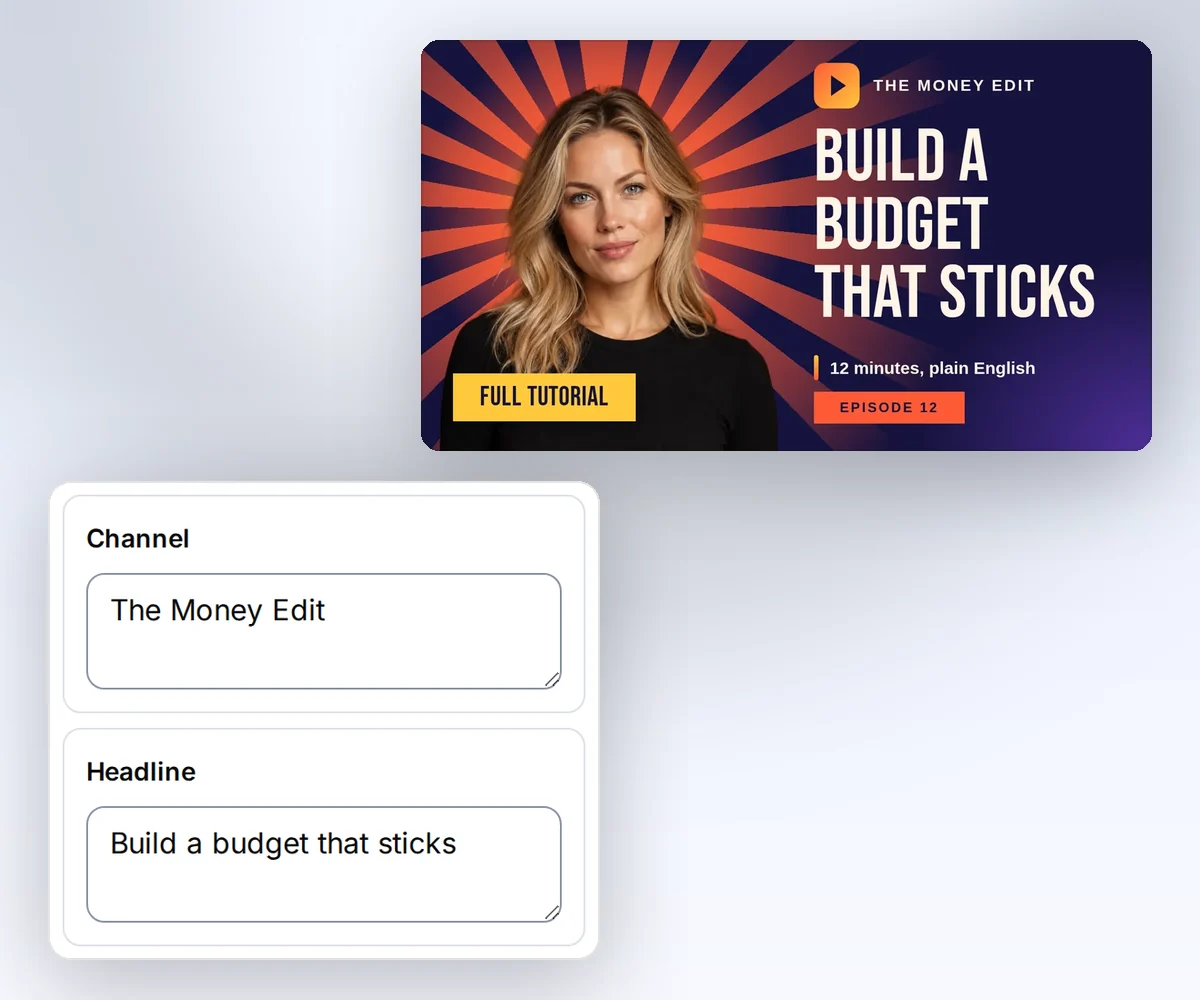
- Open the YouTube thumbnail template and click Use this template. Pick your kit in the Brand kit box, and your colours and font go on the design at once.
- Open Data and type your channel name, the episode label, the headline, a short badge, and a note. Click Upload image to swap in your own photo or channel logo. Then click Preview with data above the canvas to see the thumbnail.
- Choose JPEG and click Export JPEG. Look at the file at full size and at the small size people see in a list of videos before you upload it to YouTube Studio.
Try your longest episode title first, so you know it fits. Start free and make your first thumbnail.
Where can I find a free YouTube thumbnail template?
You can find a free YouTube thumbnail template in the thirds.ai gallery, and copying it and changing its words costs nothing. You only spend a credit when you download a finished file. A verified account gets 50 credits every month, so that's up to 50 thumbnails a month on the Free plan. See pricing for the full terms.

Each thumbnail has five details you type and two pictures you can swap. Each detail has a text limit, so it always fits the design.
| Detail | What changes | Text limit |
|---|---|---|
channel | Your channel name | 40 characters |
tag | The episode label | 30 characters |
headline | The main title | 70 characters |
badge | A short format label | 24 characters |
note | A short supporting line | 60 characters |
The photo and the logo are optional. If you skip them, the sample pictures stay, so add your own photo and logo before you publish. You can upload them in the editor or paste a public link to a PNG, JPEG, or WebP. Image and font rules explain which pictures work.
How do I make thumbnails for a whole season at once?
You make thumbnails for a whole season by uploading a CSV to Batches, and you get one JPEG for each row in a single ZIP. You need your saved copy of the YouTube thumbnail template and a spreadsheet with one row for each episode. Put the detail names in the first row, and each column fills the matching detail.
channel,tag,headline,badge,note
Signal Lab,Episode 13,Turn episode data into a thumbnail,Python guide,One saved layout for the next episode
Signal Lab,Episode 14,Plan a whole season in one sheet,Planning,Ten episodes from one spreadsheet
- Open Batches, choose your thumbnail, and pick JPEG.
- Drop your CSV on the page, or paste the cells from your spreadsheet. Check the rows and the cost.
- Click Make 2 files. The number on the button matches your rows. Download the ZIP when the files are ready.
Your plan sets how many rows fit in one batch: 10 on Free and on credit packs with no plan, 50 on Starter, 100 on Growth, and 200 on Scale. A row that fails costs nothing. Batches from a CSV has the full details.
Generate a thumbnail from episode data with Python
You can make each new thumbnail from your own Python code by sending the episode's details to the thirds.ai API with your saved template ID. The steps below write the request, send it, wait for the file, and check the download. You need Python 3 and curl on macOS or Linux, an API key, and your copied template's ID and version. Set THIRDS_API_KEY through your secret store, and keep it and the work folder out of source control. Set THIRDS_THUMBNAIL_TEMPLATE to your copied template ID and THIRDS_THUMBNAIL_VERSION to the version you review.
Save this as thumbnail-request.py. It only writes the request data to a file. It sends no API request.
import json
import os
from pathlib import Path

request = {
    "template_id": os.environ["THIRDS_THUMBNAIL_TEMPLATE"],
    "version": int(os.environ["THIRDS_THUMBNAIL_VERSION"]),
    "data": {
        "channel": "Signal Lab",
        "tag": "Episode 13",
        "headline": "Turn episode data into a thumbnail",
        "badge": "Python guide",
        "note": "One saved layout for the next episode",
    },
    "image": {"format": "jpeg", "width": 1280, "height": 720},
}
path = Path(os.environ["THUMBNAIL_WORK"]) / "request.json"
with path.open("x") as output:
    json.dump(request, output)
Create a private work folder, set THUMBNAIL_WORK to it, and run the script once. Review request.json. The next command starts one billed image render. Pick an Idempotency-Key for this episode and keep it, so a retry uses the same one.
curl --fail-with-body --silent --show-error https://thirds.ai/v1/image \
  -H "Authorization: Bearer $THIRDS_API_KEY" \
  -H 'Content-Type: application/json' \
  -H 'Idempotency-Key: thumbnail-episode-13' \
  --data @"$THUMBNAIL_WORK/request.json"
Keep the id from the response. If status is queued or running, read the job again until it ends. Replace the sample ID with yours.
curl --fail-with-body --silent --show-error \
  https://thirds.ai/v1/image/image_00000000000000000000000000000000 \
  -H "Authorization: Bearer $THIRDS_API_KEY"
Once status is succeeded, copy download.url and add https://thirds.ai before it. The download needs no API key.
curl --fail --silent --show-error \
  'https://thirds.ai/v1/downloads/YOUR_SIGNED_DOWNLOAD_TOKEN' \
  --output "$THUMBNAIL_WORK/thumbnail.jpeg"
shasum -a 256 "$THUMBNAIL_WORK/thumbnail.jpeg"
The hash must match artifact.sha256 in the job, and the file size must match artifact.byte_size. If a create request times out, send it again with the same key and the same request.json. You get the same job and pay once. Use a new key for a new episode, never to recover an uncertain request. Retry and download has the full rules.
Fix common errors
Each failed request comes back with a code, and the table says what to change for each one.
| Code or state | What to do |
|---|---|
template_not_found | Supply your saved template ID and a version number that exists. |
template_data_invalid | Send all five required text fields, each within its text limit. |
insufficient_credits | Add credits, then send the same request with the same key. |
rate_limited | Respect Retry-After and reduce concurrent requests. |
idempotency_conflict | Use the original request with its key. Give a new episode its own key. |
render_failed | Inspect the job in your account and correct the template or asset before a new render. |
Should I use 1280x720 or 1920x1080 for YouTube thumbnails?
Both are 16:9, so either works on YouTube. This template is set up at 1280 × 720, and smart resize makes a larger copy with the layout adapted when you want one.
YouTube's help page recommends 3840 × 2160 for video thumbnails, with a minimum width of 640 pixels and a 16:9 ratio. It accepts JPG or PNG, up to 2 MB from the mobile app and 50 MB from a desktop browser. Check the current thumbnail rules for your upload path; these facts were checked on 13 October 2026. For the full recommended size, use smart resize to make a 3840 × 2160 copy and check it before you upload.
What do YouTubers use to create thumbnails?
YouTubers make thumbnails with an image editor or a saved template, and the right choice depends on whether each video needs its own look. Use an image editor when every video needs its own composition. Use thirds.ai when your channel has one look: your assistant fills the design in for each episode, and a whole season comes from one spreadsheet, so nobody sits at a design app on publishing day. The social image workflow shows the same approach for your channel's posts, and the Placid comparison weighs thirds.ai against another service that fills a design from data.
Can ChatGPT create YouTube thumbnails?
ChatGPT can make and edit images from a description on every plan, as the OpenAI image guide explains (checked on 13 October 2026). Each image is a one-off, though: the next one puts the title somewhere else, and to change a word you ask for a whole new image. For a series, connect ChatGPT to thirds.ai and ask it for a thumbnail template once. Every episode after that comes out in the layout you approved, with its own title, and you can still change any word in the editor.
Open the YouTube thumbnail template, put your brand on it, and make your next episode's thumbnail.


