
An AI document template generator works best when you tell it three things: which document you need, which details change from one project to the next, and how long each part can get. Give the thirds.ai AI chat those three, and it builds the design with the logo, colours, and fonts from your brand kit. Check the draft once, and from then on your assistant or your own code makes each new document for you. The examples here use a one-page project brief.


Read the setup prompt
First read https://thirds.ai/blog/ai-prompts-for-reusable-templates, https://thirds.ai/docs/mcp, and the setup guide for ChatGPT or Claude, whichever I use. Guide me through the connection controls and browser sign-in. Never ask me to paste an API key into chat. Build a reusable project brief. Ask which details change and how long they can get; compare a draft with the Project brief template before I save it. Before spending credits, tell me the cost and wait for my approval.
Once your brief looks right, you never design it again. Connect thirds.ai to ChatGPT or Claude, and the assistant writes the next brief and hands you the finished PDF. Or your own code sends the project details and gets the file back, with no one at the screen. Either way, you stop copying last month's brief and fixing the layout by hand.
Make it without code
If you'd rather not write a prompt yet, start from the designer-made Project brief in the gallery. It takes three steps and a free thirds.ai account, and it shows you what a good reusable design looks like before you ask the AI for your own.
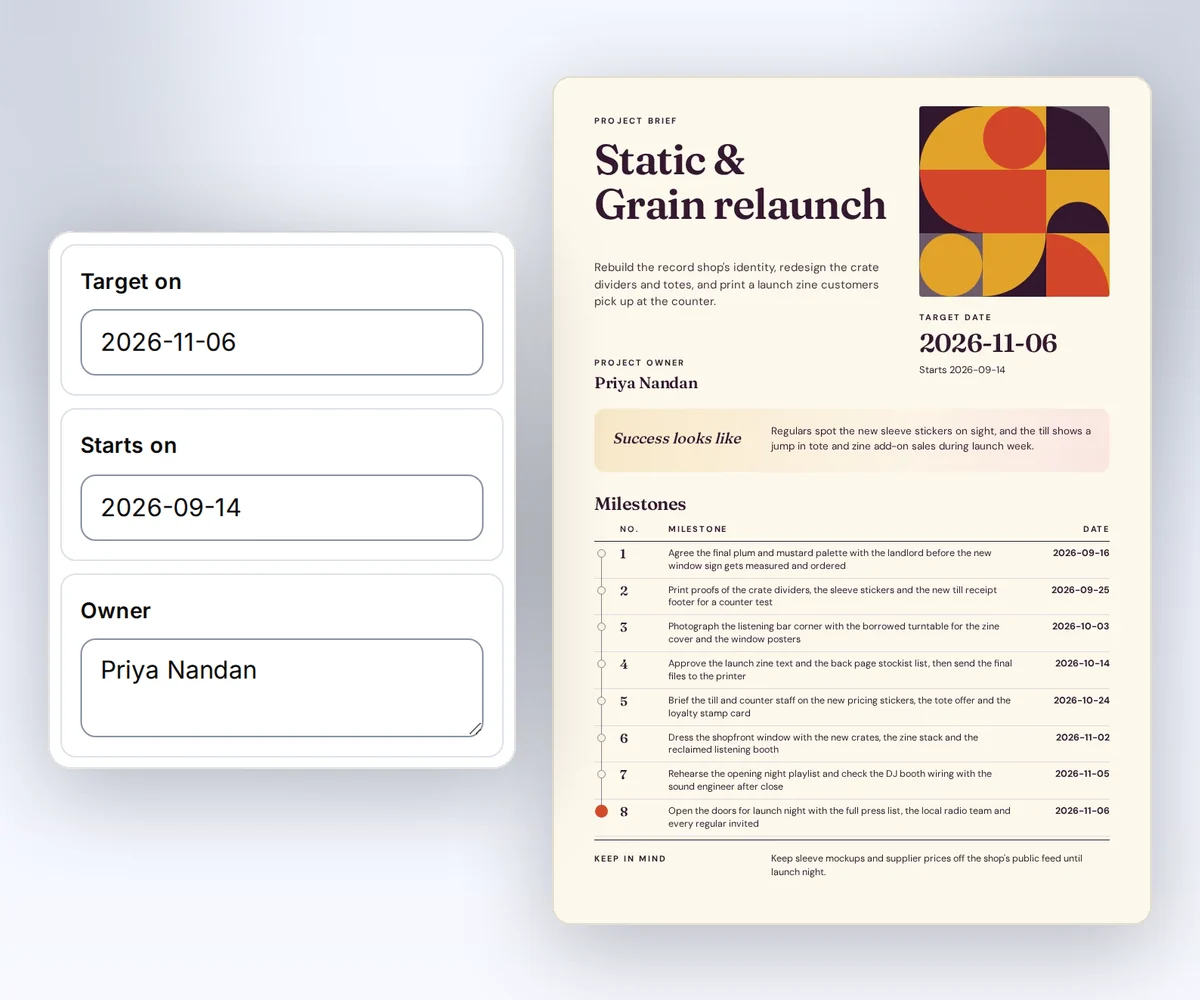
- Open the Project brief template and click Use this template. Sign in first if you need to.
- Open Data and type your project's name, owner, dates, goal, and milestones. Click Preview with data above the canvas to see your brief.
- Click Export, then Save and export PDF, and download the file. Open it and check the dates and every milestone.
Try your longest project name and all eight milestones before you share the design with your team. How to make a template you can reuse walks through the rest of the editor.
What should your prompt tell the AI document template generator?
Your prompt should name the document, the page size, each detail that changes from one project to the next, and the longest content the page must hold. You write it once: open Describe what you need, choose your brand kit, and pick PDF under Output. The AI turns each detail into a field, so the next project only needs new values and no new AI message.
The prompt below asks for a one-page brief with named details. It sets a clear layout limit and leaves the colours and fonts to your brand kit.
Create a one-page A4 project brief PDF using my brand kit.
Use editable text, a clear title, and a short milestone list.
Keep these as data fields: project_name, summary, owner, starts_on,
target_on, success, milestones, and note.
Each milestone has date and name fields. Allow one to eight milestones.
Use YYYY-MM-DD dates. Include a schema and fictional sample data.
Keep the brief readable with eight milestones and a long summary.
Do not put sample names or dates directly in the template source.
Read the cost beside the send button before you click it. This first AI build costs 50 credits, which a Free account gets each month, and the credit guide has the cost of later edits.
How do you check the AI draft before you reuse it?
You check an AI draft by changing its details and making sure the page changes with them. Do this before you reuse the draft, because a name or date that the AI typed straight into the design won't change for the next project.
When the message finishes, the draft shows under After, beside your current design. Confirm that the title, the dates, and the owner come from your details, then click Apply changes. In Data, change a value and click Update preview. The new value must show up without any change to the design. Then look at the rules the AI set for each detail, such as which details are required and how many milestones the list takes. Your draft may set different limits from the gallery brief, and those rules stop a brief going out with a missing date or too many milestones.
Compare your draft with the gallery Project brief, which already handles eight milestones and long names.

Try one milestone, eight milestones, a long project name, and an empty milestone list. Each one should still read cleanly, and the empty list should fail if you asked for at least one milestone. Fix the draft yourself with the template editing guide, send one focused change request, or click Discard.
Send a new project from your own code
You can send each new project's details from your own code and get a finished PDF back. This developer recipe takes four steps: save the request, create the PDF, check its status, and download the file. It uses the gallery Project brief as a tested starting point. Copy it into your account, then note its template ID and its checked version. To use your AI draft instead, save it first and match the request to its own schema.
You need curl and an API key. Set THIRDS_API_KEY through your secret store. Save this JSON as brief-request.json, then put your copy's template ID and version in it. It has the same eight fields as the sample data on the source page, with new project values.
{
  "template_id": "tpl_00000000000000000000000000000000",
  "version": 1,
  "data": {
    "project_name": "Signal Lab tutorial series",
    "summary": "Create a reusable brief for each new tutorial project.",
    "owner": "Alex Morgan",
    "starts_on": "2026-11-02",
    "target_on": "2026-11-20",
    "milestones": [
      { "date": "2026-11-06", "name": "Review the outline" },
      { "date": "2026-11-13", "name": "Check the first tutorial" },
      { "date": "2026-11-20", "name": "Approve the finished series" }
    ],
    "success": "Each tutorial has a checked outline, owner, and due date.",
    "note": "Fictional sample project for this recipe."
  },
  "wait": false
}
Check the JSON first. This next command spends one credit when the PDF succeeds. Choose your own Idempotency-Key for it.
curl --fail-with-body --silent --show-error \
  https://thirds.ai/v1/pdf \
  -H "Authorization: Bearer $THIRDS_API_KEY" \
  -H 'Content-Type: application/json' \
  -H 'Idempotency-Key: YOUR_UNIQUE_BRIEF_REQUEST' \
  --data-binary @brief-request.json
Keep the id from the response. Read the job until its status is succeeded, and replace the sample ID with yours:
curl --fail-with-body --silent --show-error \
  https://thirds.ai/v1/pdf/pdf_00000000000000000000000000000000 \
  -H "Authorization: Bearer $THIRDS_API_KEY"
Copy download.url from that response and add https://thirds.ai before it. The download doesn't need your API key.
curl --fail --silent --show-error \
  'https://thirds.ai/v1/downloads/YOUR_SIGNED_DOWNLOAD_TOKEN' \
  --output brief.pdf
Open brief.pdf and check the changed project values. If the create command stops, send it again with the same key and the same file. Give the next project a new key and a new file. Keep version in every request, so a later edit to the design can't change the files your code makes.
Ask for one change in each follow-up message
Ask for one change in each follow-up message, so you can see exactly what it did. Say you want bigger milestone text. Ask for that alone, and tell the AI to keep the detail names and the page size. Then check the brief with eight milestones before you click Apply changes. A message that also changes the details, the page size, and the layout gives you three things to check at once.
Fix common failures
When a project brief doesn't come out right, the error code or what you see on the page tells you what to fix. Each fix is a change to your details, your design, or your request, and a failed PDF doesn't cost a credit. The first five rows are codes that your own code gets back. The last two are things you see in the preview or the PDF.
| Code or what you see | What to check |
|---|---|
insufficient_credits | Add credits, or check your balance before you send the request again. |
template_data_invalid | Match the rules your saved version sets, such as required details and list limits. |
template_missing_data | Send every detail the design reads, or fix that detail's name in the design. |
template_not_found | Use your own copy's ID and its version number. |
idempotency_conflict | Send the original input again, or use a new key for a new project. |
| Text crosses a page or box | Shorten the details or edit the layout, then preview the longest valid project. |
| A sample name stays after a data change | Replace the fixed text in the design with the right detail before you save. |
Sign in and open Describe what you need with a prompt that names your document and its details. It's free to start. Or connect ChatGPT or Claude, and let it write the prompt, build the brief, and make every file after that. To compare tools that fill a design from your data, see the ranked list of Bannerbear alternatives.


